best solution to monitor and log power usage
-
@BearWithBeard It's all so ironic: my whole reason for buying something pre-made was to just slot something in without having to think about it. Now, with the cloud of doubt hanging over this thing, here I am having to spend time thinking about it. :face_with_rolling_eyes:
For my intended purpose the ideal solution is probably something like this:
https://jeelabs.org/book/1508a/ Even if it were to fail, it's all just low power low voltage stuff and my refrigerator would keep on working, as there's no on-off switching like with the commercially available pre-made products. No direct connection to mains, and no batteries to change either: it lives by soaking up just a tiny amount of parasitic power. I should probably just do it right the first time, and then I can just be done with it without having to worry about my refrigerator losing power, or whatever else might go wrong as it ages over a long future. -
What no one seems to mention but which certainly seems relevant is that the working temperature range for the Shelly 2.5 tops out at 40C:
https://shelly.cloud/knowledge-base/devices/shelly-25/
Does "working temperature" mean ambient temperature, or the temperature of the device itself? I'm not sure, but I believe it refers to the temperature of the device and the components therein, not ambient temperature. And if that is so, then looking at all the measurements people have done:
https://community.home-assistant.io/t/shelly-2-5-getting-hot-to-touch-63-c-external-case-should-i-be-worried/175376
it seems as though many of those measurements are above Shelly 2.5's own declared spec. -
What no one seems to mention but which certainly seems relevant is that the working temperature range for the Shelly 2.5 tops out at 40C:
https://shelly.cloud/knowledge-base/devices/shelly-25/
Does "working temperature" mean ambient temperature, or the temperature of the device itself? I'm not sure, but I believe it refers to the temperature of the device and the components therein, not ambient temperature. And if that is so, then looking at all the measurements people have done:
https://community.home-assistant.io/t/shelly-2-5-getting-hot-to-touch-63-c-external-case-should-i-be-worried/175376
it seems as though many of those measurements are above Shelly 2.5's own declared spec.@NeverDie Working temperature means ambient in this case. Quoting the Allterco CEO:
Max ambient temperature is 40 degree. With no load PCB temperature is 55-60 degree. At MAX load continuesly is 87-90 degree.
Heating protection will switch off device at 95 degree.
All parts inside are 105-120 degree certifed for continuous usage.Original source: https://www.facebook.com/groups/1686781668087857/permalink/2054834997949187/
-
Aha, good catch.
I presume it's just measuring apparent power instead of real (true) power? Power factor is going to be relevant for a refrigerator. The Shelly 2.5 makes no mention of measuring power factor or true power, but the more pricey Shelly EM does:
https://www.amazon.com/Shelly-Smart-Energy-Monitor-Consumption/dp/B07ZHLN63D -
These peacefair energy monitors are fairly inexpensive and also appear to measure power factor:
https://www.youtube.com/watch?v=74gKMTsHmYYThey use RS485 for communication.
Aside from that, it's not easy to find a power meter that takes power factor into account and which has anything other than just an LCD for its output interface.
-
Aha, good catch.
I presume it's just measuring apparent power instead of real (true) power? Power factor is going to be relevant for a refrigerator. The Shelly 2.5 makes no mention of measuring power factor or true power, but the more pricey Shelly EM does:
https://www.amazon.com/Shelly-Smart-Energy-Monitor-Consumption/dp/B07ZHLN63D -
This suddenly makes the Shelly 2.5 a whole lot more interesting! Do we know whether the Shelly 2.5 reports real power by default out-of-the-box, or does it require special configuration?
-
Hmmm.. Apparently even the sonoff POW R2 can measure real power and power factor: https://wattaurus.com/posts/smart_switch
Well, either the Sonoff or the Shelly 2.5 sound much easier to work with than the PeaceFair. I guess it's time I try them out! I can compare their measurements to my ancient kill-a-watt meter, which supposedly measures true power also, literally plug and play.
-
Nice one, thx!
-
Found this Sonof IW100:
https://smile.amazon.com/gp/product/B083LJ4HWQ/ref=ppx_yo_dt_b_asin_title_o00_s00?ie=UTF8&psc=1If it measures real power, then it should be code compliant, easier to wire, and maybe safer overall, so I ordered one to test. It's ETL certified, which as far as I can tell is just as good as UL Certified, since ETL tests to the same standards as UL. I've also read it uses the same hardware as the Sonoff S31.
-
Found this Sonof IW100:
https://smile.amazon.com/gp/product/B083LJ4HWQ/ref=ppx_yo_dt_b_asin_title_o00_s00?ie=UTF8&psc=1If it measures real power, then it should be code compliant, easier to wire, and maybe safer overall, so I ordered one to test. It's ETL certified, which as far as I can tell is just as good as UL Certified, since ETL tests to the same standards as UL. I've also read it uses the same hardware as the Sonoff S31.
-
I hadn't known this before, but from recent reading it appears that relays are appropriate for switching resistive loads, but for inductive loads (like motors) a "contactor" is recommended instead. Apparently the reason is that opening a relay on an inductive load can cause voltages to jump beyond the relay's rating, resulting in arcing. Well, I suppose that does make sense. In contrast, from what little I've read, contactors are resistant to arcing.
On the other hand, I thought the use of flywheel diodes was supposed to prevent these kinds of inductive voltage spikes, in which case I don't see what the problem is. Maybe there is no equivalent of a flywheel diode for an AC motor as there is for a DC motor? Not sure, but on first glance it looks as though it may require a snubber or similar:
https://m.littelfuse.com/~/media/electronics/application_notes/reed_switches/littelfuse_magnetic_sensors_and_reed_switches_inductive_load_arc_suppression_application_note.pdf.pdfSo, in principle it is possible, but I don't know whether sonoff's or similar account for that or not.
Hmmm.. It's starting to look as though the Shelly EM may be the only sure-fire KISS solution for monitoring refrigerators, as there is no risk of it opening/closing relays, which is something I don't need and, if anything, would rather avoid anyway.
Sorry for all my dithering on this thread, but by process of elimination I think I've may have finally arrived at a correct answer. Hopefully it's illuminating for others as well.
-
I hadn't known this before, but from recent reading it appears that relays are appropriate for switching resistive loads, but for inductive loads (like motors) a "contactor" is recommended instead. Apparently the reason is that opening a relay on an inductive load can cause voltages to jump beyond the relay's rating, resulting in arcing. Well, I suppose that does make sense. In contrast, from what little I've read, contactors are resistant to arcing.
On the other hand, I thought the use of flywheel diodes was supposed to prevent these kinds of inductive voltage spikes, in which case I don't see what the problem is. Maybe there is no equivalent of a flywheel diode for an AC motor as there is for a DC motor? Not sure, but on first glance it looks as though it may require a snubber or similar:
https://m.littelfuse.com/~/media/electronics/application_notes/reed_switches/littelfuse_magnetic_sensors_and_reed_switches_inductive_load_arc_suppression_application_note.pdf.pdfSo, in principle it is possible, but I don't know whether sonoff's or similar account for that or not.
Hmmm.. It's starting to look as though the Shelly EM may be the only sure-fire KISS solution for monitoring refrigerators, as there is no risk of it opening/closing relays, which is something I don't need and, if anything, would rather avoid anyway.
Sorry for all my dithering on this thread, but by process of elimination I think I've may have finally arrived at a correct answer. Hopefully it's illuminating for others as well.
@NeverDie If you only want to monitor and are worried about relays you could always open the shelly/sonoff/... and permanently shortcut/bypass the relay. And while you're at it, also disconnect the relay coil contacts (or remove the relay completely) to reduce heating of the unit and reduce power consumption.
-
Roll your own MySensors version can be surprisingly simple from a hardware perspective. I did this to monitor my electric car. Plug a split coil to the audio jack:
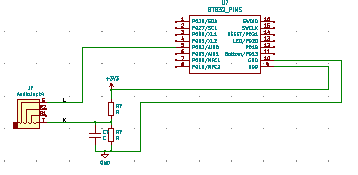
The thinking about it part, not so easy! Good reference site:
https://learn.openenergymonitor.orgC and R depend on your split coil. Calibration is a real challenge. For my car, I know what it draws from plugging into commercial chargers, and I was not worried about precision. For unknown loads around the house, you would have to have something known to calibrate against. Also, the coil has to go around 1 leg of the power wiring. which means you need an adapter cable with the line and neutral split out (but still insulated).
-
Roll your own MySensors version can be surprisingly simple from a hardware perspective. I did this to monitor my electric car. Plug a split coil to the audio jack:
The thinking about it part, not so easy! Good reference site:
https://learn.openenergymonitor.orgC and R depend on your split coil. Calibration is a real challenge. For my car, I know what it draws from plugging into commercial chargers, and I was not worried about precision. For unknown loads around the house, you would have to have something known to calibrate against. Also, the coil has to go around 1 leg of the power wiring. which means you need an adapter cable with the line and neutral split out (but still insulated).
@nagelc said in best solution to monitor and log power usage:
Plug a split coil to the audio jack:
@nagelc What?! You're doing some kind of energy monitoring by plugging a split core to the audio jack of your electric car? I know you're a smart guy, but I just don't understand how that could work, even in principle--unless you were charging your car through your audio jack, and surely that can't be. What are you even measuring?
Wait a minute. Are you referring to a real car, or a toy car?
-
Oops. I wasn't very clear.
My split coil has a cable with an audio plug on the end. Like this one:
https://www.electrodragon.com/product/yhdc-non-invasive-ac-current-sensor-100a30a/
So I used an audio jack on the board to plug the split coil into. That makes it easy to swap different rating coils. The picture above is 100A, but I'm using the 30A coil for the car charger.
Then the coil goes around one of the power wires going out to the charger.
A real car : ) -
Reporting back: After watching some youtube reviews, I decided to settle on the Emporia Smart Home Energy monitor:
https://youtu.be/Ph9344O7DEsThe above reviewer had also done a teardown review of the Gen 1 version, where he was very vocal about the things he didn't like, and the manufacturer wrote a very thoughtful multi-paragraph response to his video to explain why it was that way and why Gen 2 would be better. I had originally dismissed it because some of the prominent amazon reviews had called it inaccurate, but the current offering is the second generation, and one of the youtubers compared the Gen2 measurements to his power bill and found it to be accurate to within 1% of what his utility company billed him.
-
Nice video, i will think about it too
-
Reporting back: I installed the Gen2 Emporia Vue, and it "just works" on the first try. Ironically, it reports the same amount of power for my refrigerator as the far less expensive TopGreener power module, so I guess the TopGreener is more accurate than what I had thought. At least the Emporia Vue's built in graphing is far superior and involves no switching, so overall I'm glad I made the upgrade. :-)