Skip to content
  • MySensors
  • OpenHardware.io
  • Categories
  • Recent
  • Tags
  • Popular
Skins
  • Light
  • Brite
  • Cerulean
  • Cosmo
  • Flatly
  • Journal
  • Litera
  • Lumen
  • Lux
  • Materia
  • Minty
  • Morph
  • Pulse
  • Sandstone
  • Simplex
  • Sketchy
  • Spacelab
  • United
  • Yeti
  • Zephyr
  • Dark
  • Cyborg
  • Darkly
  • Quartz
  • Slate
  • Solar
  • Superhero
  • Vapor

  • Default (No Skin)
  • No Skin
Collapse
Brand Logo
  1. Home
  2. My Project
  3. Scrolling Text sensor node with new V_TEXT

Scrolling Text sensor node with new V_TEXT

Scheduled Pinned Locked Moved My Project
51 Posts 17 Posters 30.1k Views 13 Watching
  • Oldest to Newest
  • Newest to Oldest
  • Most Votes
Reply
  • Reply as topic
Log in to reply
This topic has been deleted. Only users with topic management privileges can see it.
  • GertSandersG GertSanders

    Is it possible to send text to the node without a request call from the node itself?

    The example is not clear on this point and the json example only sets the text value within Domoticz, right?

    AWIA Offline
    AWIA Offline
    AWI
    Hero Member
    wrote on last edited by
    #16

    @GertSanders Domoticz does not "push" the Text value when changed. The published sketch "asks" periodically for the Text value. What I do now is create a Switch (S_BINARY/ light) with function "New text available". This switch triggers the polling sequence.

    1 Reply Last reply
    0
    • GertSandersG Offline
      GertSandersG Offline
      GertSanders
      Hardware Contributor
      wrote on last edited by
      #17

      @GizMoCuz : It would be nice to be able to define the text of the S_INFO sensor in de UI of Domoticz, instead of only via json. I'm not capable of programming that myself, but it would make the use of text easier. I already log all incoming SMS messages into my SMS connected sensor in V_TEXT and have it this way a nice view on what nodes are sending to my SMS passthrough node or what SMS messages are received into my MySensors network. I know Domoticz has it's own SMS interface, but my node is capable of switching on stuff based on directly received SMS commands, and with V_TEXT I can now follow what is happening without needing a serial connection to the node. I should be clear that I'm a big fan of Domoticz :-)

      1 Reply Last reply
      0
      • J Offline
        J Offline
        Jager
        wrote on last edited by
        #18

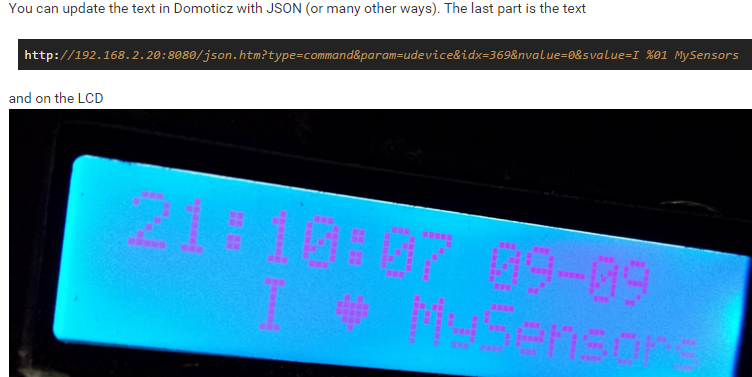
        You can send messages as done here? http://forum.mysensors.org/topic/1957/lcd-clock-and-text-sensor-node-with-new-v_text
        56b9aa18af.jpg

        AWIA 1 Reply Last reply
        0
        • J Jager

          You can send messages as done here? http://forum.mysensors.org/topic/1957/lcd-clock-and-text-sensor-node-with-new-v_text
          56b9aa18af.jpg

          AWIA Offline
          AWIA Offline
          AWI
          Hero Member
          wrote on last edited by
          #19

          @Jager If your controller supports it you can. In Domoticz the text value is not pushed so you need to make a request for it.

          1 Reply Last reply
          0
          • HoffanH Offline
            HoffanH Offline
            Hoffan
            wrote on last edited by
            #20

            What am i missing, Because i get this when i try to compile it

            Arduino:1.6.5 (Mac OS X), Kort:"Arduino Nano, ATmega328"

            ScrollingText:55: error: 'V_TEXT' was not declared in this scope
            ScrollingText.ino: In function 'void setup()':
            ScrollingText:166: error: 'S_INFO' was not declared in this scope
            ScrollingText:170: error: 'V_TEXT' was not declared in this scope
            ScrollingText.ino: In function 'void loop()':
            ScrollingText:191: error: 'V_TEXT' was not declared in this scope
            ScrollingText.ino: In function 'void incomingMessage(const MyMessage&)':
            ScrollingText:210: error: 'V_TEXT' was not declared in this scope
            'V_TEXT' was not declared in this scope

            AWIA 1 Reply Last reply
            0
            • HoffanH Hoffan

              What am i missing, Because i get this when i try to compile it

              Arduino:1.6.5 (Mac OS X), Kort:"Arduino Nano, ATmega328"

              ScrollingText:55: error: 'V_TEXT' was not declared in this scope
              ScrollingText.ino: In function 'void setup()':
              ScrollingText:166: error: 'S_INFO' was not declared in this scope
              ScrollingText:170: error: 'V_TEXT' was not declared in this scope
              ScrollingText.ino: In function 'void loop()':
              ScrollingText:191: error: 'V_TEXT' was not declared in this scope
              ScrollingText.ino: In function 'void incomingMessage(const MyMessage&)':
              ScrollingText:210: error: 'V_TEXT' was not declared in this scope
              'V_TEXT' was not declared in this scope

              AWIA Offline
              AWIA Offline
              AWI
              Hero Member
              wrote on last edited by
              #21

              @Hoffan V_TEXT is still in the development branch...

              1 Reply Last reply
              0
              • HoffanH Offline
                HoffanH Offline
                Hoffan
                wrote on last edited by
                #22

                Okey, That can explain, Byt when i use the Dev Branch
                I get this Errors

                ScrollingText:52: error: 'MyTransportNRF24' does not name a type
                ScrollingText:53: error: 'MySensor' does not name a type
                ScrollingText.ino: In function 'void setup()':
                ScrollingText:163: error: 'gw' was not declared in this scope
                ScrollingText.ino: In function 'void loop()':
                ScrollingText:177: error: 'gw' was not declared in this scope
                'MyTransportNRF24' does not name a type

                AWIA 1 Reply Last reply
                0
                • HoffanH Hoffan

                  Okey, That can explain, Byt when i use the Dev Branch
                  I get this Errors

                  ScrollingText:52: error: 'MyTransportNRF24' does not name a type
                  ScrollingText:53: error: 'MySensor' does not name a type
                  ScrollingText.ino: In function 'void setup()':
                  ScrollingText:163: error: 'gw' was not declared in this scope
                  ScrollingText.ino: In function 'void loop()':
                  ScrollingText:177: error: 'gw' was not declared in this scope
                  'MyTransportNRF24' does not name a type

                  AWIA Offline
                  AWIA Offline
                  AWI
                  Hero Member
                  wrote on last edited by
                  #23

                  @Hoffan you best read the instructions for the development branch. The syntax changed a little. I'm typing on a phone right now. Best to search yourself

                  1 Reply Last reply
                  0
                  • hekH Offline
                    hekH Offline
                    hek
                    Admin
                    wrote on last edited by hek
                    #24

                    How to convert a sketch to 1.6 is described here (until it has been posted somewhere more sticky..) :
                    https://docs.google.com/document/d/1NKq5uuNdnxF5jWnum7VT32mbKLjuvqlx2A5D1qQ-H3Q/edit#heading=h.t5sdmpn6jz2i

                    Basically a few search/replace... The above sketch would look something like this (untested)

                    /*
                     PROJECT: MySensors / Scrolling Text display
                     PROGRAMMER: AWI
                     DATE: september 12, 2015/ last update: september 12, 2015
                     FILE: AWI_scroll_MAX.ino
                     LICENSE: Public domain
                    
                     Hardware: tbd ..Ceech - ATmega328p board w/ NRF24l01
                        and MySensors 1.5 ()
                            
                    Special:
                        Need to use MySensors development edition 
                        
                    SUMMARY:
                        3 S_xx devices for scrolling text
                        - Displays a scrolling text from a "V_TEXT" variable
                        - additional dimmer sensor for controlling display brightness
                        - 'Alarm' switch. If "On", overrides the text display to display ALARM message
                        - You can also input messages from the Serial monitor (testing)
                        Uses excellent MD_MAX72XX library 
                     Remarks:
                        Fixed node-id
                    */
                    
                    #define MY_RADIO_NRF24
                    
                    
                    // Use the MD_MAX72XX library to scroll text on the display with the use of the callback function 
                    // to control what is scrolled on the display text.
                    // You need to set the used display in the library MD_MAX72XX.h
                    // User can enter text on the serial monitor and this will display as a
                    // Speed for the display is controlled by a pot on SPEED_IN analog in.
                    #include <MD_MAX72xx.h>                     // multipurpose library for MAX72xx diaplay driver  https://parola.codeplex.com/
                    #include <MySensor.h>                       // Mysensor network
                    #include <SPI.h>
                    #include <Time.h>                           //http://playground.arduino.cc/Code/Time
                    #define USE_POT_CONTROL 0                   // enable Scroll speed  potentiometer
                    #define PRINT_CALLBACK  0
                    
                    // Macro to simplify serial print
                    #define PRINT(s, v) { Serial.print(F(s)); Serial.print(v); }
                    
                    // Define the number of devices we have in the chain and the hardware interface
                    // need to be adapted to your setup
                    const int MAX_DEVICES = 8 ;                 // number of 8x8 displays
                    const int CLK_PIN = 7 ;                     // SPI like clock
                    const int DATA_PIN = 8 ;                    // SPI like data
                    const int CS_PIN = 6 ;                      // SPI like select
                    
                    // Parola is able to use SPI hardware interface, not testted in combination with MySensors
                    // MD_MAX72XX mx = MD_MAX72XX(CS_PIN, MAX_DEVICES);
                    // now use Arbitrary pins
                    MD_MAX72XX mx = MD_MAX72XX(DATA_PIN, CLK_PIN, CS_PIN, MAX_DEVICES); // instantiate one display chain
                    
                    // Scrolling parameters, you can attach normal potentiometer to A5, Vcc, Gnd
                    #if USE_POT_CONTROL
                    const int SPEED_IN = A5 ;
                    #else
                    const int SCROLL_DELAY = 20 ;               // in milliseconds
                    #endif // USE_POT_CONTROL
                    
                    const int CHAR_SPACING = 1 ;                // pixels between characters
                    
                    // MySensors constants & variables
                    const byte nodeId = 51 ;                    // MySensors fixed node id
                    const byte messageCHILD = 8 ;               // Text from ControllerLCD
                    const byte brightnessChild = 9 ;            // Brightness of display
                    const byte alarmChild = 10 ;                // Display Alarm text (overrides normal text)
                    boolean timeReceived = false ;              // Flag to indicate time received
                    // Display constants & variables
                    byte textBrightness = 1 ;                   // brightness of display (between 0 - MAX_INTENSITY (0xF)
                    byte textOnOff = true ;                     // textOnOff = ! shutdown
                    boolean textAlarm = false ;                 // Alarm (switch S_BINARY)
                    // Global message buffers shared by MySensors and Scrolling functions
                    const int BUF_SIZE = 25 ;                   // max payload for MySensors(NRF24l01)
                    char curMessage[BUF_SIZE];                  // current displayed message
                    char newMessage[BUF_SIZE];                  // next message to be displayed if available
                    bool newMessageAvailable = false ;          // new message available flag
                    uint16_t    scrollDelay;                    // in milliseconds
                    
                    // *** Definition and initialisation
                    // define the MySensor network (1.5)
                    // Initialize messages for sensor network
                    MyMessage textMsg(messageCHILD, V_TEXT);    // message for Sending Text to Controller
                    
                    
                    /* MD_MAX72XX functions: can be found in the documentation for the library,
                     * no need to customtize callback & scroll routines (unless you want to...)
                    */
                    uint8_t scrollDataSource(uint8_t dev, MD_MAX72XX::transformType_t t)
                    // Callback function for data that is required for scrolling into the display
                    {
                      static char       *p = curMessage;
                      static uint8_t    state = 0;
                      static uint8_t    curLen, showLen;
                      static uint8_t    cBuf[8];
                      uint8_t colData;
                    
                      // finite state machine to control what we do on the callback
                      switch(state)
                      {
                        case 0: // Load the next character from the font table
                          showLen = mx.getChar(*p++, sizeof(cBuf)/sizeof(cBuf[0]), cBuf);
                          curLen = 0;
                          state++;
                    
                          // if we reached end of message, reset the message pointer
                          if (*p == '\0')
                          {
                            p = curMessage;         // reset the pointer to start of message
                            if (newMessageAvailable)    // there is a new message waiting
                            {
                              strcpy(curMessage, newMessage);   // copy it in
                              newMessageAvailable = false;
                            }
                          }
                          // !! deliberately fall through to next state to start displaying
                    
                        case 1: // display the next part of the character
                          colData = cBuf[curLen++];
                          if (curLen == showLen)                // end of character insert interchar space
                          {
                            showLen = CHAR_SPACING;
                            curLen = 0;
                            state = 2;
                          }
                          break;
                    
                        case 2: // display inter-character spacing (blank column)
                          colData = 0;
                          curLen++;
                          if (curLen == showLen)
                            state = 0;
                          break;
                    
                        default:
                          state = 0;
                      }
                    
                      return(colData);
                    }
                    
                    // Callback (not used here)
                    void scrollDataSink(uint8_t dev, MD_MAX72XX::transformType_t t, uint8_t col){
                    // Callback function for data that is being scrolled off the display
                    #if PRINT_CALLBACK
                        Serial.print("\n cb ");
                        Serial.print(dev);
                        Serial.print(' ');
                        Serial.print(t);
                        Serial.print(' ');
                        Serial.println(col);
                    #endif
                    }
                    
                    // non-blocking text display to be used in loop (call frequently)
                    void scrollText(void){
                        static uint32_t prevTime = 0;
                        if (millis()-prevTime >= scrollDelay){                  // Is it time to scroll the text?
                            mx.transform(MD_MAX72XX::TSL);                      // scroll along - the callback will load all the data
                            prevTime = millis();                                // starting point for next time
                            }
                        }
                    
                    // sets the scroll delay (read from potentiometer if enabled)
                    uint16_t getScrollDelay(void){
                    #if USE_POT_CONTROL
                        uint16_t t = analogRead(SPEED_IN);
                        t = map(t, 0, 1023, 25, 250);
                        return(t);
                    #else
                        return(SCROLL_DELAY);
                    #endif
                        }
                    
                    void setup(){
                        // set up the display first
                        mx.begin();                                             // initialize display chain                 
                        mx.setShiftDataInCallback(scrollDataSource);            // define function to get the scrolldata (returned as int8)
                        //mx.setShiftDataOutCallback(scrollDataSink);           // not used
                        mx.control(MD_MAX72XX::INTENSITY, 0x01);
                    #if USE_POT_CONTROL                                         // initialize speed potentiometer if enabled
                        pinMode(SPEED_IN, INPUT);
                    #else
                        scrollDelay = SCROLL_DELAY;
                    #endif
                    
                        strcpy(curMessage, "I \x03 MySensors ");                // first message on display
                        newMessage[0] = '\0';                                   // new message initialized to empty
                        // Setup MySensors 
                       //Serial in Sensor network = 115200
                        //Send the sensor node sketch version information to the gateway
                    
                    } 
                    
                    void presentation() {
                    
                        sendSketchInfo("AWI Scroll MAX 51", "1.1");
                        present(messageCHILD, S_INFO, "Text line Scroll");   // new S_type 20150905 (not know by domoticz)
                        present(alarmChild, S_BINARY, "Alarm display");      // to display alarm text
                        present(brightnessChild, S_DIMMER, "Text brightness"); // new S_type 20150905 (not know by domoticz)
                        //send(textMsg.set("-"));                            // initialize the V_TEXT at controller for sensor to none (trick for Domoticz)
                        request(messageCHILD, V_TEXT, 0);                    // request value from controller
                        // Initializations
                        requestTime();                            // get the time from controller (handled by receiveTime)
                        }
                    
                    // loop only uses non-blocking functions
                    void loop() {
                        static unsigned long lastUpdate ;                       // Static hold the last update time
                        unsigned long now = millis();
                        scrollDelay = getScrollDelay();                         // update scroll delay from potentiometer
                        readSerial();
                        // Check for new conditions & ask for new information from controller every 10 seconds
                        if (now-lastUpdate > 10000){
                            if (textAlarm){                                     // if alarmstatus: override all text and set max intensity
                                strcpy(curMessage, "   ALARM   ");
                                mx.control(MD_MAX72XX::INTENSITY, MAX_INTENSITY);   // set current brightness
                                mx.control(MD_MAX72XX::SHUTDOWN, false) ;
                            } else {                                            // standard (non Alarm actions)
                                mx.control(MD_MAX72XX::INTENSITY, textBrightness);  // set current brightness
                                mx.control(MD_MAX72XX::SHUTDOWN, textOnOff) ;
                                request(messageCHILD, V_TEXT, 0);                // request new value from controller
                            }
                            lastUpdate = now;
                        }
                        scrollText();
                    }
                     
                    // This is called when a new time value was received
                    void receiveTime(unsigned long controllerTime) {
                        Serial.print("Time value received: ");
                        Serial.println(controllerTime);
                        setTime(controllerTime);                                // time from controller
                        timeReceived = true;
                        } 
                    
                    // This is called when a message is received 
                    void receive(const MyMessage &message) {
                        Serial.print("Message: "); Serial.print(message.sensor); Serial.print(", Message: "); Serial.println(message.getString());
                        if (message.sensor == messageCHILD){
                            if (message.type==V_TEXT) {                     // Text content
                            strcpy(newMessage, message.getString());        // copy it in
                                newMessageAvailable = true ;
                            }
                        } else if (message.sensor == alarmChild) {
                            if (message.type==V_STATUS) {                   // True/ false content
                                textAlarm = message.getBool()?true:false ;  // set alarmflag
                                Serial.print("TextAlarm: ");
                                Serial.println(textAlarm);
                            }
                        } else if (message.sensor == brightnessChild){
                            if (message.type==V_PERCENTAGE) {               // Level 0..100  content
                                textBrightness = map(message.getInt(),0, 100, 0, MAX_INTENSITY ) ;  // map to brightnesslevel 
                                Serial.print("TextBrightness: ");
                                Serial.println(textBrightness);
                            } else if (message.type==V_STATUS) {            // Display on/off
                                textOnOff = message.getBool()?false:true ;      // set shutdown/ !on/off
                                Serial.print("Text on/off: ");
                                Serial.println(textOnOff);
                            }
                        }
                    }
                    
                        
                    // Testing purposes: input routine character buffer. Reads serial characters in buffer newMessage.
                    // sets flag newMessageAvailable to true if completed
                    void readSerial(void)
                    {
                      static uint8_t    putIndex = 0;
                    
                      while (Serial.available())
                      {
                        newMessage[putIndex] = (char)Serial.read();
                        if ((newMessage[putIndex] == '\n') || (putIndex >= BUF_SIZE-3)) // end of message character or full buffer
                        {
                          // put in a message separator and end the string
                          newMessage[putIndex++] = ' ';
                          newMessage[putIndex] = '\0';
                          // restart the index for next filling spree and flag we have a message waiting
                          putIndex = 0;
                          newMessageAvailable = true;
                        }
                        else
                          // Just save the next char in next location
                          newMessage[putIndex++];
                      }
                    }
                    
                    
                    1 Reply Last reply
                    0
                    • D Offline
                      D Offline
                      dayve218
                      wrote on last edited by
                      #25

                      ive spent a couple of hours on this, and i cant get it to work. any help?

                      1 Reply Last reply
                      0
                      • D Offline
                        D Offline
                        dayve218
                        wrote on last edited by
                        #26

                        @AWI are you able to help me convrt this to1.6? i cant get it

                        1 Reply Last reply
                        0
                        • hekH Offline
                          hekH Offline
                          hek
                          Admin
                          wrote on last edited by
                          #27

                          Fixed a couple of thing in the sketch. Now it compiles on 1.6 but you have to install the MD_MAX72xx library which it uses.

                          1 Reply Last reply
                          0
                          • HoffanH Offline
                            HoffanH Offline
                            Hoffan
                            wrote on last edited by
                            #28

                            Where did you put the new sketch??

                            hekH 1 Reply Last reply
                            0
                            • HoffanH Hoffan

                              Where did you put the new sketch??

                              hekH Offline
                              hekH Offline
                              hek
                              Admin
                              wrote on last edited by
                              #29

                              @Hoffan

                              I updated my post above.

                              1 Reply Last reply
                              0
                              • HoffanH Offline
                                HoffanH Offline
                                Hoffan
                                wrote on last edited by
                                #30

                                Okey... Strange because i test to compile that i Dev Branch and i get this error
                                Arduino:1.6.5 (Mac OS X), Kort:"Arduino Nano, ATmega328"

                                Build options changed, rebuilding all
                                Scrolltext.ino: In function 'void presentation()':
                                Scrolltext:205: error: too many arguments to function 'void requestTime()'
                                In file included from /Users/Hoffan/Documents/Arduino-development/libraries/MySensors/MySensor.h:205:0,
                                from Scrolltext.ino:34:
                                /Users/Hoffan/Documents/Arduino-development/libraries/MySensors/core/MySensorCore.cpp:234:6: note: declared here
                                void requestTime() {
                                ^
                                too many arguments to function 'void requestTime()'

                                1 Reply Last reply
                                0
                                • hekH Offline
                                  hekH Offline
                                  hek
                                  Admin
                                  wrote on last edited by
                                  #31

                                  Ok, how about now then..

                                  1 Reply Last reply
                                  0
                                  • HoffanH Offline
                                    HoffanH Offline
                                    Hoffan
                                    wrote on last edited by
                                    #32

                                    Now the compile is working...

                                    Now i will test it in real :)

                                    1 Reply Last reply
                                    0
                                    • Lawrence HelmL Offline
                                      Lawrence HelmL Offline
                                      Lawrence Helm
                                      wrote on last edited by
                                      #33

                                      @Hoffan - how did you get on? Interested to know before I order some components :)

                                      1 Reply Last reply
                                      0
                                      • HoffanH Offline
                                        HoffanH Offline
                                        Hoffan
                                        wrote on last edited by
                                        #34

                                        @Lawrence-Helm

                                        It didn't work all the way for me... And i didn't have the time to check whats wrong

                                        It thing its some thing withe the display settings

                                        1 Reply Last reply
                                        0
                                        • AWIA AWI

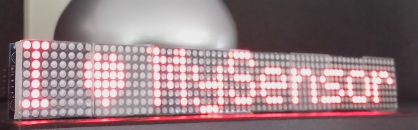
                                          Another experiment for the V_TEXT variable/ sensor. Including brightness & speed setting and special Alarm function.
                                          upload-3aa973f9-d6cf-41a5-8b59-2241311896b0
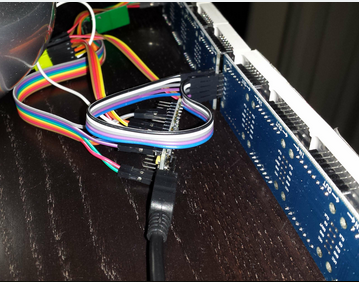
                                          A scrolling display to let the family now that the dog needs walking... nothing more than 1 nano, 8 (or whatever number) of displays with max7219 controller upload-f2290f64-a15d-48c9-8420-ab65e481a492 a radio and a few cables
                                          upload-4c163020-edac-4bc5-b3bf-50f1f3cccd24
                                          Total cost: €18 (with 8 displays)

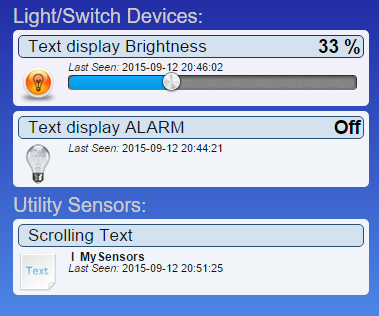
                                          in Domoticz:
                                          upload-868a0c0c-a44d-480f-940c-e0378716ebd3
                                          Built around the very versatile "Parola" driver library

                                          (I will upload a video when I know how to .. ;-))
                                          https://www.youtube.com/watch?v=gCKTm427_Zc

                                          /*
                                           PROJECT: MySensors / Scrolling Text display
                                           PROGRAMMER: AWI
                                           DATE: september 12, 2015/ last update: september 12, 2015
                                           FILE: AWI_scroll_MAX.ino
                                           LICENSE: Public domain
                                          
                                           Hardware: tbd ..Ceech - ATmega328p board w/ NRF24l01
                                          	and MySensors 1.5 ()
                                          		
                                          Special:
                                          	Need to use MySensors development edition 
                                          	
                                          SUMMARY:
                                          	3 S_xx devices for scrolling text
                                          	- Displays a scrolling text from a "V_TEXT" variable
                                           	- additional dimmer sensor for controlling display brightness
                                          	- 'Alarm' switch. If "On", overrides the text display to display ALARM message
                                          	- You can also input messages from the Serial monitor (testing)
                                          	Uses excellent MD_MAX72XX library 
                                           Remarks:
                                          	Fixed node-id
                                          */
                                          
                                          // Use the MD_MAX72XX library to scroll text on the display with the use of the callback function 
                                          // to control what is scrolled on the display text.
                                          // You need to set the used display in the library MD_MAX72XX.h
                                          // User can enter text on the serial monitor and this will display as a
                                          // Speed for the display is controlled by a pot on SPEED_IN analog in.
                                          #include <MD_MAX72xx.h>						// multipurpose library for MAX72xx diaplay driver  https://parola.codeplex.com/
                                          #include <MySensor.h>          				// Mysensor network
                                          #include <SPI.h>
                                          #include <Time.h>   						//http://playground.arduino.cc/Code/Time
                                          #define	USE_POT_CONTROL	0					// enable Scroll speed  potentiometer
                                          #define	PRINT_CALLBACK	0
                                          
                                          // Macro to simplify serial print
                                          #define	PRINT(s, v)	{ Serial.print(F(s)); Serial.print(v); }
                                          
                                          // Define the number of devices we have in the chain and the hardware interface
                                          // need to be adapted to your setup
                                          const int MAX_DEVICES = 8 ;					// number of 8x8 displays
                                          const int CLK_PIN = 7 ; 					// SPI like clock
                                          const int DATA_PIN = 8 ;					// SPI like data
                                          const int CS_PIN = 6 ; 						// SPI like select
                                          
                                          // Parola is able to use SPI hardware interface, not testted in combination with MySensors
                                          // MD_MAX72XX mx = MD_MAX72XX(CS_PIN, MAX_DEVICES);
                                          // now use Arbitrary pins
                                          MD_MAX72XX mx = MD_MAX72XX(DATA_PIN, CLK_PIN, CS_PIN, MAX_DEVICES);	// instantiate one display chain
                                          
                                          // Scrolling parameters, you can attach normal potentiometer to A5, Vcc, Gnd
                                          #if USE_POT_CONTROL
                                          const int SPEED_IN = A5 ;
                                          #else
                                          const int SCROLL_DELAY = 20 ;				// in milliseconds
                                          #endif // USE_POT_CONTROL
                                          
                                          const int CHAR_SPACING = 1 ;				// pixels between characters
                                          
                                          // MySensors constants & variables
                                          const byte nodeId = 51 ;					// MySensors fixed node id
                                          const byte messageCHILD = 8 ;				// Text from ControllerLCD
                                          const byte brightnessChild = 9 ;			// Brightness of display
                                          const byte alarmChild = 10 ;				// Display Alarm text (overrides normal text)
                                          boolean timeReceived = false ;				// Flag to indicate time received
                                          // Display constants & variables
                                          byte textBrightness = 1 ;					// brightness of display (between 0 - MAX_INTENSITY (0xF)
                                          byte textOnOff = true ;						// textOnOff = ! shutdown
                                          boolean textAlarm = false ;					// Alarm (switch S_BINARY)
                                          // Global message buffers shared by MySensors and Scrolling functions
                                          const int BUF_SIZE = 25 ;					// max payload for MySensors(NRF24l01)
                                          char curMessage[BUF_SIZE];					// current displayed message
                                          char newMessage[BUF_SIZE];					// next message to be displayed if available
                                          bool newMessageAvailable = false ;			// new message available flag
                                          uint16_t	scrollDelay;					// in milliseconds
                                          
                                          // *** Definition and initialisation
                                          // define the MySensor network (1.5)
                                          MyTransportNRF24 transport(9,10); 			// Sensoduino (8,7) Ceech board, 3.3v (7,8)  (pin default 9,10)
                                          MySensor gw(transport);  
                                          // Initialize messages for sensor network
                                          MyMessage textMsg(messageCHILD, V_TEXT);	// message for Sending Text to Controller
                                          
                                          
                                          /* MD_MAX72XX functions: can be found in the documentation for the library,
                                           * no need to customtize callback & scroll routines (unless you want to...)
                                          */
                                          uint8_t scrollDataSource(uint8_t dev, MD_MAX72XX::transformType_t t)
                                          // Callback function for data that is required for scrolling into the display
                                          {
                                            static char		*p = curMessage;
                                            static uint8_t	state = 0;
                                            static uint8_t	curLen, showLen;
                                            static uint8_t	cBuf[8];
                                            uint8_t colData;
                                          
                                            // finite state machine to control what we do on the callback
                                            switch(state)
                                            {
                                              case 0:	// Load the next character from the font table
                                                showLen = mx.getChar(*p++, sizeof(cBuf)/sizeof(cBuf[0]), cBuf);
                                                curLen = 0;
                                                state++;
                                          
                                                // if we reached end of message, reset the message pointer
                                                if (*p == '\0')
                                                {
                                                  p = curMessage;			// reset the pointer to start of message
                                                  if (newMessageAvailable)	// there is a new message waiting
                                                  {
                                                    strcpy(curMessage, newMessage);	// copy it in
                                                    newMessageAvailable = false;
                                                  }
                                                }
                                                // !! deliberately fall through to next state to start displaying
                                          
                                              case 1:	// display the next part of the character
                                                colData = cBuf[curLen++];
                                                if (curLen == showLen)				// end of character insert interchar space
                                                {
                                                  showLen = CHAR_SPACING;
                                                  curLen = 0;
                                                  state = 2;
                                                }
                                                break;
                                          
                                              case 2:	// display inter-character spacing (blank column)
                                                colData = 0;
                                                curLen++;
                                                if (curLen == showLen)
                                                  state = 0;
                                                break;
                                          
                                              default:
                                                state = 0;
                                            }
                                          
                                            return(colData);
                                          }
                                          
                                          // Callback (not used here)
                                          void scrollDataSink(uint8_t dev, MD_MAX72XX::transformType_t t, uint8_t col){
                                          // Callback function for data that is being scrolled off the display
                                          #if PRINT_CALLBACK
                                          	Serial.print("\n cb ");
                                          	Serial.print(dev);
                                          	Serial.print(' ');
                                          	Serial.print(t);
                                          	Serial.print(' ');
                                          	Serial.println(col);
                                          #endif
                                          }
                                          
                                          // non-blocking text display to be used in loop (call frequently)
                                          void scrollText(void){
                                          	static uint32_t	prevTime = 0;
                                          	if (millis()-prevTime >= scrollDelay){					// Is it time to scroll the text?
                                          		mx.transform(MD_MAX72XX::TSL);						// scroll along - the callback will load all the data
                                          		prevTime = millis();								// starting point for next time
                                          		}
                                          	}
                                          
                                          // sets the scroll delay (read from potentiometer if enabled)
                                          uint16_t getScrollDelay(void){
                                          #if USE_POT_CONTROL
                                          	uint16_t t = analogRead(SPEED_IN);
                                          	t = map(t, 0, 1023, 25, 250);
                                          	return(t);
                                          #else
                                          	return(SCROLL_DELAY);
                                          #endif
                                          	}
                                          
                                          void setup(){
                                          	// set up the display first
                                          	mx.begin();												// initialize display chain					
                                          	mx.setShiftDataInCallback(scrollDataSource);			// define function to get the scrolldata (returned as int8)
                                          	//mx.setShiftDataOutCallback(scrollDataSink); 			// not used
                                          	mx.control(MD_MAX72XX::INTENSITY, 0x01);
                                          #if USE_POT_CONTROL											// initialize speed potentiometer if enabled
                                          	pinMode(SPEED_IN, INPUT);
                                          #else
                                          	scrollDelay = SCROLL_DELAY;
                                          #endif
                                          
                                          	strcpy(curMessage, "I \x03 MySensors ");				// first message on display
                                          	newMessage[0] = '\0';									// new message initialized to empty
                                          	// Setup MySensors 
                                             //Serial in Sensor network = 115200
                                              gw.begin(incomingMessage, nodeId); 						// this node is 51 fixed 
                                              //Send the sensor node sketch version information to the gateway
                                              gw.sendSketchInfo("AWI Scroll MAX 51", "1.1");
                                           	gw.present(messageCHILD, S_INFO, "Text line Scroll");	// new S_type 20150905 (not know by domoticz)
                                           	gw.present(alarmChild, S_BINARY, "Alarm display");		// to display alarm text
                                          	gw.present(brightnessChild, S_DIMMER, "Text brightness"); // new S_type 20150905 (not know by domoticz)
                                              //gw.send(textMsg.set("-"));							// initialize the V_TEXT at controller for sensor to none (trick for Domoticz)
                                          	gw.request(messageCHILD, V_TEXT, 0); 					// request value from controller
                                          	// Initializations
                                              gw.requestTime(receiveTime);							// get the time from controller (handled by receiveTime)
                                          	}
                                          
                                          // loop only uses non-blocking functions
                                          void loop() {
                                          	gw.process();
                                          	static unsigned long lastUpdate ;						// Static hold the last update time
                                          	unsigned long now = millis();
                                          	scrollDelay = getScrollDelay();							// update scroll delay from potentiometer
                                          	readSerial();
                                              // Check for new conditions & ask for new information from controller every 10 seconds
                                              if (now-lastUpdate > 10000){
                                          		if (textAlarm){										// if alarmstatus: override all text and set max intensity
                                          			strcpy(curMessage, "   ALARM   ");
                                          			mx.control(MD_MAX72XX::INTENSITY, MAX_INTENSITY);	// set current brightness
                                          			mx.control(MD_MAX72XX::SHUTDOWN, false) ;
                                          		} else {											// standard (non Alarm actions)
                                          			mx.control(MD_MAX72XX::INTENSITY, textBrightness);	// set current brightness
                                          			mx.control(MD_MAX72XX::SHUTDOWN, textOnOff) ;
                                          			gw.request(messageCHILD, V_TEXT, 0); 				// request new value from controller
                                          		}
                                          		lastUpdate = now;
                                          	}
                                          	scrollText();
                                          }
                                           
                                          // This is called when a new time value was received
                                          void receiveTime(unsigned long controllerTime) {
                                              Serial.print("Time value received: ");
                                              Serial.println(controllerTime);
                                              setTime(controllerTime); 								// time from controller
                                              timeReceived = true;
                                          	} 
                                          
                                          // This is called when a message is received 
                                          void incomingMessage(const MyMessage &message) {
                                          	Serial.print("Message: "); Serial.print(message.sensor); Serial.print(", Message: "); Serial.println(message.getString());
                                          	if (message.sensor == messageCHILD){
                                          		if (message.type==V_TEXT) {						// Text content
                                          		strcpy(newMessage, message.getString());		// copy it in
                                           			newMessageAvailable = true ;
                                          		}
                                          	} else if (message.sensor == alarmChild) {
                                          		if (message.type==V_STATUS) {					// True/ false content
                                           			textAlarm = message.getBool()?true:false ;	// set alarmflag
                                          			Serial.print("TextAlarm: ");
                                          			Serial.println(textAlarm);
                                          		}
                                          	} else if (message.sensor == brightnessChild){
                                          		if (message.type==V_PERCENTAGE) {				// Level 0..100  content
                                           			textBrightness = map(message.getInt(),0, 100, 0, MAX_INTENSITY ) ;	// map to brightnesslevel 
                                          			Serial.print("TextBrightness: ");
                                          			Serial.println(textBrightness);
                                          		} else if (message.type==V_STATUS) {			// Display on/off
                                           			textOnOff = message.getBool()?false:true ;		// set shutdown/ !on/off
                                          			Serial.print("Text on/off: ");
                                          			Serial.println(textOnOff);
                                          		}
                                          	}
                                          }
                                          
                                          	
                                          // Testing purposes: input routine character buffer. Reads serial characters in buffer newMessage.
                                          // sets flag newMessageAvailable to true if completed
                                          void readSerial(void)
                                          {
                                            static uint8_t	putIndex = 0;
                                          
                                            while (Serial.available())
                                            {
                                              newMessage[putIndex] = (char)Serial.read();
                                              if ((newMessage[putIndex] == '\n') || (putIndex >= BUF_SIZE-3))	// end of message character or full buffer
                                              {
                                                // put in a message separator and end the string
                                                newMessage[putIndex++] = ' ';
                                                newMessage[putIndex] = '\0';
                                                // restart the index for next filling spree and flag we have a message waiting
                                                putIndex = 0;
                                                newMessageAvailable = true;
                                              }
                                              else
                                                // Just save the next char in next location
                                                newMessage[putIndex++];
                                            }
                                          }


                                          korttomaK Offline
                                          korttomaK Offline
                                          korttoma
                                          Hero Member
                                          wrote on last edited by
                                          #35

                                          Hi @AWI do you stil have this setup in use? I tried to convert this to 2.0 and hock it up but there is something wrong with the order of the LED elements. They are somehow scrolling in the wrong direction. With part of the code handles this? Might be that I have the wrong library for the MD_MAX72XX where did you get the lib?

                                          • Tomas
                                          AWIA 1 Reply Last reply
                                          0
                                          Reply
                                          • Reply as topic
                                          Log in to reply
                                          • Oldest to Newest
                                          • Newest to Oldest
                                          • Most Votes


                                          21

                                          Online

                                          11.7k

                                          Users

                                          11.2k

                                          Topics

                                          113.1k

                                          Posts


                                          Copyright 2025 TBD   |   Forum Guidelines   |   Privacy Policy   |   Terms of Service
                                          • Login

                                          • Don't have an account? Register

                                          • Login or register to search.
                                          • First post
                                            Last post
                                          0
                                          • MySensors
                                          • OpenHardware.io
                                          • Categories
                                          • Recent
                                          • Tags
                                          • Popular