Scrolling Text sensor node with new V_TEXT
-
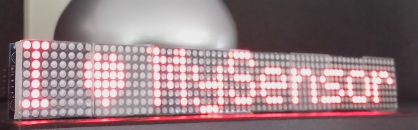
Another experiment for the V_TEXT variable/ sensor. Including brightness & speed setting and special Alarm function.
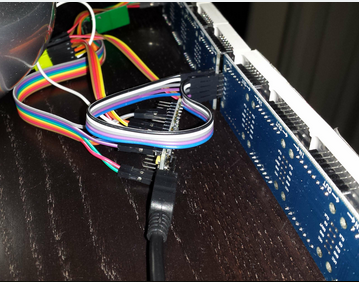
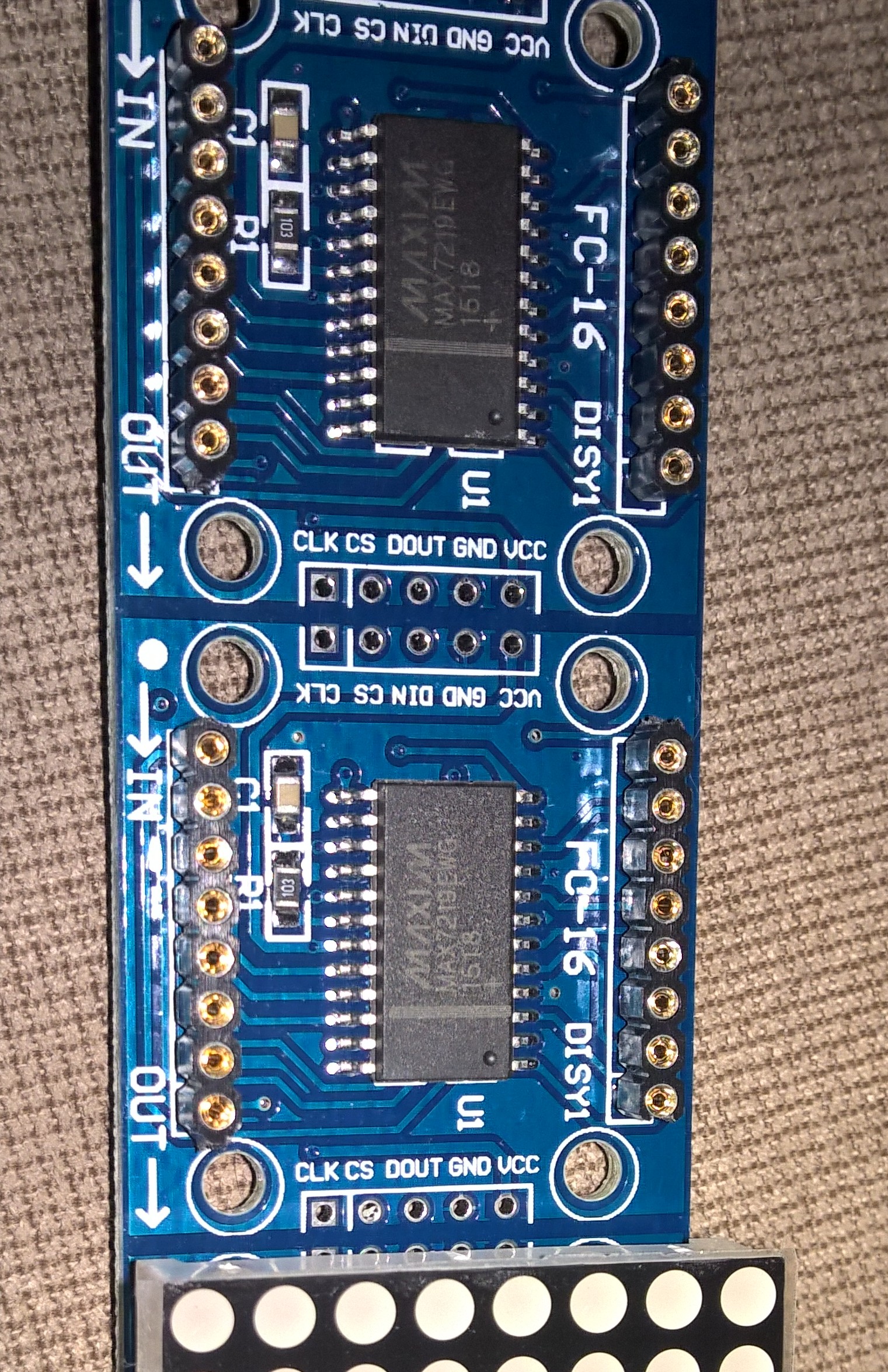
A scrolling display to let the family now that the dog needs walking... nothing more than 1 nano, 8 (or whatever number) of displays with max7219 controllera radio and a few cables
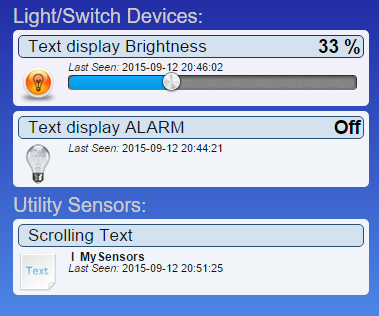
Total cost: €18 (with 8 displays)in Domoticz:
Built around the very versatile "Parola" driver library(I will upload a video when I know how to .. ;-))
https://www.youtube.com/watch?v=gCKTm427_Zc/* PROJECT: MySensors / Scrolling Text display PROGRAMMER: AWI DATE: september 12, 2015/ last update: september 12, 2015 FILE: AWI_scroll_MAX.ino LICENSE: Public domain Hardware: tbd ..Ceech - ATmega328p board w/ NRF24l01 and MySensors 1.5 () Special: Need to use MySensors development edition SUMMARY: 3 S_xx devices for scrolling text - Displays a scrolling text from a "V_TEXT" variable - additional dimmer sensor for controlling display brightness - 'Alarm' switch. If "On", overrides the text display to display ALARM message - You can also input messages from the Serial monitor (testing) Uses excellent MD_MAX72XX library Remarks: Fixed node-id */ // Use the MD_MAX72XX library to scroll text on the display with the use of the callback function // to control what is scrolled on the display text. // You need to set the used display in the library MD_MAX72XX.h // User can enter text on the serial monitor and this will display as a // Speed for the display is controlled by a pot on SPEED_IN analog in. #include <MD_MAX72xx.h> // multipurpose library for MAX72xx diaplay driver https://parola.codeplex.com/ #include <MySensor.h> // Mysensor network #include <SPI.h> #include <Time.h> //http://playground.arduino.cc/Code/Time #define USE_POT_CONTROL 0 // enable Scroll speed potentiometer #define PRINT_CALLBACK 0 // Macro to simplify serial print #define PRINT(s, v) { Serial.print(F(s)); Serial.print(v); } // Define the number of devices we have in the chain and the hardware interface // need to be adapted to your setup const int MAX_DEVICES = 8 ; // number of 8x8 displays const int CLK_PIN = 7 ; // SPI like clock const int DATA_PIN = 8 ; // SPI like data const int CS_PIN = 6 ; // SPI like select // Parola is able to use SPI hardware interface, not testted in combination with MySensors // MD_MAX72XX mx = MD_MAX72XX(CS_PIN, MAX_DEVICES); // now use Arbitrary pins MD_MAX72XX mx = MD_MAX72XX(DATA_PIN, CLK_PIN, CS_PIN, MAX_DEVICES); // instantiate one display chain // Scrolling parameters, you can attach normal potentiometer to A5, Vcc, Gnd #if USE_POT_CONTROL const int SPEED_IN = A5 ; #else const int SCROLL_DELAY = 20 ; // in milliseconds #endif // USE_POT_CONTROL const int CHAR_SPACING = 1 ; // pixels between characters // MySensors constants & variables const byte nodeId = 51 ; // MySensors fixed node id const byte messageCHILD = 8 ; // Text from ControllerLCD const byte brightnessChild = 9 ; // Brightness of display const byte alarmChild = 10 ; // Display Alarm text (overrides normal text) boolean timeReceived = false ; // Flag to indicate time received // Display constants & variables byte textBrightness = 1 ; // brightness of display (between 0 - MAX_INTENSITY (0xF) byte textOnOff = true ; // textOnOff = ! shutdown boolean textAlarm = false ; // Alarm (switch S_BINARY) // Global message buffers shared by MySensors and Scrolling functions const int BUF_SIZE = 25 ; // max payload for MySensors(NRF24l01) char curMessage[BUF_SIZE]; // current displayed message char newMessage[BUF_SIZE]; // next message to be displayed if available bool newMessageAvailable = false ; // new message available flag uint16_t scrollDelay; // in milliseconds // *** Definition and initialisation // define the MySensor network (1.5) MyTransportNRF24 transport(9,10); // Sensoduino (8,7) Ceech board, 3.3v (7,8) (pin default 9,10) MySensor gw(transport); // Initialize messages for sensor network MyMessage textMsg(messageCHILD, V_TEXT); // message for Sending Text to Controller /* MD_MAX72XX functions: can be found in the documentation for the library, * no need to customtize callback & scroll routines (unless you want to...) */ uint8_t scrollDataSource(uint8_t dev, MD_MAX72XX::transformType_t t) // Callback function for data that is required for scrolling into the display { static char *p = curMessage; static uint8_t state = 0; static uint8_t curLen, showLen; static uint8_t cBuf[8]; uint8_t colData; // finite state machine to control what we do on the callback switch(state) { case 0: // Load the next character from the font table showLen = mx.getChar(*p++, sizeof(cBuf)/sizeof(cBuf[0]), cBuf); curLen = 0; state++; // if we reached end of message, reset the message pointer if (*p == '\0') { p = curMessage; // reset the pointer to start of message if (newMessageAvailable) // there is a new message waiting { strcpy(curMessage, newMessage); // copy it in newMessageAvailable = false; } } // !! deliberately fall through to next state to start displaying case 1: // display the next part of the character colData = cBuf[curLen++]; if (curLen == showLen) // end of character insert interchar space { showLen = CHAR_SPACING; curLen = 0; state = 2; } break; case 2: // display inter-character spacing (blank column) colData = 0; curLen++; if (curLen == showLen) state = 0; break; default: state = 0; } return(colData); } // Callback (not used here) void scrollDataSink(uint8_t dev, MD_MAX72XX::transformType_t t, uint8_t col){ // Callback function for data that is being scrolled off the display #if PRINT_CALLBACK Serial.print("\n cb "); Serial.print(dev); Serial.print(' '); Serial.print(t); Serial.print(' '); Serial.println(col); #endif } // non-blocking text display to be used in loop (call frequently) void scrollText(void){ static uint32_t prevTime = 0; if (millis()-prevTime >= scrollDelay){ // Is it time to scroll the text? mx.transform(MD_MAX72XX::TSL); // scroll along - the callback will load all the data prevTime = millis(); // starting point for next time } } // sets the scroll delay (read from potentiometer if enabled) uint16_t getScrollDelay(void){ #if USE_POT_CONTROL uint16_t t = analogRead(SPEED_IN); t = map(t, 0, 1023, 25, 250); return(t); #else return(SCROLL_DELAY); #endif } void setup(){ // set up the display first mx.begin(); // initialize display chain mx.setShiftDataInCallback(scrollDataSource); // define function to get the scrolldata (returned as int8) //mx.setShiftDataOutCallback(scrollDataSink); // not used mx.control(MD_MAX72XX::INTENSITY, 0x01); #if USE_POT_CONTROL // initialize speed potentiometer if enabled pinMode(SPEED_IN, INPUT); #else scrollDelay = SCROLL_DELAY; #endif strcpy(curMessage, "I \x03 MySensors "); // first message on display newMessage[0] = '\0'; // new message initialized to empty // Setup MySensors //Serial in Sensor network = 115200 gw.begin(incomingMessage, nodeId); // this node is 51 fixed //Send the sensor node sketch version information to the gateway gw.sendSketchInfo("AWI Scroll MAX 51", "1.1"); gw.present(messageCHILD, S_INFO, "Text line Scroll"); // new S_type 20150905 (not know by domoticz) gw.present(alarmChild, S_BINARY, "Alarm display"); // to display alarm text gw.present(brightnessChild, S_DIMMER, "Text brightness"); // new S_type 20150905 (not know by domoticz) //gw.send(textMsg.set("-")); // initialize the V_TEXT at controller for sensor to none (trick for Domoticz) gw.request(messageCHILD, V_TEXT, 0); // request value from controller // Initializations gw.requestTime(receiveTime); // get the time from controller (handled by receiveTime) } // loop only uses non-blocking functions void loop() { gw.process(); static unsigned long lastUpdate ; // Static hold the last update time unsigned long now = millis(); scrollDelay = getScrollDelay(); // update scroll delay from potentiometer readSerial(); // Check for new conditions & ask for new information from controller every 10 seconds if (now-lastUpdate > 10000){ if (textAlarm){ // if alarmstatus: override all text and set max intensity strcpy(curMessage, " ALARM "); mx.control(MD_MAX72XX::INTENSITY, MAX_INTENSITY); // set current brightness mx.control(MD_MAX72XX::SHUTDOWN, false) ; } else { // standard (non Alarm actions) mx.control(MD_MAX72XX::INTENSITY, textBrightness); // set current brightness mx.control(MD_MAX72XX::SHUTDOWN, textOnOff) ; gw.request(messageCHILD, V_TEXT, 0); // request new value from controller } lastUpdate = now; } scrollText(); } // This is called when a new time value was received void receiveTime(unsigned long controllerTime) { Serial.print("Time value received: "); Serial.println(controllerTime); setTime(controllerTime); // time from controller timeReceived = true; } // This is called when a message is received void incomingMessage(const MyMessage &message) { Serial.print("Message: "); Serial.print(message.sensor); Serial.print(", Message: "); Serial.println(message.getString()); if (message.sensor == messageCHILD){ if (message.type==V_TEXT) { // Text content strcpy(newMessage, message.getString()); // copy it in newMessageAvailable = true ; } } else if (message.sensor == alarmChild) { if (message.type==V_STATUS) { // True/ false content textAlarm = message.getBool()?true:false ; // set alarmflag Serial.print("TextAlarm: "); Serial.println(textAlarm); } } else if (message.sensor == brightnessChild){ if (message.type==V_PERCENTAGE) { // Level 0..100 content textBrightness = map(message.getInt(),0, 100, 0, MAX_INTENSITY ) ; // map to brightnesslevel Serial.print("TextBrightness: "); Serial.println(textBrightness); } else if (message.type==V_STATUS) { // Display on/off textOnOff = message.getBool()?false:true ; // set shutdown/ !on/off Serial.print("Text on/off: "); Serial.println(textOnOff); } } } // Testing purposes: input routine character buffer. Reads serial characters in buffer newMessage. // sets flag newMessageAvailable to true if completed void readSerial(void) { static uint8_t putIndex = 0; while (Serial.available()) { newMessage[putIndex] = (char)Serial.read(); if ((newMessage[putIndex] == '\n') || (putIndex >= BUF_SIZE-3)) // end of message character or full buffer { // put in a message separator and end the string newMessage[putIndex++] = ' '; newMessage[putIndex] = '\0'; // restart the index for next filling spree and flag we have a message waiting putIndex = 0; newMessageAvailable = true; } else // Just save the next char in next location newMessage[putIndex++]; } }Hi @AWI do you stil have this setup in use? I tried to convert this to 2.0 and hock it up but there is something wrong with the order of the LED elements. They are somehow scrolling in the wrong direction. With part of the code handles this? Might be that I have the wrong library for the MD_MAX72XX where did you get the lib?
- Tomas
-
Hi @AWI do you stil have this setup in use? I tried to convert this to 2.0 and hock it up but there is something wrong with the order of the LED elements. They are somehow scrolling in the wrong direction. With part of the code handles this? Might be that I have the wrong library for the MD_MAX72XX where did you get the lib?
Hi @korttoma I have it somewhere in the (large) pile of 'old and/or unfinished' projects :blush:
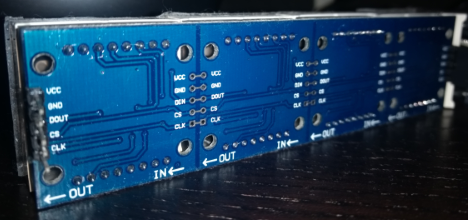
What I remember is that there are difference between the MAX displays in orientation. Below a picture off mine..
You can change the display type in the MD_MAX72xx.h file of the library.
From line #212 you can choose various display types (only select one). Have fun and let us know your progress..
-
Hi @korttoma I have it somewhere in the (large) pile of 'old and/or unfinished' projects :blush:
What I remember is that there are difference between the MAX displays in orientation. Below a picture off mine..
You can change the display type in the MD_MAX72xx.h file of the library.
From line #212 you can choose various display types (only select one). Have fun and let us know your progress..
-
@korttoma said:
Chose the FC-16 from the .h file and now it is working! Thanks again @AWI
Thomas, could/would you please share the 2.0 version of the sketch as i also want to use the max7219 modules with mysensors. I already tried them with the md_parola library examples and there are pretty nice animations and effects in there.
Any chances to use those effects other than the scrolling examples with a node red/mqtt gateway combination?
-
@korttoma said:
Chose the FC-16 from the .h file and now it is working! Thanks again @AWI
Thomas, could/would you please share the 2.0 version of the sketch as i also want to use the max7219 modules with mysensors. I already tried them with the md_parola library examples and there are pretty nice animations and effects in there.
Any chances to use those effects other than the scrolling examples with a node red/mqtt gateway combination?
@Orkspalter said:
please share the 2.0 version of the sketch
Sure I can do that, I will share it when I get home to the computer where it is located.
-
@Orkspalter said:
please share the 2.0 version of the sketch
Sure I can do that, I will share it when I get home to the computer where it is located.
@korttoma said:
Sure I can do that, I will share it when I get home to the computer where it is located.
Thanks Tomas
-
Hi,
I'm using this fantastic code as well. This is working on 2.0
Next step for me would be to be able to create an array with more messages, so that the display could cycle thru them.
/* PROJECT: MySensors / Scrolling Text display PROGRAMMER: AWI DATE: september 12, 2015/ last update: september 12, 2015 FILE: AWI_scroll_MAX.ino LICENSE: Public domain Hardware: tbd ..Ceech - ATmega328p board w/ NRF24l01 and MySensors 1.5 () Special: Need to use MySensors development edition SUMMARY: 3 S_xx devices for scrolling text - Displays a scrolling text from a "V_TEXT" variable - additional dimmer sensor for controlling display brightness - 'Alarm' switch. If "On", overrides the text display to display ALARM message - You can also input messages from the Serial monitor (testing) Uses excellent MD_MAX72XX library Remarks: Fixed node-id */ #include <MD_Parola.h> #define MY_RADIO_NRF24 // Enable repeater functionality for this node #define MY_REPEATER_FEATURE // Use the MD_MAX72XX library to scroll text on the display with the use of the callback function // to control what is scrolled on the display text. // You need to set the used display in the library MD_MAX72XX.h // User can enter text on the serial monitor and this will display as a // Speed for the display is controlled by a pot on SPEED_IN analog in. #include <MD_MAX72xx.h> // multipurpose library for MAX72xx diaplay driver https://parola.codeplex.com/ #include <MySensors.h> // Mysensor network #include <SPI.h> #include <Time.h> //http://playground.arduino.cc/Code/Time #include <TimeLib.h> #define USE_POT_CONTROL 0 // enable Scroll speed potentiometer #define PRINT_CALLBACK 1 // Macro to simplify serial print #define PRINT(s, v) { Serial.print(F(s)); Serial.print(v); } // Define the number of devices we have in the chain and the hardware interface // need to be adapted to your setup const int MAX_DEVICES = 2 ; // number of 8x8 displays const int CLK_PIN = 7 ; // SPI like clock const int DATA_PIN = 8 ; // SPI like data const int CS_PIN = 6 ; // SPI like select // Parola is able to use SPI hardware interface, not testted in combination with MySensors // MD_MAX72XX mx = MD_MAX72XX(CS_PIN, MAX_DEVICES); // now use Arbitrary pins MD_MAX72XX mx = MD_MAX72XX(DATA_PIN, CLK_PIN, CS_PIN, MAX_DEVICES); // instantiate one display chain // Scrolling parameters, you can attach normal potentiometer to A5, Vcc, Gnd #if USE_POT_CONTROL const int SPEED_IN = A5 ; #else const int SCROLL_DELAY = 20 ; // in milliseconds #endif // USE_POT_CONTROL const int CHAR_SPACING = 1 ; // pixels between characters // MySensors constants & variables //const byte nodeId = 51 ; // MySensors fixed node id const byte messageCHILD = 8 ; // Text from ControllerLCD const byte brightnessChild = 9 ; // Brightness of display const byte alarmChild = 10 ; // Display Alarm text (overrides normal text) boolean timeReceived = false ; // Flag to indicate time received // Display constants & variables byte textBrightness = 1 ; // brightness of display (between 0 - MAX_INTENSITY (0xF) byte textOnOff = false ; // textOnOff = ! shutdown boolean textAlarm = false ; // Alarm (switch S_BINARY) // Global message buffers shared by MySensors and Scrolling functions const int BUF_SIZE = 25 ; // max payload for MySensors(NRF24l01) char curMessage[BUF_SIZE]; // current displayed message char newMessage[BUF_SIZE]; // next message to be displayed if available bool newMessageAvailable = false ; // new message available flag uint16_t scrollDelay; // in milliseconds // *** Definition and initialisation // define the MySensor network (1.5) // Initialize messages for sensor network MyMessage textMsg(messageCHILD, V_TEXT); // message for Sending Text to Controller /* MD_MAX72XX functions: can be found in the documentation for the library, * no need to customtize callback & scroll routines (unless you want to...) */ uint8_t scrollDataSource(uint8_t dev, MD_MAX72XX::transformType_t t) // Callback function for data that is required for scrolling into the display { static char *p = curMessage; static uint8_t state = 0; static uint8_t curLen, showLen; static uint8_t cBuf[8]; uint8_t colData; // finite state machine to control what we do on the callback switch(state) { case 0: // Load the next character from the font table showLen = mx.getChar(*p++, sizeof(cBuf)/sizeof(cBuf[0]), cBuf); curLen = 0; state++; // if we reached end of message, reset the message pointer if (*p == '\0') { p = curMessage; // reset the pointer to start of message if (newMessageAvailable) // there is a new message waiting { strcpy(curMessage, newMessage); // copy it in newMessageAvailable = false; } } // !! deliberately fall through to next state to start displaying case 1: // display the next part of the character colData = cBuf[curLen++]; if (curLen == showLen) // end of character insert interchar space { showLen = CHAR_SPACING; curLen = 0; state = 2; } break; case 2: // display inter-character spacing (blank column) colData = 0; curLen++; if (curLen == showLen) state = 0; break; default: state = 0; } return(colData); } // Callback (not used here) void scrollDataSink(uint8_t dev, MD_MAX72XX::transformType_t t, uint8_t col){ // Callback function for data that is being scrolled off the display #if PRINT_CALLBACK Serial.print("\n cb "); Serial.print(dev); Serial.print(' '); Serial.print(t); Serial.print(' '); Serial.println(col); #endif } // non-blocking text display to be used in loop (call frequently) void scrollText(void){ static uint32_t prevTime = 0; if (millis()-prevTime >= scrollDelay){ // Is it time to scroll the text? mx.transform(MD_MAX72XX::TSL); // scroll along - the callback will load all the data prevTime = millis(); // starting point for next time } } // sets the scroll delay (read from potentiometer if enabled) uint16_t getScrollDelay(void){ #if USE_POT_CONTROL uint16_t t = analogRead(SPEED_IN); t = map(t, 0, 1023, 25, 250); return(t); #else return(SCROLL_DELAY); #endif } void setup(){ // set up the display first mx.begin(); // initialize display chain mx.setShiftDataInCallback(scrollDataSource); // define function to get the scrolldata (returned as int8) //mx.setShiftDataOutCallback(scrollDataSink); // not used mx.control(MD_MAX72XX::INTENSITY, 0x01); #if USE_POT_CONTROL // initialize speed potentiometer if enabled pinMode(SPEED_IN, INPUT); #else scrollDelay = SCROLL_DELAY; #endif strcpy(curMessage, "I \x03 MySensors "); // first message on display //newMessage[0] = '\0'; // new message initialized to empty RE This is not working.... // Setup MySensors //Serial in Sensor network = 115200 //Send the sensor node sketch version information to the gateway } void presentation() { sendSketchInfo("Scrollo small 52", "1.0"); present(messageCHILD, S_INFO, "Text line Scroll"); // new S_type 20150905 (not know by domoticz) present(alarmChild, S_BINARY, "Alarm display"); // to display alarm text present(brightnessChild, S_DIMMER, "Text brightness"); // new S_type 20150905 (not know by domoticz) //send(textMsg.set("-")); // initialize the V_TEXT at controller for sensor to none (trick for Domoticz) request(messageCHILD, V_TEXT, 0); // request value from controller // Initializations requestTime(); // get the time from controller (handled by receiveTime) } // loop only uses non-blocking functions void loop() { static unsigned long lastUpdate ; // Static hold the last update time unsigned long now = millis(); scrollDelay = getScrollDelay(); // update scroll delay from potentiometer //readSerial(); // Check for new conditions & ask for new information from controller every 10 seconds if (now-lastUpdate > 10000){ if (textAlarm){ // if alarmstatus: override all text and set max intensity strcpy(curMessage, " ALARM "); mx.control(MD_MAX72XX::INTENSITY, MAX_INTENSITY); // set current brightness mx.control(MD_MAX72XX::SHUTDOWN, false) ; } else { // standard (non Alarm actions) mx.control(MD_MAX72XX::INTENSITY, textBrightness); // set current brightness mx.control(MD_MAX72XX::SHUTDOWN, textOnOff) ; request(messageCHILD, V_TEXT, 0); // request new value from controller } lastUpdate = now; } scrollText(); } // This is called when a new time value was received void receiveTime(unsigned long controllerTime) { Serial.print("Time value received: "); Serial.println(controllerTime); setTime(controllerTime); // time from controller timeReceived = true; } // This is called when a message is received void receive(const MyMessage &message) { Serial.print("Message: "); Serial.print(message.sensor); Serial.print(", Message: "); Serial.println(message.getString()); if (message.sensor == messageCHILD){ if (message.type==V_TEXT) { // Text content strcpy(newMessage, message.getString()); // copy it in newMessageAvailable = true ; } } else if (message.sensor == alarmChild) { if (message.type==V_STATUS) { // True/ false content textAlarm = message.getBool()?true:false ; // set alarmflag Serial.print("TextAlarm: "); Serial.println(textAlarm); } } else if (message.sensor == brightnessChild){ if (message.type==V_PERCENTAGE) { // Level 0..100 content textBrightness = map(message.getInt(),0, 100, 0, MAX_INTENSITY ) ; // map to brightnesslevel Serial.print("TextBrightness: "); Serial.println(textBrightness); } else if (message.type==V_STATUS) { // Display on/off textOnOff = message.getBool()?false:true ; // set shutdown/ !on/off Serial.print("Text on/off: "); Serial.println(textOnOff); } } } // Testing purposes: input routine character buffer. Reads serial characters in buffer newMessage. // sets flag newMessageAvailable to true if completed void readSerial(void) { static uint8_t putIndex = 0; while (Serial.available()) { newMessage[putIndex] = (char)Serial.read(); if ((newMessage[putIndex] == '\n') || (putIndex >= BUF_SIZE-3)) // end of message character or full buffer { // put in a message separator and end the string newMessage[putIndex++] = ' '; newMessage[putIndex] = '\0'; // restart the index for next filling spree and flag we have a message waiting putIndex = 0; newMessageAvailable = true; } else // Just save the next char in next location newMessage[putIndex++]; } } -
Hi,
I'm using this fantastic code as well. This is working on 2.0
Next step for me would be to be able to create an array with more messages, so that the display could cycle thru them.
/* PROJECT: MySensors / Scrolling Text display PROGRAMMER: AWI DATE: september 12, 2015/ last update: september 12, 2015 FILE: AWI_scroll_MAX.ino LICENSE: Public domain Hardware: tbd ..Ceech - ATmega328p board w/ NRF24l01 and MySensors 1.5 () Special: Need to use MySensors development edition SUMMARY: 3 S_xx devices for scrolling text - Displays a scrolling text from a "V_TEXT" variable - additional dimmer sensor for controlling display brightness - 'Alarm' switch. If "On", overrides the text display to display ALARM message - You can also input messages from the Serial monitor (testing) Uses excellent MD_MAX72XX library Remarks: Fixed node-id */ #include <MD_Parola.h> #define MY_RADIO_NRF24 // Enable repeater functionality for this node #define MY_REPEATER_FEATURE // Use the MD_MAX72XX library to scroll text on the display with the use of the callback function // to control what is scrolled on the display text. // You need to set the used display in the library MD_MAX72XX.h // User can enter text on the serial monitor and this will display as a // Speed for the display is controlled by a pot on SPEED_IN analog in. #include <MD_MAX72xx.h> // multipurpose library for MAX72xx diaplay driver https://parola.codeplex.com/ #include <MySensors.h> // Mysensor network #include <SPI.h> #include <Time.h> //http://playground.arduino.cc/Code/Time #include <TimeLib.h> #define USE_POT_CONTROL 0 // enable Scroll speed potentiometer #define PRINT_CALLBACK 1 // Macro to simplify serial print #define PRINT(s, v) { Serial.print(F(s)); Serial.print(v); } // Define the number of devices we have in the chain and the hardware interface // need to be adapted to your setup const int MAX_DEVICES = 2 ; // number of 8x8 displays const int CLK_PIN = 7 ; // SPI like clock const int DATA_PIN = 8 ; // SPI like data const int CS_PIN = 6 ; // SPI like select // Parola is able to use SPI hardware interface, not testted in combination with MySensors // MD_MAX72XX mx = MD_MAX72XX(CS_PIN, MAX_DEVICES); // now use Arbitrary pins MD_MAX72XX mx = MD_MAX72XX(DATA_PIN, CLK_PIN, CS_PIN, MAX_DEVICES); // instantiate one display chain // Scrolling parameters, you can attach normal potentiometer to A5, Vcc, Gnd #if USE_POT_CONTROL const int SPEED_IN = A5 ; #else const int SCROLL_DELAY = 20 ; // in milliseconds #endif // USE_POT_CONTROL const int CHAR_SPACING = 1 ; // pixels between characters // MySensors constants & variables //const byte nodeId = 51 ; // MySensors fixed node id const byte messageCHILD = 8 ; // Text from ControllerLCD const byte brightnessChild = 9 ; // Brightness of display const byte alarmChild = 10 ; // Display Alarm text (overrides normal text) boolean timeReceived = false ; // Flag to indicate time received // Display constants & variables byte textBrightness = 1 ; // brightness of display (between 0 - MAX_INTENSITY (0xF) byte textOnOff = false ; // textOnOff = ! shutdown boolean textAlarm = false ; // Alarm (switch S_BINARY) // Global message buffers shared by MySensors and Scrolling functions const int BUF_SIZE = 25 ; // max payload for MySensors(NRF24l01) char curMessage[BUF_SIZE]; // current displayed message char newMessage[BUF_SIZE]; // next message to be displayed if available bool newMessageAvailable = false ; // new message available flag uint16_t scrollDelay; // in milliseconds // *** Definition and initialisation // define the MySensor network (1.5) // Initialize messages for sensor network MyMessage textMsg(messageCHILD, V_TEXT); // message for Sending Text to Controller /* MD_MAX72XX functions: can be found in the documentation for the library, * no need to customtize callback & scroll routines (unless you want to...) */ uint8_t scrollDataSource(uint8_t dev, MD_MAX72XX::transformType_t t) // Callback function for data that is required for scrolling into the display { static char *p = curMessage; static uint8_t state = 0; static uint8_t curLen, showLen; static uint8_t cBuf[8]; uint8_t colData; // finite state machine to control what we do on the callback switch(state) { case 0: // Load the next character from the font table showLen = mx.getChar(*p++, sizeof(cBuf)/sizeof(cBuf[0]), cBuf); curLen = 0; state++; // if we reached end of message, reset the message pointer if (*p == '\0') { p = curMessage; // reset the pointer to start of message if (newMessageAvailable) // there is a new message waiting { strcpy(curMessage, newMessage); // copy it in newMessageAvailable = false; } } // !! deliberately fall through to next state to start displaying case 1: // display the next part of the character colData = cBuf[curLen++]; if (curLen == showLen) // end of character insert interchar space { showLen = CHAR_SPACING; curLen = 0; state = 2; } break; case 2: // display inter-character spacing (blank column) colData = 0; curLen++; if (curLen == showLen) state = 0; break; default: state = 0; } return(colData); } // Callback (not used here) void scrollDataSink(uint8_t dev, MD_MAX72XX::transformType_t t, uint8_t col){ // Callback function for data that is being scrolled off the display #if PRINT_CALLBACK Serial.print("\n cb "); Serial.print(dev); Serial.print(' '); Serial.print(t); Serial.print(' '); Serial.println(col); #endif } // non-blocking text display to be used in loop (call frequently) void scrollText(void){ static uint32_t prevTime = 0; if (millis()-prevTime >= scrollDelay){ // Is it time to scroll the text? mx.transform(MD_MAX72XX::TSL); // scroll along - the callback will load all the data prevTime = millis(); // starting point for next time } } // sets the scroll delay (read from potentiometer if enabled) uint16_t getScrollDelay(void){ #if USE_POT_CONTROL uint16_t t = analogRead(SPEED_IN); t = map(t, 0, 1023, 25, 250); return(t); #else return(SCROLL_DELAY); #endif } void setup(){ // set up the display first mx.begin(); // initialize display chain mx.setShiftDataInCallback(scrollDataSource); // define function to get the scrolldata (returned as int8) //mx.setShiftDataOutCallback(scrollDataSink); // not used mx.control(MD_MAX72XX::INTENSITY, 0x01); #if USE_POT_CONTROL // initialize speed potentiometer if enabled pinMode(SPEED_IN, INPUT); #else scrollDelay = SCROLL_DELAY; #endif strcpy(curMessage, "I \x03 MySensors "); // first message on display //newMessage[0] = '\0'; // new message initialized to empty RE This is not working.... // Setup MySensors //Serial in Sensor network = 115200 //Send the sensor node sketch version information to the gateway } void presentation() { sendSketchInfo("Scrollo small 52", "1.0"); present(messageCHILD, S_INFO, "Text line Scroll"); // new S_type 20150905 (not know by domoticz) present(alarmChild, S_BINARY, "Alarm display"); // to display alarm text present(brightnessChild, S_DIMMER, "Text brightness"); // new S_type 20150905 (not know by domoticz) //send(textMsg.set("-")); // initialize the V_TEXT at controller for sensor to none (trick for Domoticz) request(messageCHILD, V_TEXT, 0); // request value from controller // Initializations requestTime(); // get the time from controller (handled by receiveTime) } // loop only uses non-blocking functions void loop() { static unsigned long lastUpdate ; // Static hold the last update time unsigned long now = millis(); scrollDelay = getScrollDelay(); // update scroll delay from potentiometer //readSerial(); // Check for new conditions & ask for new information from controller every 10 seconds if (now-lastUpdate > 10000){ if (textAlarm){ // if alarmstatus: override all text and set max intensity strcpy(curMessage, " ALARM "); mx.control(MD_MAX72XX::INTENSITY, MAX_INTENSITY); // set current brightness mx.control(MD_MAX72XX::SHUTDOWN, false) ; } else { // standard (non Alarm actions) mx.control(MD_MAX72XX::INTENSITY, textBrightness); // set current brightness mx.control(MD_MAX72XX::SHUTDOWN, textOnOff) ; request(messageCHILD, V_TEXT, 0); // request new value from controller } lastUpdate = now; } scrollText(); } // This is called when a new time value was received void receiveTime(unsigned long controllerTime) { Serial.print("Time value received: "); Serial.println(controllerTime); setTime(controllerTime); // time from controller timeReceived = true; } // This is called when a message is received void receive(const MyMessage &message) { Serial.print("Message: "); Serial.print(message.sensor); Serial.print(", Message: "); Serial.println(message.getString()); if (message.sensor == messageCHILD){ if (message.type==V_TEXT) { // Text content strcpy(newMessage, message.getString()); // copy it in newMessageAvailable = true ; } } else if (message.sensor == alarmChild) { if (message.type==V_STATUS) { // True/ false content textAlarm = message.getBool()?true:false ; // set alarmflag Serial.print("TextAlarm: "); Serial.println(textAlarm); } } else if (message.sensor == brightnessChild){ if (message.type==V_PERCENTAGE) { // Level 0..100 content textBrightness = map(message.getInt(),0, 100, 0, MAX_INTENSITY ) ; // map to brightnesslevel Serial.print("TextBrightness: "); Serial.println(textBrightness); } else if (message.type==V_STATUS) { // Display on/off textOnOff = message.getBool()?false:true ; // set shutdown/ !on/off Serial.print("Text on/off: "); Serial.println(textOnOff); } } } // Testing purposes: input routine character buffer. Reads serial characters in buffer newMessage. // sets flag newMessageAvailable to true if completed void readSerial(void) { static uint8_t putIndex = 0; while (Serial.available()) { newMessage[putIndex] = (char)Serial.read(); if ((newMessage[putIndex] == '\n') || (putIndex >= BUF_SIZE-3)) // end of message character or full buffer { // put in a message separator and end the string newMessage[putIndex++] = ' '; newMessage[putIndex] = '\0'; // restart the index for next filling spree and flag we have a message waiting putIndex = 0; newMessageAvailable = true; } else // Just save the next char in next location newMessage[putIndex++]; } } -
@korttoma here is the sketch I'm using, probably quite similar to the one @gus shared
/* PROJECT: MySensors / Scrolling Text display PROGRAMMER: AWI DATE: september 12, 2015/ last update: september 12, 2015 FILE: AWI_scroll_MAX.ino LICENSE: Public domain Hardware: tbd ..Ceech - ATmega328p board w/ NRF24l01 and MySensors 1.5 () Special: Need to use MySensors development edition SUMMARY: 3 S_xx devices for scrolling text - Displays a scrolling text from a "V_TEXT" variable - additional dimmer sensor for controlling display brightness - 'Alarm' switch. If "On", overrides the text display to display ALARM message - You can also input messages from the Serial monitor (testing) Uses excellent MD_MAX72XX library Remarks: Fixed node-id */ // Use the MD_MAX72XX library to scroll text on the display with the use of the callback function // to control what is scrolled on the display text. // You need to set the used display in the library MD_MAX72XX.h // User can enter text on the serial monitor and this will display as a // Speed for the display is controlled by a pot on SPEED_IN analog in. #define MY_DEBUG #define MY_BAUD_RATE 9600 #define MY_RADIO_NRF24 #define MY_NODE_ID 20 #define SN "Scrolling Text" #define SV "2.1" #include <MyConfig.h> #include <MySensors.h> #include <MD_MAX72xx.h> // multipurpose library for MAX72xx diaplay driver https://parola.codeplex.com/ #include <SPI.h> #include <Time.h> //http://playground.arduino.cc/Code/Time #define USE_POT_CONTROL 0 // enable Scroll speed potentiometer #define PRINT_CALLBACK 1 // Macro to simplify serial print #define PRINT(s, v) { Serial.print(F(s)); Serial.print(v); } // Define the number of devices we have in the chain and the hardware interface // need to be adapted to your setup const int MAX_DEVICES = 8 ; // number of 8x8 displays const int CLK_PIN = 7 ; // SPI like clock const int DATA_PIN = 8 ; // SPI like data const int CS_PIN = 6 ; // SPI like select // Parola is able to use SPI hardware interface, not testted in combination with MySensors // MD_MAX72XX mx = MD_MAX72XX(CS_PIN, MAX_DEVICES); // now use Arbitrary pins MD_MAX72XX mx = MD_MAX72XX(DATA_PIN, CLK_PIN, CS_PIN, MAX_DEVICES); // instantiate one display chain // Scrolling parameters, you can attach normal potentiometer to A5, Vcc, Gnd #if USE_POT_CONTROL const int SPEED_IN = A5 ; #else const int SCROLL_DELAY = 60 ; // in milliseconds #endif // USE_POT_CONTROL const int CHAR_SPACING = 1 ; // pixels between characters // MySensors constants & variables const byte messageCHILD = 8 ; // Text from ControllerLCD const byte brightnessChild = 9 ; // Brightness of display const byte alarmChild = 10 ; // Display Alarm text (overrides normal text) boolean timeReceived = false ; // Flag to indicate time received // Display constants & variables byte textBrightness = 1 ; // brightness of display (between 0 - MAX_INTENSITY (0xF) byte textOnOff = false ; // textOnOff = ! shutdown boolean textAlarm = false ; // Alarm (switch S_BINARY) // Global message buffers shared by MySensors and Scrolling functions const int BUF_SIZE = 25 ; // max payload for MySensors(NRF24l01) char curMessage[BUF_SIZE]; // current displayed message char newMessage[BUF_SIZE]; // next message to be displayed if available bool newMessageAvailable = false ; // new message available flag uint16_t scrollDelay; // in milliseconds // *** Definition and initialisation // define the MySensor network (1.5) // Initialize messages for sensor network MyMessage textMsg(messageCHILD, V_TEXT); // message for Sending Text to Controller void presentation() { // Send the sketch version information to the gateway and Controller sendSketchInfo(SN, SV); // Register all sensors to gateway (they will be created as child devices) present(messageCHILD, S_INFO, "Text line Scroll"); // new S_type 20150905 (not know by domoticz) wait(200); present(alarmChild, S_BINARY, "Alarm display"); // to display alarm text wait(200); present(brightnessChild, S_DIMMER, "Text brightness"); // new S_type 20150905 (not know by domoticz) //gw.send(textMsg.set("-")); // initialize the V_TEXT at controller for sensor to none (trick for Domoticz) wait(200); request(messageCHILD, V_TEXT, 0); // request value from controller // Initializations wait(200); requestTime(receiveTime); // get the time from controller (handled by receiveTime) wait(200); } /* MD_MAX72XX functions: can be found in the documentation for the library, * no need to customtize callback & scroll routines (unless you want to...) */ uint8_t scrollDataSource(uint8_t dev, MD_MAX72XX::transformType_t t) // Callback function for data that is required for scrolling into the display { static char *p = curMessage; static uint8_t state = 0; static uint8_t curLen, showLen; static uint8_t cBuf[8]; uint8_t colData; // finite state machine to control what we do on the callback switch(state) { case 0: // Load the next character from the font table showLen = mx.getChar(*p++, sizeof(cBuf)/sizeof(cBuf[0]), cBuf); curLen = 0; state++; // if we reached end of message, reset the message pointer if (*p == '\0') { p = curMessage; // reset the pointer to start of message if (newMessageAvailable) // there is a new message waiting { strcpy(curMessage, newMessage); // copy it in newMessageAvailable = false; } } // !! deliberately fall through to next state to start displaying case 1: // display the next part of the character colData = cBuf[curLen++]; if (curLen == showLen) // end of character insert interchar space { showLen = CHAR_SPACING; curLen = 0; state = 2; } break; case 2: // display inter-character spacing (blank column) colData = 0; curLen++; if (curLen == showLen) state = 0; break; default: state = 0; } return(colData); } // Callback (not used here) void scrollDataSink(uint8_t dev, MD_MAX72XX::transformType_t t, uint8_t col){ // Callback function for data that is being scrolled off the display #if PRINT_CALLBACK Serial.print("\n cb "); Serial.print(dev); Serial.print(' '); Serial.print(t); Serial.print(' '); Serial.println(col); #endif } // non-blocking text display to be used in loop (call frequently) void scrollText(void){ static uint32_t prevTime = 0; if (millis()-prevTime >= scrollDelay){ // Is it time to scroll the text? mx.transform(MD_MAX72XX::TSL); // scroll along - the callback will load all the data prevTime = millis(); // starting point for next time } } // sets the scroll delay (read from potentiometer if enabled) uint16_t getScrollDelay(void){ #if USE_POT_CONTROL uint16_t t = analogRead(SPEED_IN); t = map(t, 0, 1023, 25, 250); return(t); #else return(SCROLL_DELAY); #endif } void setup(){ // set up the display first mx.begin(); // initialize display chain mx.setShiftDataInCallback(scrollDataSource); // define function to get the scrolldata (returned as int8) //mx.setShiftDataOutCallback(scrollDataSink); // not used mx.control(MD_MAX72XX::INTENSITY, 0x01); #if USE_POT_CONTROL // initialize speed potentiometer if enabled pinMode(SPEED_IN, INPUT); #else scrollDelay = SCROLL_DELAY; #endif strcpy(curMessage, "HEJ ARON "); // first message on display newMessage[0] = '\0'; // new message initialized to empty // Setup MySensors //Serial in Sensor network = 115200 } // loop only uses non-blocking functions void loop() { static unsigned long lastUpdate ; // Static hold the last update time unsigned long now = millis(); scrollDelay = getScrollDelay(); // update scroll delay from potentiometer readSerial(); // Check for new conditions & ask for new information from controller every 10 seconds if (now-lastUpdate > 10000){ if (textAlarm){ // if alarmstatus: override all text and set max intensity strcpy(curMessage, " ALARM "); mx.control(MD_MAX72XX::INTENSITY, MAX_INTENSITY); // set current brightness mx.control(MD_MAX72XX::SHUTDOWN, false) ; } else { // standard (non Alarm actions) mx.control(MD_MAX72XX::INTENSITY, textBrightness); // set current brightness mx.control(MD_MAX72XX::SHUTDOWN, textOnOff) ; request(messageCHILD, V_TEXT, 0); // request new value from controller } lastUpdate = now; } scrollText(); } // This is called when a new time value was received void receiveTime(unsigned long controllerTime) { Serial.print("Time value received: "); Serial.println(controllerTime); setTime(controllerTime); // time from controller timeReceived = true; } // This is called when a message is received void receive(const MyMessage &message) { Serial.print("Message: "); Serial.print(message.sensor); Serial.print(", Message: "); Serial.println(message.getString()); if (message.sensor == messageCHILD){ if (message.type==V_TEXT) { // Text content strcpy(newMessage, message.getString()); // copy it in newMessageAvailable = true ; } } else if (message.sensor == alarmChild) { if (message.type==V_STATUS) { // True/ false content textAlarm = message.getBool()?true:false ; // set alarmflag Serial.print("TextAlarm: "); Serial.println(textAlarm); } } else if (message.sensor == brightnessChild){ if (message.type==V_PERCENTAGE) { // Level 0..100 content int IncomingBrightness = message.getInt(); if (IncomingBrightness == 0) { textOnOff = true; }else { textOnOff = false; textBrightness = map(message.getInt(),0, 100, 0, MAX_INTENSITY ) ; // map to brightnesslevel Serial.print("TextBrightness: "); Serial.println(textBrightness); } } else if (message.type==V_STATUS) { // Display on/off textOnOff = message.getBool()?false:true ; // set shutdown/ !on/off Serial.print("Text on/off: "); Serial.println(textOnOff); } } } // Testing purposes: input routine character buffer. Reads serial characters in buffer newMessage. // sets flag newMessageAvailable to true if completed void readSerial(void) { static uint8_t putIndex = 0; while (Serial.available()) { newMessage[putIndex] = (char)Serial.read(); if ((newMessage[putIndex] == '\n') || (putIndex >= BUF_SIZE-3)) // end of message character or full buffer { // put in a message separator and end the string newMessage[putIndex++] = ' '; newMessage[putIndex] = '\0'; // restart the index for next filling spree and flag we have a message waiting putIndex = 0; newMessageAvailable = true; } else // Just save the next char in next location newMessage[putIndex++]; } } -
Anybody have an example where this setup shows the time while there is no message to scroll?
-
Anybody have an example where this setup shows the time while there is no message to scroll?
Here are found the blank, you need to check how it works
/* PROJECT: MySensors / Scrolling Text display PROGRAMMER: AWI DATE: september 12, 2015/ last update: september 12, 2015 FILE: AWI_scroll_MAX.ino LICENSE: Public domain Hardware: tbd ..Ceech - ATmega328p board w/ NRF24l01 and MySensors 1.5 () Special: Need to use MySensors development edition SUMMARY: 3 S_xx devices for scrolling text - Displays a scrolling text from a "V_TEXT" variable - additional dimmer sensor for controlling display brightness - 'Alarm' switch. If "On", overrides the text display to display ALARM message - You can also input messages from the Serial monitor (testing) Uses excellent MD_MAX72XX library Remarks: Fixed node-id */ // Enable debug prints to serial monitor #define MY_DEBUG // Enable and select radio type attached #define MY_RADIO_NRF24 //#define MY_RADIO_RFM69 #define DEBUG 0 // Enable or disable (default) debugging output // Use the MD_MAX72XX library to scroll text on the display with the use of the callback function // to control what is scrolled on the display text. // You need to set the used display in the library MD_MAX72XX.h // User can enter text on the serial monitor and this will display as a // Speed for the display is controlled by a pot on SPEED_IN analog in. #include <MD_MAX72xx.h> // multipurpose library for MAX72xx diaplay driver https://parola.codeplex.com/ #include <MySensor.h> // Mysensor network #include <SPI.h> #include <Time.h> //http://playground.arduino.cc/Code/Time #define PRINT_CALLBACK 0 // Macro to simplify serial print #define PRINT(s, v) { Serial.print(F(s)); Serial.print(v); } #define PRINTS(x) Serial.print(F(x)) #define PRINTD(x) Serial.println(x, DEC) // Define the number of devices we have in the chain and the hardware interface // need to be adapted to your setup const int MAX_DEVICES = 8 ; // number of 8x8 displays const int CLK_PIN = 7 ; // SPI like clock const int DATA_PIN = 8 ; // SPI like data const int CS_PIN = 6 ; // SPI like select // Parola is able to use SPI hardware interface, not testted in combination with MySensors // MD_MAX72XX mx = MD_MAX72XX(CS_PIN, MAX_DEVICES); // now use Arbitrary pins MD_MAX72XX mx = MD_MAX72XX(DATA_PIN, CLK_PIN, CS_PIN, MAX_DEVICES); // instantiate one display chain const int SCROLL_DELAY = 20 ; // in milliseconds const int CHAR_SPACING = 1 ; // pixels between characters int statetus_tame = 1; char sdate[11]; char stime[9]; // MySensors constants & variables //const byte nodeId = 51 ; // MySensors fixed node id const byte messageCHILD = 8 ; // Text from ControllerLCD const byte brightnessChild = 9 ; // Brightness of display const byte alarmChild = 10 ; // Display Alarm text (overrides normal text) boolean timeReceived = false ; // Flag to indicate time received // Display constants & variables byte textBrightness = 1 ; // brightness of display (between 0 - MAX_INTENSITY (0xF) byte textOnOff = true ; // textOnOff = ! shutdown boolean textAlarm = false ; // Alarm (switch S_BINARY) // Global message buffers shared by MySensors and Scrolling functions const int BUF_SIZE = 25 ; // max payload for MySensors(NRF24l01) char curMessage[BUF_SIZE]; // current displayed message char newMessage[BUF_SIZE]; // next message to be displayed if available bool newMessageAvailable = false ; // new message available flag uint16_t scrollDelay; // in milliseconds // *** Definition and initialisation // define the MySensor network (1.5) // Initialize messages for sensor network MyMessage textMsg(messageCHILD, V_TEXT); // message for Sending Text to Controller /* MD_MAX72XX functions: can be found in the documentation for the library, no need to customtize callback & scroll routines (unless you want to...) */ uint8_t scrollDataSource(uint8_t dev, MD_MAX72XX::transformType_t t) // Callback function for data that is required for scrolling into the display { static char *p = curMessage; static uint8_t state = 0; static uint8_t curLen, showLen; static uint8_t cBuf[8]; uint8_t colData; // finite state machine to control what we do on the callback switch (state) { case 0: // Load the next character from the font table showLen = mx.getChar(*p++, sizeof(cBuf) / sizeof(cBuf[0]), cBuf); curLen = 0; state++; // if we reached end of message, reset the message pointer if (*p == '\0') { p = curMessage; // reset the pointer to start of message if (newMessageAvailable) // there is a new message waiting { strcpy(curMessage, newMessage); // copy it in newMessageAvailable = false; } } // !! deliberately fall through to next state to start displaying case 1: // display the next part of the character colData = cBuf[curLen++]; if (curLen == showLen) // end of character insert interchar space { showLen = CHAR_SPACING; curLen = 0; state = 2; } break; case 2: // display inter-character spacing (blank column) colData = 0; curLen++; if (curLen == showLen) state = 0; break; default: state = 0; } return (colData); } void printText(uint8_t modStart, uint8_t modEnd, char *pMsg) // Print the text string to the LED matrix modules specified. // Message area is padded with blank columns after printing. { uint8_t state = 0; uint8_t curLen; uint16_t showLen; uint8_t cBuf[8]; int16_t col = ((modEnd + 1) * COL_SIZE) - 1; mx.control(modStart, modEnd, MD_MAX72XX::UPDATE, MD_MAX72XX::OFF); do // finite state machine to print the characters in the space available { switch (state) { case 0: // Load the next character from the font table // if we reached end of message, reset the message pointer if (*pMsg == '\0') { showLen = col - (modEnd * COL_SIZE); // padding characters state = 2; break; } // retrieve the next character form the font file showLen = mx.getChar(*pMsg++, sizeof(cBuf) / sizeof(cBuf[0]), cBuf); curLen = 0; state++; // !! deliberately fall through to next state to start displaying case 1: // display the next part of the character mx.setColumn(col--, cBuf[curLen++]); // done with font character, now display the space between chars if (curLen == showLen) { showLen = CHAR_SPACING; state = 2; } break; case 2: // initialize state for displaying empty columns curLen = 0; state++; // fall through case 3: // display inter-character spacing or end of message padding (blank columns) mx.setColumn(col--, 0); curLen++; if (curLen == showLen) state = 0; break; default: col = -1; // this definitely ends the do loop } } while (col >= (modStart * COL_SIZE)); mx.control(modStart, modEnd, MD_MAX72XX::UPDATE, MD_MAX72XX::ON); } void scrollDataSink(uint8_t dev, MD_MAX72XX::transformType_t t, uint8_t col) { // Callback function for data that is being scrolled off the display #if PRINT_CALLBACK Serial.print("\n cb "); Serial.print(dev); Serial.print(' '); Serial.print(t); Serial.print(' '); Serial.println(col); #endif } // non-blocking text display to be used in loop (call frequently) void scrollText(void) { static uint32_t prevTime = 0; if (millis() - prevTime >= scrollDelay) { // Is it time to scroll the text? mx.transform(MD_MAX72XX::TSL); // scroll along - the callback will load all the data prevTime = millis(); // starting point for next time } } // sets the scroll delay (read from potentiometer if enabled) uint16_t getScrollDelay(void) { return (SCROLL_DELAY); } void setup() { // set up the display first mx.begin(); // initialize display chain mx.setShiftDataInCallback(scrollDataSource); // define function to get the scrolldata (returned as int8) //mx.setShiftDataOutCallback(scrollDataSink); // not used mx.control(MD_MAX72XX::INTENSITY, 0x01); scrollDelay = SCROLL_DELAY; strcpy(curMessage, "I \x03 MySensors "); // first message on display newMessage[0] = '\0'; // new message initialized to empty // Setup MySensors //Serial in Sensor network = 115200 //Send the sensor node sketch version information to the gateway } void presentation() { sendSketchInfo("AWI Scroll MAX 51", "1.1"); present(messageCHILD, S_INFO, "Text line Scroll"); // new S_type 20150905 (not know by domoticz) present(alarmChild, S_BINARY, "Alarm display"); // to display alarm text present(brightnessChild, S_DIMMER, "Text brightness"); // new S_type 20150905 (not know by domoticz) //send(textMsg.set("-")); // initialize the V_TEXT at controller for sensor to none (trick for Domoticz) request(messageCHILD, V_TEXT, 0); // request value from controller // Initializations requestTime(); // get the time from controller (handled by receiveTime) } // loop only uses non-blocking functions void loop() { static unsigned long lastUpdate ; // Static hold the last update time static unsigned long lastUpdate2 ; // Static hold the last update time unsigned long now = millis(); scrollDelay = getScrollDelay(); // update scroll delay from potentiometer readSerial(); // Check for new conditions & ask for new information from controller every 10 seconds if (now - lastUpdate > 30000 && statetus_tame == 0) { statetus_tame = 0; sprintf(sdate, "%02d-%02d-%d", day(), month(), year()); printText(0, MAX_DEVICES - 1, sdate); lastUpdate = now; } if (textAlarm) { // if alarmstatus: override all text and set max intensity //strcpy(curMessage, " ALARM "); mx.control(MD_MAX72XX::INTENSITY, MAX_INTENSITY); // set current brightness mx.control(MD_MAX72XX::SHUTDOWN, false) ; } else { // standard (non Alarm actions) /* mx.control(MD_MAX72XX::INTENSITY, textBrightness); // set current brightness mx.control(MD_MAX72XX::SHUTDOWN, textOnOff) ; request(messageCHILD, V_TEXT, 0); // request new value from controller */ } if (textAlarm) { scrollText(); } else { //sprintf(stime, "%02d:%02d:%02d", hour(), minute(), second()); if (statetus_tame == 1) { sprintf(stime, "%02d:%02d:%02d", hour(), minute(), second()); printText(0, MAX_DEVICES - 3, stime); mx.setShiftDataOutCallback(scrollDataSink); } mx.control(MD_MAX72XX::INTENSITY, textBrightness); // set current brightness } if (now - lastUpdate2 > 32000) { statetus_tame = 1; mx.clear(); lastUpdate2 = now; } if (now - lastUpdate >33000 ){ requestTime(); lastUpdate = now; } } // This is called when a new time value was received void receiveTime(unsigned long controllerTime) { Serial.print("Time value received: "); Serial.println(controllerTime); setTime(controllerTime); // time from controller timeReceived = true; } // This is called when a message is received void receive(const MyMessage &message) { Serial.print("Message: "); Serial.print(message.sensor); Serial.print(", Message: "); Serial.println(message.getString()); if (message.sensor == messageCHILD) { if (message.type == V_TEXT) { // Text content strcpy(newMessage, message.getString()); // copy it in newMessageAvailable = true ; } } else if (message.sensor == alarmChild) { if (message.type == V_STATUS) { // True/ false content textAlarm = message.getBool() ? true : false ; // set alarmflag Serial.print("TextAlarm: "); Serial.println(textAlarm); } } else if (message.sensor == brightnessChild) { if (message.type == V_PERCENTAGE) { // Level 0..100 content textBrightness = map(message.getInt(), 0, 100, 0, MAX_INTENSITY ) ; // map to brightnesslevel Serial.print("TextBrightness: "); Serial.println(textBrightness); } else if (message.type == V_STATUS) { // Display on/off textOnOff = message.getBool() ? false : true ; // set shutdown/ !on/off Serial.print("Text on/off: "); Serial.println(textOnOff); } } } // Testing purposes: input routine character buffer. Reads serial characters in buffer newMessage. // sets flag newMessageAvailable to true if completed void readSerial(void) { static uint8_t putIndex = 0; while (Serial.available()) { newMessage[putIndex] = (char)Serial.read(); if ((newMessage[putIndex] == '\n') || (putIndex >= BUF_SIZE - 3)) // end of message character or full buffer { // put in a message separator and end the string newMessage[putIndex++] = ' '; newMessage[putIndex] = '\0'; // restart the index for next filling spree and flag we have a message waiting putIndex = 0; newMessageAvailable = true; } else // Just save the next char in next location newMessage[putIndex++]; } } -
Here are found the blank, you need to check how it works
/* PROJECT: MySensors / Scrolling Text display PROGRAMMER: AWI DATE: september 12, 2015/ last update: september 12, 2015 FILE: AWI_scroll_MAX.ino LICENSE: Public domain Hardware: tbd ..Ceech - ATmega328p board w/ NRF24l01 and MySensors 1.5 () Special: Need to use MySensors development edition SUMMARY: 3 S_xx devices for scrolling text - Displays a scrolling text from a "V_TEXT" variable - additional dimmer sensor for controlling display brightness - 'Alarm' switch. If "On", overrides the text display to display ALARM message - You can also input messages from the Serial monitor (testing) Uses excellent MD_MAX72XX library Remarks: Fixed node-id */ // Enable debug prints to serial monitor #define MY_DEBUG // Enable and select radio type attached #define MY_RADIO_NRF24 //#define MY_RADIO_RFM69 #define DEBUG 0 // Enable or disable (default) debugging output // Use the MD_MAX72XX library to scroll text on the display with the use of the callback function // to control what is scrolled on the display text. // You need to set the used display in the library MD_MAX72XX.h // User can enter text on the serial monitor and this will display as a // Speed for the display is controlled by a pot on SPEED_IN analog in. #include <MD_MAX72xx.h> // multipurpose library for MAX72xx diaplay driver https://parola.codeplex.com/ #include <MySensor.h> // Mysensor network #include <SPI.h> #include <Time.h> //http://playground.arduino.cc/Code/Time #define PRINT_CALLBACK 0 // Macro to simplify serial print #define PRINT(s, v) { Serial.print(F(s)); Serial.print(v); } #define PRINTS(x) Serial.print(F(x)) #define PRINTD(x) Serial.println(x, DEC) // Define the number of devices we have in the chain and the hardware interface // need to be adapted to your setup const int MAX_DEVICES = 8 ; // number of 8x8 displays const int CLK_PIN = 7 ; // SPI like clock const int DATA_PIN = 8 ; // SPI like data const int CS_PIN = 6 ; // SPI like select // Parola is able to use SPI hardware interface, not testted in combination with MySensors // MD_MAX72XX mx = MD_MAX72XX(CS_PIN, MAX_DEVICES); // now use Arbitrary pins MD_MAX72XX mx = MD_MAX72XX(DATA_PIN, CLK_PIN, CS_PIN, MAX_DEVICES); // instantiate one display chain const int SCROLL_DELAY = 20 ; // in milliseconds const int CHAR_SPACING = 1 ; // pixels between characters int statetus_tame = 1; char sdate[11]; char stime[9]; // MySensors constants & variables //const byte nodeId = 51 ; // MySensors fixed node id const byte messageCHILD = 8 ; // Text from ControllerLCD const byte brightnessChild = 9 ; // Brightness of display const byte alarmChild = 10 ; // Display Alarm text (overrides normal text) boolean timeReceived = false ; // Flag to indicate time received // Display constants & variables byte textBrightness = 1 ; // brightness of display (between 0 - MAX_INTENSITY (0xF) byte textOnOff = true ; // textOnOff = ! shutdown boolean textAlarm = false ; // Alarm (switch S_BINARY) // Global message buffers shared by MySensors and Scrolling functions const int BUF_SIZE = 25 ; // max payload for MySensors(NRF24l01) char curMessage[BUF_SIZE]; // current displayed message char newMessage[BUF_SIZE]; // next message to be displayed if available bool newMessageAvailable = false ; // new message available flag uint16_t scrollDelay; // in milliseconds // *** Definition and initialisation // define the MySensor network (1.5) // Initialize messages for sensor network MyMessage textMsg(messageCHILD, V_TEXT); // message for Sending Text to Controller /* MD_MAX72XX functions: can be found in the documentation for the library, no need to customtize callback & scroll routines (unless you want to...) */ uint8_t scrollDataSource(uint8_t dev, MD_MAX72XX::transformType_t t) // Callback function for data that is required for scrolling into the display { static char *p = curMessage; static uint8_t state = 0; static uint8_t curLen, showLen; static uint8_t cBuf[8]; uint8_t colData; // finite state machine to control what we do on the callback switch (state) { case 0: // Load the next character from the font table showLen = mx.getChar(*p++, sizeof(cBuf) / sizeof(cBuf[0]), cBuf); curLen = 0; state++; // if we reached end of message, reset the message pointer if (*p == '\0') { p = curMessage; // reset the pointer to start of message if (newMessageAvailable) // there is a new message waiting { strcpy(curMessage, newMessage); // copy it in newMessageAvailable = false; } } // !! deliberately fall through to next state to start displaying case 1: // display the next part of the character colData = cBuf[curLen++]; if (curLen == showLen) // end of character insert interchar space { showLen = CHAR_SPACING; curLen = 0; state = 2; } break; case 2: // display inter-character spacing (blank column) colData = 0; curLen++; if (curLen == showLen) state = 0; break; default: state = 0; } return (colData); } void printText(uint8_t modStart, uint8_t modEnd, char *pMsg) // Print the text string to the LED matrix modules specified. // Message area is padded with blank columns after printing. { uint8_t state = 0; uint8_t curLen; uint16_t showLen; uint8_t cBuf[8]; int16_t col = ((modEnd + 1) * COL_SIZE) - 1; mx.control(modStart, modEnd, MD_MAX72XX::UPDATE, MD_MAX72XX::OFF); do // finite state machine to print the characters in the space available { switch (state) { case 0: // Load the next character from the font table // if we reached end of message, reset the message pointer if (*pMsg == '\0') { showLen = col - (modEnd * COL_SIZE); // padding characters state = 2; break; } // retrieve the next character form the font file showLen = mx.getChar(*pMsg++, sizeof(cBuf) / sizeof(cBuf[0]), cBuf); curLen = 0; state++; // !! deliberately fall through to next state to start displaying case 1: // display the next part of the character mx.setColumn(col--, cBuf[curLen++]); // done with font character, now display the space between chars if (curLen == showLen) { showLen = CHAR_SPACING; state = 2; } break; case 2: // initialize state for displaying empty columns curLen = 0; state++; // fall through case 3: // display inter-character spacing or end of message padding (blank columns) mx.setColumn(col--, 0); curLen++; if (curLen == showLen) state = 0; break; default: col = -1; // this definitely ends the do loop } } while (col >= (modStart * COL_SIZE)); mx.control(modStart, modEnd, MD_MAX72XX::UPDATE, MD_MAX72XX::ON); } void scrollDataSink(uint8_t dev, MD_MAX72XX::transformType_t t, uint8_t col) { // Callback function for data that is being scrolled off the display #if PRINT_CALLBACK Serial.print("\n cb "); Serial.print(dev); Serial.print(' '); Serial.print(t); Serial.print(' '); Serial.println(col); #endif } // non-blocking text display to be used in loop (call frequently) void scrollText(void) { static uint32_t prevTime = 0; if (millis() - prevTime >= scrollDelay) { // Is it time to scroll the text? mx.transform(MD_MAX72XX::TSL); // scroll along - the callback will load all the data prevTime = millis(); // starting point for next time } } // sets the scroll delay (read from potentiometer if enabled) uint16_t getScrollDelay(void) { return (SCROLL_DELAY); } void setup() { // set up the display first mx.begin(); // initialize display chain mx.setShiftDataInCallback(scrollDataSource); // define function to get the scrolldata (returned as int8) //mx.setShiftDataOutCallback(scrollDataSink); // not used mx.control(MD_MAX72XX::INTENSITY, 0x01); scrollDelay = SCROLL_DELAY; strcpy(curMessage, "I \x03 MySensors "); // first message on display newMessage[0] = '\0'; // new message initialized to empty // Setup MySensors //Serial in Sensor network = 115200 //Send the sensor node sketch version information to the gateway } void presentation() { sendSketchInfo("AWI Scroll MAX 51", "1.1"); present(messageCHILD, S_INFO, "Text line Scroll"); // new S_type 20150905 (not know by domoticz) present(alarmChild, S_BINARY, "Alarm display"); // to display alarm text present(brightnessChild, S_DIMMER, "Text brightness"); // new S_type 20150905 (not know by domoticz) //send(textMsg.set("-")); // initialize the V_TEXT at controller for sensor to none (trick for Domoticz) request(messageCHILD, V_TEXT, 0); // request value from controller // Initializations requestTime(); // get the time from controller (handled by receiveTime) } // loop only uses non-blocking functions void loop() { static unsigned long lastUpdate ; // Static hold the last update time static unsigned long lastUpdate2 ; // Static hold the last update time unsigned long now = millis(); scrollDelay = getScrollDelay(); // update scroll delay from potentiometer readSerial(); // Check for new conditions & ask for new information from controller every 10 seconds if (now - lastUpdate > 30000 && statetus_tame == 0) { statetus_tame = 0; sprintf(sdate, "%02d-%02d-%d", day(), month(), year()); printText(0, MAX_DEVICES - 1, sdate); lastUpdate = now; } if (textAlarm) { // if alarmstatus: override all text and set max intensity //strcpy(curMessage, " ALARM "); mx.control(MD_MAX72XX::INTENSITY, MAX_INTENSITY); // set current brightness mx.control(MD_MAX72XX::SHUTDOWN, false) ; } else { // standard (non Alarm actions) /* mx.control(MD_MAX72XX::INTENSITY, textBrightness); // set current brightness mx.control(MD_MAX72XX::SHUTDOWN, textOnOff) ; request(messageCHILD, V_TEXT, 0); // request new value from controller */ } if (textAlarm) { scrollText(); } else { //sprintf(stime, "%02d:%02d:%02d", hour(), minute(), second()); if (statetus_tame == 1) { sprintf(stime, "%02d:%02d:%02d", hour(), minute(), second()); printText(0, MAX_DEVICES - 3, stime); mx.setShiftDataOutCallback(scrollDataSink); } mx.control(MD_MAX72XX::INTENSITY, textBrightness); // set current brightness } if (now - lastUpdate2 > 32000) { statetus_tame = 1; mx.clear(); lastUpdate2 = now; } if (now - lastUpdate >33000 ){ requestTime(); lastUpdate = now; } } // This is called when a new time value was received void receiveTime(unsigned long controllerTime) { Serial.print("Time value received: "); Serial.println(controllerTime); setTime(controllerTime); // time from controller timeReceived = true; } // This is called when a message is received void receive(const MyMessage &message) { Serial.print("Message: "); Serial.print(message.sensor); Serial.print(", Message: "); Serial.println(message.getString()); if (message.sensor == messageCHILD) { if (message.type == V_TEXT) { // Text content strcpy(newMessage, message.getString()); // copy it in newMessageAvailable = true ; } } else if (message.sensor == alarmChild) { if (message.type == V_STATUS) { // True/ false content textAlarm = message.getBool() ? true : false ; // set alarmflag Serial.print("TextAlarm: "); Serial.println(textAlarm); } } else if (message.sensor == brightnessChild) { if (message.type == V_PERCENTAGE) { // Level 0..100 content textBrightness = map(message.getInt(), 0, 100, 0, MAX_INTENSITY ) ; // map to brightnesslevel Serial.print("TextBrightness: "); Serial.println(textBrightness); } else if (message.type == V_STATUS) { // Display on/off textOnOff = message.getBool() ? false : true ; // set shutdown/ !on/off Serial.print("Text on/off: "); Serial.println(textOnOff); } } } // Testing purposes: input routine character buffer. Reads serial characters in buffer newMessage. // sets flag newMessageAvailable to true if completed void readSerial(void) { static uint8_t putIndex = 0; while (Serial.available()) { newMessage[putIndex] = (char)Serial.read(); if ((newMessage[putIndex] == '\n') || (putIndex >= BUF_SIZE - 3)) // end of message character or full buffer { // put in a message separator and end the string newMessage[putIndex++] = ' '; newMessage[putIndex] = '\0'; // restart the index for next filling spree and flag we have a message waiting putIndex = 0; newMessageAvailable = true; } else // Just save the next char in next location newMessage[putIndex++]; } } -
Sorry for hijack. I am trying to get domoticz to show text from a node but am not able to.
present(2, S_INFO, "Gate Open Reason");
[..]
MyMessage msg2(2,V_TEXT);
[..]
String reason = "blah";
send(msg2.set(reason));But domoticz only shows a 1. Probably missing something obvious?
-
Sorry for hijack. I am trying to get domoticz to show text from a node but am not able to.
present(2, S_INFO, "Gate Open Reason");
[..]
MyMessage msg2(2,V_TEXT);
[..]
String reason = "blah";
send(msg2.set(reason));But domoticz only shows a 1. Probably missing something obvious?
-
@shabba Try without using "String" type use "char[x]" instead. In general you should try to avoid using this type in real time environments.
send(msg2.set("Blah"));should do the trick in first instance.