Skip to content
  • MySensors
  • OpenHardware.io
  • Categories
  • Recent
  • Tags
  • Popular
Skins
  • Light
  • Brite
  • Cerulean
  • Cosmo
  • Flatly
  • Journal
  • Litera
  • Lumen
  • Lux
  • Materia
  • Minty
  • Morph
  • Pulse
  • Sandstone
  • Simplex
  • Sketchy
  • Spacelab
  • United
  • Yeti
  • Zephyr
  • Dark
  • Cyborg
  • Darkly
  • Quartz
  • Slate
  • Solar
  • Superhero
  • Vapor

  • Default (No Skin)
  • No Skin
Collapse
Brand Logo
  1. Home
  2. Troubleshooting
  3. I have great problem with raspberry and domoticz and mysensors gateway !

I have great problem with raspberry and domoticz and mysensors gateway !

Scheduled Pinned Locked Moved Troubleshooting
42 Posts 6 Posters 9.8k Views 6 Watching
  • Oldest to Newest
  • Newest to Oldest
  • Most Votes
Reply
  • Reply as topic
Log in to reply
This topic has been deleted. Only users with topic management privileges can see it.
  • tbowmoT tbowmo

    @gohan

    63Mb. The sd card was made for my old 512Mb RPI B, now it runs on my 1024Mb RPI2, and have been working fine for more than a year.

    R Offline
    R Offline
    Reza
    wrote on last edited by Reza
    #28

    @tbowmo do you know how i can stop domoticz.sh (after i compile source domoticz) for change log...
    i see this topic. (https://www.domoticz.com/wiki/Moving_Log_and_Temporary_Files_To_a_RAM_Drive)
    but this is for standard install. i use source and i can not how stop and change and start again....

    1 Reply Last reply
    0
    • tbowmoT Offline
      tbowmoT Offline
      tbowmo
      Admin
      wrote on last edited by
      #29

      @Reza

      I think you can find information here http://bfy.tw/Dn2q

      R 1 Reply Last reply
      1
      • tbowmoT tbowmo

        @Reza

        I think you can find information here http://bfy.tw/Dn2q

        R Offline
        R Offline
        Reza
        wrote on last edited by
        #30

        @tbowmo i search about this and i test this code before:
        Start Domoticz
        sudo service domoticz.sh start

        Stop Domoticz
        sudo service domoticz.sh stop

        Check if Domoticz is running
        sudo service domoticz.sh status

        but this is dont work for domoticz that compile from source.
        this is result:

        
        pi@raspberrypi:~ $ sudo service domoticz.sh stop
        Failed to stop domoticz.service: Unit domoticz.service not loaded.
        pi@raspberrypi:~ $ sudo service domoticz.sh status
        ● domoticz.service
           Loaded: not-found (Reason: No such file or directory)
           Active: inactive (dead)
        pi@raspberrypi:~ $
        

        for this i had to question from you :(

        sundberg84S gohanG 2 Replies Last reply
        0
        • R Reza

          @tbowmo i search about this and i test this code before:
          Start Domoticz
          sudo service domoticz.sh start

          Stop Domoticz
          sudo service domoticz.sh stop

          Check if Domoticz is running
          sudo service domoticz.sh status

          but this is dont work for domoticz that compile from source.
          this is result:

          
          pi@raspberrypi:~ $ sudo service domoticz.sh stop
          Failed to stop domoticz.service: Unit domoticz.service not loaded.
          pi@raspberrypi:~ $ sudo service domoticz.sh status
          ● domoticz.service
             Loaded: not-found (Reason: No such file or directory)
             Active: inactive (dead)
          pi@raspberrypi:~ $
          

          for this i had to question from you :(

          sundberg84S Offline
          sundberg84S Offline
          sundberg84
          Hardware Contributor
          wrote on last edited by sundberg84
          #31

          @Reza you can run ps to see current services running. Maybe its named something else when compiled from source - or its not just running? Did you try to start it before stopping it?

          Controller: Proxmox VM - Home Assistant
          MySensors GW: Arduino Uno - W5100 Ethernet, Gw Shield Nrf24l01+ 2,4Ghz
          MySensors GW: Arduino Uno - Gw Shield RFM69, 433mhz
          RFLink GW - Arduino Mega + RFLink Shield, 433mhz

          R 1 Reply Last reply
          1
          • R Reza

            @tbowmo i search about this and i test this code before:
            Start Domoticz
            sudo service domoticz.sh start

            Stop Domoticz
            sudo service domoticz.sh stop

            Check if Domoticz is running
            sudo service domoticz.sh status

            but this is dont work for domoticz that compile from source.
            this is result:

            
            pi@raspberrypi:~ $ sudo service domoticz.sh stop
            Failed to stop domoticz.service: Unit domoticz.service not loaded.
            pi@raspberrypi:~ $ sudo service domoticz.sh status
            ● domoticz.service
               Loaded: not-found (Reason: No such file or directory)
               Active: inactive (dead)
            pi@raspberrypi:~ $
            

            for this i had to question from you :(

            gohanG Offline
            gohanG Offline
            gohan
            Mod
            wrote on last edited by
            #32

            @Reza why are you running it from source and not from standard install?

            R 1 Reply Last reply
            1
            • sundberg84S sundberg84

              @Reza you can run ps to see current services running. Maybe its named something else when compiled from source - or its not just running? Did you try to start it before stopping it?

              R Offline
              R Offline
              Reza
              wrote on last edited by
              #33

              @sundberg84
              thank you friend. domoticz now is working for me.but when run ps i dont see domoticz:

              
              pi@raspberrypi:~ $ ps
                PID TTY          TIME CMD
               1000 pts/0    00:00:00 bash
               1026 pts/0    00:00:00 Xtightvnc
               1031 pts/0    00:00:00 xstartup
               1034 pts/0    00:00:00 lxsession
               1066 pts/0    00:00:00 dbus-launch
               1084 pts/0    00:00:00 openbox
               1086 pts/0    00:00:00 lxpolkit
               1088 pts/0    00:00:00 lxpanel
               1090 pts/0    00:00:01 pcmanfm
               1134 pts/0    00:00:00 start-pulseaudi
               1135 pts/0    00:00:00 xprop
               1585 pts/0    00:00:01 Xtightvnc
               1589 pts/0    00:00:00 xstartup
               1592 pts/0    00:00:00 lxsession
               1624 pts/0    00:00:00 dbus-launch
               1643 pts/0    00:00:00 openbox
               1645 pts/0    00:00:00 lxpolkit
               1647 pts/0    00:00:00 lxpanel
               1649 pts/0    00:00:02 pcmanfm
               1693 pts/0    00:00:00 start-pulseaudi
               1694 pts/0    00:00:00 xprop
               2546 pts/0    00:00:00 ps
              

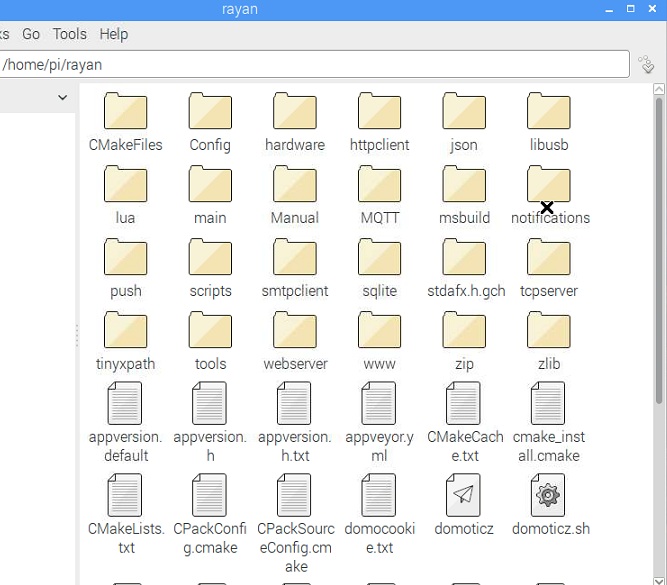
              this is files after compile . and i put "/home/pi/rayan/domoticz" to "rc.local" for up after startup.
              0_1504776551528_0000000.jpg

              1 Reply Last reply
              0
              • gohanG gohan

                @Reza why are you running it from source and not from standard install?

                R Offline
                R Offline
                Reza
                wrote on last edited by
                #34

                @gohan because i wanted change some things. for example font , theme , icons and etc...

                1 Reply Last reply
                0
                • tbowmoT Offline
                  tbowmoT Offline
                  tbowmo
                  Admin
                  wrote on last edited by
                  #35

                  @Reza

                  Once again, try this link http://bfy.tw/DnCc

                  (Hint.. try looking for answers by using google!)

                  R 2 Replies Last reply
                  1
                  • tbowmoT tbowmo

                    @Reza

                    Once again, try this link http://bfy.tw/DnCc

                    (Hint.. try looking for answers by using google!)

                    R Offline
                    R Offline
                    Reza
                    wrote on last edited by
                    #36

                    @tbowmo thank you . i will search about this issue

                    1 Reply Last reply
                    0
                    • tbowmoT tbowmo

                      @Reza

                      Once again, try this link http://bfy.tw/DnCc

                      (Hint.. try looking for answers by using google!)

                      R Offline
                      R Offline
                      Reza
                      wrote on last edited by
                      #37

                      @tbowmo thanks for all guide. i could do it. thank you
                      My friend just one question . i want know if i choose for example 20mb for ram driver (tmpfs). after full this memory (if i dont clear this), so what happen ? raspberry will be crash ? or not happen and I dont have any new log and report ? or again write on ago log ? thank you for all help

                      1 Reply Last reply
                      0
                      • tbowmoT Offline
                        tbowmoT Offline
                        tbowmo
                        Admin
                        wrote on last edited by
                        #38

                        I restart domoticz every night, and delete the log file. If you don't do this regularly, the disk will fill up, and domoticz will not be able to write any logs. I don't know what will happen with domoticz in that case

                        R 2 Replies Last reply
                        0
                        • tbowmoT tbowmo

                          I restart domoticz every night, and delete the log file. If you don't do this regularly, the disk will fill up, and domoticz will not be able to write any logs. I don't know what will happen with domoticz in that case

                          R Offline
                          R Offline
                          Reza
                          wrote on last edited by
                          #39

                          @tbowmo
                          every night !! :O you do with hand or auto with a program? if you have a program for this can you share this ?
                          i test with 1mb memory, i see after full , domoticz dont work and have some problem. so we must clear ...
                          can you help me for build a program for this ? for example when this is 90% memory (tmpfs) so clear this...

                          1 Reply Last reply
                          0
                          • tbowmoT tbowmo

                            I restart domoticz every night, and delete the log file. If you don't do this regularly, the disk will fill up, and domoticz will not be able to write any logs. I don't know what will happen with domoticz in that case

                            R Offline
                            R Offline
                            Reza
                            wrote on last edited by Reza
                            #40

                            @tbowmo i found this script.but becuase i am beginner in script i can not know this.
                            can we use this for clean tmpfs after 2day each week ? can you edit this for our use exactly ? i build a tmpfs in /var/log . and i move domoticz.log to this folder... now what change i need in this script for clean /var/log every 2 days and how to use this automatic for always when power off/on , reboot and...
                            thank you for help

                            #!/bin/bash
                            # Diskclean-Linux.sh - Remove unused files from /tmp directories
                            # @author: Crunchify.com
                             
                            # ------------- Here are Default Configuration --------------------
                            # CRUNCHIFY_TMP_DIRS - List of directories to search
                            # DEFAULT_FILE_AGE - # days ago (rounded up) that file was last accessed
                            # DEFAULT_LINK_AGE - # days ago (rounded up) that symlink was last accessed
                            # DEFAULT_SOCK_AGE - # days ago (rounded up) that socket was last accessed
                             
                            CRUNCHIFY_TMP_DIRS="/tmp /var/tmp /usr/src/tmp /mnt/tmp"
                            DEFAULT_FILE_AGE=+2
                            DEFAULT_LINK_AGE=+2
                            DEFAULT_SOCK_AGE=+2
                             
                            # Make EMPTYFILES true to delete zero-length files
                            EMPTYFILES=false
                            #EMPTYFILES=true
                             
                            cd
                            /tmp/log "cleantmp.sh[$$] - Begin cleaning tmp directories"
                             
                            echo ""
                            echo "delete any tmp files that are more than 2 days old"
                            /usr/bin/find $CRUNCHIFY_TMP_DIRS                               \
                                 -depth                                                     \
                                 -type f -a -ctime $DEFAULT_FILE_AGE                        \
                                 -print -delete
                            echo ""
                             
                            echo "delete any old tmp symlinks"
                            /usr/bin/find $CRUNCHIFY_TMP_DIRS                               \
                                 -depth                                                     \
                                 -type l -a -ctime $DEFAULT_LINK_AGE                        \
                                 -print -delete
                            echo ""
                             
                            if /usr/bin/$EMPTYFILES ;
                            then
                            echo "delete any empty files"
                            /usr/bin/find $CRUNCHIFY_TMP_DIRS                               \
                                 -depth                                                     \
                                 -type f -a -empty                                          \
                                 -print -delete
                            fi
                             
                            echo "Delete any old Unix sockets"
                            /usr/bin/find $CRUNCHIFY_TMP_DIRS                               \
                                 -depth                                                     \
                                 -type s -a -ctime $DEFAULT_SOCK_AGE -a -size 0             \
                                 -print -delete
                            echo""
                             
                            echo "delete any empty directories (other than lost+found)"
                            /usr/bin/find $CRUNCHIFY_TMP_DIRS                               \
                                 -depth -mindepth 1                                         \
                                 -type d -a -empty -a ! -name 'lost+found'                  \
                                 -print -delete
                            echo ""
                             
                            /usr/bin/logger "cleantmp.sh[$$] - Done cleaning tmp directories"
                             
                            # send out an email about diskcleanup action
                            mail -s "Disk cleanup has been performed successfully." you@email.com
                             
                            echo ""
                            echo "Diskcleanup Script Successfully Executed"
                            exit 0
                            
                            1 Reply Last reply
                            0
                            • tbowmoT Offline
                              tbowmoT Offline
                              tbowmo
                              Admin
                              wrote on last edited by
                              #41

                              @Reza

                              One quick fix would be to delete the /var/log/domoticz.log file whenever domoticz is restarting. Then you just need to implement a periodically restart of domoticz.

                              1 Reply Last reply
                              0
                              • R Offline
                                R Offline
                                Reza
                                wrote on last edited by Reza
                                #42

                                ok thank you. but i have a new problem...
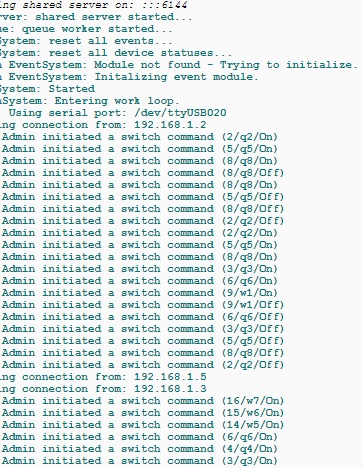
                                i think just move domoticz.log to ram driver. but report of sensors in mysensors... where these is save?:/
                                i think report of mysensors can not write... now in domoticz log i can not see report.. also i chack var/log memory after 1 day.when i send command for turn on light (alot command) memory of var/log increase.but 1 day i dont send any command and i wait for increase memory with report sensors but dont increase.what is problem? when i change your setting to defult work and i see report of sensors.
                                0_1505027201982_lklklklk.jpg
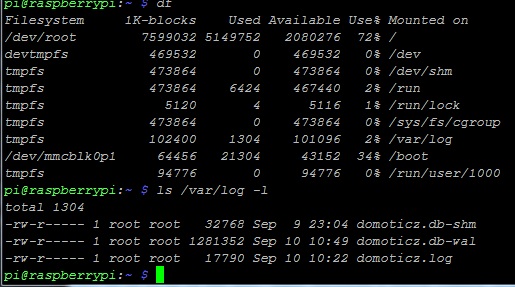
                                and this is memory of log after one day. sensors was sending report to controller for 1 deys but before memory was 1304 and now is 1304...
                                0_1505027249721_jkjkj.jpg

                                1 Reply Last reply
                                0
                                Reply
                                • Reply as topic
                                Log in to reply
                                • Oldest to Newest
                                • Newest to Oldest
                                • Most Votes


                                31

                                Online

                                11.7k

                                Users

                                11.2k

                                Topics

                                113.1k

                                Posts


                                Copyright 2025 TBD   |   Forum Guidelines   |   Privacy Policy   |   Terms of Service
                                • Login

                                • Don't have an account? Register

                                • Login or register to search.
                                • First post
                                  Last post
                                0
                                • MySensors
                                • OpenHardware.io
                                • Categories
                                • Recent
                                • Tags
                                • Popular

