Skip to content
  • MySensors
  • OpenHardware.io
  • Categories
  • Recent
  • Tags
  • Popular
Skins
  • Light
  • Brite
  • Cerulean
  • Cosmo
  • Flatly
  • Journal
  • Litera
  • Lumen
  • Lux
  • Materia
  • Minty
  • Morph
  • Pulse
  • Sandstone
  • Simplex
  • Sketchy
  • Spacelab
  • United
  • Yeti
  • Zephyr
  • Dark
  • Cyborg
  • Darkly
  • Quartz
  • Slate
  • Solar
  • Superhero
  • Vapor

  • Default (No Skin)
  • No Skin
Collapse
Brand Logo
  1. Home
  2. Troubleshooting
  3. PIzeroW + RFM69HW + arduino node connection problem

PIzeroW + RFM69HW + arduino node connection problem

Scheduled Pinned Locked Moved Troubleshooting
14 Posts 4 Posters 2.5k Views 3 Watching
  • Oldest to Newest
  • Newest to Oldest
  • Most Votes
Reply
  • Reply as topic
Log in to reply
This topic has been deleted. Only users with topic management privileges can see it.
  • M Offline
    M Offline
    MaDDoG
    wrote on last edited by MaDDoG
    #3

    No there is no output to the sensor, this is the only output i get, which is the controller i think:

    mysgw: Client 0 connected
    mysgw: Client 0: 0;255;3;0;18;
    mysgw: Client 0: 255;255;3;0;20;
    mysgw: TSF:MSG:SEND,0-0-255-255,s=255,c=3,t=20,pt=0,l=0,sg=0,ft=0,st=OK:
    mysgw: Client 0: 0;255;3;0;18;
    mysgw: Client 0: 0;255;3;0;2;
    mysgw: TSM:READY:NWD REQ
    mysgw: TSF:MSG:SEND,0-0-255-255,s=255,c=3,t=20,pt=0,l=0,sg=0,ft=0,st=OK:


    Changing the distance does not help

    1 Reply Last reply
    0
    • gohanG Offline
      gohanG Offline
      gohan
      Mod
      wrote on last edited by
      #4

      Are you sure the radios are hw and not w only? Make sure you have the irq pin connected on gateway and nodes.

      M 1 Reply Last reply
      0
      • gohanG gohan

        Are you sure the radios are hw and not w only? Make sure you have the irq pin connected on gateway and nodes.

        M Offline
        M Offline
        MaDDoG
        wrote on last edited by MaDDoG
        #5

        @gohan Checked it, everything is connected correctly. One thing I saw, it is the rfm69H not HW. Don't really know the difference.

        1 Reply Last reply
        0
        • gohanG Offline
          gohanG Offline
          gohan
          Mod
          wrote on last edited by
          #6

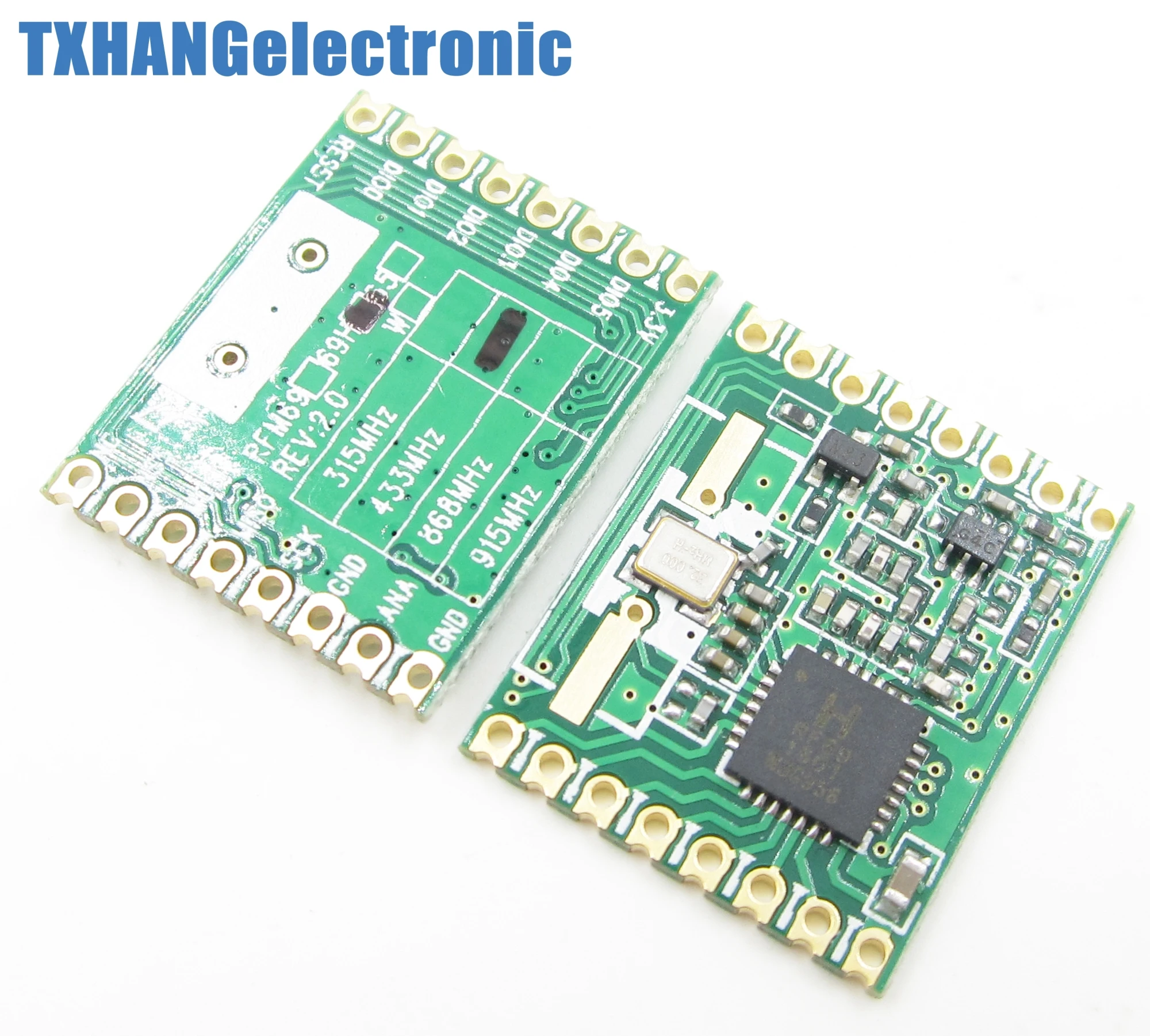
          The HW are the high power version, w are the standard. I'm asking because I got the w delivered instead of the hw and I lost so much time because the code wasn't working since I enabled the define for the hw version

          M 1 Reply Last reply
          0
          • gohanG gohan

            The HW are the high power version, w are the standard. I'm asking because I got the w delivered instead of the hw and I lost so much time because the code wasn't working since I enabled the define for the hw version

            M Offline
            M Offline
            MaDDoG
            wrote on last edited by
            #7

            @gohan I surely orderd the HW but its marked with only the H and now the HW. Is there any difference between them?

            1 Reply Last reply
            0
            • gohanG Offline
              gohanG Offline
              gohan
              Mod
              wrote on last edited by
              #8

              To my knowledge only w and hw exists, so they most likely are hw. If want to be sure you need to check the marking on the chip

              1 Reply Last reply
              0
              • archiijsA Offline
                archiijsA Offline
                archiijs
                wrote on last edited by archiijs
                #9

                @gohan said in PIzeroW + RFM69HW + arduino node connection problem:

                they most likely are hw. If want to be sure you need to check the marking on the chip

                A picture of module should settle if it is W or HW

                1 Reply Last reply
                0
                • M Offline
                  M Offline
                  MaDDoG
                  wrote on last edited by
                  #10

                  Same as I have, but have a look at the markings, only the H is marked.. same like mine

                  alt text

                  1 Reply Last reply
                  0
                  • M Offline
                    M Offline
                    MaDDoG
                    wrote on last edited by
                    #11

                    I just tried the nrf24 and those work fine. Im stuck, all i can think is: rfm69 issue

                    1 Reply Last reply
                    0
                    • M Offline
                      M Offline
                      MaDDoG
                      wrote on last edited by
                      #12

                      An other update:

                      Did a radio test:

                      Test program (only difference is the node id):

                      // ***************************************************************************************
                      // Sample RFM69 sketch for Moteino to illustrate:
                      //   - sending
                      //   - receiving
                      //   - automatic transmission control
                      //   - button reading/interrupts
                      // ***************************************************************************************
                      // When you press the button on the SENDER Moteino, it will send a short message to the
                      // RECEIVER Moteino and wait for an ACK (acknowledgement that message was received) from 
                      // the RECEIVER Moteino. If the ACK was received, the SENDER will blink the onboard LED
                      // a few times. The RECEIVER listens to a specific token, and it alternates the onboard LED
                      // state from HIGH to LOW or vice versa whenever this token is received.
                      // ***************************************************************************************
                      // Hardware setup:
                      // ***************************************************************************************
                      // On the sender, hook up a momentary tactile button to D3 like this:
                      //          __-__
                      //        __|   |___
                      // GND ----> BTN ----> D3 (D11 on MoteinoMEGA)
                      // Load this sketch on the RECEIVER with NODEID=RECEIVER (adjust in config section below)
                      // Load this sketch on the SENDER with NODEID=SENDER (adjust in config section below)
                      // RFM69 library and code by Felix Rusu - felix@lowpowerlab.com
                      // Get libraries at: https://github.com/LowPowerLab/
                      // Make sure you adjust the settings in the configuration section below !!!
                      // **********************************************************************************
                      // Copyright Felix Rusu 2016, http://www.LowPowerLab.com/contact
                      // **********************************************************************************
                      // License
                      // **********************************************************************************
                      // This program is free software; you can redistribute it 
                      // and/or modify it under the terms of the GNU General    
                      // Public License as published by the Free Software       
                      // Foundation; either version 3 of the License, or        
                      // (at your option) any later version.                    
                      //                                                        
                      // This program is distributed in the hope that it will   
                      // be useful, but WITHOUT ANY WARRANTY; without even the  
                      // implied warranty of MERCHANTABILITY or FITNESS FOR A   
                      // PARTICULAR PURPOSE. See the GNU General Public        
                      // License for more details.                              
                      //                                                        
                      // Licence can be viewed at                               
                      // http://www.gnu.org/licenses/gpl-3.0.txt
                      //
                      // Please maintain this license information along with authorship
                      // and copyright notices in any redistribution of this code
                      // **********************************************************************************
                      #include <RFM69.h>         //get it here: https://www.github.com/lowpowerlab/rfm69
                      #include <RFM69_ATC.h>     //get it here: https://github.com/lowpowerlab/RFM69
                      #include <SPI.h>           //included with Arduino IDE (www.arduino.cc)
                      #include <LowPower.h>      //get library from: https://github.com/lowpowerlab/lowpower
                      
                      //****************************************************************************************************************
                      //**** IMPORTANT RADIO SETTINGS - YOU MUST CHANGE/CONFIGURE TO MATCH YOUR HARDWARE TRANSCEIVER CONFIGURATION! ****
                      //****************************************************************************************************************
                      #define NETWORKID     100  //the same on all nodes that talk to each other
                      #define RECEIVER      1    //unique ID of the gateway/receiver
                      #define SENDER        2
                      #define NODEID        SENDER  //change to "SENDER" if this is the sender node (the one with the button)
                      //Match frequency to the hardware version of the radio on your Moteino (uncomment one):
                      #define FREQUENCY     RF69_433MHZ
                      //#define FREQUENCY     RF69_868MHZ
                      //#define FREQUENCY     RF69_915MHZ
                      #define ENCRYPTKEY    "sampleEncryptKey" //exactly the same 16 characters/bytes on all nodes!
                      #define IS_RFM69HW_HCW  //uncomment only for RFM69HW/HCW! Leave out if you have RFM69W/CW!
                      //*****************************************************************************************************************************
                      #define ENABLE_ATC      //comment out this line to disable AUTO TRANSMISSION CONTROL
                      #define ATC_RSSI        -75
                      //*********************************************************************************************
                      #define SERIAL_BAUD   115200
                      #ifdef __AVR_ATmega1284P__
                        #define LED           15 // Moteino MEGAs have LEDs on D15
                        #define BUTTON_INT    1 //user button on interrupt 1 (D3)
                        #define BUTTON_PIN    11 //user button on interrupt 1 (D3)
                      #else
                        #define LED           13 // Moteinos have LEDs on D9
                        #define BUTTON_INT    1 //user button on interrupt 1 (D3)
                        #define BUTTON_PIN    3 //user button on interrupt 1 (D3)
                      #endif
                      
                      #define LED_GREEN       4 //GREEN LED on the SENDER
                      #define LED_RED         5 //RED LED on the SENDER
                      #define RX_TOGGLE_PIN   7 //GPIO to toggle on the RECEIVER
                      
                      #ifdef ENABLE_ATC
                        RFM69_ATC radio;
                      #else
                        RFM69 radio;
                      #endif
                      
                      void setup() {
                        Serial.begin(SERIAL_BAUD);
                        radio.initialize(FREQUENCY,NODEID,NETWORKID);
                      #ifdef IS_RFM69HW_HCW
                        radio.setHighPower(); //must include this only for RFM69HW/HCW!
                      #endif
                        radio.encrypt(ENCRYPTKEY);
                        
                      #ifdef ENABLE_ATC
                        radio.enableAutoPower(ATC_RSSI);
                      #endif
                      
                        char buff[50];
                        sprintf(buff, "\nListening at %d Mhz...", FREQUENCY==RF69_433MHZ ? 433 : FREQUENCY==RF69_868MHZ ? 868 : 915);
                        Serial.println(buff);
                        Serial.flush();
                        pinMode(BUTTON_PIN, INPUT_PULLUP);
                        pinMode(LED, OUTPUT);
                        attachInterrupt(BUTTON_INT, handleButton, FALLING);
                      
                        pinMode(LED_GREEN, OUTPUT);
                        pinMode(LED_RED, OUTPUT);
                        pinMode(RX_TOGGLE_PIN, OUTPUT);
                        digitalWrite(LED_GREEN, LOW);
                        digitalWrite(LED_RED, HIGH);
                      }
                      
                      //******** THIS IS INTERRUPT BASED DEBOUNCING FOR BUTTON ATTACHED TO D3 (INTERRUPT 1)
                      #define FLAG_INTERRUPT 0x01
                      volatile int mainEventFlags = 0;
                      boolean buttonPressed = false;
                      void handleButton()
                      {
                        mainEventFlags |= FLAG_INTERRUPT;
                      }
                      
                      byte LEDSTATE=LOW; //LOW=0
                      void loop() {
                        //******** THIS IS INTERRUPT BASED DEBOUNCING FOR BUTTON ATTACHED TO D3 (INTERRUPT 1)
                        if (mainEventFlags & FLAG_INTERRUPT)
                        {
                          LowPower.powerDown(SLEEP_120MS, ADC_OFF, BOD_ON);
                          mainEventFlags &= ~FLAG_INTERRUPT;
                          if (!digitalRead(BUTTON_PIN)) {
                            buttonPressed=true;
                          }
                        }
                      
                        if (buttonPressed)
                        {
                          Serial.println("Button pressed!");
                          buttonPressed = false;
                          
                          if(LEDSTATE==LOW)
                          {
                            LEDSTATE=HIGH;
                            digitalWrite(LED_GREEN, HIGH);
                            digitalWrite(LED_RED, LOW);
                          }
                          else
                          {
                            LEDSTATE=LOW;
                            digitalWrite(LED_GREEN, LOW);
                            digitalWrite(LED_RED, HIGH);
                          }
                      
                          if (radio.sendWithRetry(RECEIVER, "Hi", 2)) //target node Id, message as string or byte array, message length
                            Blink(LED, 40, 3); //blink LED 3 times, 40ms between blinks
                        }
                        
                        //check if something was received (could be an interrupt from the radio)
                        if (radio.receiveDone())
                        {
                          //print message received to serial
                          Serial.print('[');Serial.print(radio.SENDERID);Serial.print("] ");
                          Serial.print((char*)radio.DATA);
                          Serial.print("   [RX_RSSI:");Serial.print(radio.RSSI);Serial.print("]");
                          Serial.println();
                          
                          //check if received message is 2 bytes long, and check if the message is specifically "Hi"
                          if (radio.DATALEN==2 && radio.DATA[0]=='H' && radio.DATA[1]=='i')
                          {
                            if(LEDSTATE==LOW)
                              LEDSTATE=HIGH;
                            else LEDSTATE=LOW;
                            digitalWrite(LED, LEDSTATE);
                            digitalWrite(RX_TOGGLE_PIN, LEDSTATE);
                          }
                         
                          //check if sender wanted an ACK
                          if (radio.ACKRequested())
                          {
                            radio.sendACK();
                            Serial.print(" - ACK sent");
                          }
                        }
                        
                        radio.receiveDone(); //put radio in RX mode
                        Serial.flush(); //make sure all serial data is clocked out before sleeping the MCU
                        LowPower.powerDown(SLEEP_8S, ADC_OFF, BOD_ON); //sleep Moteino in low power mode (to save battery)
                      }
                      
                      void Blink(byte PIN, byte DELAY_MS, byte loops)
                      {
                        for (byte i=0; i<loops; i++)
                        {
                          digitalWrite(PIN,HIGH);
                          delay(DELAY_MS);
                          digitalWrite(PIN,LOW);
                          delay(DELAY_MS);
                        }
                      }
                      

                      which results in:

                      Listening at 433 Mhz...
                      [2] Hi   [RX_RSSI:-56]
                       - ACK sent[2] Hi   [RX_RSSI:-58]
                       - ACK sent[2] Hi   [RX_RSSI:-58]
                       - ACK sent[2] Hi   [RX_RSSI:-57]
                       - ACK sent[2] Hi   [RX_RSSI:-57]
                       - ACK sent[2] Hi   [RX_RSSI:-59]
                       - ACK sent[2] Hi   [RX_RSSI:-59]
                       - ACK sent[2] Hi   [RX_RSSI:-59]
                       - ACK sent[2] Hi   [RX_RSSI:-59]
                       - ACK sent[2] Hi   [RX_RSSI:-59]
                       - ACK sent[2] Hi   [RX_RSSI:-60]
                       - ACK sent[2] Hi   [RX_RSSI:-60]
                       - ACK sent[2] Hi   [RX_RSSI:-61]
                       - ACK sent[2] Hi   [RX_RSSI:-62]
                       - ACK sent[2] Hi   [RX_RSSI:-62]
                       - ACK sent[2] Hi   [RX_RSSI:-62]
                       - ACK sent[2] Hi   [RX_RSSI:-63]
                       - ACK sent[2] Hi   [RX_RSSI:-62]
                       - ACK sent[2] Hi   [RX_RSSI:-64]
                       - ACK sent[2] Hi   [RX_RSSI:-64]
                       - ACK sent[2] Hi   [RX_RSSI:-65]
                      

                      So my radio"s and arduino"s are fine.

                      Which brings me to the question is the Raspberry pi zero w not supported? Will try the RPI3 tomorrow.


                      1 Reply Last reply
                      0
                      • archiijsA Offline
                        archiijsA Offline
                        archiijs
                        wrote on last edited by
                        #13

                        The modules to me look like HW variants, so this is no problem (and You have already verified this with your sketch), sadly I can not help with RPI ZW.

                        1 Reply Last reply
                        0
                        • M Offline
                          M Offline
                          MaDDoG
                          wrote on last edited by
                          #14

                          Tested a arduino node with a arduino gateway (433 rfm69hw) that works fine, used the same node code as posted above. This narrows it down the RPI Zero W gateway.

                          1 Reply Last reply
                          0
                          Reply
                          • Reply as topic
                          Log in to reply
                          • Oldest to Newest
                          • Newest to Oldest
                          • Most Votes


                          14

                          Online

                          11.7k

                          Users

                          11.2k

                          Topics

                          113.1k

                          Posts


                          Copyright 2025 TBD   |   Forum Guidelines   |   Privacy Policy   |   Terms of Service
                          • Login

                          • Don't have an account? Register

                          • Login or register to search.
                          • First post
                            Last post
                          0
                          • MySensors
                          • OpenHardware.io
                          • Categories
                          • Recent
                          • Tags
                          • Popular