
[Solved] Beginner receive() question
-
Currently I implemented some nodes sending data to a Serial-Gatway connected to a RasPi.
I'm running Node-Red on this RasPi and and the data area stoet into InfluxDB. Everything is working fine.So now I'm trying to send some data from Node-Red to an example node.
First I verified that the node is working fine, when sending data to the Gateway.For sending the data I'm using following flow:
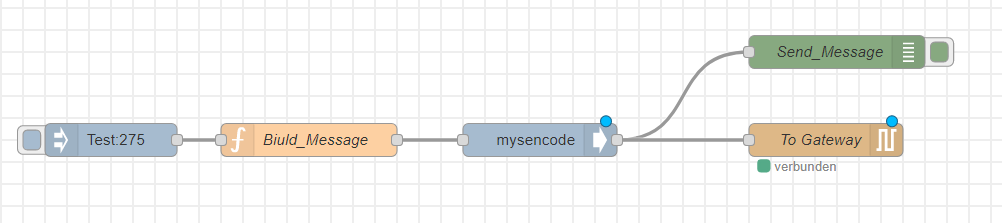
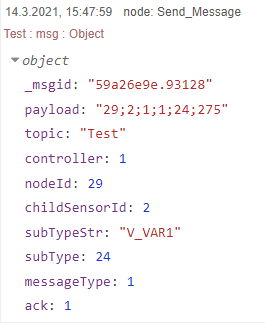
It sends the number 275 to my Node_ID 29. The type is V_VAR1.
The Node-Red Debug shows, what is sent:
The loop in the node is a state machine, where I added a wait() just to slow it down while testing.
The cases are empty functions so nothing happens there.void loop() { Serial.println("Runinng Main Loop"); wait(3000); // Main-Lopp for state-machine switch (Current_State) { case CHECK_LEVEL: Check_Water_Level(); break; case FILL_WATER: Check_Water_Level(); break; //same function for both cases. case PUMP_ON: Pumping(); break; case SUSPEND: Suspend(); break; case REMOTE_CONTROL: Remote_Control(); break; case SLEEP_MODE: Start_Sleep_Mode(); break; } }The receive function includes only some print commands to show me when the data was received:
void receive(const MyMessage &message)
{

  Serial.println( "Message received:  ");
  Serial.println( message.type);
  Serial.println( message.getUInt());
}
Unfortunately nothing happens, when I'm injecting the data in Node-Red.
I scanned the forum but didn't find the right postings helping me to understand, what my error is.Thanks in advance for any advice.
-
-
I have never figured out how node red should work with the serial port node. Since you receive and send, these nodes use the same serial port at the same time. Is that possible?
Could you try to delete the receiving node, to exclude that from this issue?@electrik I just deactivated the receiving Node, but without any effect on the observed behavior.
My understanding of the serial interface is, that it is bi-directional so it should work in both directions.
But the next question arising for me is, what the Arduino-Nano, which is running as the Serial-Gateway in my configuration, is doing, when on its the serial-interface something arrives, what is to be transmitted via the radio.
I used the GatewaySerial script without any changes except of the setting of the RF24_Channel. -
Yes, the serial communication is bidirectional for sure. I wasn't sure how sharing of the serial port is done between the in and out node.
Since you receive data (right?) the sketch you have used should be all right.
I have two doubts. The wait statement, could it be this prevents the data from being received?
Second is there should be a newline at the end of the payload as send by the mysencode node.I'm using the node red also, though with a mqtt gateway.
Edit: how did you deactivate the node? The right way is to delete it.
-
Yes, the serial communication is bidirectional for sure. I wasn't sure how sharing of the serial port is done between the in and out node.
Since you receive data (right?) the sketch you have used should be all right.
I have two doubts. The wait statement, could it be this prevents the data from being received?
Second is there should be a newline at the end of the payload as send by the mysencode node.I'm using the node red also, though with a mqtt gateway.
Edit: how did you deactivate the node? The right way is to delete it.
@electrik: The wait() statement was just added, because I was not sure whether maybe the jumping into the empty functions will be the problem, while in one of the posts I read that wait() is written this way that receive() is not affected.
Yes, receiving the data from the Sensor-Node 29 in Node-Red is working fine and very fast.
Yes I also tried with different characters added at the end (no character, \r, \n ) all tested, no effect.
What concerns deactivating of a node in Node-Red, when you open the dialog-box to edit the node, there is a checkbox at the bottom, where you can make this node inactive. Based on your posting I tried also with deleting the node, but also with no effect on the outcome.
-
@electrik: The wait() statement was just added, because I was not sure whether maybe the jumping into the empty functions will be the problem, while in one of the posts I read that wait() is written this way that receive() is not affected.
Yes, receiving the data from the Sensor-Node 29 in Node-Red is working fine and very fast.
Yes I also tried with different characters added at the end (no character, \r, \n ) all tested, no effect.
What concerns deactivating of a node in Node-Red, when you open the dialog-box to edit the node, there is a checkbox at the bottom, where you can make this node inactive. Based on your posting I tried also with deleting the node, but also with no effect on the outcome.
@Alberto77 said in Beginner receive() question:
Yes I also tried with different characters added at the end (no character, \r, \n ) all tested, no effect.
The right one is to add '\n'.
The next try would be to connect the serial gateway to a pc and enable MY_DEBUG on the gateway. Maybe this tells you more.
-
@electrik: I don't thing that it is necessary to connect to PC. I have MY_DEBUG active on the Gateway, and because I'm receiving also the traffic, I could see, if there would be something.
Here is my receive path:
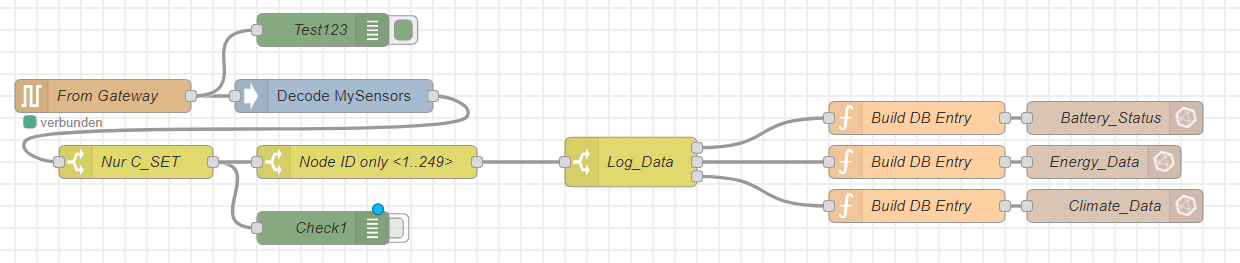
When I trigger the sending of data to the sensor node, the "From Gateway" node does not provide any output. So, I will assume that the Gateway is not reacting at all. -
@electrik: I found the solution. It was my misunderstanding of your advice. As you mentioned to add the \n then I thought it is the \n in the configuration of the Serial-Ouput Node, see here:
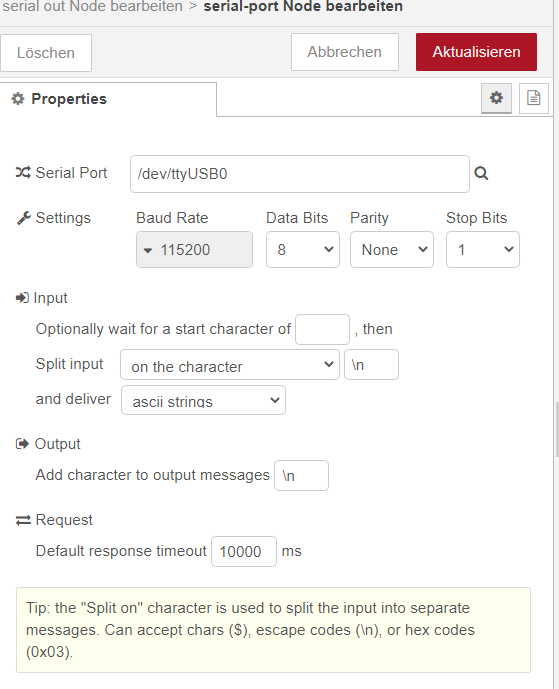
In the Output section you can "Add Character to output message". Apparently this is not equivalent to adding \n into the
payload itself. Now my paload looks like this:
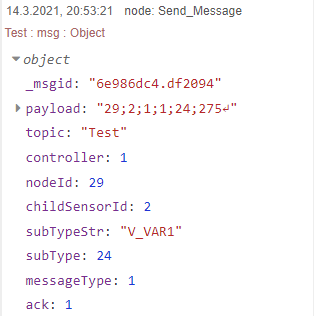
and the Node is receiving it, great :-)
Thank you very much for your help @electrik -
You're welcome!
I've used node red like you are doing for some times and it works well. Since around 1-2 years I'm using home assistant as controller, and node red for the logic in automations.
Home assistant makes life much easier, as it for example takes care of filling data into influxdb automatically 👍

Hello! It looks like you're interested in this conversation, but you don't have an account yet.
Getting fed up of having to scroll through the same posts each visit? When you register for an account, you'll always come back to exactly where you were before, and choose to be notified of new replies (either via email, or push notification). You'll also be able to save bookmarks and upvote posts to show your appreciation to other community members.
With your input, this post could be even better 💗
Register Login