
💬 The Logger Machine - Short and long term serial logging
-
I updated the 3d box. One of the holes for the switches was a bit off and also it was a little tight for the logger itself.
-
Hello Sandberg84, I recently bought the logger and have problem setting up baud rate.
I can connect to BT with my phone just fine, I can get serial output from sensor at specified intervals, but it is all nonprintable characters, alas bad baud rate.
When I connect logger to pc via serial adapter I get no response to AT commands.
Can you show me way to try something?Thanx
-
Hello Sandberg84, I recently bought the logger and have problem setting up baud rate.
I can connect to BT with my phone just fine, I can get serial output from sensor at specified intervals, but it is all nonprintable characters, alas bad baud rate.
When I connect logger to pc via serial adapter I get no response to AT commands.
Can you show me way to try something?Thanx
@terxw - sure! How do you connect when you wants to set up baud rate. (Picture?)
The module i send have 115200 set as for BT. If you have a node with that baud-rate - does it work? Or what does your node have at the moment for baudrate?This is from https://www.openhardware.io/view/532/The-Logger-Machine-Short-and-long-term-serial-logging where i documented the instructions:
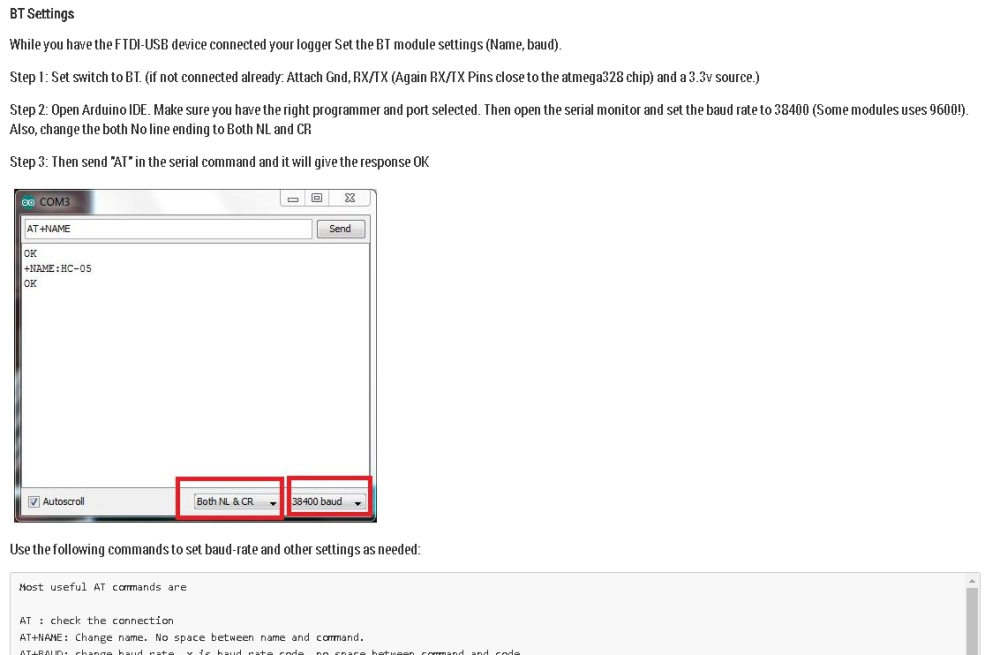 op
op -
OK, couple of good pointers!
I found the atmega RX a TX pins, but cannot get any response in the serial console.
Connectiona are: USB -> USB Serial Converter -> GND, power -> logger & RT/TX -> Tx/RX on atmega on logger.
If I set BR to 11520, I can see on my BT connected phone what I typed in the arduino serial monitor, e.g. if I type "AT" in Arduino serial console with BR 115200 , I can see clear ascii text "AT" on my phone.
If i set BR to 9600 or 38400, I see just scrambled characters or nothing at all.
I tried to put some test serial.println with BR 11520 on new pro mini (3.3V, 8Mhz), when I discovered some interesting problems....
None of my serial/USB converters worked, I tried to guess BR etc. to no avail.
I tried to reupload bootloader with usbasp, with set BR, but could not get clear text serial output form my nodes.... After 5 diferent USB to serial adapters i tried to compile code with arduino IDE instead of platformio, voala, now I could send text from promini with BR 115200 through logger to my phone.So there are couple problems, probably with my toolchain (platformio) - I remembered that I had problems with some new custom boards (NRF24Duino) and serial output which was garbled...
But nevertheless, I cannot change BR of logger, because I am using custom bootloaders with 1 MHz internal oscilator and 4800 BR, I need to set it lower.
What else could I try?
-
OK, couple of good pointers!
I found the atmega RX a TX pins, but cannot get any response in the serial console.
Connectiona are: USB -> USB Serial Converter -> GND, power -> logger & RT/TX -> Tx/RX on atmega on logger.
If I set BR to 11520, I can see on my BT connected phone what I typed in the arduino serial monitor, e.g. if I type "AT" in Arduino serial console with BR 115200 , I can see clear ascii text "AT" on my phone.
If i set BR to 9600 or 38400, I see just scrambled characters or nothing at all.
I tried to put some test serial.println with BR 11520 on new pro mini (3.3V, 8Mhz), when I discovered some interesting problems....
None of my serial/USB converters worked, I tried to guess BR etc. to no avail.
I tried to reupload bootloader with usbasp, with set BR, but could not get clear text serial output form my nodes.... After 5 diferent USB to serial adapters i tried to compile code with arduino IDE instead of platformio, voala, now I could send text from promini with BR 115200 through logger to my phone.So there are couple problems, probably with my toolchain (platformio) - I remembered that I had problems with some new custom boards (NRF24Duino) and serial output which was garbled...
But nevertheless, I cannot change BR of logger, because I am using custom bootloaders with 1 MHz internal oscilator and 4800 BR, I need to set it lower.
What else could I try?
@terxw - ok.
4800 should work just fine.
The command should be AT+BAUD3
I used this link when i designed and wrote this - it has some more in-depth analysis.
https://www.instructables.com/id/AT-command-mode-of-HC-05-Bluetooth-module/What good to know is that if you are the one who bought the module from me just recently from ebay this is tested and verified working by me so we should get this sorted!!
Can you post a picture on how it looks (connections) when you try to change baud-rate?
-
@terxw - ok.
4800 should work just fine.
The command should be AT+BAUD3
I used this link when i designed and wrote this - it has some more in-depth analysis.
https://www.instructables.com/id/AT-command-mode-of-HC-05-Bluetooth-module/What good to know is that if you are the one who bought the module from me just recently from ebay this is tested and verified working by me so we should get this sorted!!
Can you post a picture on how it looks (connections) when you try to change baud-rate?
-
@terxw - sorry, the manual is wrong and unclear here - when you talk to the bluetooth module you should not connect to the programming pins. they are only for programming atmega chip. Must be a copy/paste error when i wrote the manual i think. Looking at the schematics RX goes only from that programming pin to the atmega and not bt module. TX has a input protection diode as well, so you need to swap that one to.
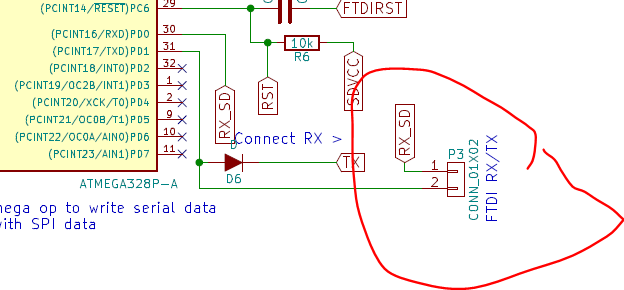
As you see in the image, RX and TX from that programming point is only connected to atmega chip. Try connecting them to ordinary input. In worst case scenario, the diodes are making the serial communication fail at the baud rate you are testing... (should work with 115200 since thats what i set it to) but worst case scenario, solder wires to BT module and test.
Also dont power it using BAT (it goes through a dc/dc booster if you do). Try a regulated 3.3v power source and input on 3.3v pin.
Also, change the both No line ending to Both NL and CR
Edit: I will be home on thursday, traveling at work, but I have a identical module i build the same time as yours I can test on, if you dont want to solder around and mess the module up.
-
@sundberg84
So I tried all rx/tx combinations, no response to AT commands, I will try with different software and/or computer. -
any plans to add an RTC on this and be able to timestamp the log entries? I have some sensors that only wake up and do readings every 90 minutes. But sometimes they just stop doing it. So time stamps on the logs would be good to see if there is anything happening right around the time it stops reporting.
-
All new nodes have set BR 11520 and the logger is working nicely, I finaly have a way to debug basic problems!
@terxw okey, thanks for reporting back !! Let me know if there is something else. This is a 0.5v so I'm open for improvements.

Hello! It looks like you're interested in this conversation, but you don't have an account yet.
Getting fed up of having to scroll through the same posts each visit? When you register for an account, you'll always come back to exactly where you were before, and choose to be notified of new replies (either via email, or push notification). You'll also be able to save bookmarks and upvote posts to show your appreciation to other community members.
With your input, this post could be even better 💗
Register Login