
[Solved] problems trying to save on two measurements
-
I'm trying to save the sensor data received from mqtt into two different measurements, if they are internal network messages, I want them in "internal" and all the sensor values into "values"
For that I tried using a switch module checking the "sensor" attribute being 255, but I can't make it save on the internal "table"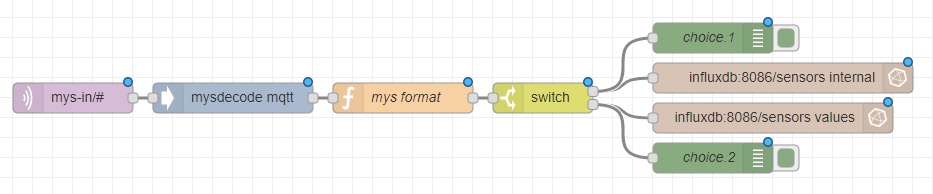
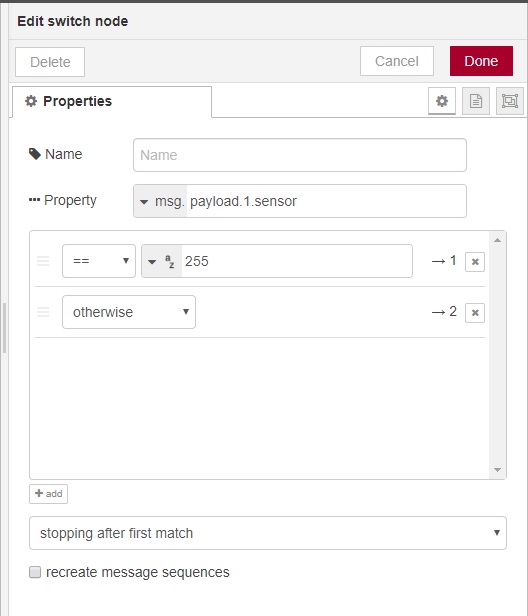
To my confussion, the switch seems to work, as I put debug nodes on the output (1, 2) and it keeps printing 1 or 2 correctly depending on the message.
But from the two DB/measurement connections that hangs on it only executes the second one. Nothing is written into "internal", although the debug is hit and also the measurement has received the series :scream: :key --- internal,node=0,sensor=255,subType=I_HEARTBEAT_RESPONSE internal,node=1,sensor=255,subType=I_DISCOVER_RESPONSE values,node=1,sensor=1,subType=V_KWH values,node=1,sensor=1,subType=V_VAR1 values,node=1,sensor=1,subType=V_WATT values,node=1,sensor=2,subType=V_WATT values,node=1,sensor=3,subType=V_WATT values,node=1,sensor=4,subType=V_WATTCan someone give me a clue of what is happening? I'm newb with node-red and influxdb.
-
Seems that the problem was that influxdb always configures the field type the first time a series is accessed.
I thought that the value was something like a "variant" and would eat anything I throw at it. So when I altered the data types in the flow, the db refused to save.
A drop and re create solved the problem.

Hello! It looks like you're interested in this conversation, but you don't have an account yet.
Getting fed up of having to scroll through the same posts each visit? When you register for an account, you'll always come back to exactly where you were before, and choose to be notified of new replies (either via email, or push notification). You'll also be able to save bookmarks and upvote posts to show your appreciation to other community members.
With your input, this post could be even better 💗
Register Login