
openHAB 2.0 binding
-
@rob There definitely is a problem with the link between node(s) and the gateway. This is not related to the binding / controller.
Often this is related to a weak power supply.
Do you have MySensors nodes already working with one of the gateways you've build?@TimO Yeah it worked for months with a bunch of sensors like 10 temp/hum sensors relays weatherstation etc with the 2.0 binding and the hue binding etc bunch of rules had the whole house automated with alarm and whatnot and stable but then the misses managed to destroy the pi/openhab server (im still making her pay tho :D) i got the capicitators on the nrf etc all by the book made them all myself and programmed them all myself. got a new pi installed openhab 2.1 and the 2.1 binding but i just cant get them to talk to openhab again (was running 2.0 before) i reinstalled raspbian and openhab like a gazillion times now made al the opgrades incl java and the feature binding install etc.. im cleuless now
-
@rob There definitely is a problem with the link between node(s) and the gateway. This is not related to the binding / controller.
Often this is related to a weak power supply.
Do you have MySensors nodes already working with one of the gateways you've build? -
Hey @Nicklas-Starkel !
Actually there is a PR for MQTT support which is a huge leap forward and needs testing: https://github.com/tobof/openhab2-addons/pull/75
I'm 90% done on fulfilling the OH2 development compliance: https://github.com/openhab/openhab2-addons/pull/2066 which I'm working on since weeks (months). :o
My road map is:
- Finish the work on the compliance. (Maybe this week, for sure next week)
- Move repository to 2.2.0 snapshot
- Integrate RGB(W)
- Integrate MQTT
RGB(W) needs some more attention, because there is a bug in the conversion and it needs some more testing.
The current work is a second refactoring with many changes. Also a few options (names) have changed which need some attention by the users because configurations need to be adjusted. Hopefully the names now speak more for itself. :-)
I've also extended the JUnit Testing of the binding (which I'll need to quickly fix the RGB(W) bug).I need to catch up with the development of the openhab2-addons base. This is done after the OH2 compliance is done. At the moment I can't compile a MQTT testversion of the binding because the repository needs to be moved to 2.2.0 Snapshot.
Sadly the process for OH2 compliance is at the moment blocking the enhancements of the binding. I had no idea this would take so long.
@TimO said in openHAB 2.0 binding:
My road map is:
Finish the work on the compliance. (Maybe this week, for sure next week) :white_check_mark:
Move repository to 2.2.0 snapshot :white_check_mark:
Integrate RGB(W)
Integrate MQTT -
I'm trying to make a energy/Watt meter based on a ATM90E26 to send Watt, VAR, VA etc to OpenHab. But I'm running into two problems.
First, not all channels show up in OpenHab. Only Watt, KWH (which should be named kWh), Battery level and Last Update show up from my S_POWER sensor. VAR, VA and PowerFactor are missing. Also V_VAR1 (the custom values) are not showing.
Second problem is with decimal places. From my sensor I send a value with a decimal place. The log shows me:
11074 TSF:MSG:SEND,2-2-0-0,s=1,c=1,t=38,pt=0,l=6,sg=0,ft=0,st=OK:236.16
for a voltage of 236.16V. Only OpenHab ignores the decimal place most of the time. It just shows 236.0V. Somethings for a fraction of a second a non-zero decimal is shown.Both is with OpenHAB 2.0.0 and MySensors Binding 2.1.0
-
I'm trying to make a energy/Watt meter based on a ATM90E26 to send Watt, VAR, VA etc to OpenHab. But I'm running into two problems.
First, not all channels show up in OpenHab. Only Watt, KWH (which should be named kWh), Battery level and Last Update show up from my S_POWER sensor. VAR, VA and PowerFactor are missing. Also V_VAR1 (the custom values) are not showing.
Second problem is with decimal places. From my sensor I send a value with a decimal place. The log shows me:
11074 TSF:MSG:SEND,2-2-0-0,s=1,c=1,t=38,pt=0,l=6,sg=0,ft=0,st=OK:236.16
for a voltage of 236.16V. Only OpenHab ignores the decimal place most of the time. It just shows 236.0V. Somethings for a fraction of a second a non-zero decimal is shown.Both is with OpenHAB 2.0.0 and MySensors Binding 2.1.0
Hi @Timo-Engelgeer !
-
KWH -> kWH.
-
VAR, VA & Power Factor added.
-
Decimal place: Did you check your item definition? kWH should be shown with two decimal places.
-
Is it possible for you to use the CustomSensor with var1-var5 (with a separate childId)?
Looks like this now in PaperUI:
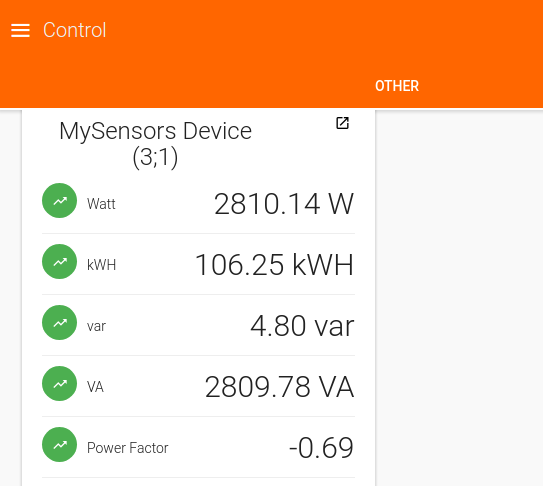
I'll push these changes with the next release I'm working on.
-
-
Since last update, I have to reinstall mysensors binding from IOT marketplace. But lot of warning when I'm starting :
14:21:30.964 [WARN ] [.smarthome.config.core.Configuration] - Could not set field value for field 'nodeId': Can not set int field org.openhab.binding.mysensors.config.MySensorsSensorConfiguration.nodeId to java.lang.String
java.lang.IllegalArgumentException: Can not set int field org.openhab.binding.mysensors.config.MySensorsSensorConfiguration.nodeId to java.lang.String
	at sun.reflect.UnsafeFieldAccessorImpl.throwSetIllegalArgumentException(UnsafeFieldAccessorImpl.java:167)[:1.8.0_131]
	at sun.reflect.UnsafeFieldAccessorImpl.throwSetIllegalArgumentException(UnsafeFieldAccessorImpl.java:171)[:1.8.0_131]
	at sun.reflect.UnsafeIntegerFieldAccessorImpl.set(UnsafeIntegerFieldAccessorImpl.java:98)[:1.8.0_131]
	at java.lang.reflect.Field.set(Field.java:764)[:1.8.0_131]
	at org.apache.commons.lang.reflect.FieldUtils.writeField(FieldUtils.java:523)[30:org.apache.commons.lang:2.6.0]
	at org.apache.commons.lang.reflect.FieldUtils.writeField(FieldUtils.java:500)[30:org.apache.commons.lang:2.6.0]
	at org.apache.commons.lang.reflect.FieldUtils.writeField(FieldUtils.java:560)[30:org.apache.commons.lang:2.6.0]
	at org.eclipse.smarthome.config.core.Configuration.as(Configuration.java:96)[94:org.eclipse.smarthome.config.core:0.9.0.201706270841]
	at org.eclipse.smarthome.core.thing.binding.BaseThingHandler.getConfigAs(BaseThingHandler.java:248)[105:org.eclipse.smarthome.core.thing:0.9.0.201706270841]
...
And now I can't control my shutters :
14:22:11.672 [WARN ] [ensors.handler.MySensorsThingHandler] - Variable not found, cannot handle command for thing mysensors:cover:ESPgw:VoletBureau of type cover
14:22:11.674 [INFO ] [smarthome.event.ItemCommandEvent    ] - Item 'VoletBureau' received command UP
14:22:11.682 [INFO ] [marthome.event.ItemStateChangedEvent] - VoletBureau changed from NULL to 0
14:22:13.198 [WARN ] [ensors.handler.MySensorsThingHandler] - Variable not found, cannot handle command for thing mysensors:cover:ESPgw:VoletBureau of type cover
14:22:13.200 [INFO ] [smarthome.event.ItemCommandEvent    ] - Item 'VoletBureau' received command STOP
14:22:14.063 [WARN ] [ensors.handler.MySensorsThingHandler] - Variable not found, cannot handle command for thing mysensors:cover:ESPgw:VoletBureau of type cover
14:22:14.064 [INFO ] [smarthome.event.ItemCommandEvent    ] - Item 'VoletBureau' received command UP
14:22:17.362 [DEBUG] [rsAbstractConnection$MySensorsReader] - Message from gateway received: 211;0;1;0;52;464.1
bundle info :
223 | Active | 80 | 2.2.0.201707181152 | MySensors Binding -
Since last update, I have to reinstall mysensors binding from IOT marketplace. But lot of warning when I'm starting :
14:21:30.964 [WARN ] [.smarthome.config.core.Configuration] - Could not set field value for field 'nodeId': Can not set int field org.openhab.binding.mysensors.config.MySensorsSensorConfiguration.nodeId to java.lang.String
java.lang.IllegalArgumentException: Can not set int field org.openhab.binding.mysensors.config.MySensorsSensorConfiguration.nodeId to java.lang.String
	at sun.reflect.UnsafeFieldAccessorImpl.throwSetIllegalArgumentException(UnsafeFieldAccessorImpl.java:167)[:1.8.0_131]
	at sun.reflect.UnsafeFieldAccessorImpl.throwSetIllegalArgumentException(UnsafeFieldAccessorImpl.java:171)[:1.8.0_131]
	at sun.reflect.UnsafeIntegerFieldAccessorImpl.set(UnsafeIntegerFieldAccessorImpl.java:98)[:1.8.0_131]
	at java.lang.reflect.Field.set(Field.java:764)[:1.8.0_131]
	at org.apache.commons.lang.reflect.FieldUtils.writeField(FieldUtils.java:523)[30:org.apache.commons.lang:2.6.0]
	at org.apache.commons.lang.reflect.FieldUtils.writeField(FieldUtils.java:500)[30:org.apache.commons.lang:2.6.0]
	at org.apache.commons.lang.reflect.FieldUtils.writeField(FieldUtils.java:560)[30:org.apache.commons.lang:2.6.0]
	at org.eclipse.smarthome.config.core.Configuration.as(Configuration.java:96)[94:org.eclipse.smarthome.config.core:0.9.0.201706270841]
	at org.eclipse.smarthome.core.thing.binding.BaseThingHandler.getConfigAs(BaseThingHandler.java:248)[105:org.eclipse.smarthome.core.thing:0.9.0.201706270841]
...
And now I can't control my shutters :
14:22:11.672 [WARN ] [ensors.handler.MySensorsThingHandler] - Variable not found, cannot handle command for thing mysensors:cover:ESPgw:VoletBureau of type cover
14:22:11.674 [INFO ] [smarthome.event.ItemCommandEvent    ] - Item 'VoletBureau' received command UP
14:22:11.682 [INFO ] [marthome.event.ItemStateChangedEvent] - VoletBureau changed from NULL to 0
14:22:13.198 [WARN ] [ensors.handler.MySensorsThingHandler] - Variable not found, cannot handle command for thing mysensors:cover:ESPgw:VoletBureau of type cover
14:22:13.200 [INFO ] [smarthome.event.ItemCommandEvent    ] - Item 'VoletBureau' received command STOP
14:22:14.063 [WARN ] [ensors.handler.MySensorsThingHandler] - Variable not found, cannot handle command for thing mysensors:cover:ESPgw:VoletBureau of type cover
14:22:14.064 [INFO ] [smarthome.event.ItemCommandEvent    ] - Item 'VoletBureau' received command UP
14:22:17.362 [DEBUG] [rsAbstractConnection$MySensorsReader] - Message from gateway received: 211;0;1;0;52;464.1
bundle info :
223 | Active | 80 | 2.2.0.201707181152 | MySensors BindingHey @Fabien !
I've switched to a new release please look here for further information: https://forum.mysensors.org/topic/7176/openhab-2-2-binding
I've added a download link to the old version too in case you won't have time to change your configuration. ;-)
-
@TimO Thanks for your answers!
- The symbol for hour really is a small h ;) https://en.wikipedia.org/wiki/Kilowatt_hour
- Great! And you'r right, it's indeed var, not VAR (weirdly enough...) Right on time for the demo :package:
- I've lost where I can check that :no_mouth: But weird thing is, OpenHAB does show it with decimals, they're just zero most of the time...
- Could do, I just used it with S_POWER because the MySensors doc said they should work with any device. Which I think does make sense in order not to cluther things with S_CUSTOMS. But then again, S_POWER having a V_VOLTAGE also makes sense :p
-
@TimO Thanks for your answers!
- The symbol for hour really is a small h ;) https://en.wikipedia.org/wiki/Kilowatt_hour
- Great! And you'r right, it's indeed var, not VAR (weirdly enough...) Right on time for the demo :package:
- I've lost where I can check that :no_mouth: But weird thing is, OpenHAB does show it with decimals, they're just zero most of the time...
- Could do, I just used it with S_POWER because the MySensors doc said they should work with any device. Which I think does make sense in order not to cluther things with S_CUSTOMS. But then again, S_POWER having a V_VOLTAGE also makes sense :p
-
Yes, of course! It's changed by now.
-
Did you define something in the *.items file? "%d" instead of "%.2f" ?
-
It is very easy for me to add all var1-var5 channels to all things. It's just a litte copy & paste. The reason I've not done this so far is, that all channels are displayed and configured in the control section of the PaperUI (in simple mode). So if you've a temperature sensor, you additionally get: battery, lastUpdate, var1, var2, var3, var4 and var5. All of them can be disabled easily though.
-
Heyy @TimO (are you really called the same as me?) Thanks for getting back to me!
- Thanks!
- Nope, for now I just used the simple mode so no .items file.
- Yeah, I agree it can make it feel a bit more cluttered. But then again, battery is also not used in every device (and useless in wall powered sensors). Also other channels you might not use them all as well. For example, I use S_MULTIMETER for voltage and current (because weirdly S_POWER lacks that) but impedance is an useless/meaningless channel here.
-
Hi, I use OpenHAB 2.1 with the OpenHAB 2.0 Binding on a Raspberry Pi with a serial RS485 gateway connected with a FTDI to USB. Sometimes the gateway freezes (at the moment i don´t know why). After pushing the reset button everything works for the next hours/days.
I´d like to reset the gateway automatically from openhab. Is it possible to reset the Gateway with this binding ? (Send DTR to the FTDI) -
Hi, I use OpenHAB 2.1 with the OpenHAB 2.0 Binding on a Raspberry Pi with a serial RS485 gateway connected with a FTDI to USB. Sometimes the gateway freezes (at the moment i don´t know why). After pushing the reset button everything works for the next hours/days.
I´d like to reset the gateway automatically from openhab. Is it possible to reset the Gateway with this binding ? (Send DTR to the FTDI)Hi @seeers !
Interesting idea. I suppose the arduino IDE is doing this via avrdude and we won't be able to call avrdude from within the binding. If someone has an idea on how to reset an arduino via serial/usb from within java I could look into it.
-
Hi @seeers !
Interesting idea. I suppose the arduino IDE is doing this via avrdude and we won't be able to call avrdude from within the binding. If someone has an idea on how to reset an arduino via serial/usb from within java I could look into it.
@TimO you just need to toggle the DTR line.
Try:
serialPort.setDTR(true);
Thread.sleep(500);
serialPort.open();
serialPort.setDTR(false); -
@TimO you just need to toggle the DTR line.
Try:
serialPort.setDTR(true);
Thread.sleep(500);
serialPort.open();
serialPort.setDTR(false);@gonzalonal Thanks for the hint!
For that a switch of NRSerial library to SerialPort is neccessary. A first try looks promising, but I'm not able to test it against hardware yet. Maybe @seeers might give it a try:I've tested with the following bridge configuration:
Bridge mysensors:bridge-ser:gateway [ serialPort="/dev/pts/20", hardReset=false, sendDelay=200, startupCheckEnabled=true, networkSanCheckEnabled=true, networkSanCheckInterval=1, networkSanCheckConnectionFailAttempts=1 ] {
  }
The sanity check needs to fail two times. After that it will try to disconnect (and do the hardReset via DTR) and reconnect.
Log (in debug) should look like:
[DEBUG] [.p.s.MySensorsSerialConnection:138  ] - Trying to reset of attached gateway with DTR
[DEBUG] [.p.s.MySensorsSerialConnection:146  ] - Finished reset of attached gateway with DTR
I suppose only FTDI based gateways will react on that? What about sensebender gateway?
-
Thanks for the suggestions and the change. Maybe it`s not necessary. Today I could observe how the gateway was rebooted by openhab by Shutting down the serial connection.
I have added a "heartbeat" to my gateway, every minute a Serial.writeline "State:OK". Of course an exception appears in the openhab binding... I do not understand why the binding was down: ...Shutting down serial connection!...11:29:43.176 [DEBUG] [rsAbstractConnection$MySensorsReader] - Message from gateway received: State:OK 11:29:43.177 [WARN ] [rsAbstractConnection$MySensorsReader] - Exception on reading from connection java.text.ParseException: class java.text.ParseException : Message length is not > 4 ..... 11:29:43.181 [DEBUG] [col.serial.MySensorsSerialConnection] - Request disconnection flag setted to: true 11:29:44.873 [INFO ] [col.serial.MySensorsSerialConnection] - Connection request disconnection... 11:29:44.874 [DEBUG] [col.serial.MySensorsSerialConnection] - Request disconnection flag setted to: false 11:29:44.874 [DEBUG] [col.serial.MySensorsSerialConnection] - Shutting down serial connection! 11:29:44.875 [DEBUG] [rsAbstractConnection$MySensorsWriter] - Stopping Writer thread 11:29:44.876 [WARN ] [rsAbstractConnection$MySensorsWriter] - Interrupted MySensorsWriter 11:29:44.877 [DEBUG] [rsAbstractConnection$MySensorsReader] - Stopping Reader thread 11:29:44.882 [WARN ] [rsAbstractConnection$MySensorsReader] - Interrupted MySensorsReader ..... 11:29:44.901 [INFO ] [me.event.ThingStatusInfoChangedEvent] - 'mysensors:temperature:gateway:Temp_OG_KSued_2' changed from ONLINE to OFFLINE (COMMUNICATION_ERROR) 11:29:44.905 [INFO ] [me.event.ThingStatusInfoChangedEvent] - 'mysensors:humidity:gateway:Hum__OG_KSued' changed from ONLINE to OFFLINE (COMMUNICATION_ERROR) ..... 11:29:48.132 [DEBUG] [rsAbstractConnection$MySensorsReader] - Message from gateway received: 0;255;3;0;14;Gateway startup complete. 11:29:48.132 [INFO ] [rs.internal.gateway.MySensorsGateway] - Node 0 available again! 11:29:48.133 [DEBUG] [rsAbstractConnection$MySensorsReader] - Message from gateway received: 0;255;0;0;18;2.1.1 11:29:48.133 [WARN ] [col.serial.MySensorsSerialConnection] - Skipping I_VERSION connection test, not recommended... 11:29:48.137 [DEBUG] [ensors.factory.MySensorsCacheFactory] - Writing on cache given_ids, content: [0,32,1,33,34,35,11,12,13,14,21,22,23,24,26,27,31] 11:29:48.138 [INFO ] [col.serial.MySensorsSerialConnection] - Successfully connected to MySensors Bridge. 11:29:48.138 [DEBUG] [rs.internal.gateway.MySensorsGateway] - Presentation Message received 11:29:48.138 [DEBUG] [ensors.handler.MySensorsThingHandler] - MySensors Bridge Status updated to ONLINE for device: mysensors:temperature:gateway:Temp_KG_Flur_1 .... 11:29:48.140 [DEBUG] [ensors.handler.MySensorsThingHandler] - MySensors Bridge Status updated to ONLINE for device: mysensors:humidity:gateway:Hum__KG_Wasch 11:29:48.142 [INFO ] [me.event.ThingStatusInfoChangedEvent] - 'mysensors:bridge-ser:gateway' changed from OFFLINE to ONLINE ....

