
How to wire battery sensor with battery voltage reports...
-
Hi!
Ok, i wanted to share my "sollution" or atleast current setup if someone else in the future has the same problem.
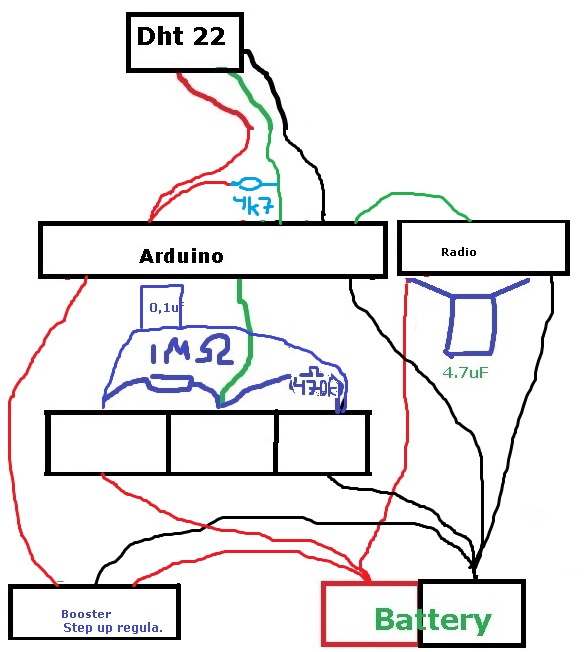
The radio and battery voltage sensor (R1/R2) is not connected to Step up regulator.
Also DHT22 sensor needs atleast 3v to operate so i put the arduino and DHT22 after the voltage regulator.Im sleeping the node for 15min, then sends temp and hum. The Battery status is sent each 8 loop. Now i will have a look how fast the battery is drained. I have not removed the led in the aurdino or step up reg so im guessing quite fast.
I have the radio about 15 meter (1 wall) from the gw - 100% seems to be st=ok.
Any improvement ideas - let me know,
Br
Andreas@sundberg84 said:
Hi!
Ok, i wanted to share my "sollution" or atleast current setup if someone else in the future has the same problem.
The radio and battery voltage sensor (R1/R2) is not connected to Step up regulator.
Also DHT22 sensor needs atleast 3v to operate so i put the arduino and DHT22 after the voltage regulator.Im sleeping the node for 15min, then sends temp and hum. The Battery status is sent each 8 loop. Now i will have a look how fast the battery is drained. I have not removed the led in the aurdino or step up reg so im guessing quite fast.
I have the radio about 15 meter (1 wall) from the gw - 100% seems to be st=ok.
Any improvement ideas - let me know,
Br
AndreasHi all, I'm newbie with these libraries.
And I'm a bit confused about the picture.
I'm guessing is that the picture still similar with the battery page in build sites. What makes me confused is that resistor position. And also what is the source to measure in the voltage divider? Is it vcc? -
-
@sundberg84 said:
Hi!
Ok, i wanted to share my "sollution" or atleast current setup if someone else in the future has the same problem.
The radio and battery voltage sensor (R1/R2) is not connected to Step up regulator.
Also DHT22 sensor needs atleast 3v to operate so i put the arduino and DHT22 after the voltage regulator.Im sleeping the node for 15min, then sends temp and hum. The Battery status is sent each 8 loop. Now i will have a look how fast the battery is drained. I have not removed the led in the aurdino or step up reg so im guessing quite fast.
I have the radio about 15 meter (1 wall) from the gw - 100% seems to be st=ok.
Any improvement ideas - let me know,
Br
AndreasHi all, I'm newbie with these libraries.
And I'm a bit confused about the picture.
I'm guessing is that the picture still similar with the battery page in build sites. What makes me confused is that resistor position. And also what is the source to measure in the voltage divider? Is it vcc?@funky81 said:
Hi all, I'm newbie with these libraries.
And I'm a bit confused about the picture.
I'm guessing is that the picture still similar with the battery page in build sites. What makes me confused is that resistor position. And also what is the source to measure in the voltage divider? Is it vcc?Im a newbie as well, also a bit on and off building...
Yes, i have tried to work from the battery build site. I saw you did a own post about this and worked it out.-
I have also tried to take power to the radio from the booster - but this seems to drain the battery very fast, annyone else experienced this?
-
Also i tried to take power to the radio from the arduino - and it works well, is there any downsides with this?
-
Is the radio using any power not used? It seems like the battery last longer with the radio connected to the arduino instread of the battery. When the arduino sleeps - so does the radio i guess, but does the radio sleep any time connected directly to the battery?
-
-
Would be awesome if you made a fritz sketch of this :)
Newbie with RPi and Domoticz, trying to automate my home.
-
Would be awesome if you made a fritz sketch of this :)
@ronnyandre - hehe! That was a while ago :)
I even made a PCB for everyone to use (including full schematics)!Check it out here: https://www.openhardware.io/view/4/EasyNewbie-PCB-for-MySensors



Hello! It looks like you're interested in this conversation, but you don't have an account yet.
Getting fed up of having to scroll through the same posts each visit? When you register for an account, you'll always come back to exactly where you were before, and choose to be notified of new replies (either via email, or push notification). You'll also be able to save bookmarks and upvote posts to show your appreciation to other community members.
With your input, this post could be even better 💗
Register Login