
Switched to the add-on and now some sensors aren't accepted
-
I recently wiped and re created my homeassistant and mysensors integration on my raspberry pi 3 before, I used the config integration. With the new build I used the Add-on integration and I am now getting the following error ```
Logger: mysensors
Source: /usr/local/lib/python3.8/site-packages/mysensors/init.py:61
First occurred: 13 June 2021, 22:41:28 (7490 occurrences)
Last logged: 9:33:58Invalid <Message data="2;255;3;0;32;500">: Not valid message sub-type: 32 for object value @ data['sub_type']. Got 32 not a valid value for object value @ data['payload']. Got '500' Invalid <Message data="3;255;3;0;33;900000">: Not valid message sub-type: 33 for object value @ data['sub_type']. Got 33 not a valid value for object value @ data['payload']. Got '900000' Invalid <Message data="3;21;1;0;43;F">: Not valid message sub-type: 43 for object value @ data['sub_type']. Got 43 not a valid value for object value @ data['payload']. Got 'F' Invalid <Message data="3;17;1;0;43;Lux">: Not valid message sub-type: 43 for object value @ data['sub_type']. Got 43 not a valid value for object value @ data['payload']. Got 'Lux' Invalid <Message data="3;255;3;0;32;500">: Not valid message sub-type: 32 for object value @ data['sub_type']. Got 32 not a valid value for object value @ data['payload']. Got '500'I have a rain gauge, temperature and humidity entities that function properly but, my soil moisture, lux and prefix items are failing to be recognised. I assume it is a version issue. I have attempted to use the following in my config file to fix it
mysensors:
  gateways:
    - device: ...
      # other things ...
  version: "2.3"
I attempted to use /dev/ttyACM0 as a device but begin to get a persistence file error that I could not get solved.
any ideas?
-
I recently wiped and re created my homeassistant and mysensors integration on my raspberry pi 3 before, I used the config integration. With the new build I used the Add-on integration and I am now getting the following error ```
Logger: mysensors
Source: /usr/local/lib/python3.8/site-packages/mysensors/init.py:61
First occurred: 13 June 2021, 22:41:28 (7490 occurrences)
Last logged: 9:33:58Invalid <Message data="2;255;3;0;32;500">: Not valid message sub-type: 32 for object value @ data['sub_type']. Got 32 not a valid value for object value @ data['payload']. Got '500' Invalid <Message data="3;255;3;0;33;900000">: Not valid message sub-type: 33 for object value @ data['sub_type']. Got 33 not a valid value for object value @ data['payload']. Got '900000' Invalid <Message data="3;21;1;0;43;F">: Not valid message sub-type: 43 for object value @ data['sub_type']. Got 43 not a valid value for object value @ data['payload']. Got 'F' Invalid <Message data="3;17;1;0;43;Lux">: Not valid message sub-type: 43 for object value @ data['sub_type']. Got 43 not a valid value for object value @ data['payload']. Got 'Lux' Invalid <Message data="3;255;3;0;32;500">: Not valid message sub-type: 32 for object value @ data['sub_type']. Got 32 not a valid value for object value @ data['payload']. Got '500'I have a rain gauge, temperature and humidity entities that function properly but, my soil moisture, lux and prefix items are failing to be recognised. I assume it is a version issue. I have attempted to use the following in my config file to fix it
mysensors:
  gateways:
    - device: ...
      # other things ...
  version: "2.3"
I attempted to use /dev/ttyACM0 as a device but begin to get a persistence file error that I could not get solved.
any ideas?
not sure if this error helps at all.
Logger: mysensors.sensor Source: /usr/local/lib/python3.8/site-packages/mysensors/sensor.py:96 First occurred: 13 June 2021, 22:41:13 (14 occurrences) Last logged: 9:54:39 child_id 8 already exists in children of node 0, cannot add child child_id 2 already exists in children of node 2, cannot add child child_id 21 already exists in children of node 2, cannot add child child_id 3 already exists in children of node 2, cannot add child child_id 4 already exists in children of node 2, cannot add child -
I recently wiped and re created my homeassistant and mysensors integration on my raspberry pi 3 before, I used the config integration. With the new build I used the Add-on integration and I am now getting the following error ```
Logger: mysensors
Source: /usr/local/lib/python3.8/site-packages/mysensors/init.py:61
First occurred: 13 June 2021, 22:41:28 (7490 occurrences)
Last logged: 9:33:58Invalid <Message data="2;255;3;0;32;500">: Not valid message sub-type: 32 for object value @ data['sub_type']. Got 32 not a valid value for object value @ data['payload']. Got '500' Invalid <Message data="3;255;3;0;33;900000">: Not valid message sub-type: 33 for object value @ data['sub_type']. Got 33 not a valid value for object value @ data['payload']. Got '900000' Invalid <Message data="3;21;1;0;43;F">: Not valid message sub-type: 43 for object value @ data['sub_type']. Got 43 not a valid value for object value @ data['payload']. Got 'F' Invalid <Message data="3;17;1;0;43;Lux">: Not valid message sub-type: 43 for object value @ data['sub_type']. Got 43 not a valid value for object value @ data['payload']. Got 'Lux' Invalid <Message data="3;255;3;0;32;500">: Not valid message sub-type: 32 for object value @ data['sub_type']. Got 32 not a valid value for object value @ data['payload']. Got '500'I have a rain gauge, temperature and humidity entities that function properly but, my soil moisture, lux and prefix items are failing to be recognised. I assume it is a version issue. I have attempted to use the following in my config file to fix it
mysensors:
  gateways:
    - device: ...
      # other things ...
  version: "2.3"
I attempted to use /dev/ttyACM0 as a device but begin to get a persistence file error that I could not get solved.
any ideas?
@Jeff-Willecke said in Switched to the add-on and now some sensors aren't accepted:
With the new build I used the Add-on integration
By that you mean that you configured MySensors via the web interface?
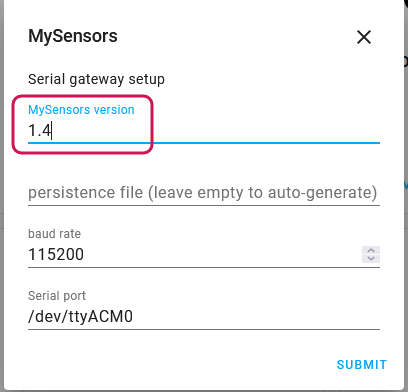
Your assumption that it is a version issue seems correct, but you can't fix it by specifying a version in YAML when you configured the integration via the GUI.
Could it be that you forgot to adjust the MySensors version during setup? If so, delete it and create a new one. (I don't think you can make changes to existing MySensors integrations (yet))
child_id 8 already exists in children of node 0, cannot add child [...]
That's nothing to worry about. Those warning appear every time you boot up a node that has been presented to Home Assistant before already. It's helpful in situation where you accidentally assign a sensor / child ID twice to different data types or re-assign a previously existing node ID to a completely new node.
-
Thanks! That fixed everything.

Hello! It looks like you're interested in this conversation, but you don't have an account yet.
Getting fed up of having to scroll through the same posts each visit? When you register for an account, you'll always come back to exactly where you were before, and choose to be notified of new replies (either via email, or push notification). You'll also be able to save bookmarks and upvote posts to show your appreciation to other community members.
With your input, this post could be even better 💗
Register Login