
Battery percentage incorrectly send to gateway.
-
I ordered a custom pcb with a ATMega328P and a dallas tempsensor , powered by 2AA batteries. Simular like http://forum.mysensors.org/topic/1107/sensors-in-boxes/7.
I use allso the sketch as shown in that topic, however the battery status allways read 102%. I'm sure the batteries are not full.
Can you point me in the right direction why my battery percentage is not send correctly?// Example sketch showing how to send in OneWire temperature readings
#include <MySensor.h>
#include <SPI.h>
#include <DallasTemperature.h>
#include <OneWire.h>#define ONE_WIRE_BUS 3 // Pin where dallase sensor is connected
#define MAX_ATTACHED_DS18B20 16
unsigned long SLEEP_TIME = 30000; // Sleep time between reads (in milliseconds)
OneWire oneWire(ONE_WIRE_BUS);
DallasTemperature sensors(&oneWire);
MySensor gw;
float lastTemperature[MAX_ATTACHED_DS18B20];
int numSensors=0;
boolean receivedConfig = false;
boolean metric = true;
// Initialize temperature message
MyMessage msg(0,V_TEMP);
MyMessage msgvolt(1,V_VOLTAGE);
int BATTERY_SENSE_PIN = A0;
int oldBatteryPcnt = 0;void setup()
{
analogReference(INTERNAL);
// Startup OneWire
sensors.begin();// Startup and initialize MySensors library. Set callback for incoming messages.
gw.begin();// Send the sketch version information to the gateway and Controller
gw.sendSketchInfo("Temperature Sensor", "1.0");// Fetch the number of attached temperature sensors
numSensors = sensors.getDeviceCount();// Present all sensors to controller
for (int i=0; i<numSensors && i<MAX_ATTACHED_DS18B20; i++) {
gw.present(i, S_TEMP);
}
}void loop()
{
// Process incoming messages (like config from server)
gw.process();// Fetch temperatures from Dallas sensors
sensors.requestTemperatures();// Battery Monitoring
int sensorValue = analogRead(BATTERY_SENSE_PIN);
float batteryV = sensorValue * 0.003363075;
int batteryPcnt = sensorValue / 10;Serial.print("Battery Voltage: ");
Serial.print(batteryV);
Serial.println(" V");Serial.print("Battery percent: ");
Serial.print(batteryPcnt);
Serial.println(" %");if (oldBatteryPcnt != batteryPcnt) {
gw.send(msgvolt.set(batteryPcnt,1));
oldBatteryPcnt = batteryPcnt;
}
// Read temperatures and send them to controller
for (int i=0; i<numSensors && i<MAX_ATTACHED_DS18B20; i++) {// Fetch and round temperature to one decimal float temperature = static_cast<float>(static_cast<int>((gw.getConfig().isMetric?sensors.getTempCByIndex(i):sensors.getTempFByIndex(i)) * 10.)) / 10.; // Only send data if temperature has changed and no error if (lastTemperature[i] != temperature && temperature != -127.00) { // Send in the new temperature gw.send(msg.setSensor(i).set(temperature,1)); lastTemperature[i]=temperature; }}
gw.sleep(SLEEP_TIME);
} -
-
I tried just with 2 AAA batteries (used from a remotecontrol), again it shows 102%. :-(
-
Did you wire the voltage divider like this? http://www.mysensors.org/build/battery or how does your wiring look like=?
-
@sundberg84
This is a screenshot of the schema. ( left out the top layer which is only used for the radio)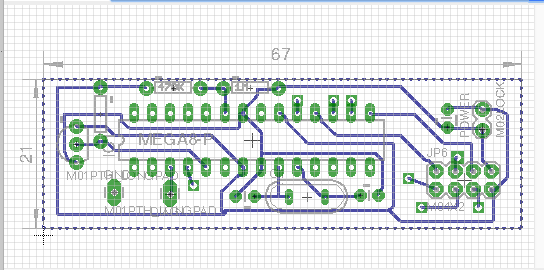
I tried the basic battery sensor sketch. I see that the sensor value is devided 10.
Should this be default or can I calculate how the devider should be programmed?float batteryV = sensorValue * 0.003363075;
int batteryPcnt = sensorValue / 10;end: 1-1-0-0 s=255,c=3,t=6,pt=1,l=1,sg=0,st=o x00x00send: 1-1-0-0 s=255,c=0,t=17,pt=0,l=3,sg=0,st=ok:1.5
send: 1-1-0-0 s=255,c=3,t=6,pt=1,l=1,sg=0,st=ok:0
read: 0-0-1 s=255,c=3,t=6,pt=0,l=1,sg=0:M
sensor started, id=1, parent=0, distance=1
send: 1-1-0-0 s=255,c=3,t=11,pt=0,l=13,sg=0,st=ok:Battery Meter
send: 1-1-0-0 s=255,c=3,t=12,pt=0,l=3,sg=0,st=ok:1.0
1023
Battery Voltage: 3.44 V
Battery percent: 102 %
send: 1-1-0-0 s=255,c=3,t=0,pt=1,l=1,sg=0,st=ok:102 -
Ok... resistors are switched place , problem solved ;-) make a big difference offcource.
send: 1-1-0-0 s=255,c=3,t=6,pt=1,l=1,sg=0,st=ok:0
read: 0-0-1 s=255,c=3,t=6,pt=0,l=1,sg=0:M
sensor started, id=1, parent=0, distance=1
send: 1-1-0-0 s=255,c=3,t=11,pt=0,l=13,sg=0,st=ok:Battery Meter
send: 1-1-0-0 s=255,c=3,t=12,pt=0,l=3,sg=0,st=ok:1.0
934
Battery Voltage: 3.14 V
Battery percent: 93 %
send: 1-1-0-0 s=255,c=3,t=0,pt=1,l=1,sg=0,st=ok:93


Hello! It looks like you're interested in this conversation, but you don't have an account yet.
Getting fed up of having to scroll through the same posts each visit? When you register for an account, you'll always come back to exactly where you were before, and choose to be notified of new replies (either via email, or push notification). You'll also be able to save bookmarks and upvote posts to show your appreciation to other community members.
With your input, this post could be even better 💗
Register Login