
PCB Design and Production
-
@clippermiami - If you havent used eagle before, i strongly recommend you take a look at these Tutorials on Eagle:
http://youtu.be/1AXwjZoyNno- there are 3 tutorials which cover the schematic , pcb layout, and sending it off for manufacture!
Also has a great series on Arduino programming too! ( must rewatch these actually! )
-
Thanks! I've been looking for something like this. I've got Simon Monk's book that I've started to read also.
-
@clippermiami - If you havent used eagle before, i strongly recommend you take a look at these Tutorials on Eagle:
http://youtu.be/1AXwjZoyNno- there are 3 tutorials which cover the schematic , pcb layout, and sending it off for manufacture!
Also has a great series on Arduino programming too! ( must rewatch these actually! )
@gregl I went through the three tutorials this morning. Like all people who make such things, he knows what he's doing so he makes it look so easy ...
Seriously they are quite helpful. Maybe a few more times through them will make me more comfortable. I've looked everywhere and while there are some Arduino items the ones I've found seem to do with creating a Anduino UNO or Pro-Mini from scratch. At prices from China that seems like a loosing proposition :) I found one that has the outline and pinout of the ProMini which helps but nothing on the Radio, the Ethernet, etc. Maybe my first project should be creating Eagle libraries for them ... :)
-
I downloaded the Eagle free version, and watch all three videos. And i actually produce a usable circuit board.I found it's quite easy and quite straightforward and think that most people on this site will be able to actually produce a circuit board. The Software is quite intuitive and easy to use.
-
This is my first printed circuit, refined a little, might actually get this one done.
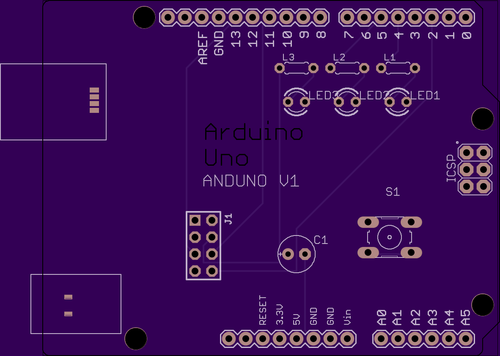
If you upload your design to https://oshpark.com they will quote you for free boards and it will give you a good representation of what you're bored will look like how cool is that. -
Nice!
I am also considering designing my own board. It is pretty far in the future though.
I'll start off with breadboard design, but the goal is to have wireless (optionally) battery powered sensors and I would like to somehow standardize those, so I plan to design a semi-generic PCB for an Arduino part and some standard sockets around it for sensor input. And perhaps a miniature prototyping area for "exotic" sensors. Have not decided if I want to mount an existing Arduino module or use the chip directly. I would prefer to keep the height down, but then, it is nice to just plug in the module directly. We'll see... -
I'm still trying to sort out how to use Eagle to do this but my general idea is a PCB with
- CR123 3v Lithium Battery. High capacity, long life and small form factor
- Arduino Pro-Mini AT328 off the shelf module (could be soldered directly to save space but I'm leaning to using headers for this and the wireless module below for simplicity/replacement/ease of programming)
- NRF24L01 off the shelf wireless module.
- Regulator/Upconverter off the shelf module 0.8v => 3v to stabilize the voltage delivered by the battery and allow it to run with low battery voltages
- Onboard battery level monitoring circuit
- Mini (2.54mm) Screw terminal blocks for sensor connection (total 12 screws)
--- 2 @ Digital (4 screws - shared Vcc/Gnd)
--- 2 @ Analog (4 screws - shared Vcc/Gnd)
--- 1 @ L2C (4 screws)
OPTIONS:
SPACE/Pads for optional 5v Upconverter/Regulator off the shelf module for the odd 5v sensor
SPACE/Pads for external power coaxial connector socket under the battery holder locationI'm guessing that this will produce a fairly small device of maybe 40-50 mm by 60-75 mm without crowding things
That's where I am right now. While I'd like to find Eagle Library devices for the Wireless module,regulator, etc., I'm thinking it can be done with just pads/throughholes as if they were just headers or sockets. But as I say i have no experience with Eagle at this point so it a learning curve :)
-
-
You may want to have a look at this for some ideas or inspiration, it has pro mini and nrf24l01 connections and some of the features you want.
https://oshpark.com/shared_projects/pRJiKWxV
$18 for 3 boards, pretty pricey, considering the brains of the system only costs $3 and the nrf only $1.
-
I think you should go with Eagle and KICAD as these are free ware and a lot of tutorials are available to teach how to use these software and I personally recommend Eagle as PCB manufacturers accept the Eagle files to build the boards and for cheap PCB boards you should look at some manufacturers with manufacturing facility is in China.





Hello! It looks like you're interested in this conversation, but you don't have an account yet.
Getting fed up of having to scroll through the same posts each visit? When you register for an account, you'll always come back to exactly where you were before, and choose to be notified of new replies (either via email, or push notification). You'll also be able to save bookmarks and upvote posts to show your appreciation to other community members.
With your input, this post could be even better 💗
Register Login