Skip to content
  • MySensors
  • OpenHardware.io
  • Categories
  • Recent
  • Tags
  • Popular
Skins
  • Light
  • Brite
  • Cerulean
  • Cosmo
  • Flatly
  • Journal
  • Litera
  • Lumen
  • Lux
  • Materia
  • Minty
  • Morph
  • Pulse
  • Sandstone
  • Simplex
  • Sketchy
  • Spacelab
  • United
  • Yeti
  • Zephyr
  • Dark
  • Cyborg
  • Darkly
  • Quartz
  • Slate
  • Solar
  • Superhero
  • Vapor

  • Default (No Skin)
  • No Skin
Collapse
Brand Logo
  1. Home
  2. Controllers
  3. Domoticz
  4. Adding a relay switch

Adding a relay switch

Scheduled Pinned Locked Moved Domoticz
4 Posts 2 Posters 2.5k Views 2 Watching
  • Oldest to Newest
  • Newest to Oldest
  • Most Votes
Reply
  • Reply as topic
Log in to reply
This topic has been deleted. Only users with topic management privileges can see it.
  • drradkinD Offline
    drradkinD Offline
    drradkin
    wrote on last edited by
    #1

    Very new to mysensors and domoticz. I just want to add, for now, some simple switches using a USB gateway and a Nano/NRF24L01+/relay to switch a light on and off.

    1 Reply Last reply
    0
    • Boots33B Offline
      Boots33B Offline
      Boots33
      Hero Member
      wrote on last edited by Boots33
      #2

      If it is just a relay to be controlled by Domoticz then you will need the RelayActuator sketch from the MySensors example files in the arduino IDE.

      if you also want to control the relay with a local button as well then you will need the RelayWithButtonActuator sketch which you will find here

      1 Reply Last reply
      1
      • drradkinD Offline
        drradkinD Offline
        drradkin
        wrote on last edited by
        #3

        Okay, I have that much. I need to know how to add a toggle control in domoticz.

        Boots33B 1 Reply Last reply
        0
        • drradkinD drradkin

          Okay, I have that much. I need to know how to add a toggle control in domoticz.

          Boots33B Offline
          Boots33B Offline
          Boots33
          Hero Member
          wrote on last edited by Boots33
          #4

          @drradkin
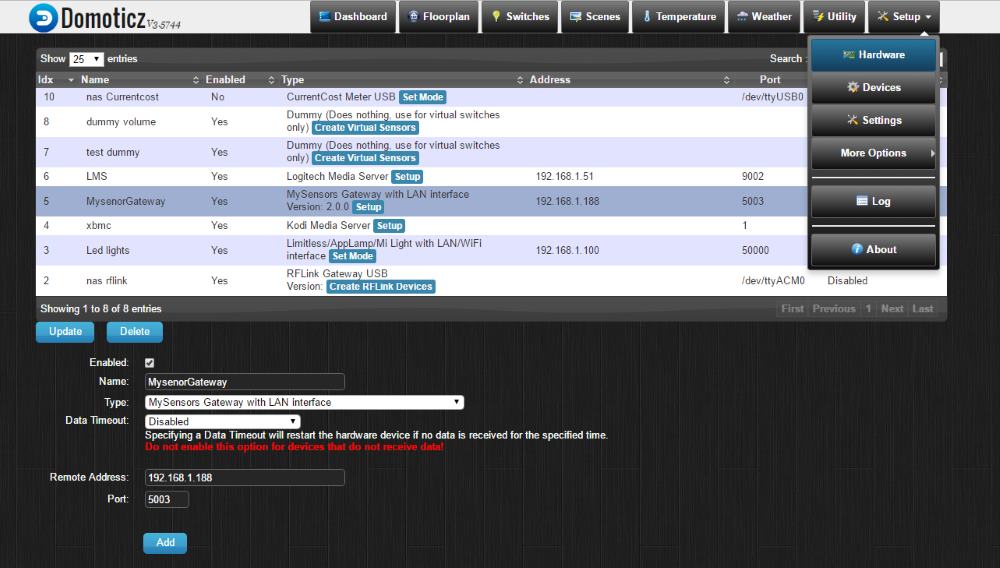
          First you need to add your serial gateway as a hardware device. You can see below my LAN Gateway on the hardware page. You will need to select the Mysensors gateway USB from the drop down list and probably enter the serial port it is connected to.
          0_1476511195973_Screenshot (146).jpg

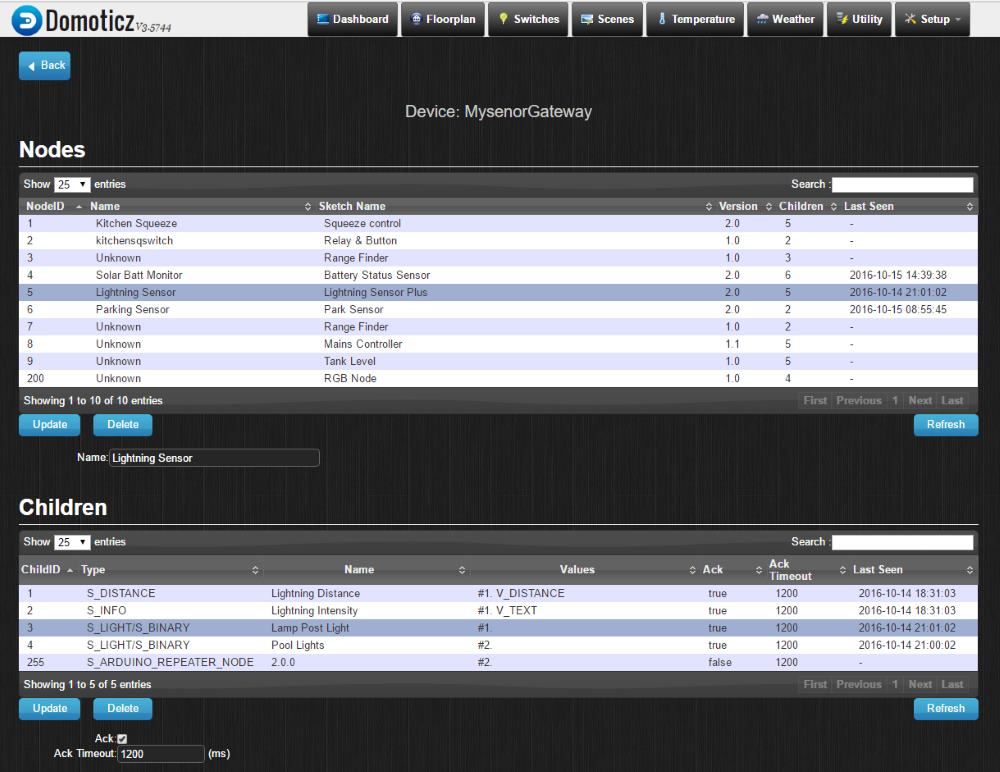
          Once the gateway is running start up your node and then click the setup button for the mysensors gateway. You should now see the node listed. if you click on the node you will see its children listed as well. In the picture below you can see my lightning detector node which also has two light (relay) switches shown as S_LIGHTS_BINARY with child id's of 3 and 4
          0_1476511541427_Screenshot (147).jpg

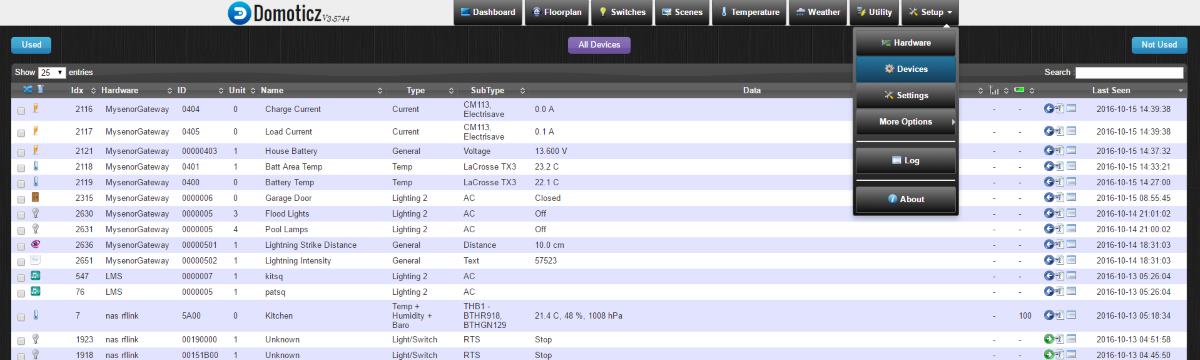
          Now you go to the Devices page and you should see the switches listed there. You can see my two switches with a unit id of 3 and 4 in the middle of the list. Now to use these you will need to click on the green arrow for the switch over on the right side of the page (mine are blue as they are already added) to add them to your used devices. you will get a requester to give it a name.
          0_1476512146085_Screenshot (148).jpg

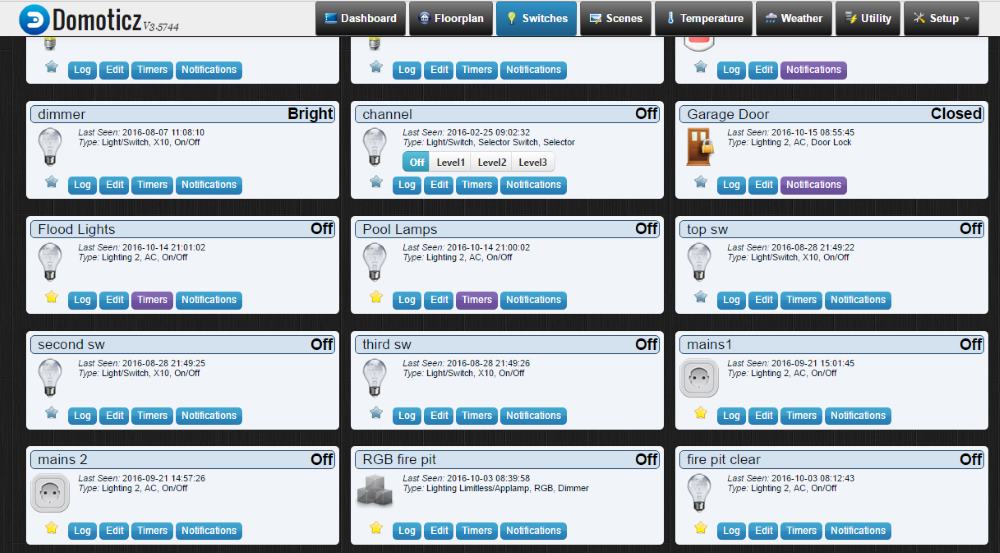
          Then you will be able to see them on your switches page. Again you can see my two switches called Flood Lights and Pool Lamps. you can turn them on and off by clicking the light globe icon.
          0_1476512427804_Screenshot (149).jpg

          1 Reply Last reply
          3
          Reply
          • Reply as topic
          Log in to reply
          • Oldest to Newest
          • Newest to Oldest
          • Most Votes


          15

          Online

          11.7k

          Users

          11.2k

          Topics

          113.1k

          Posts


          Copyright 2025 TBD   |   Forum Guidelines   |   Privacy Policy   |   Terms of Service
          • Login

          • Don't have an account? Register

          • Login or register to search.
          • First post
            Last post
          0
          • MySensors
          • OpenHardware.io
          • Categories
          • Recent
          • Tags
          • Popular