
light and relay turn on automatically !
-
The LED blinks when the radio is active. This could be caused by a bug in your code. Can you share your sketch?
The light turning in by itself could be a forgotten rule in your controller or maybe a neighbor using mysensors, too? :D
@Jan-Gatzke
thank you for answer.
about blink i see this before ( bug in code ) and TX led was blink . but now L led is blink. 2 nodes have this problem . one a gas sensors, two is a relay 6 channel. this is strange because i use same code for other device , but for these ....
my sketch:
gas:#define MY_DEBUG #define MY_RADIO_NRF24 #define MY_RF24_CHANNEL 0 #define MY_NODE_ID 4 #define MY_REPEATER_FEATURE #include <SPI.h> #include <MySensors.h> #include <avr/wdt.h> #define CHILD_GAS 3 int mq2 = A0; int value; uint16_t GAS; MyMessage msg(CHILD_GAS, V_HUM); void setup() { pinMode(mq2, INPUT); wdt_enable(WDTO_4S); } void presentation() { sendSketchInfo("R_M Gas sensor", "1.0"); present(CHILD_GAS, S_HUM); } void loop() { value = analogRead(mq2); Serial.print("LPG SENSOR : "); if (value <= 60) { GAS = 0; } else { GAS = (value - 60) / 9.64; } Serial.println(GAS); send(msg.set(GAS)); wait(60000); }relay:
#define MY_DEBUG
#define MY_TRANSPORT_WAIT_READY_MS 10000
#define MY_RADIO_NRF24
#define MY_RF24_CHANNEL 0
#define MY_REPEATER_FEATURE
#define MY_NODE_ID 160

#include <SPI.h>
#include <MySensors.h>
#include <Bounce2.h>
#include <avr/wdt.h>

#define RELAY_ON 0
#define RELAY_OFF 1

#define A_ID 1
#define B_ID 2
#define C_ID 3
#define D_ID 4
#define E_ID 5
#define F_ID 6

const int buttonPinA = 14;
const int buttonPinB = 15;
const int buttonPinC = 16;
const int buttonPinD = 17;
const int buttonPinE = 18;
const int buttonPinF = 19;

const int relayPinA = 3;
const int relayPinB = 4;
const int relayPinC = 5;
const int relayPinD = 6;
const int relayPinE = 7;
const int relayPinF = 8;

int oldValueA = 0;
int oldValueB = 0;
int oldValueC = 0;
int oldValueD = 0;
int oldValueE = 0;
int oldValueF = 0;


unsigned long time_m;
unsigned long a, b, c, d, e, f ;

bool stateA = false;
bool stateB = false;
bool stateC = false;
bool stateD = false;
bool stateE = false;
bool stateF = false;

int trigger = 0;

Bounce debouncerA = Bounce();
Bounce debouncerB = Bounce();
Bounce debouncerC = Bounce();
Bounce debouncerD = Bounce();
Bounce debouncerE = Bounce();
Bounce debouncerF = Bounce();

MyMessage msgA(A_ID, V_STATUS);
MyMessage msgB(B_ID, V_STATUS);
MyMessage msgC(C_ID, V_STATUS);
MyMessage msgD(D_ID, V_STATUS);
MyMessage msgE(E_ID, V_STATUS);
MyMessage msgF(F_ID, V_STATUS);


void setup()
{
  wdt_enable(WDTO_4S);
  pinMode(buttonPinA, INPUT_PULLUP);
  pinMode(buttonPinB, INPUT_PULLUP);
  pinMode(buttonPinC, INPUT_PULLUP);
  pinMode(buttonPinD, INPUT_PULLUP);
  pinMode(buttonPinE, INPUT_PULLUP);
  pinMode(buttonPinF, INPUT_PULLUP);

  // After setting up the buttons, setup debouncer
  debouncerA.attach(buttonPinA);
  debouncerA.interval(5);
  debouncerB.attach(buttonPinB);
  debouncerB.interval(5);
  debouncerC.attach(buttonPinC);
  debouncerC.interval(5);
  debouncerD.attach(buttonPinD);
  debouncerD.interval(5);
  debouncerE.attach(buttonPinE);
  debouncerE.interval(5);
  debouncerF.attach(buttonPinF);
  debouncerF.interval(5);

  // Make sure relays are off when starting up
  digitalWrite(relayPinA, RELAY_OFF);
  digitalWrite(relayPinB, RELAY_OFF);
  digitalWrite(relayPinC, RELAY_OFF);
  digitalWrite(relayPinD, RELAY_OFF);
  digitalWrite(relayPinE, RELAY_OFF);
  digitalWrite(relayPinF, RELAY_OFF);
  // Then set relay pins in output mode
  pinMode(relayPinA, OUTPUT);
  pinMode(relayPinB, OUTPUT);
  pinMode(relayPinC, OUTPUT);
  pinMode(relayPinD, OUTPUT);
  pinMode(relayPinE, OUTPUT);
  pinMode(relayPinF, OUTPUT);

}


void presentation()  {
  // Send the sketch version information to the gateway and Controller
  sendSketchInfo("Re.Mi RELAY6", "1.0");

  // Register all sensors to gw (they will be created as child devices)
  present(A_ID, S_LIGHT);
  present(B_ID, S_LIGHT);
  present(C_ID, S_LIGHT);
  present(D_ID, S_LIGHT);
  present(E_ID, S_LIGHT);
  present(F_ID, S_LIGHT);

}


void loop()
{
  {
    time_m = millis();
    a = time_m % 3600000;
    b = time_m % 3601000;
    c = time_m % 3602000;
    d = time_m % 3603000;
    e = time_m % 3604000;
    f = time_m % 3605000;
    if (a == 0) {
      send(msgA.set(stateA ? true : false), true);
    }
    if (b ==0){
      send(msgB.set(stateB ? true : false), true);
    }

    if (c==0){
      send(msgC.set(stateC ? true : false), true);
    }

    if (d==0){
      send(msgD.set(stateD ? true : false), true);
    }

    if (e==0){
      send(msgE.set(stateE ? true : false), true);
    }

    if (f==0){
      send(msgF.set(stateF ? true : false), true);
    }
  }
    if (trigger == 0) {
    send(msgA.set(false)); // Send off state for relayA to ensure controller knows the switch is off
    send(msgB.set(false)); // Send off state for relayB to ensure controller knows the switch is off
    send(msgC.set(false));
    send(msgD.set(false));
    send(msgE.set(false));
    send(msgF.set(false));
    trigger = 1;
  }
  debouncerA.update();
  // Get the update value
  int valueA = debouncerA.read();
  if (valueA != oldValueA && valueA == 0) {
    send(msgA.set(stateA ? false : true), true); // Send new state and request ack back

  }
  oldValueA = valueA;


  debouncerB.update();
  // Get the update value
  int valueB = debouncerB.read();
  if (valueB != oldValueB && valueB == 0) {
    send(msgB.set(stateB ? false : true), true); // Send new state and request ack back

  }
  oldValueB = valueB;

  debouncerC.update();
  // Get the update value
  int valueC = debouncerC.read();
  if (valueC != oldValueC && valueC == 0) {
    send(msgC.set(stateC ? false : true), true); // Send new state and request ack back

  }
  oldValueC = valueC;

  debouncerD.update();
  // Get the update value
  int valueD = debouncerD.read();
  if (valueD != oldValueD && valueD == 0) {
    send(msgD.set(stateD ? false : true), true); // Send new state and request ack back

  }
  oldValueD = valueD;

  debouncerE.update();
  // Get the update value
  int valueE = debouncerE.read();
  if (valueE != oldValueE && valueE == 0) {
    send(msgE.set(stateE ? false : true), true); // Send new state and request ack back

  }
  oldValueE = valueE;

  debouncerF.update();
  // Get the update value
  int valueF = debouncerF.read();
  if (valueF != oldValueF && valueF == 0) {
    send(msgF.set(stateF ? false : true), true); // Send new state and request ack back

  }
  oldValueF = valueF;
wdt_reset();
}

void receive(const MyMessage &message) {
  // We only expect one type of message from controller. But we better check anyway.
  if (message.type == V_STATUS) {

    switch (message.sensor) {
      case 1:
        stateA = message.getBool();
        digitalWrite(message.sensor + 2, stateA ? RELAY_ON : RELAY_OFF);

        break;
      case 2:
        stateB = message.getBool();
        digitalWrite(message.sensor + 2 , stateB ? RELAY_ON : RELAY_OFF);

        break;

      case 3:
        stateC = message.getBool();
        digitalWrite(message.sensor + 2 , stateC ? RELAY_ON : RELAY_OFF);

        break;
      case 4:
        stateD = message.getBool();
        digitalWrite(message.sensor + 2 , stateD ? RELAY_ON : RELAY_OFF);

        break;
      case 5:
        stateE = message.getBool();
        digitalWrite(message.sensor + 2, stateE ? RELAY_ON : RELAY_OFF);

        break;
      case 6:
        stateF = message.getBool();
        digitalWrite(message.sensor + 2 , stateF ? RELAY_ON : RELAY_OFF);

        break;

    }

    // Write some debug info
    Serial.print("Incoming change for sensor:");
    Serial.println(message.sensor);
    Serial.print("from node:");
    Serial.println(message.sender);
    Serial.print(", New status: ");
    Serial.println(message.getBool());
  }
}
about light turning auto i have neighbor but we use several channel for network.
what is forgetten rule in my controller ? please explain more. Could have other reasons? this is suddenly for example 3:00 AM o'clock a channel of relay turn on auto. i change relay module and radio and arduino but repeat again
thank you -
@Jan-Gatzke
thank you for answer.
about blink i see this before ( bug in code ) and TX led was blink . but now L led is blink. 2 nodes have this problem . one a gas sensors, two is a relay 6 channel. this is strange because i use same code for other device , but for these ....
my sketch:
gas:#define MY_DEBUG #define MY_RADIO_NRF24 #define MY_RF24_CHANNEL 0 #define MY_NODE_ID 4 #define MY_REPEATER_FEATURE #include <SPI.h> #include <MySensors.h> #include <avr/wdt.h> #define CHILD_GAS 3 int mq2 = A0; int value; uint16_t GAS; MyMessage msg(CHILD_GAS, V_HUM); void setup() { pinMode(mq2, INPUT); wdt_enable(WDTO_4S); } void presentation() { sendSketchInfo("R_M Gas sensor", "1.0"); present(CHILD_GAS, S_HUM); } void loop() { value = analogRead(mq2); Serial.print("LPG SENSOR : "); if (value <= 60) { GAS = 0; } else { GAS = (value - 60) / 9.64; } Serial.println(GAS); send(msg.set(GAS)); wait(60000); }relay:
#define MY_DEBUG
#define MY_TRANSPORT_WAIT_READY_MS 10000
#define MY_RADIO_NRF24
#define MY_RF24_CHANNEL 0
#define MY_REPEATER_FEATURE
#define MY_NODE_ID 160

#include <SPI.h>
#include <MySensors.h>
#include <Bounce2.h>
#include <avr/wdt.h>

#define RELAY_ON 0
#define RELAY_OFF 1

#define A_ID 1
#define B_ID 2
#define C_ID 3
#define D_ID 4
#define E_ID 5
#define F_ID 6

const int buttonPinA = 14;
const int buttonPinB = 15;
const int buttonPinC = 16;
const int buttonPinD = 17;
const int buttonPinE = 18;
const int buttonPinF = 19;

const int relayPinA = 3;
const int relayPinB = 4;
const int relayPinC = 5;
const int relayPinD = 6;
const int relayPinE = 7;
const int relayPinF = 8;

int oldValueA = 0;
int oldValueB = 0;
int oldValueC = 0;
int oldValueD = 0;
int oldValueE = 0;
int oldValueF = 0;


unsigned long time_m;
unsigned long a, b, c, d, e, f ;

bool stateA = false;
bool stateB = false;
bool stateC = false;
bool stateD = false;
bool stateE = false;
bool stateF = false;

int trigger = 0;

Bounce debouncerA = Bounce();
Bounce debouncerB = Bounce();
Bounce debouncerC = Bounce();
Bounce debouncerD = Bounce();
Bounce debouncerE = Bounce();
Bounce debouncerF = Bounce();

MyMessage msgA(A_ID, V_STATUS);
MyMessage msgB(B_ID, V_STATUS);
MyMessage msgC(C_ID, V_STATUS);
MyMessage msgD(D_ID, V_STATUS);
MyMessage msgE(E_ID, V_STATUS);
MyMessage msgF(F_ID, V_STATUS);


void setup()
{
  wdt_enable(WDTO_4S);
  pinMode(buttonPinA, INPUT_PULLUP);
  pinMode(buttonPinB, INPUT_PULLUP);
  pinMode(buttonPinC, INPUT_PULLUP);
  pinMode(buttonPinD, INPUT_PULLUP);
  pinMode(buttonPinE, INPUT_PULLUP);
  pinMode(buttonPinF, INPUT_PULLUP);

  // After setting up the buttons, setup debouncer
  debouncerA.attach(buttonPinA);
  debouncerA.interval(5);
  debouncerB.attach(buttonPinB);
  debouncerB.interval(5);
  debouncerC.attach(buttonPinC);
  debouncerC.interval(5);
  debouncerD.attach(buttonPinD);
  debouncerD.interval(5);
  debouncerE.attach(buttonPinE);
  debouncerE.interval(5);
  debouncerF.attach(buttonPinF);
  debouncerF.interval(5);

  // Make sure relays are off when starting up
  digitalWrite(relayPinA, RELAY_OFF);
  digitalWrite(relayPinB, RELAY_OFF);
  digitalWrite(relayPinC, RELAY_OFF);
  digitalWrite(relayPinD, RELAY_OFF);
  digitalWrite(relayPinE, RELAY_OFF);
  digitalWrite(relayPinF, RELAY_OFF);
  // Then set relay pins in output mode
  pinMode(relayPinA, OUTPUT);
  pinMode(relayPinB, OUTPUT);
  pinMode(relayPinC, OUTPUT);
  pinMode(relayPinD, OUTPUT);
  pinMode(relayPinE, OUTPUT);
  pinMode(relayPinF, OUTPUT);

}


void presentation()  {
  // Send the sketch version information to the gateway and Controller
  sendSketchInfo("Re.Mi RELAY6", "1.0");

  // Register all sensors to gw (they will be created as child devices)
  present(A_ID, S_LIGHT);
  present(B_ID, S_LIGHT);
  present(C_ID, S_LIGHT);
  present(D_ID, S_LIGHT);
  present(E_ID, S_LIGHT);
  present(F_ID, S_LIGHT);

}


void loop()
{
  {
    time_m = millis();
    a = time_m % 3600000;
    b = time_m % 3601000;
    c = time_m % 3602000;
    d = time_m % 3603000;
    e = time_m % 3604000;
    f = time_m % 3605000;
    if (a == 0) {
      send(msgA.set(stateA ? true : false), true);
    }
    if (b ==0){
      send(msgB.set(stateB ? true : false), true);
    }

    if (c==0){
      send(msgC.set(stateC ? true : false), true);
    }

    if (d==0){
      send(msgD.set(stateD ? true : false), true);
    }

    if (e==0){
      send(msgE.set(stateE ? true : false), true);
    }

    if (f==0){
      send(msgF.set(stateF ? true : false), true);
    }
  }
    if (trigger == 0) {
    send(msgA.set(false)); // Send off state for relayA to ensure controller knows the switch is off
    send(msgB.set(false)); // Send off state for relayB to ensure controller knows the switch is off
    send(msgC.set(false));
    send(msgD.set(false));
    send(msgE.set(false));
    send(msgF.set(false));
    trigger = 1;
  }
  debouncerA.update();
  // Get the update value
  int valueA = debouncerA.read();
  if (valueA != oldValueA && valueA == 0) {
    send(msgA.set(stateA ? false : true), true); // Send new state and request ack back

  }
  oldValueA = valueA;


  debouncerB.update();
  // Get the update value
  int valueB = debouncerB.read();
  if (valueB != oldValueB && valueB == 0) {
    send(msgB.set(stateB ? false : true), true); // Send new state and request ack back

  }
  oldValueB = valueB;

  debouncerC.update();
  // Get the update value
  int valueC = debouncerC.read();
  if (valueC != oldValueC && valueC == 0) {
    send(msgC.set(stateC ? false : true), true); // Send new state and request ack back

  }
  oldValueC = valueC;

  debouncerD.update();
  // Get the update value
  int valueD = debouncerD.read();
  if (valueD != oldValueD && valueD == 0) {
    send(msgD.set(stateD ? false : true), true); // Send new state and request ack back

  }
  oldValueD = valueD;

  debouncerE.update();
  // Get the update value
  int valueE = debouncerE.read();
  if (valueE != oldValueE && valueE == 0) {
    send(msgE.set(stateE ? false : true), true); // Send new state and request ack back

  }
  oldValueE = valueE;

  debouncerF.update();
  // Get the update value
  int valueF = debouncerF.read();
  if (valueF != oldValueF && valueF == 0) {
    send(msgF.set(stateF ? false : true), true); // Send new state and request ack back

  }
  oldValueF = valueF;
wdt_reset();
}

void receive(const MyMessage &message) {
  // We only expect one type of message from controller. But we better check anyway.
  if (message.type == V_STATUS) {

    switch (message.sensor) {
      case 1:
        stateA = message.getBool();
        digitalWrite(message.sensor + 2, stateA ? RELAY_ON : RELAY_OFF);

        break;
      case 2:
        stateB = message.getBool();
        digitalWrite(message.sensor + 2 , stateB ? RELAY_ON : RELAY_OFF);

        break;

      case 3:
        stateC = message.getBool();
        digitalWrite(message.sensor + 2 , stateC ? RELAY_ON : RELAY_OFF);

        break;
      case 4:
        stateD = message.getBool();
        digitalWrite(message.sensor + 2 , stateD ? RELAY_ON : RELAY_OFF);

        break;
      case 5:
        stateE = message.getBool();
        digitalWrite(message.sensor + 2, stateE ? RELAY_ON : RELAY_OFF);

        break;
      case 6:
        stateF = message.getBool();
        digitalWrite(message.sensor + 2 , stateF ? RELAY_ON : RELAY_OFF);

        break;

    }

    // Write some debug info
    Serial.print("Incoming change for sensor:");
    Serial.println(message.sensor);
    Serial.print("from node:");
    Serial.println(message.sender);
    Serial.print(", New status: ");
    Serial.println(message.getBool());
  }
}
about light turning auto i have neighbor but we use several channel for network.
what is forgetten rule in my controller ? please explain more. Could have other reasons? this is suddenly for example 3:00 AM o'clock a channel of relay turn on auto. i change relay module and radio and arduino but repeat again
thank youWhat do you mean with L led?
The gas sensor is sending a value for every iteration of the loop. You should only send a new value to the controller if it changed (more than x). This way the node is always active and spamming the controller.I don't see anything wrong with the relay sketch.
Regarding the self switching relay node I just wanted to say that I you should look for external reasons for this behaviour. Either the controller or another sender is telling the node to switch the relay on.
-
What do you mean with L led?
The gas sensor is sending a value for every iteration of the loop. You should only send a new value to the controller if it changed (more than x). This way the node is always active and spamming the controller.I don't see anything wrong with the relay sketch.
Regarding the self switching relay node I just wanted to say that I you should look for external reasons for this behaviour. Either the controller or another sender is telling the node to switch the relay on.
@Jan-Gatzke
this led :
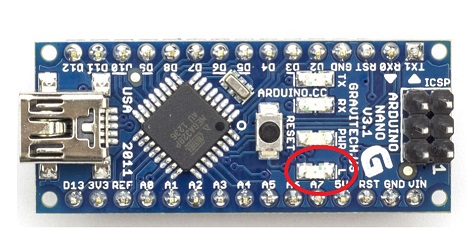
i think blink led is not related to gas skatch because this problem is for both (relay and gas)
is that possible my controller have problem ? because some time controller auto go to offline.... -
@Jan-Gatzke
this led :
i think blink led is not related to gas skatch because this problem is for both (relay and gas)
is that possible my controller have problem ? because some time controller auto go to offline....Does the blinking stop when you shutdown the controller?
-
Does the blinking stop when you shutdown the controller?
@Jan-Gatzke
i dont test this . when start blink just i power off/on node and true again and after some sent command again blink. -
the blinking led which doesn't stop without poweroff, makes me think:
- autoreset generated by brownout and power supply issues,
- wdt and bootloaders
perhaps the first one
-
the blinking led which doesn't stop without poweroff, makes me think:
- autoreset generated by brownout and power supply issues,
- wdt and bootloaders
perhaps the first one
He only wrote about a blinking led not about the whole node failing.
-
the blinking led which doesn't stop without poweroff, makes me think:
- autoreset generated by brownout and power supply issues,
- wdt and bootloaders
perhaps the first one
-
hi guys
i found 2 new strange problem!
one problem is related to turn on light automatically ! i have some light with button . some time for example 3:00 AM relay auto turn on ! :O did anybody experience this ?
second problem is related to LED on arduino (L) . some sensors (for example gas sensors) some time i see L led is bilinking fast and dont stop .stop just with power off/on.
did anybody experience this ?@Jan-Gatzke
I answered to his 2nd problem ;)@Reza said in light and relay turn on automatically !:
second problem is related to LED on arduino (L) . some sensors (for example gas sensors) some time i see L led is bilinking fast and dont stop .stop just with power off/on.
In mcu there is a brownout mechanism which reset the mcu if its voltage falls below a threshold which is set by fuses.
Also, depending of the bootloader used, this "L" (in general 13 if i remember) blinks at startup.
Then if you have hw issues like relays, multiple sensors, radio which consumes too much it can reset. I'm not talking about input power supply but about the vcc provided by voltage regulatorThe same kind of autoreset can happen with a bad bootloader and wrong wdt settings.
It's all covered in arduino forums. And here too, i don't remember the links.
Finally, and that can also triggers same kind of problems (weird behaviour etc..), is playing with AC voltage, relays, RF radios etc due to noise etc.. Add to this that when you don't care about filtering in those case, you will get a bad Signal-to-Noise Ratio for your radio and get a poor range and sensibility.
You can have a quick idea when to take care of this by reading this
http://hackaday.com/2017/01/26/pcb-design-guidelines-to-minimize-rf-transmissions/ -
@Jan-Gatzke
I answered to his 2nd problem ;)@Reza said in light and relay turn on automatically !:
second problem is related to LED on arduino (L) . some sensors (for example gas sensors) some time i see L led is bilinking fast and dont stop .stop just with power off/on.
In mcu there is a brownout mechanism which reset the mcu if its voltage falls below a threshold which is set by fuses.
Also, depending of the bootloader used, this "L" (in general 13 if i remember) blinks at startup.
Then if you have hw issues like relays, multiple sensors, radio which consumes too much it can reset. I'm not talking about input power supply but about the vcc provided by voltage regulatorThe same kind of autoreset can happen with a bad bootloader and wrong wdt settings.
It's all covered in arduino forums. And here too, i don't remember the links.
Finally, and that can also triggers same kind of problems (weird behaviour etc..), is playing with AC voltage, relays, RF radios etc due to noise etc.. Add to this that when you don't care about filtering in those case, you will get a bad Signal-to-Noise Ratio for your radio and get a poor range and sensibility.
You can have a quick idea when to take care of this by reading this
http://hackaday.com/2017/01/26/pcb-design-guidelines-to-minimize-rf-transmissions/

Hello! It looks like you're interested in this conversation, but you don't have an account yet.
Getting fed up of having to scroll through the same posts each visit? When you register for an account, you'll always come back to exactly where you were before, and choose to be notified of new replies (either via email, or push notification). You'll also be able to save bookmarks and upvote posts to show your appreciation to other community members.
With your input, this post could be even better 💗
Register Login