
openHAB 2.0 binding
-
@TimO Just tried the changes you made. Color picker now worked straight away! :smile:
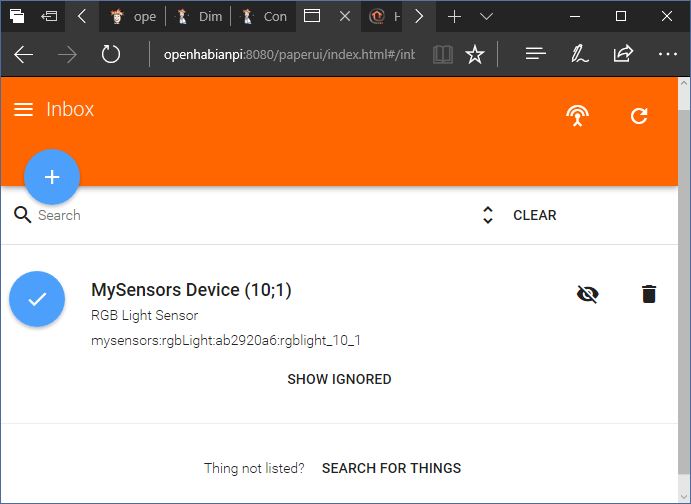
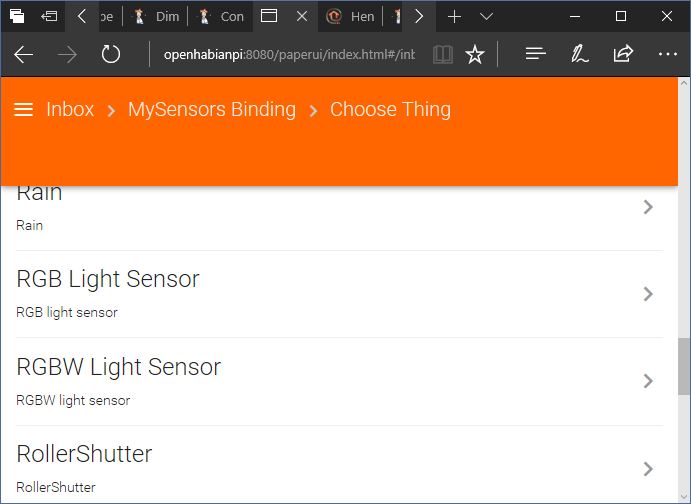
I also checked the sketch and it seems to be declaring itself as an RGB Light, not as a sensor. But could it be that what I see in the PaperUI are just the labels that still need to be changed?
void presentation()
{
  // Send the Sketch Version Information to the Gateway
  sendSketchInfo(SN, SV);
  present(CHILD_ID_LIGHT, S_RGB_LIGHT);
}
One last question: the
Variable 2 not presenterror I get everytime a command is send, is that because those two variables aren't set in the sketch I'm using?Thanks!
-
Hi,
just a quick question:
OpenHab2 can be used without touching any code right?
I use mysensors serial gateway. Tried to set it up all day yesterday from skratch. Also with OpenHabian. But no success.
So it seems i still have to edit files and folders manually in order to get it running right?I got Domoticz working after short time. Was expecting OpenHab2 makes it even more easy :/
@edsteve Yes, that's one goal of the binding. For the serial gateway the hardest part is to determine the path of the serial port. Something like: /dev/ttyUSB0 or /dev/ttyACM0 if you're using Linux.
What exactly does not work? Please attach a log from the karaf console.
-
@TimO
I use Nano Neo as Hardware with Armbian Linux and OpenHabian on top. The bundle:list showed me mysensors.
I don't find any Things. Where do i have to put this info: /dev/ttyUSB0 or /dev/ttyACM0?? In which config file?
Now i get an error with karaf saying "connection refused" when i try:ssh -p 8101 openhab@localhostYesterday it worked... the karaf thing make it even more difficult.
EDIT: I just found out that i have to make a demo.things file with the code for the serial gateway.... And for sure that was not the last file which needs manual editing. I go back to Domoticz. Till OpenHab becomes same easy.
-
@FusedHe3 Please enable DEBUG mode in the karaf console and paste the output around
Variable 2 not presenthere.@TimO Thanks for investigating!
Here's the log, but I don't know if it's of any more help.18:36:25.233 [DEBUG] [.converter.MySensorsRGBTypeConverter] - Converting RGB Int to Hex: R 05, G 71, B ff 18:36:25.295 [DEBUG] [rs.internal.gateway.MySensorsGateway] - Node 10 found in gateway 18:36:25.321 [DEBUG] [rs.internal.gateway.MySensorsGateway] - Child 1 found in node 10 18:36:25.408 [INFO ] [marthome.event.ItemStateChangedEvent] - RGBLEDStrip_Color changed from 15,100,100 to 214,98,100 18:36:25.346 [DEBUG] [rsAbstractConnection$MySensorsWriter] - Sending to MySensors: 10;1;1;0;40;0571ff 18:36:25.365 [INFO ] [smarthome.event.ItemCommandEvent ] - Item 'RGBLEDStrip_Color' received command 214,98,100 18:36:25.840 [DEBUG] [rsAbstractConnection$MySensorsReader] - 10;1;1;0;2;1 18:36:25.863 [DEBUG] [rs.internal.gateway.MySensorsGateway] - Node 10 found in gateway 18:36:25.895 [DEBUG] [rs.internal.gateway.MySensorsGateway] - Child 1 found in node 10 18:36:25.919 [WARN ] [rs.internal.gateway.MySensorsGateway] - Variable 2 not present 18:36:26.209 [DEBUG] [rsAbstractConnection$MySensorsReader] - 10;1;1;0;3;100 18:36:26.232 [DEBUG] [rs.internal.gateway.MySensorsGateway] - Node 10 found in gateway 18:36:26.254 [DEBUG] [rs.internal.gateway.MySensorsGateway] - Child 1 found in node 10 18:36:26.276 [WARN ] [rs.internal.gateway.MySensorsGateway] - Variable 3 not presentI guess it may have something to do with a
V_lightandV_dimmeranswer that is being send by the node. (As a reminder: I'm using this this one.) -
@TimO So I finally got around to testing the RGBW version of the plugin. I tested it with one sensor (light and the battery voltage) and an RGBW node.
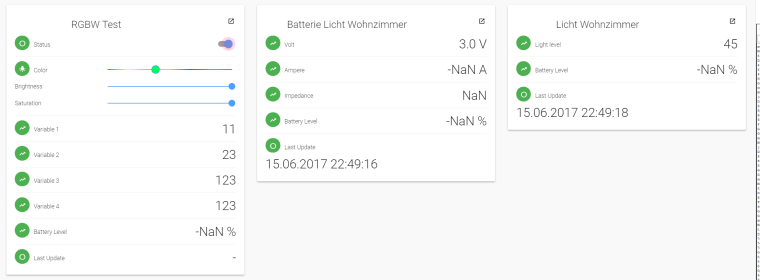
Results:
- RGBW color settings works well. Its a message of lengths 8 (e.g. 00ff5100) instead of the 9 from domoticz (#00ff5100). So I had to change my node's code. But your solution looks cleaner, so I guess thats fine :+1: What didn't work are all the other values beside "color". As you can see I changed the variable 1-4 and it gets send to the node as message type 24-27, which are custom variables... why did you use these?
- RGBW on/off did not work. The "status" button does nothing. Log below. Would be nice to have a button to send on/off commands to the nodes.
- Light and Voltage sensors seem to work just fine
By the way, short question about openhab 2: what is the difference between things and items? Seems like items/sitemaps are used in the "old" frontends to display sensors/actors. Are things the same for the new paperUI? I have just used that one yet. And why do I have to declare the gateway in a file while the rest is auto discovered (also it seems like some of you also added their sensors to the file with the gateway definition)?
Seems to be hard to find up-to-date easy information on these things, so thanks in advance for an explanation.Log from the status button:
22:55:02.378 [INFO ] [smarthome.event.ItemCommandEvent ] - Item 'mysensors_rgbwLight_gateway_rgbwlight_10_1_status' received command OFF 22:55:02.402 [WARN ] [ensors.handler.MySensorsThingHandler] - Variable not found, cannot handle command for thing mysensors:rgbwLight:gateway:rgbwlight_10_1 of type status 22:55:02.440 [INFO ] [marthome.event.ItemStateChangedEvent] - mysensors_rgbwLight_gateway_rgbwlight_10_1_status changed from ON to OFF -
By the way has someone running openhab together with an echo (alexa)? I am currently trying to use that combination and at least with the RGBW nodes there seems to be no reaction (yet) to the commands.
-
Hello,
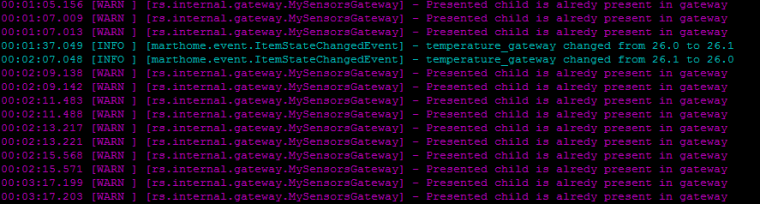
With 2 nodes, first has 1 child with id 0 , second has 2 children, id 0 and id 1, I get the following in the logs. Second node is not picked up.
Used the openhab2 zip and the jar from here http://www.oberfoell.com/openhab2/org.openhab.binding.mysensors-2.1.0-SNAPSHOT.jar for the installation.
All the configuration was done from the paperui.
Any thoughts ?
Best regards,
Romeo -
Hello,
With 2 nodes, first has 1 child with id 0 , second has 2 children, id 0 and id 1, I get the following in the logs. Second node is not picked up.
Used the openhab2 zip and the jar from here http://www.oberfoell.com/openhab2/org.openhab.binding.mysensors-2.1.0-SNAPSHOT.jar for the installation.
All the configuration was done from the paperui.
Any thoughts ?
Best regards,
Romeo@frg Please enter
log:set DEBUG org.openhab.binding.mysensorsin the karaf console and post the debug log of the binding here. -
@TimO So I finally got around to testing the RGBW version of the plugin. I tested it with one sensor (light and the battery voltage) and an RGBW node.
Results:
- RGBW color settings works well. Its a message of lengths 8 (e.g. 00ff5100) instead of the 9 from domoticz (#00ff5100). So I had to change my node's code. But your solution looks cleaner, so I guess thats fine :+1: What didn't work are all the other values beside "color". As you can see I changed the variable 1-4 and it gets send to the node as message type 24-27, which are custom variables... why did you use these?
- RGBW on/off did not work. The "status" button does nothing. Log below. Would be nice to have a button to send on/off commands to the nodes.
- Light and Voltage sensors seem to work just fine
By the way, short question about openhab 2: what is the difference between things and items? Seems like items/sitemaps are used in the "old" frontends to display sensors/actors. Are things the same for the new paperUI? I have just used that one yet. And why do I have to declare the gateway in a file while the rest is auto discovered (also it seems like some of you also added their sensors to the file with the gateway definition)?
Seems to be hard to find up-to-date easy information on these things, so thanks in advance for an explanation.Log from the status button:
22:55:02.378 [INFO ] [smarthome.event.ItemCommandEvent ] - Item 'mysensors_rgbwLight_gateway_rgbwlight_10_1_status' received command OFF 22:55:02.402 [WARN ] [ensors.handler.MySensorsThingHandler] - Variable not found, cannot handle command for thing mysensors:rgbwLight:gateway:rgbwlight_10_1 of type status 22:55:02.440 [INFO ] [marthome.event.ItemStateChangedEvent] - mysensors_rgbwLight_gateway_rgbwlight_10_1_status changed from ON to OFF@LastSamurai Thank you for the feedback!!
I'm glad RGBW seems to work. :-)
RGBW status indeed wasn't working, that definately was a bug and is fixed now (for RGB too).About your general questions:
You don't have to define the gateway in the things file. It is not discovered automatically, as this is something that is not very easy to implement (i.e. search for serial connections on windows / linux, search for network devices, is it a gateway or not?)
You may just use PaperUI: Configurations -> Things and hit the white plus sign in the blue circle and select serial or ethernet gateway. :-)When it comes to things and items: for me, a thing is a sensor. For example the RGBW sensor is a thing in the OpenHab world. There are a few channels (children) that are frequently found, when this sensor is used: one channel for RGBW, one for status and occasionally var1-var4 and battery. The thing is defined by its channels. The thing is a representation of the hardware in this case.
The items are the representation for the UI and the user. The user uses the Color picker and the thing/hardware needs a string (#aabbccdd). There may be "hardware" behind an item but there is no need to. An example is the lastUpdate channel/item. The information is not send by the sensor, it is generated by the controller/binding. -
This post is deleted!
-
@Timo
I attached the file.
https://notebin.cc/1jhks38r3sw
If there is something else you need me to do let me know. -
@Timo
I attached the file.
https://notebin.cc/1jhks38r3sw
If there is something else you need me to do let me know.@frg Okay, this is interesting. :smile:
After reviewing your log, I have no idea why this message still appears. There are 7 incoming presentation messages, all handled before. After about four minutes after the last presentation message was received there are 7 warnings about already presented childs. I don't see that behaviour in my log.
It's nothing serious we need to worry about, maybe the category "WARN" is exaggerated for this message. :wink: I'll look for that behaviour in my system, so that I may be able to reproduce it, but at the moment I don't see anything I am able to do here. -
@RVMRVM Interesting. Do you have a corresponding log for me?
Here's my test:
[INFO ] [arthome.event.ItemCommandEvent:43 ] - Item 'mysensors_rgbLight_8a7ca179_rgblight_199_0_rgb' received command 71,46,91 [DEBUG] [.c.thing.internal.ThingManager:366 ] - Delegating command '71,46,91' for item 'mysensors_rgbLight_8a7ca179_rgblight_199_0_rgb' to handler for channel 'mysensors:rgbLight:8a7ca179:rgblight_199_0:rgb' [DEBUG] [.m.c.MySensorsRGBTypeConverter:63 ] - Converting RGB Int to Hex: R d4, G e8, B 7d [DEBUG] [b.m.i.gateway.MySensorsGateway:563 ] - Node 199 found in gateway [DEBUG] [b.m.i.gateway.MySensorsGateway:567 ] - Child 0 found in node 199 [DEBUG] [ractConnection$MySensorsWriter:524 ] - Sending to MySensors: 199;0;1;0;40;d4e87d -
@TimO , did you ever get MQTT to work or do you need someone to test?
-
@TimO , did you ever get MQTT to work or do you need someone to test?
Hey @Nicklas-Starkel !
Actually there is a PR for MQTT support which is a huge leap forward and needs testing: https://github.com/tobof/openhab2-addons/pull/75
I'm 90% done on fulfilling the OH2 development compliance: https://github.com/openhab/openhab2-addons/pull/2066 which I'm working on since weeks (months). :o
My road map is:
- Finish the work on the compliance. (Maybe this week, for sure next week)
- Move repository to 2.2.0 snapshot
- Integrate RGB(W)
- Integrate MQTT
RGB(W) needs some more attention, because there is a bug in the conversion and it needs some more testing.
The current work is a second refactoring with many changes. Also a few options (names) have changed which need some attention by the users because configurations need to be adjusted. Hopefully the names now speak more for itself. :-)
I've also extended the JUnit Testing of the binding (which I'll need to quickly fix the RGB(W) bug).I need to catch up with the development of the openhab2-addons base. This is done after the OH2 compliance is done. At the moment I can't compile a MQTT testversion of the binding because the repository needs to be moved to 2.2.0 Snapshot.
Sadly the process for OH2 compliance is at the moment blocking the enhancements of the binding. I had no idea this would take so long.
-
Hello forum! I am very new with mySensors and OpenHAB (you've heard it before). I have OpenHab 2.1 running on Raspberri Pi2. I configured Z-wave binding, things and a few items, and it works fine. Now I am trying to bind OpenHab to a serial gateway build with Arduino Nano. The default example sketch is loaded to Arduino. The latest v2.1.0 mySensors .jar is placed in \openhab2-addons. I configured serial port as /dev/pts/2 but Gateway is offline. I tried to reboot Raspberry, Arduino but mySensors gateway is always offline, while Z-wave is online and operational. What am I doing wrong?
-
Hello forum! I am very new with mySensors and OpenHAB (you've heard it before). I have OpenHab 2.1 running on Raspberri Pi2. I configured Z-wave binding, things and a few items, and it works fine. Now I am trying to bind OpenHab to a serial gateway build with Arduino Nano. The default example sketch is loaded to Arduino. The latest v2.1.0 mySensors .jar is placed in \openhab2-addons. I configured serial port as /dev/pts/2 but Gateway is offline. I tried to reboot Raspberry, Arduino but mySensors gateway is always offline, while Z-wave is online and operational. What am I doing wrong?
-
@APL2017 The device is definitely wrong. It should be something like /dev/ttyUSB1. Execute dmesg in the console and look for usb, ch340, ch341 or ft232. :)
@TimO said in openHAB 2.0 binding:
dmesg
Thank you! When I entered serial ports as /dev/ttyUSB0, as reported by dmesg, the mySensors serial gateway binding came alive in OpenHAB. Initially, I got confused by instructions how to setup gateway in https://github.com/tobof/openhab2-addons/wiki/Configuration where I spotted serialPort="/dev/pts/2"
-
Hello i installed openhab 2.1 and the openhab jar 2.1 file in addons directory the gateway (serial) is up and running, in the log i see the senors !! but the autodiscovery stops the second i start it and wont show anny sensors but i do see them in the log if i replace the 2.1 jar with the 2.0 jar the autodiscovery runs but doesnt show anny sensors. i had it all working but decided to start from scratch again.
Im doing something wrong but cant figure it out.
-
Hello i installed openhab 2.1 and the openhab jar 2.1 file in addons directory the gateway (serial) is up and running, in the log i see the senors !! but the autodiscovery stops the second i start it and wont show anny sensors but i do see them in the log if i replace the 2.1 jar with the 2.0 jar the autodiscovery runs but doesnt show anny sensors. i had it all working but decided to start from scratch again.
Im doing something wrong but cant figure it out.


Hello! It looks like you're interested in this conversation, but you don't have an account yet.
Getting fed up of having to scroll through the same posts each visit? When you register for an account, you'll always come back to exactly where you were before, and choose to be notified of new replies (either via email, or push notification). You'll also be able to save bookmarks and upvote posts to show your appreciation to other community members.
With your input, this post could be even better 💗
Register Login