
BME280 Temp Sensor Problem - Min Power Up Time? Min Time To Get First Reading?
-
Hey guys, I created a battery powered circuit that powers up, takes a temperature/humidity/pressure reading from the BME280, then powers down completely. I am having troubles getting good readings with certain delays.
I am trying to make this process as quickly as possible to conserve battery power.
Currently I have a 2 millisecond delay at startup to give the BME280 time to power up. Is this necessary? I can't find any info on what is an appropriate delay for this.
I then initialize the BME280 using these settings:
- tStandby = 0.5ms
- filter = off
- humidity oversampling = *1
- temperature oversampling = *1
- pressure oversampling = *1
- run mode = normal
If I immediately then take temp/humidity/pressure readings I always get good humidity values, and bad temperature and pressure readings (No matter what I get about 72 degrees and 14,000 feet elevation... no matter if I move the sensor to cold, warm, etc. And its always the exact same value, it never changes). I am at 5280 feet by the way.
If I add 10ms delay after initializing, then take readings, I still have the same problem.
If I change it to a 20ms delay, then take readings, I now sometimes get accurate readings for temp/humidity/pressure.
If I do the 20ms delay, take readings, then wait another 20ms delay, then take readings again I always get accurate readings.
I did the calculation in the datasheet for "Typical Measurement Time" and "Maximum Measurement Time" and I get 8ms typical, and 9.3ms max. So I would think the original 10ms delay should be good, but it doesn't seem to be working right?
Is there something I am missing? Any help or advice would be greatly appreciated, thanks!
-
Hey guys, I created a battery powered circuit that powers up, takes a temperature/humidity/pressure reading from the BME280, then powers down completely. I am having troubles getting good readings with certain delays.
I am trying to make this process as quickly as possible to conserve battery power.
Currently I have a 2 millisecond delay at startup to give the BME280 time to power up. Is this necessary? I can't find any info on what is an appropriate delay for this.
I then initialize the BME280 using these settings:
- tStandby = 0.5ms
- filter = off
- humidity oversampling = *1
- temperature oversampling = *1
- pressure oversampling = *1
- run mode = normal
If I immediately then take temp/humidity/pressure readings I always get good humidity values, and bad temperature and pressure readings (No matter what I get about 72 degrees and 14,000 feet elevation... no matter if I move the sensor to cold, warm, etc. And its always the exact same value, it never changes). I am at 5280 feet by the way.
If I add 10ms delay after initializing, then take readings, I still have the same problem.
If I change it to a 20ms delay, then take readings, I now sometimes get accurate readings for temp/humidity/pressure.
If I do the 20ms delay, take readings, then wait another 20ms delay, then take readings again I always get accurate readings.
I did the calculation in the datasheet for "Typical Measurement Time" and "Maximum Measurement Time" and I get 8ms typical, and 9.3ms max. So I would think the original 10ms delay should be good, but it doesn't seem to be working right?
Is there something I am missing? Any help or advice would be greatly appreciated, thanks!
@mahonroy is there a reason the sensor is powered off? According to the datasheet, the sensor consumes 0.1 μA in sleep mode, so the time spent initializing the sensor will likely use more power than keeping it in sleep mode.
Similar discussions:
https://forum.mysensors.org/topic/7046/solved-bme280-power-consumtion/4
https://forum.mysensors.org/topic/9641/bme280-battery-powered-sensorsWhich library are you using to communicate with the bme280? (My guess is https://github.com/embeddedadventures/BME280 but lets make sure we're looking at the same library.)
-
Hey guys, I created a battery powered circuit that powers up, takes a temperature/humidity/pressure reading from the BME280, then powers down completely. I am having troubles getting good readings with certain delays.
I am trying to make this process as quickly as possible to conserve battery power.
Currently I have a 2 millisecond delay at startup to give the BME280 time to power up. Is this necessary? I can't find any info on what is an appropriate delay for this.
I then initialize the BME280 using these settings:
- tStandby = 0.5ms
- filter = off
- humidity oversampling = *1
- temperature oversampling = *1
- pressure oversampling = *1
- run mode = normal
If I immediately then take temp/humidity/pressure readings I always get good humidity values, and bad temperature and pressure readings (No matter what I get about 72 degrees and 14,000 feet elevation... no matter if I move the sensor to cold, warm, etc. And its always the exact same value, it never changes). I am at 5280 feet by the way.
If I add 10ms delay after initializing, then take readings, I still have the same problem.
If I change it to a 20ms delay, then take readings, I now sometimes get accurate readings for temp/humidity/pressure.
If I do the 20ms delay, take readings, then wait another 20ms delay, then take readings again I always get accurate readings.
I did the calculation in the datasheet for "Typical Measurement Time" and "Maximum Measurement Time" and I get 8ms typical, and 9.3ms max. So I would think the original 10ms delay should be good, but it doesn't seem to be working right?
Is there something I am missing? Any help or advice would be greatly appreciated, thanks!
@mahonroy Why so extreme? What is your power budget? I'm using a standard sketch for the same sensor and the power consumption is negligible.
I even added a 2 second (2000ms) powered on delay in order to mycontroller.org to detect the parent EUI.
-
@mahonroy is there a reason the sensor is powered off? According to the datasheet, the sensor consumes 0.1 μA in sleep mode, so the time spent initializing the sensor will likely use more power than keeping it in sleep mode.
Similar discussions:
https://forum.mysensors.org/topic/7046/solved-bme280-power-consumtion/4
https://forum.mysensors.org/topic/9641/bme280-battery-powered-sensorsWhich library are you using to communicate with the bme280? (My guess is https://github.com/embeddedadventures/BME280 but lets make sure we're looking at the same library.)
@mfalkvidd said in BME280 Temp Sensor Problem - Min Power Up Time? Min Time To Get First Reading?:
@mahonroy is there a reason the sensor is powered off? According to the datasheet, the sensor consumes 0.1 μA in sleep mode, so the time spent initializing the sensor will likely use more power than keeping it in sleep mode.
Similar discussions:
https://forum.mysensors.org/topic/7046/solved-bme280-power-consumtion/4
https://forum.mysensors.org/topic/9641/bme280-battery-powered-sensorsWhich library are you using to communicate with the bme280? (My guess is https://github.com/embeddedadventures/BME280 but lets make sure we're looking at the same library.)
@guillermo-schimmel said in BME280 Temp Sensor Problem - Min Power Up Time? Min Time To Get First Reading?:
@mahonroy Why so extreme? What is your power budget? I'm using a standard sketch for the same sensor and the power consumption is negligible.
I even added a 2 second (2000ms) powered on delay in order to mycontroller.org to detect the parent EUI.
Thanks for the responses! The way my circuit works is I have a small coin cell battery and an external timer TPL5111 that powers up the circuit on a configurable timer. The microcontroller does its work, then signals back to the TPL5111 that the work is done, and the timer will cut power to the circuit until the timer has elapsed again. There are other things that are happening as well such as transmitting data via RF.
This way I don't have to worry about quiescent current draw from the battery boosting circuit, I don't have to mess with putting stuff to sleep, shutting down and re-enabling peripherals, etc. And the current draw for the entire circuit is only 35nA when asleep.And this is the library I am using:
https://github.com/e-radionicacom/BME280-Arduino-Library/blob/master/BME280.cpp -
@mfalkvidd said in BME280 Temp Sensor Problem - Min Power Up Time? Min Time To Get First Reading?:
@mahonroy is there a reason the sensor is powered off? According to the datasheet, the sensor consumes 0.1 μA in sleep mode, so the time spent initializing the sensor will likely use more power than keeping it in sleep mode.
Similar discussions:
https://forum.mysensors.org/topic/7046/solved-bme280-power-consumtion/4
https://forum.mysensors.org/topic/9641/bme280-battery-powered-sensorsWhich library are you using to communicate with the bme280? (My guess is https://github.com/embeddedadventures/BME280 but lets make sure we're looking at the same library.)
@guillermo-schimmel said in BME280 Temp Sensor Problem - Min Power Up Time? Min Time To Get First Reading?:
@mahonroy Why so extreme? What is your power budget? I'm using a standard sketch for the same sensor and the power consumption is negligible.
I even added a 2 second (2000ms) powered on delay in order to mycontroller.org to detect the parent EUI.
Thanks for the responses! The way my circuit works is I have a small coin cell battery and an external timer TPL5111 that powers up the circuit on a configurable timer. The microcontroller does its work, then signals back to the TPL5111 that the work is done, and the timer will cut power to the circuit until the timer has elapsed again. There are other things that are happening as well such as transmitting data via RF.
This way I don't have to worry about quiescent current draw from the battery boosting circuit, I don't have to mess with putting stuff to sleep, shutting down and re-enabling peripherals, etc. And the current draw for the entire circuit is only 35nA when asleep.And this is the library I am using:
https://github.com/e-radionicacom/BME280-Arduino-Library/blob/master/BME280.cpp@mahonroy It is a very interesting experiment indeed.
I just connected the batteries to the arduino, no boosting. But I have space for 2 AAs. With coin things surely are harder.
I can't help you now but will keep watching your results. Good luck!
-
Something I tried which seems to be working for several hours so far:
Waiting 3ms, initialize BME280, then immediately read temp/humidity/pressure.... then wait 10ms, then take another reading. If I do this I seem to get good values 100% of the time. Seems odd, and seems kind of a hack, but it appears to be working like this. -
Something I tried which seems to be working for several hours so far:
Waiting 3ms, initialize BME280, then immediately read temp/humidity/pressure.... then wait 10ms, then take another reading. If I do this I seem to get good values 100% of the time. Seems odd, and seems kind of a hack, but it appears to be working like this. -
@mahonroy waiting 3ms can probably be lowered a little bit, but is in the right range to handle the bme280 startup time.

Bosch recommends using forced mode:
Using forced mode is recommended for applications which require low sampling rate
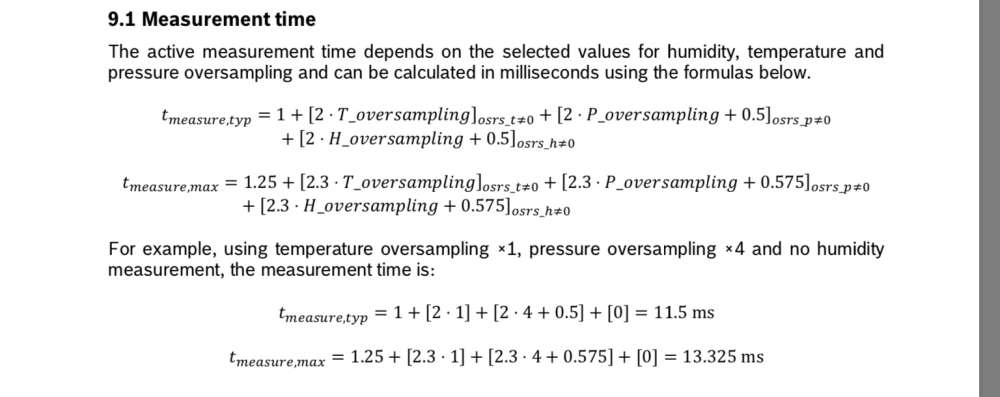
This part of the datasheet indicates that the time required to complete a measurement is 1.25 + 2.3 + 2.875 + 2.875 = 9.7ms, which is close to the wait time you have found. I would have thought that the library handled the wait time though, but I have not studied the library you are using.
EDIT: the library you are using already has a 10ms delay in begin() (after setting the mode which starts the measurement process) so you should not need to wait an additional 10ms. The comment in the library source code is confusing though; it refers to start up time, but the start up time needs to pass before sending any commands.
-
hi, i'm making something similar to yours, i know a lot of time has elapsed, but i'll input my knowledge. For your problem it has to do with how the data you are collecting is saved and the configuration for taking measurements you are using.
You probably are using a pull measurement, instead of constant measurement. So the device will give you the data saved in register, before taking a new measurement. For example if you take a measure every 1hour, without turning off, it will give you the measurement of the preview hour each time you request for data. This is common in a lot of systems with registers.
So your problem may be that when you turn on the device, there is garbage on the register. Thats why you have to do 2 measurements to get the actual value.


Hello! It looks like you're interested in this conversation, but you don't have an account yet.
Getting fed up of having to scroll through the same posts each visit? When you register for an account, you'll always come back to exactly where you were before, and choose to be notified of new replies (either via email, or push notification). You'll also be able to save bookmarks and upvote posts to show your appreciation to other community members.
With your input, this post could be even better 💗
Register Login