
Push button to toggle lights etc
-
Can someone help with how to make a toggling switch in Domoticz? I've only used blockly for automation, but I think I might have to do something else to make this work.
Push button sketch:
/**
 * Single button sending transmitter
 * Battery powered by 3V Li-bat
 */

#define MY_DEBUG
#define MY_RADIO_RF24
#define MY_NODE_ID 7

#include <MySensors.h>

int BATTERY_SENSE_PIN = A0;  // select the input pin for the battery sense point
int oldBatteryPcnt = 0;
#define BUTTON_PIN 2   //pin for button

MyMessage msgButton(BUTTON_PIN, V_STATUS);

int sentCounter = 2;
int reading;           // the current reading from the input pin
int previous = HIGH;    // the previous reading from the input pin

void setup()
{
	pinMode(BUTTON_PIN, INPUT);
	digitalWrite(BUTTON_PIN, HIGH);
  analogReference(INTERNAL);
}

void presentation()
{
  sendSketchInfo("WCNappiBAT", "v08032019");
	present(BUTTON_PIN, S_BINARY, "WC Nappi");
}

void loop()
{
delay(10);
reading = digitalRead(BUTTON_PIN);
  if (reading == LOW && previous == HIGH) {
    previous = reading;
    send(msgButton.set(1));
    sentCounter++;
    delay(50);
    }
  else {
    previous = reading;
    }

if (sentCounter % 5 == 0) {
  int sensorValue = analogRead(BATTERY_SENSE_PIN);
  // 3.44/1023 = Volts per bit = 0.003363075
  int batteryPcnt = sensorValue / 10;
  float batteryV  = sensorValue * 0.003363075;
  Serial.print("Battery Voltage: ");
  Serial.print(batteryV);
  Serial.print(" V, ");
  Serial.print("Battery percent: ");
  Serial.print(batteryPcnt);
  Serial.println(" %");

  sendBatteryLevel(batteryPcnt);
  }

  sleep(0, CHANGE, 0);
}
So the idea is it sends a "1" for every press. That should toggle the lights (controlled by another nodes relay). I had direct communication before but it keeps failing.
Any ideas? Or should I change the sketch? I thought about sending alternate 0 & 1 but then it will not "know" if the light is on or not...
-
Can someone help with how to make a toggling switch in Domoticz? I've only used blockly for automation, but I think I might have to do something else to make this work.
Push button sketch:
/**
 * Single button sending transmitter
 * Battery powered by 3V Li-bat
 */

#define MY_DEBUG
#define MY_RADIO_RF24
#define MY_NODE_ID 7

#include <MySensors.h>

int BATTERY_SENSE_PIN = A0;  // select the input pin for the battery sense point
int oldBatteryPcnt = 0;
#define BUTTON_PIN 2   //pin for button

MyMessage msgButton(BUTTON_PIN, V_STATUS);

int sentCounter = 2;
int reading;           // the current reading from the input pin
int previous = HIGH;    // the previous reading from the input pin

void setup()
{
	pinMode(BUTTON_PIN, INPUT);
	digitalWrite(BUTTON_PIN, HIGH);
  analogReference(INTERNAL);
}

void presentation()
{
  sendSketchInfo("WCNappiBAT", "v08032019");
	present(BUTTON_PIN, S_BINARY, "WC Nappi");
}

void loop()
{
delay(10);
reading = digitalRead(BUTTON_PIN);
  if (reading == LOW && previous == HIGH) {
    previous = reading;
    send(msgButton.set(1));
    sentCounter++;
    delay(50);
    }
  else {
    previous = reading;
    }

if (sentCounter % 5 == 0) {
  int sensorValue = analogRead(BATTERY_SENSE_PIN);
  // 3.44/1023 = Volts per bit = 0.003363075
  int batteryPcnt = sensorValue / 10;
  float batteryV  = sensorValue * 0.003363075;
  Serial.print("Battery Voltage: ");
  Serial.print(batteryV);
  Serial.print(" V, ");
  Serial.print("Battery percent: ");
  Serial.print(batteryPcnt);
  Serial.println(" %");

  sendBatteryLevel(batteryPcnt);
  }

  sleep(0, CHANGE, 0);
}
So the idea is it sends a "1" for every press. That should toggle the lights (controlled by another nodes relay). I had direct communication before but it keeps failing.
Any ideas? Or should I change the sketch? I thought about sending alternate 0 & 1 but then it will not "know" if the light is on or not...
@masmat
Just an idea...
As I recall, Domoticz only responds to changes. So if you send '1' to a switch that are already have '1' status, nothing happens. So I suggest that you first send '1' when the button is pressed. Then after for example 500ms you send '0'. That way the button switch will toggle.
Now - in the switch settings, you can send a ‘Toggle’ command to the node that controls the relay:
http://127.0.0.1:8080/json.htm?type=command&dparam=switchlight&idx=42&switchcmd=Toggle
In your case the ‘idx=42’ should correspond to your relay node.
With this setup, you should be able to toggle your relay with single presses on your button.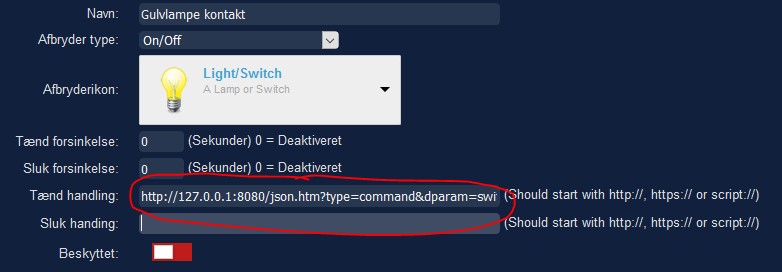
-
@masmat
Just an idea...
As I recall, Domoticz only responds to changes. So if you send '1' to a switch that are already have '1' status, nothing happens. So I suggest that you first send '1' when the button is pressed. Then after for example 500ms you send '0'. That way the button switch will toggle.
Now - in the switch settings, you can send a ‘Toggle’ command to the node that controls the relay:
http://127.0.0.1:8080/json.htm?type=command&dparam=switchlight&idx=42&switchcmd=Toggle
In your case the ‘idx=42’ should correspond to your relay node.
With this setup, you should be able to toggle your relay with single presses on your button. -
Hi
Yes, it works for me.
You can read more about the json part here:
https://www.domoticz.com/wiki/Domoticz_API/JSON_URL's#Lights_and_switchesBr
Lemme -
@lemme said in Push button to toggle lights etc:
http://127.0.0.1:8080/json.htm?type=command&dparam=switchlight&idx=42&switchcmd=Toggle
Works brilliantly!!

Hello! It looks like you're interested in this conversation, but you don't have an account yet.
Getting fed up of having to scroll through the same posts each visit? When you register for an account, you'll always come back to exactly where you were before, and choose to be notified of new replies (either via email, or push notification). You'll also be able to save bookmarks and upvote posts to show your appreciation to other community members.
With your input, this post could be even better 💗
Register Login