
RaspberryPi 4 as a gateway/controller
-
Hi All,
I want to make my Raspberry Pi a gateway of MySensors RS485 networ and controller of home automation using Domoticz.
Hardware i've got:
- Raspberry Pi 4 (2GB RAM)
- Converter USB <-> RS485 (it uses FTDI FR232RL chip) connected to the RPI
- Converter RS485 <-> UART (MAX485)
- Arduino Uno
I was trying to use this tutorial: https://www.mysensors.org/build/raspberry
But i think, i'm making something wrong.
After i connect the USB converter to the RPI i've got this answers:
- ls -l /dev/tty* (images -> attachment: RPI1)
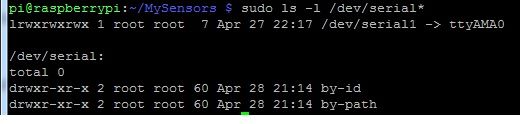
- ls -l /dev/serial* (images -> attachment: RPI2)
- ls -l /dev/serial/by-id/ (images -> attachment: RPI3)
What parameters should i use to configure this system correctly ?
I tried:
./configure --my-transport=rs485 --my-gateway=serial --my-serial-is-pty --my-serial-port=/dev/ttyUSB0 --my-serial-baudrate=115200And:
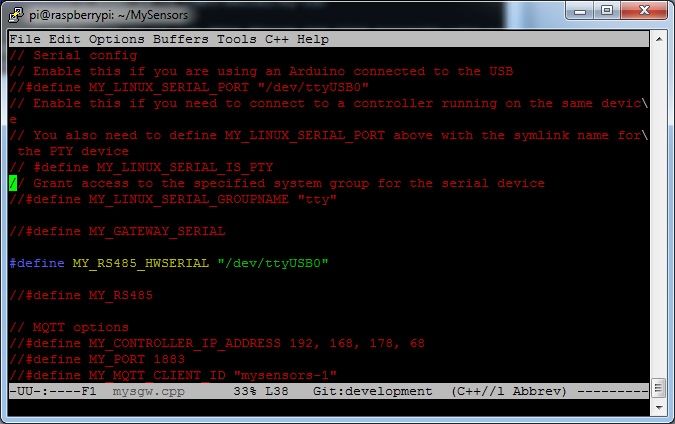
./configure --my-transport=rs485 --my-gateway=serial --my-serial-is-pty --my-serial-port=usb-FTDI_FT232R_USB_UART_A50285BI-if00-port0 --my-serial-baudrate=115200And what should i type in examples_linux/mysgw.cpp file (preprocessor definitions)? (images -> attachment: RPI4)
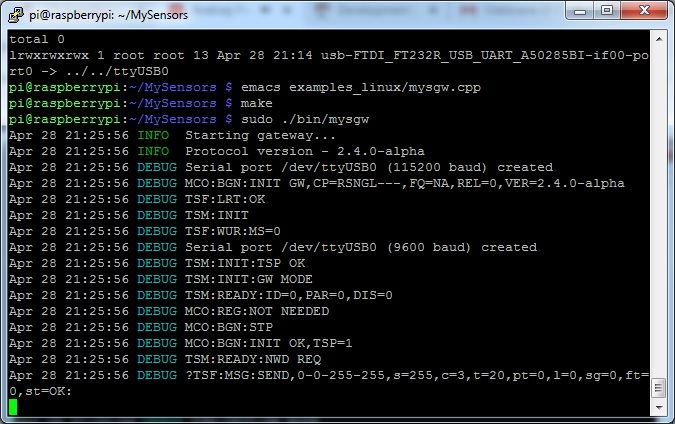
I made (make command) both configurations, and i've got the same ./bin/mysgw logs messages. (images -> attachment: RPI5)
To the RS485 network, i connected RS485 node example (MotionSensorRS485)
And at the end, how to cofigure domoticz hardware, when i want to use raspberry pi gateway?


-
Hi All,
I want to make my Raspberry Pi a gateway of MySensors RS485 networ and controller of home automation using Domoticz.
Hardware i've got:
- Raspberry Pi 4 (2GB RAM)
- Converter USB <-> RS485 (it uses FTDI FR232RL chip) connected to the RPI
- Converter RS485 <-> UART (MAX485)
- Arduino Uno
I was trying to use this tutorial: https://www.mysensors.org/build/raspberry
But i think, i'm making something wrong.
After i connect the USB converter to the RPI i've got this answers:
- ls -l /dev/tty* (images -> attachment: RPI1)
- ls -l /dev/serial* (images -> attachment: RPI2)
- ls -l /dev/serial/by-id/ (images -> attachment: RPI3)
What parameters should i use to configure this system correctly ?
I tried:
./configure --my-transport=rs485 --my-gateway=serial --my-serial-is-pty --my-serial-port=/dev/ttyUSB0 --my-serial-baudrate=115200And:
./configure --my-transport=rs485 --my-gateway=serial --my-serial-is-pty --my-serial-port=usb-FTDI_FT232R_USB_UART_A50285BI-if00-port0 --my-serial-baudrate=115200And what should i type in examples_linux/mysgw.cpp file (preprocessor definitions)? (images -> attachment: RPI4)
I made (make command) both configurations, and i've got the same ./bin/mysgw logs messages. (images -> attachment: RPI5)
To the RS485 network, i connected RS485 node example (MotionSensorRS485)
And at the end, how to cofigure domoticz hardware, when i want to use raspberry pi gateway?
Okey, i know more.
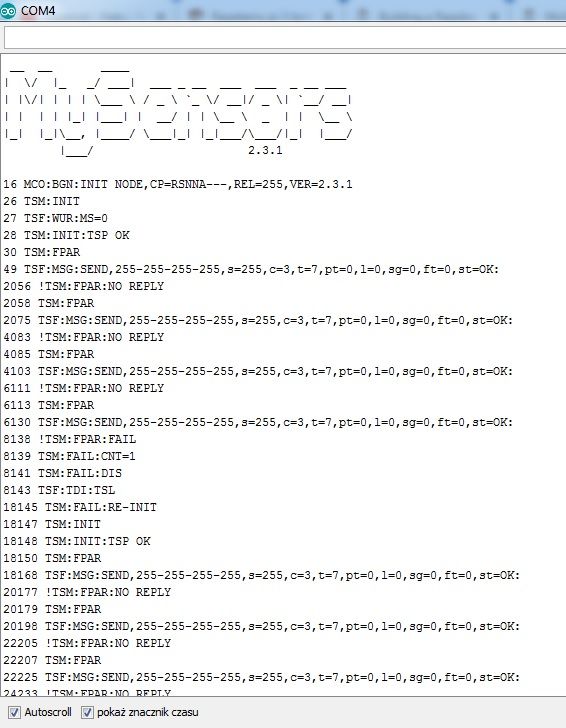
So, I programmed Arduino using MotionSensorRS485 example.
And using monitor COM tool, i see this in arduino logs:
And by using this command:
./configure --my-gateway=serial --my-serial-is-pty --my-serial-port=/dev/ttyUSB020
im saying RaspberryPi to create the gateway that commucnicates with controller using virtual serial port (/dev/ttyUSB020),and i think that by editing file examples_linux/mygw.cpp i'm choosing serial port for RS485 network (sensors network).
After i add the hardware to the domoticz controller, i've got this:

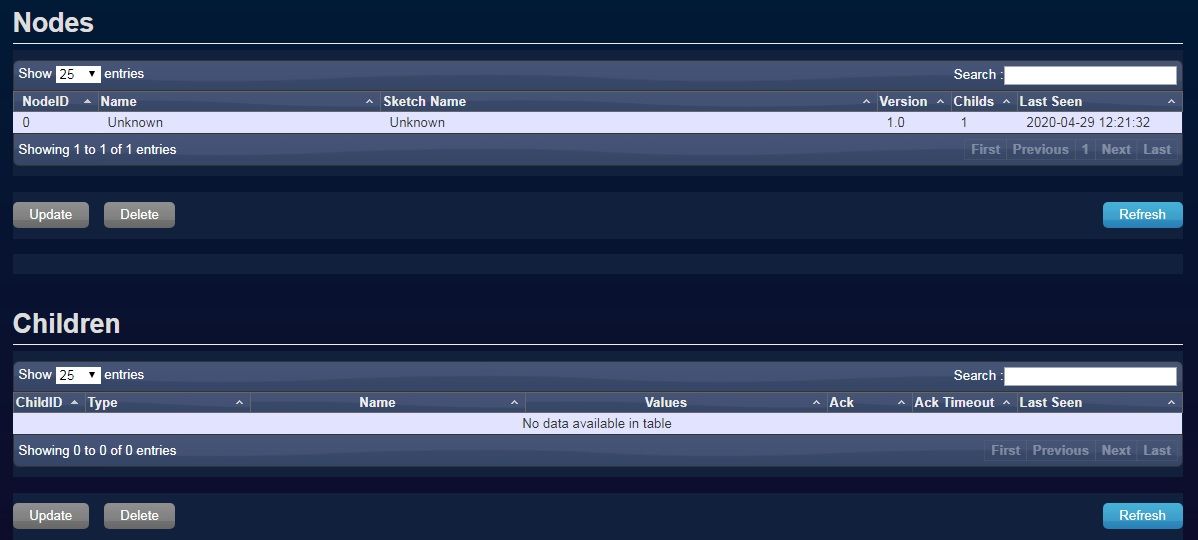
but still node is unknown.
Please help. -
I checked the frames. And when i coneccted USB-RS485 to the computer i've got this in Realterm:

And next in python script on Raspbeery Pi i've got this:
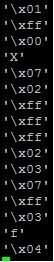
So, i think the communication beetwen Raspberry Pi and Arduino is working (through USB-RS485 converter).
How should looks the frame of presentation, and sendSketchInfo ?
-
I bought second arduino uno.
And, first Arduino has example MotionSensorRS485,
second Arduino has example GetwaySerialRS485.And i have got the same situation. So even Gateway on Arduino doesn't see MotionSensor.
Next test i made, i disconnected MAX485 converters, and i connected UART pins from first arduino to the second one (UART = Rx(8) <-> Tx(9), Tx(9)<->Rx(8)) and GND. And i have got the same result. Gateway doesn't see sensor.
Hello! It looks like you're interested in this conversation, but you don't have an account yet.
Getting fed up of having to scroll through the same posts each visit? When you register for an account, you'll always come back to exactly where you were before, and choose to be notified of new replies (either via email, or push notification). You'll also be able to save bookmarks and upvote posts to show your appreciation to other community members.
With your input, this post could be even better 💗
Register Login