Skip to content
  • MySensors
  • OpenHardware.io
  • Categories
  • Recent
  • Tags
  • Popular
Skins
  • Light
  • Brite
  • Cerulean
  • Cosmo
  • Flatly
  • Journal
  • Litera
  • Lumen
  • Lux
  • Materia
  • Minty
  • Morph
  • Pulse
  • Sandstone
  • Simplex
  • Sketchy
  • Spacelab
  • United
  • Yeti
  • Zephyr
  • Dark
  • Cyborg
  • Darkly
  • Quartz
  • Slate
  • Solar
  • Superhero
  • Vapor

  • Default (No Skin)
  • No Skin
Collapse
Brand Logo
  1. Home
  2. Hardware
  3. MQ2 Sensor w/AirQuality Sketch

MQ2 Sensor w/AirQuality Sketch

Scheduled Pinned Locked Moved Hardware
15 Posts 5 Posters 12.4k Views 5 Watching
  • Oldest to Newest
  • Newest to Oldest
  • Most Votes
Reply
  • Reply as topic
Log in to reply
This topic has been deleted. Only users with topic management privileges can see it.
  • G gigaguy

    @robosensor What is on pin 13? In the Setup() warmup part?
    btw, I am getting a value of 1 or 2, after warmup.

    R Offline
    R Offline
    robosensor
    wrote on last edited by robosensor
    #6

    @gigaguy
    example response of sensors for natural gas (left) and alcohol (right):
    gas.png

    1 Reply Last reply
    0
    • E Offline
      E Offline
      epierre
      Hero Member
      wrote on last edited by
      #7

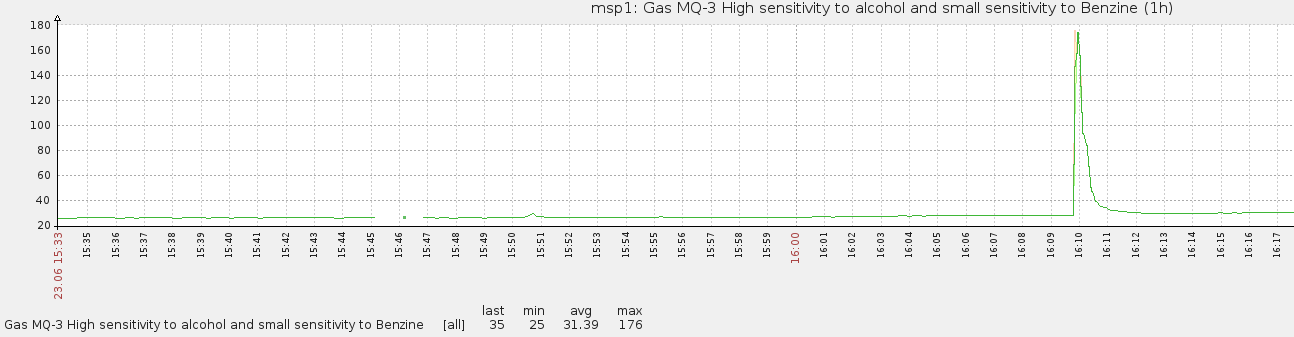
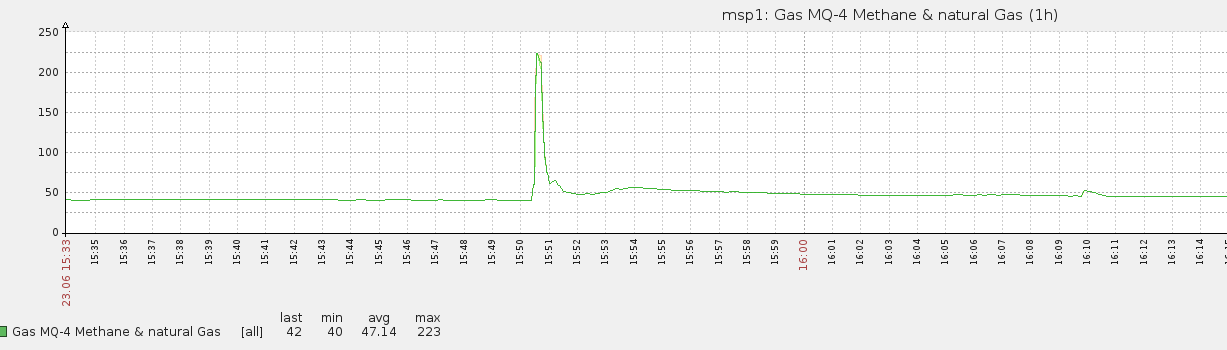
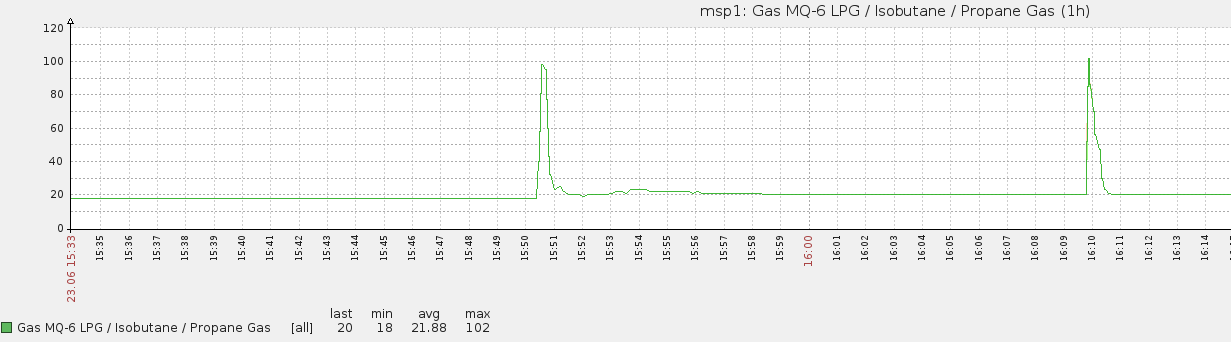
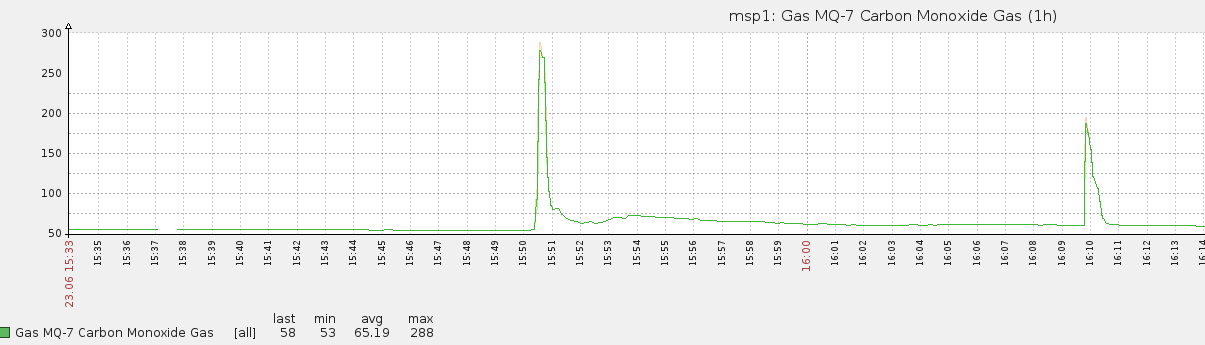
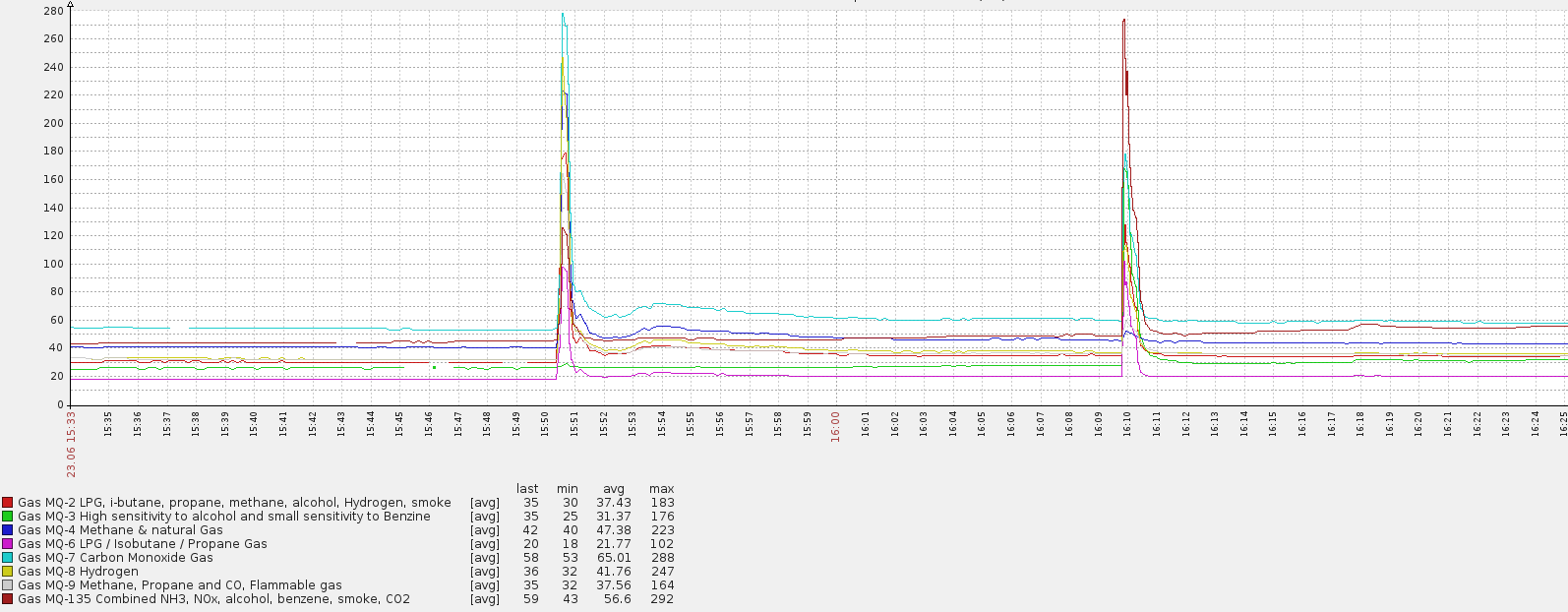
      @robosensor this graph shows well the limit ofg the MQ gas sensors, they somehow all react to the same gases, and thus are not one gas specific.

      z-wave - Vera -> Domoticz
      rfx - Domoticz <- MyDomoAtHome <- Imperihome
      mysensors -> mysensors-gw -> Domoticz

      R 1 Reply Last reply
      0
      • E epierre

        @robosensor this graph shows well the limit ofg the MQ gas sensors, they somehow all react to the same gases, and thus are not one gas specific.

        R Offline
        R Offline
        robosensor
        wrote on last edited by
        #8

        @epierre in general, you are right, but there are exceptions.

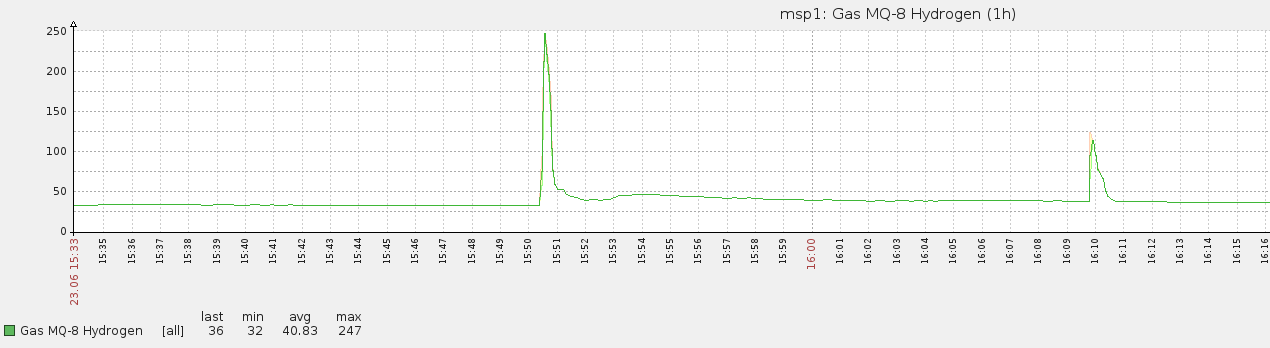
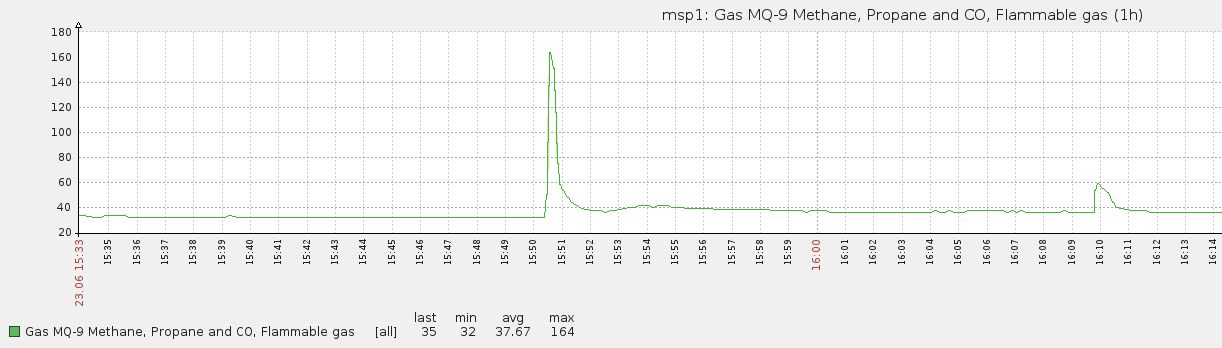
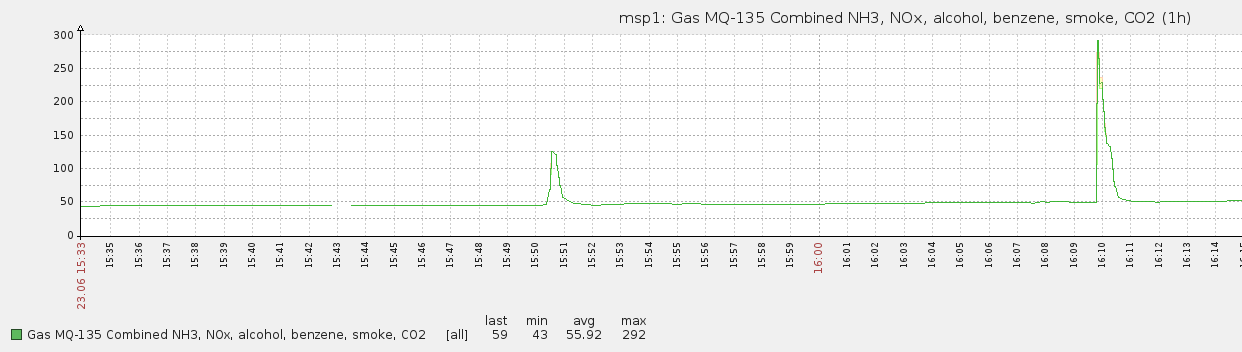
        This measurements, but one sensor per graph:
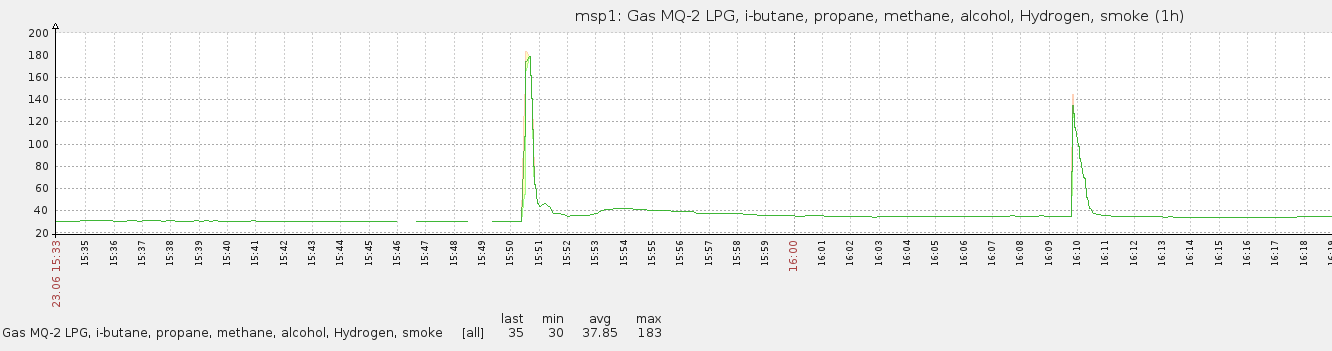
        mq2.png
        mq3.png
        mq4.png
        mq6.png
        mq7.png
        mq8.png
        mq9.png
        mq135.png

        And 6-day graph of all sensors:
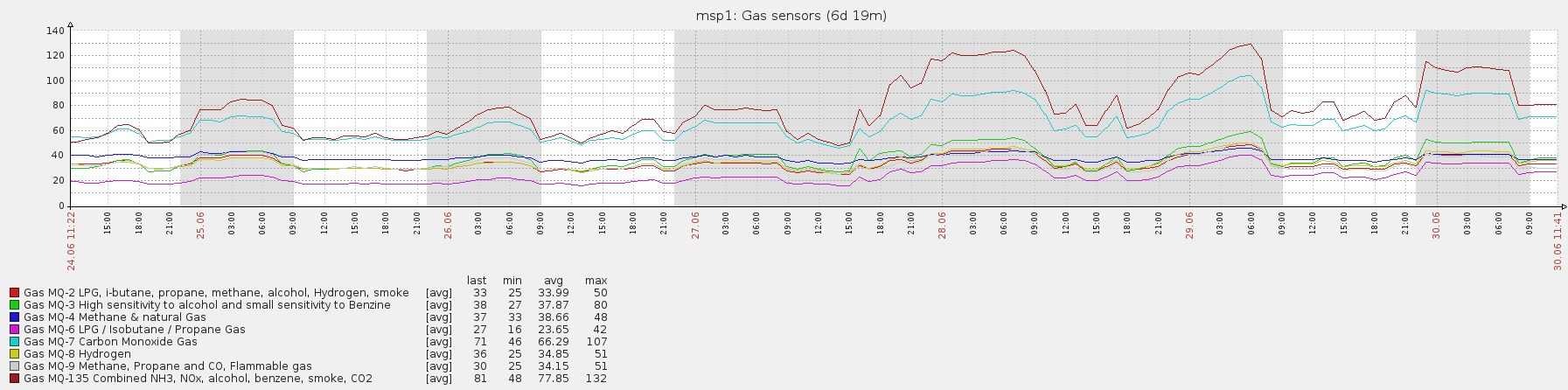
        mq-all-6days.png

        1 Reply Last reply
        0
        • E Offline
          E Offline
          epierre
          Hero Member
          wrote on last edited by
          #9

          @robosensor sure, but people need to know not to rely for their life on these classes of sensors.

          z-wave - Vera -> Domoticz
          rfx - Domoticz <- MyDomoAtHome <- Imperihome
          mysensors -> mysensors-gw -> Domoticz

          1 Reply Last reply
          0
          • V Offline
            V Offline
            Viper_Scull
            wrote on last edited by
            #10

            is it normal that the reads of my MQ-2 sensor are 0ppm in fresh air?
            If I use a lighter to throw some gas, the reads skyrocket and then without gas they go back to zero.
            Should I adjust the sensitivity?

            1 Reply Last reply
            0
            • E Offline
              E Offline
              epierre
              Hero Member
              wrote on last edited by
              #11

              @Viper_Scull If you follow my method, it considers clean air has no toxic gas so it should be 0.

              If you are able to do a calibration, you could change that, but I would recommend to keep the straight lean air way if you cannot do that.

              z-wave - Vera -> Domoticz
              rfx - Domoticz <- MyDomoAtHome <- Imperihome
              mysensors -> mysensors-gw -> Domoticz

              V 1 Reply Last reply
              0
              • E epierre

                @Viper_Scull If you follow my method, it considers clean air has no toxic gas so it should be 0.

                If you are able to do a calibration, you could change that, but I would recommend to keep the straight lean air way if you cannot do that.

                V Offline
                V Offline
                Viper_Scull
                wrote on last edited by
                #12

                @epierre said:

                @Viper_Scull If you follow my method, it considers clean air has no toxic gas so it should be 0.

                If you are able to do a calibration, you could change that, but I would recommend to keep the straight lean air way if you cannot do that.

                @epierre I use the AirQualitySensor example in the MySensors library that I believe is your work indeed. Happy now to know that it's ok 0ppm for clean air.

                One thing I noticed on the sketch is that last_mq inital value is 0. If we are in clean air, no value is send to the gateway when connected because val_mq = last_mq, so the controller would have no data to display unless it sets it to zero by default or gas is present.

                By the way, I can't get domoticz to recognize this sensor. It receives the name of the sketch and the version, but although I can see that the sensor sends the value, there's no sign of it in the log of domotic and no device is recognized.

                1 Reply Last reply
                0
                • E Offline
                  E Offline
                  epierre
                  Hero Member
                  wrote on last edited by
                  #13

                  @Viper_Scull I have someone else reporting this, you should ask @GizMoCuz for him to support it

                  z-wave - Vera -> Domoticz
                  rfx - Domoticz <- MyDomoAtHome <- Imperihome
                  mysensors -> mysensors-gw -> Domoticz

                  1 Reply Last reply
                  0
                  • V Offline
                    V Offline
                    Viper_Scull
                    wrote on last edited by
                    #14

                    @epierre, already asked. Turns out, domoticz doesn't support V_VARs. Changing V_VAR1 in the sketch for V_DUST_LEVEL works.

                    Moshe LivneM 1 Reply Last reply
                    0
                    • V Viper_Scull

                      @epierre, already asked. Turns out, domoticz doesn't support V_VARs. Changing V_VAR1 in the sketch for V_DUST_LEVEL works.

                      Moshe LivneM Offline
                      Moshe LivneM Offline
                      Moshe Livne
                      Hero Member
                      wrote on last edited by
                      #15

                      @Viper_Scull Domoticz supports V_VARs, just not as a viewable or modifiable value on the controller. It will store and return the V_VARs values for the sketch, nothing more.


                      1 Reply Last reply
                      0

                      Hello! It looks like you're interested in this conversation, but you don't have an account yet.

                      Getting fed up of having to scroll through the same posts each visit? When you register for an account, you'll always come back to exactly where you were before, and choose to be notified of new replies (either via email, or push notification). You'll also be able to save bookmarks and upvote posts to show your appreciation to other community members.

                      With your input, this post could be even better 💗

                      Register Login
                      Reply
                      • Reply as topic
                      Log in to reply
                      • Oldest to Newest
                      • Newest to Oldest
                      • Most Votes


                      18

                      Online

                      12.0k

                      Users

                      11.2k

                      Topics

                      113.4k

                      Posts


                      Copyright 2025 TBD   |   Forum Guidelines   |   Privacy Policy   |   Terms of Service
                      • Login

                      • Don't have an account? Register

                      • Login or register to search.
                      • First post
                        Last post
                      0
                      • MySensors
                      • OpenHardware.io
                      • Categories
                      • Recent
                      • Tags
                      • Popular