
Any good home automation controllers?
-
Domoticz allow to enter DB password:
If you have put a password to your database (what I recommand)
In database field, put:domoticz&u=DatabaseUser&p=DatabasePassword
Maybe the same problem with crashing your Domoticz if enabled InfluxDP push.
Many people using it normally. -
@yveaux Can you explain a bit how your setup looks like? Are you controlling anything with it or just collecting data?
@avamander If you want more than just collecting data, you may also have a look at FHEM. This is a rock-solid piece of software written in Perl (this indeed is very special) allowing to virtually connect anything with IoT-capabilities and steering it.
But not everybody likes it's look and feel. This is getting better using the new "f18"-Design, but still it's imo more targeting towards those wanting to get things done in the background. For UI design, there are also several options, but this needs some "hands on work" to be done.
But eg. grafana is also supported as well as logging using all kind of SQL-databases.Despite most of the forum post are in german, english questions will also be answered in most cases
-
Perhaps you could create a python plugin for Domoticz to automate creating the sensors somehow. Any plugin can create up to 255 new devices.
-
-
As for Domoticz, you could make a forum post what you would like to see changed...
It might be a bit difficult to setup initially, working with idx values, but when you just go to the devices table, you can quickly find the correct idx.
As for the value type/name, that is stored in the correct influxdb password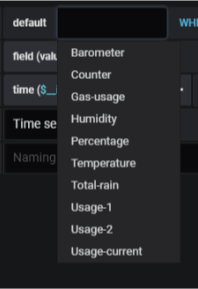
So the series name comment does not make sense.
Now, the reason why i choose for the idx value, instead of a name, is because when you rename a device, the idx stays the same.
But on the other hand, when you have a cheap temperature sensor, and the battery runs out, you probably get a new device-id when inserting new batteries, so the idx changes.
You will also have to deal with scenarios when using other solutions.As for username/password support, this will be added soon (i need to find some time, unless someone beats me to it).
If you have a better solution, you can always propose this on the forum/github
-
Domoticz allow to enter DB password:
If you have put a password to your database (what I recommand)
In database field, put:domoticz&u=DatabaseUser&p=DatabasePassword
Maybe the same problem with crashing your Domoticz if enabled InfluxDP push.
Many people using it normally. -
As for Domoticz, you could make a forum post what you would like to see changed...
It might be a bit difficult to setup initially, working with idx values, but when you just go to the devices table, you can quickly find the correct idx.
As for the value type/name, that is stored in the correct influxdb passwordSo the series name comment does not make sense.
Now, the reason why i choose for the idx value, instead of a name, is because when you rename a device, the idx stays the same.
But on the other hand, when you have a cheap temperature sensor, and the battery runs out, you probably get a new device-id when inserting new batteries, so the idx changes.
You will also have to deal with scenarios when using other solutions.As for username/password support, this will be added soon (i need to find some time, unless someone beats me to it).
If you have a better solution, you can always propose this on the forum/github
-
We’ve spent a lot of time researching smart home and home automation over the past year or so for our own house and there are a couple of sites that we continually refer to.
CNET give some really good in-depth reviews and features of specific smart home products however their website is pretty bloated with ads.
For the Smart Home is one of the better blogs for smart home stuff – I’ve gone to them for advice on a couple of products in the past and their articles are much easier to read than a lot of the other blogs on this topic.
Although they aren’t specifically focused on smart home/home automation per-se, The Wirecutter do some really thorough reviews of specific smart home products.
-
Small update to the situation. With awesome work done by @jkandasa, the main developer of MyController the InfluxDB backend is now fast enough to almost keep up with the data inserted, that's a big improvement. This means the last issue I had with MyController just got resolved :D and it's suitable for my use-case. Yay!
-
If you’re already using MySensors, Home Assistant is definitely worth a look - great community, lots of integrations, and works really well with DIY setups. OpenHAB is another solid option if you prefer something more configurable.



Hello! It looks like you're interested in this conversation, but you don't have an account yet.
Getting fed up of having to scroll through the same posts each visit? When you register for an account, you'll always come back to exactly where you were before, and choose to be notified of new replies (either via email, or push notification). You'll also be able to save bookmarks and upvote posts to show your appreciation to other community members.
With your input, this post could be even better 💗
Register Login