

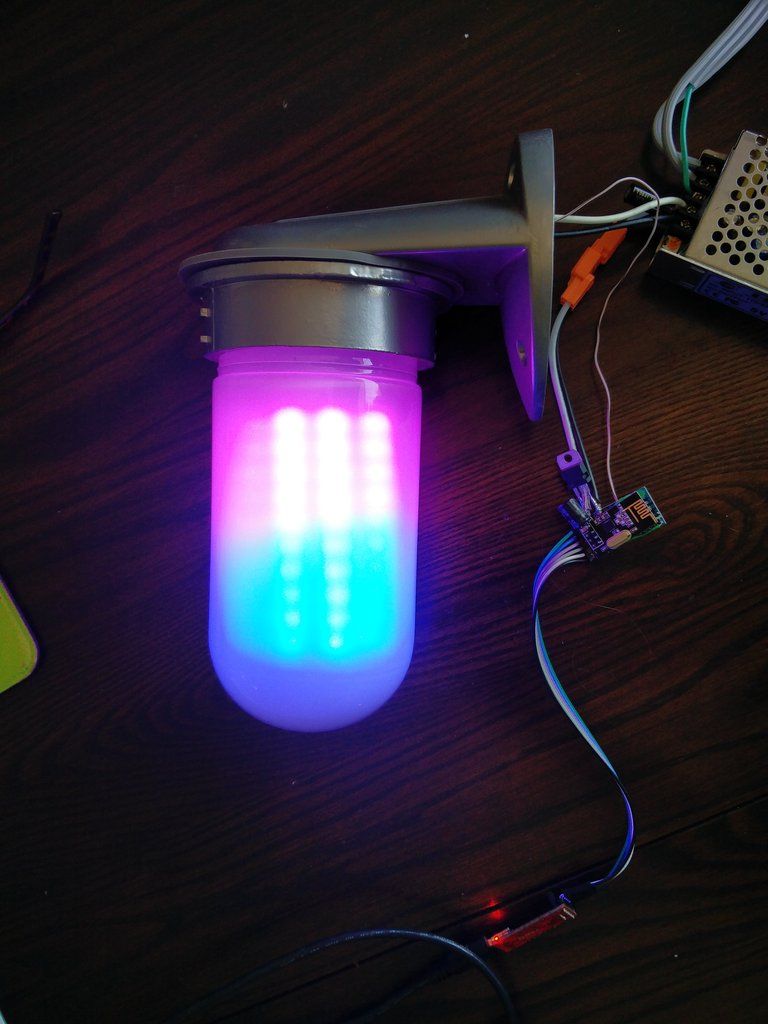
So Im building a porch light using some ws2812b's. I am connecting it to openhab so I can do all kinds of fun things based on the time of year, football games and such.
I would like to see if anyone can see in my code, sense I am a beginner, ways to clean it up as what I have already takes up 86% and I would like it to do a few more things. I would really like any feedback, including other things to do with it.
#include <Adafruit_GFX.h>
#include <Adafruit_NeoMatrix.h>
#include <Adafruit_NeoPixel.h>
#include "RGB.h"
#include <SPI.h>
#define MY_NODE_ID 16
#define MY_RADIO_NRF24
#define MY_DEBUG
#define MY_REPEATER_FEATURE
#include <MySensors.h>
#include <MyConfig.h>

#define PIN 5
#define CHILD_ID_LED 1
#define CHILD_ID_C1  2
#define CHILD_ID_C2  3
#define CHILD_ID_C3  4
#define CHILD_ID_C4  5
#define CHILD_ID_C5  6
#define CHILD_ID_C6  7


//   NEO_MATRIX_TOP, NEO_MATRIX_BOTTOM, NEO_MATRIX_LEFT, NEO_MATRIX_RIGHT:
//     Position of the FIRST LED in the matrix; pick two, e.g.
//     NEO_MATRIX_TOP + NEO_MATRIX_LEFT for the top-left corner.
//   NEO_MATRIX_ROWS, NEO_MATRIX_COLUMNS: LEDs are arranged in horizontal
//     rows or in vertical columns, respectively; pick one or the other.
//   NEO_MATRIX_PROGRESSIVE, NEO_MATRIX_ZIGZAG: all rows/columns proceed
//     in the same order, or alternate lines reverse direction; pick one.
//   See example below for these values in action.

Adafruit_NeoMatrix matrix = Adafruit_NeoMatrix(8, 10, 1, 1, PIN,
  NEO_MATRIX_TOP     + NEO_MATRIX_LEFT +
  NEO_MATRIX_COLUMNS + NEO_MATRIX_ZIGZAG,
  NEO_GRB            + NEO_KHZ800);

const uint16_t colors[] = {
  matrix.Color(orange.r, orange.g, orange.b), matrix.Color(blue.r, blue.g, blue.b) };

int x    = matrix.width();
int pass = 0;
int LEDMODE = 0;
RGB Color1 = seanwhite;
RGB Color2 = {20,20,20};
RGB Color3 = {20,20,20};
RGB Color4 = {20,20,20};
RGB Color5 = {20,20,20};
RGB Color6 = {20,20,20};

void setup() {
  Serial.begin(115200);
  matrix.begin();
  matrix.setTextWrap(false);
  matrix.setBrightness(100);
}

void presentation()
{
  sendSketchInfo("Porchlight", ".9");
  present(CHILD_ID_LED, S_CUSTOM);
  present(CHILD_ID_C1, S_INFO);
  present(CHILD_ID_C2, S_INFO);
  present(CHILD_ID_C3, S_INFO);
  present(CHILD_ID_C4, S_INFO);
  present(CHILD_ID_C5, S_INFO);
  present(CHILD_ID_C6, S_INFO);
}

void loop() {
  if(LEDMODE == 0)  {
    matrix.fillScreen(matrix.Color(Color1.r, Color1.g, Color1.b));
    matrix.show();
  }
  if(LEDMODE == 1)  {
    if(++pass >= 2) pass = 0;
    if(pass == 0) colorWipe(orange, 10);
    if(pass == 1) colorWipe(blue, 10);
    matrix.show();
    String twitterHandle = "B R O N C O S";
    scrollText(twitterHandle);
    delay(100);
  }
  if(LEDMODE == 2)  {
   // You can put this code in loop()
  int r;
  int c;
  r = random(10);
  c = random(8);
  fadePixel(c, r, Color1, Color2, 140, 0);
  matrix.show();
  }
  if(LEDMODE == 3)  {
    matrix.fillScreen(matrix.Color(Color1.r, Color1.g, Color1.b));
    colorWipe(Color2, 100);

  }
  if(LEDMODE == 4)  {
  colorWipe(red, 30);
  colorWipe(orange, 30);
  colorWipe(yellow, 30);
  colorWipe(green,30);
  colorWipe(blue, 30);
  colorWipe(purple, 30);
  }
  if(LEDMODE == 5)  {
    crossFade(orange, blue, 50, 10);
    crossFade(blue, orange, 50, 10);
  }
  if(LEDMODE == 6)  {
    colorWipe(seanwhite,10);
    drawLogo();
  }
  if(LEDMODE == 7)  {
    colorWipe(off, 10);
  }
}

// Fill the pixels one after the other with a color
void colorWipe(RGB color, uint8_t wait) {
  for(uint16_t row=0; row < 10; row++) {
    for(uint16_t column=0; column < 8; column++) {
      matrix.drawPixel(column, row, matrix.Color(color.r, color.g, color.b));
      matrix.show();
      delay(wait);
    }
  }
}
// Crossfade entire screen from startColor to endColor
void crossFade(RGB startColor, RGB endColor, int steps, int wait) {
  for(int i = 0; i <= steps; i++)
  {
     int newR = startColor.r + (endColor.r - startColor.r) * i / steps;
     int newG = startColor.g + (endColor.g - startColor.g) * i / steps;
     int newB = startColor.b + (endColor.b - startColor.b) * i / steps;

     matrix.fillScreen(matrix.Color(newR, newG, newB));
     matrix.show();
     delay(wait);
  }
}

void drawLogo() {
  // This 8x8 array represents the LED matrix pixels.
  // A value of 1 means we’ll fade the pixel to white
  int logo[10][8] = {
   {0, 0, 0, 0, 0, 0, 0, 0},
   {0, 1, 0, 0, 0, 1, 0, 0},
   {0, 1, 1, 0, 1, 1, 0, 0},
   {0, 1, 0, 1, 0, 1, 0, 0},
   {0, 1, 0, 1, 0, 1, 0, 0},
   {0, 1, 0, 0, 0, 1, 0, 0},
   {0, 1, 0, 0, 0, 1, 0, 0},
   {0, 1, 0, 0, 0, 1, 0, 0},
   {0, 1, 0, 0, 0, 1, 0, 0},
   {0, 0, 0, 0, 0, 0, 0, 0},
  };

  for(int row = 0; row < 10; row++) {
    for(int column = 0; column < 8; column++) {
     if(logo[row][column] == 1) {
       fadePixel(column, row, purple, white, 120, 0);
     }
   }
  }
}

// Fade pixel (x, y) from startColor to endColor
void fadePixel(int x, int y, RGB startColor, RGB endColor, int steps, int wait) {
  for(int i = 0; i <= steps; i++)
  {
     int newR = startColor.r + (endColor.r - startColor.r) * i / steps;
     int newG = startColor.g + (endColor.g - startColor.g) * i / steps;
     int newB = startColor.b + (endColor.b - startColor.b) * i / steps;

     matrix.drawPixel(x, y, matrix.Color(newR, newG, newB));
     matrix.show();
     delay(wait);
  }
}


void scrollText(String textToDisplay) {
  int x = matrix.width();

  // Account for 6 pixel wide characters plus a space
  int pixelsInText = textToDisplay.length() * 7;

  matrix.setCursor(x, 0);
  matrix.print(textToDisplay);
  matrix.show();

  while(x > (matrix.width() - pixelsInText)) {
    matrix.fillScreen(colors[pass]);
    matrix.setCursor(--x, 1);
    matrix.print(textToDisplay);
    matrix.show();
    delay(75);
  }
}

void receive(const MyMessage &message) {
  // We only expect one type of message from controller. But we better check anyway.
  if (message.type == V_CUSTOM) {
    Serial.println( "Porchlight mode recieved..." );
    int porchvalue= atoi( message.data );
    if ((porchvalue<0)||(porchvalue>7)) {
      Serial.print(porchvalue);
      Serial.println( " is not a defined value." );
      return;
    } else {
      LEDMODE = porchvalue;
    }
  }
  if (message.type == V_TEXT) {
    Serial.println( "New message V_TEXT type recieved...");
    Serial.print("Message: "); Serial.print(message.sensor); Serial.print(", Message: "); Serial.println(message.getString());
    String input = message.getString();
    Serial.println(input);
    int commaIndex = input.indexOf(',');
    //  Search for the next comma just after the first
    int secondCommaIndex = input.indexOf(',', commaIndex+1);
    String firstValue = input.substring(0, commaIndex);
    String secondValue = input.substring(commaIndex+1, secondCommaIndex);
    String thirdValue = input.substring(secondCommaIndex+1); // To the end of the string
    int firstValueI = firstValue.toInt();
    int secondValueI = secondValue.toInt();
    int thirdValueI = thirdValue.toInt();
    if (message.sensor == 2) {
      Color1 = (RGB){firstValueI,secondValueI,thirdValueI};
      Serial.print("Color1 updated: ");
      Serial.print(Color1.r);
      Serial.print(" ");
      Serial.print(Color1.g);
      Serial.print(" ");
      Serial.println(Color1.b);
    }
    if (message.sensor == 3) {
      Color2 = (RGB){firstValueI,secondValueI,thirdValueI};
      Serial.print("Color2 updated: ");
      Serial.print(Color2.r);
      Serial.print(" ");
      Serial.print(Color2.g);
      Serial.print(" ");
      Serial.println(Color2.b);
    }
    if (message.sensor == 4) {
      Color3 = (RGB){firstValueI,secondValueI,thirdValueI};
      Serial.print("Color3 updated: ");
      Serial.print(Color3.r);
      Serial.print(" ");
      Serial.print(Color3.g);
      Serial.print(" ");
      Serial.println(Color3.b);
    }
    if (message.sensor == 5) {
      Color4 = (RGB){firstValueI,secondValueI,thirdValueI};
      Serial.print("Color4 updated: ");
      Serial.print(Color4.r);
      Serial.print(" ");
      Serial.print(Color4.g);
      Serial.print(" ");
      Serial.println(Color4.b);
    }
    if (message.sensor == 6) {
      Color5 = (RGB){firstValueI,secondValueI,thirdValueI};
      Serial.print("Color5 updated: ");
      Serial.print(Color5.r);
      Serial.print(" ");
      Serial.print(Color5.g);
      Serial.print(" ");
      Serial.println(Color5.b);
    }
    if (message.sensor == 7) {
      Color6 = (RGB){firstValueI,secondValueI,thirdValueI};
      Serial.print("Color6 updated: ");
      Serial.print(Color6.r);
      Serial.print(" ");
      Serial.print(Color6.g);
      Serial.print(" ");
      Serial.println(Color6.b);
    }
  }
}