
raspberrry pi 4 + rf24 receives data from arduino + rf24
-
Hello!
I have a Raspberry Pi 4 with a nrf24l01 module connected that has to receive data (temperature measured by a DHT) from an Arduino that also has a nrf24l01 connected to it. I want to implement it to Openhab, but first I am trying to see in the terminal if the connection is ok - currently it fails (it doesn’t receive any data). Here are the steps I have taken.
I have connected the Arduino to the nrf24l01 module and to a DHT sensor as it follows:
nrf24l01             Arduino Uno
GND                    GND
CE                       pin 4
SCK                     pin 13
MISO                   pin 12
VCC                     3.3V
CSN                     pin 2
MOSI                   pin 11
IRQ                      to nothing
The code on the Arduino is:
// Enable debug prints
#define MY_DEBUG

// Enable and select radio type attached
#define MY_RADIO_RF24
//#define MY_RADIO_RFM69
//#define MY_RS485

// Enable serial gateway
#define MY_GATEWAY_SERIAL

#include <SPI.h>
#include <MySensors.h>
#include <DHT.h>

// Set this to the pin you connected the DHT's data pin to
#define DHT_DATA_PIN 3

#define DHTTYPE DHT11

// Sleep time between sensor updates (in milliseconds)
// Must be >1000ms for DHT22 and >2000ms for DHT11
static const uint64_t UPDATE_INTERVAL = 60000;

#define CHILD_ID_TEMP 2

float lastTemp;
uint8_t nNoUpdatesTemp;
bool metric = true;

MyMessage msgTemp(CHILD_ID_TEMP, V_TEMP);
DHT dht(DHT_DATA_PIN, DHTTYPE);

void presentation()
{
  // Send the sketch version information to the gateway
  sendSketchInfo("Temperature", "1.1");

  // Register all sensors to gw (they will be created as child devices)
  present(CHILD_ID_TEMP, S_TEMP);
}


void setup()
{
  dht.begin();
}


void loop()
{
  // Get temperature from DHT library
  float temperature = dht.readTemperature();

  send(msgTemp.set(temperature, 1));

  // Sleep for a while to save energy
  sleep(UPDATE_INTERVAL);
}
The wiring scheme for the Raspberry Pi 4 is:
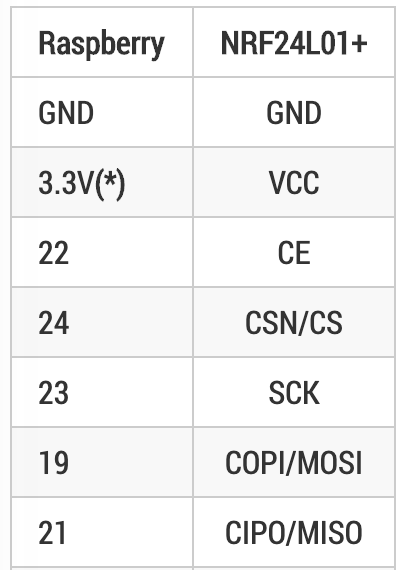
I have followed the instructions at https://www.mysensors.org/build/raspberry with the following configurations:
--my-transport=rf24
--my-gateway=serial --my-serial-is-pty —my-serial-port=/dev/ttyMySensorsGatewayI have build the gateway but when I test it with sudo ./bin/mysgw I get the following error message:
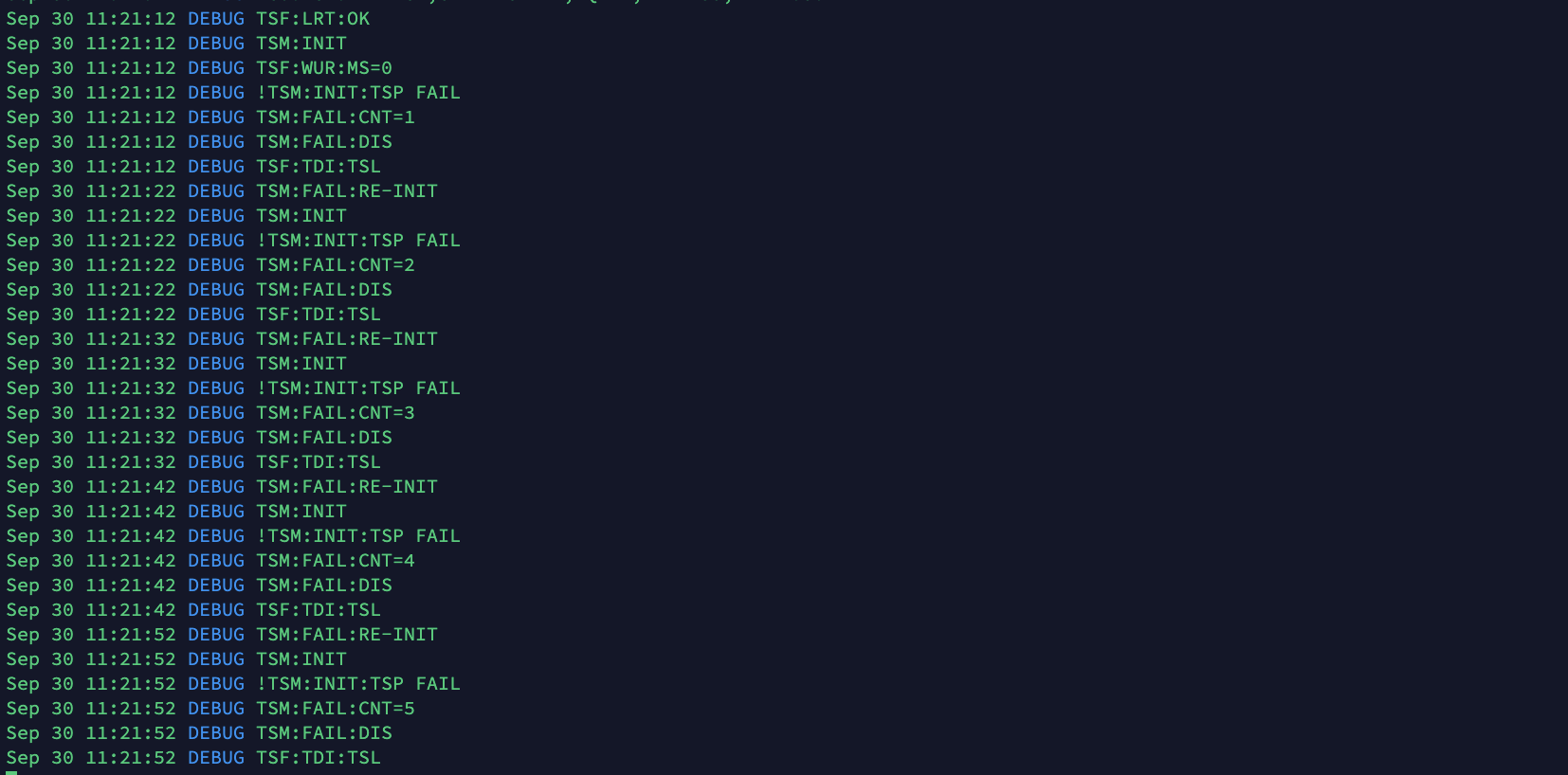
Do you know what may cause the error? I am relatively new and I didn’t try debugging it yet.
Thanks!
-
Hello!
I have a Raspberry Pi 4 with a nrf24l01 module connected that has to receive data (temperature measured by a DHT) from an Arduino that also has a nrf24l01 connected to it. I want to implement it to Openhab, but first I am trying to see in the terminal if the connection is ok - currently it fails (it doesn’t receive any data). Here are the steps I have taken.
I have connected the Arduino to the nrf24l01 module and to a DHT sensor as it follows:
nrf24l01             Arduino Uno
GND                    GND
CE                       pin 4
SCK                     pin 13
MISO                   pin 12
VCC                     3.3V
CSN                     pin 2
MOSI                   pin 11
IRQ                      to nothing
The code on the Arduino is:
// Enable debug prints
#define MY_DEBUG

// Enable and select radio type attached
#define MY_RADIO_RF24
//#define MY_RADIO_RFM69
//#define MY_RS485

// Enable serial gateway
#define MY_GATEWAY_SERIAL

#include <SPI.h>
#include <MySensors.h>
#include <DHT.h>

// Set this to the pin you connected the DHT's data pin to
#define DHT_DATA_PIN 3

#define DHTTYPE DHT11

// Sleep time between sensor updates (in milliseconds)
// Must be >1000ms for DHT22 and >2000ms for DHT11
static const uint64_t UPDATE_INTERVAL = 60000;

#define CHILD_ID_TEMP 2

float lastTemp;
uint8_t nNoUpdatesTemp;
bool metric = true;

MyMessage msgTemp(CHILD_ID_TEMP, V_TEMP);
DHT dht(DHT_DATA_PIN, DHTTYPE);

void presentation()
{
  // Send the sketch version information to the gateway
  sendSketchInfo("Temperature", "1.1");

  // Register all sensors to gw (they will be created as child devices)
  present(CHILD_ID_TEMP, S_TEMP);
}


void setup()
{
  dht.begin();
}


void loop()
{
  // Get temperature from DHT library
  float temperature = dht.readTemperature();

  send(msgTemp.set(temperature, 1));

  // Sleep for a while to save energy
  sleep(UPDATE_INTERVAL);
}
The wiring scheme for the Raspberry Pi 4 is:
I have followed the instructions at https://www.mysensors.org/build/raspberry with the following configurations:
--my-transport=rf24
--my-gateway=serial --my-serial-is-pty —my-serial-port=/dev/ttyMySensorsGatewayI have build the gateway but when I test it with sudo ./bin/mysgw I get the following error message:
Do you know what may cause the error? I am relatively new and I didn’t try debugging it yet.
Thanks!
Welcome to the forum @Stoica-Andreea
TSM INIT TSP FAIL means that the Raspberry Pi is unable to talk to the nrf24. Double/triple-check the wiring. If you can't find anything wrong, post photos from multiple angles and we'll try to spot the problem. An extra pair of eyes can often help.
Also try to switch the nrf24. It could be broken.
If you haven't already, see https://forum.mysensors.org/topic/666/read-this-first-it-could-save-you-a-lot-of-time/ for the most common problems and how to troubleshoot them efficiently.
-
Thanks a lot for the reply! It was very useful. After debugging I came to the conclusion that one of the nrf24 modules was faulty.
-
I have replaced de nrf24 sensors and I managed to get the right message for testing:
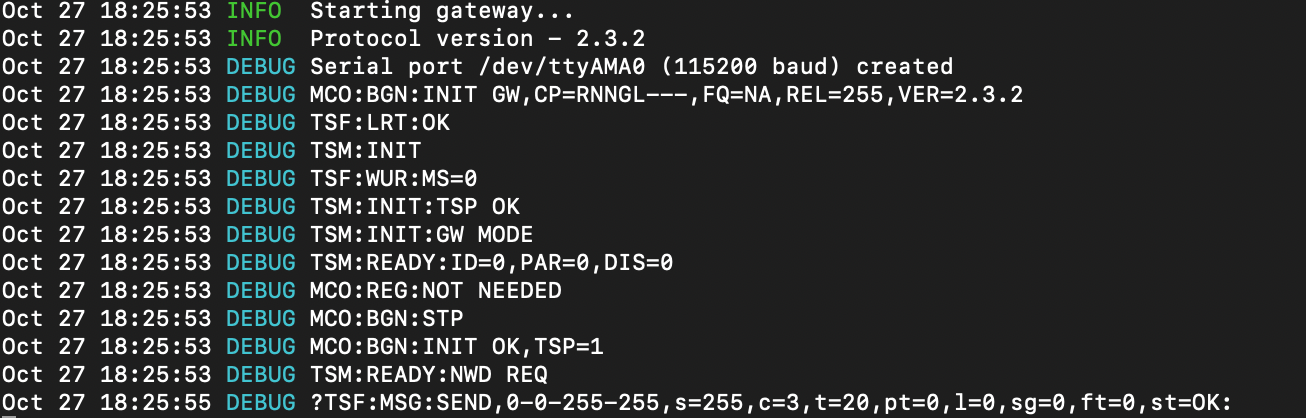
I am confused because I have read a lot of posts and I couldn't find a clear answer.
I want to use the rpi as the gateway without connecting a controller via the usb port. Still, I have used ./configure with the serial gateway tags as explained in this tutorial https://www.mysensors.org/build/raspberry because I have read that the port can be virtual and it doesn't need a controller connected to the rpi. The mysgw.service is up and running at every boot of the rpi.I am working with openhab and I need to display the measured values on the web site. Here is the debug window for openhab.
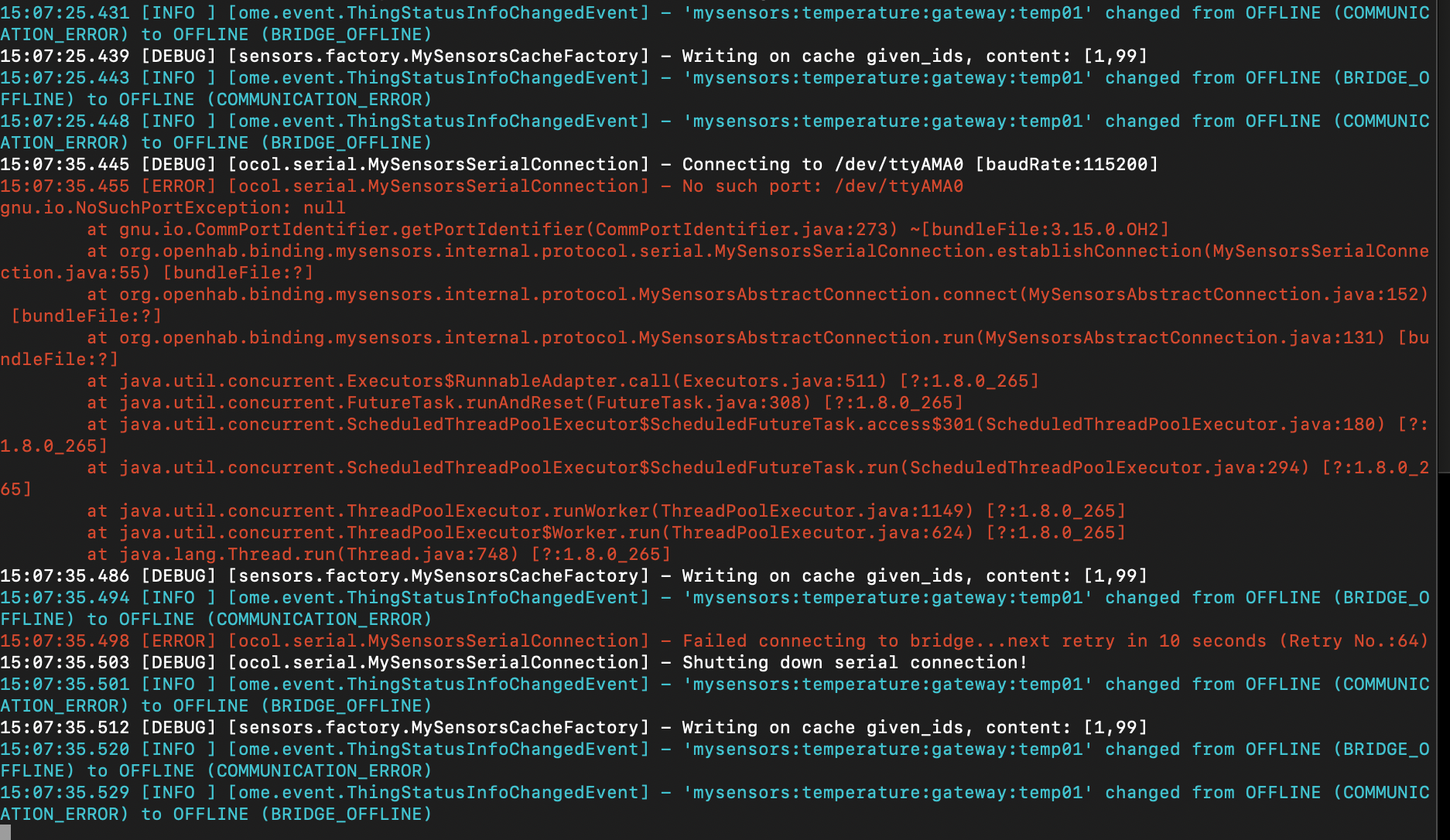
Do you have any suggestions or tutorials I can follow?
-
I have replaced de nrf24 sensors and I managed to get the right message for testing:
I am confused because I have read a lot of posts and I couldn't find a clear answer.
I want to use the rpi as the gateway without connecting a controller via the usb port. Still, I have used ./configure with the serial gateway tags as explained in this tutorial https://www.mysensors.org/build/raspberry because I have read that the port can be virtual and it doesn't need a controller connected to the rpi. The mysgw.service is up and running at every boot of the rpi.I am working with openhab and I need to display the measured values on the web site. Here is the debug window for openhab.
Do you have any suggestions or tutorials I can follow?
-
@Stoica-Andreea In an earlier post, you said that you had set the name of the serial port to
/dev/ttyMySensorsGateway. The openhab debug window says that it tries to open/dev/ttyAMA0. The gateway and openhab need to use the same name.@mfalkvidd I have renamed it to /dev/ttyAMA0


Hello! It looks like you're interested in this conversation, but you don't have an account yet.
Getting fed up of having to scroll through the same posts each visit? When you register for an account, you'll always come back to exactly where you were before, and choose to be notified of new replies (either via email, or push notification). You'll also be able to save bookmarks and upvote posts to show your appreciation to other community members.
With your input, this post could be even better 💗
Register Login