
Skip to content
  • MySensors
  • OpenHardware.io
  • Categories
  • Recent
  • Tags
  • Popular
Skins
  • Light
  • Brite
  • Cerulean
  • Cosmo
  • Flatly
  • Journal
  • Litera
  • Lumen
  • Lux
  • Materia
  • Minty
  • Morph
  • Pulse
  • Sandstone
  • Simplex
  • Sketchy
  • Spacelab
  • United
  • Yeti
  • Zephyr
  • Dark
  • Cyborg
  • Darkly
  • Quartz
  • Slate
  • Solar
  • Superhero
  • Vapor

  • Default (No Skin)
  • No Skin
Collapse
Brand Logo
  1. Home
  2. Development
  3. Starting my PC with a 3.3v arduino pro mini?

Starting my PC with a 3.3v arduino pro mini?
Scheduled Pinned Locked Moved Development
15 Posts 3 Posters 223 Views 3 Watching
  • Oldest to Newest
  • Newest to Oldest
  • Most Votes
Reply
  • Reply as topic
Log in to reply
This topic has been deleted. Only users with topic management privileges can see it.
  • K Offline
    K Offline
    kiesel
    wrote on last edited by
    #3

    Thank you. It seems I have some groundwork to do and learn how to read the schematics :D That hasn't been necessary until now. I'll do that and come back here when I understand enough

    1 Reply Last reply
    0
    • K Offline
      K Offline
      kiesel
      wrote on last edited by kiesel
      #4

      So I think I understand the main part of your drawing: The optocoupler keeps the Arduino circuit separate from the mainboard circuit to prevent a short. The resistor is for the diode inside the optocoupler.

      There are a few things about your drawing that I don't understand:

      1. Why is there a 5V powerline with a diode?
      2. What does the MB stand for? Mainboard
      3. Why are there two connection points from the Mainboard? Is one reset?

      I tried my first Fritzing to make sense of this and to show how I would design the connections (doesn't mean it's right).
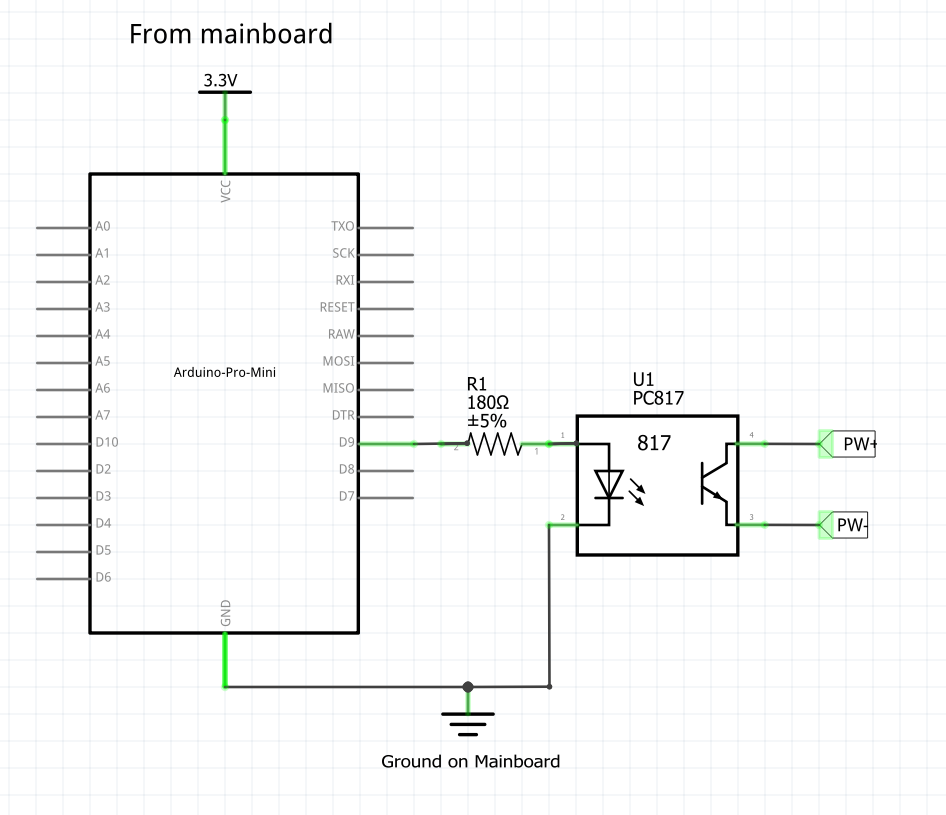
      fritzing1.png

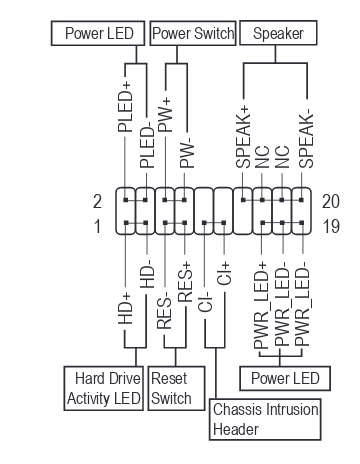
      PW+ and PW- are the pins from the schematic in the first post. , 3,3V and GND are available on another set of pins on the mainboard. Would this work?

      C 1 Reply Last reply
      0
      • K kiesel

        So I think I understand the main part of your drawing: The optocoupler keeps the Arduino circuit separate from the mainboard circuit to prevent a short. The resistor is for the diode inside the optocoupler.

        There are a few things about your drawing that I don't understand:

        1. Why is there a 5V powerline with a diode?
        2. What does the MB stand for? Mainboard
        3. Why are there two connection points from the Mainboard? Is one reset?

        I tried my first Fritzing to make sense of this and to show how I would design the connections (doesn't mean it's right).

        fritzing1.png

        PW+ and PW- are the pins from the schematic in the first post. , 3,3V and GND are available on another set of pins on the mainboard. Would this work?

        C Offline
        C Offline
        cabat
        wrote on last edited by cabat
        #5

        @kiesel Great work! :)

        1. 5V connected through diode to protect of polarity revers
        2. MB = Motherboard, you right
        3. First need to connect power button from front panel, second to connect to "Power Switch" on motherboard. This allows power on both from power button and Arduino.

        You disign is absolutely working!

        K 1 Reply Last reply
        1
        • C cabat

          @kiesel Great work! :)

          1. 5V connected through diode to protect of polarity revers
          2. MB = Motherboard, you right
          3. First need to connect power button from front panel, second to connect to "Power Switch" on motherboard. This allows power on both from power button and Arduino.

          You disign is absolutely working!

          K Offline
          K Offline
          kiesel
          wrote on last edited by
          #6

          @cabat

          Cool, thank you for your help!

          Should I use a diode between 3.3v and GND too? And do I need a resistor in the mainboard-side of the schematic? Some people used them to protect the optocoupler from high current but I guess there isn't a high current when the power button is pressed?

          C 1 Reply Last reply
          0
          • K kiesel

            @cabat

            Cool, thank you for your help!

            Should I use a diode between 3.3v and GND too? And do I need a resistor in the mainboard-side of the schematic? Some people used them to protect the optocoupler from high current but I guess there isn't a high current when the power button is pressed?

            C Offline
            C Offline
            cabat
            wrote on last edited by
            #7

            @kiesel I don't undestand - why you want to use diode between 3.3V and GND?
            About resistor on the mainboard side - i don't use it and all works fine :)

            K 1 Reply Last reply
            0
            • C cabat

              @kiesel I don't undestand - why you want to use diode between 3.3V and GND?
              About resistor on the mainboard side - i don't use it and all works fine :)

              K Offline
              K Offline
              kiesel
              wrote on last edited by
              #8

              @cabat

              To protect from polarity reversing, like you did in your sketch. Sorry if that's a stupid question!

              C 1 Reply Last reply
              0
              • K kiesel

                @cabat

                To protect from polarity reversing, like you did in your sketch. Sorry if that's a stupid question!

                C Offline
                C Offline
                cabat
                wrote on last edited by
                #9

                @kiesel See for example this for understand the idea:
                https://www.allaboutcircuits.com/technical-articles/how-to-protect-your-circuits-using-only-a-diode/

                K 1 Reply Last reply
                0
                • C cabat

                  @kiesel See for example this for understand the idea:
                  https://www.allaboutcircuits.com/technical-articles/how-to-protect-your-circuits-using-only-a-diode/

                  K Offline
                  K Offline
                  kiesel
                  wrote on last edited by
                  #10

                  @cabat

                  Ah, ok, I get it now. The diode protects me from wiring this up with POWER and GND switched. So I would use it like this
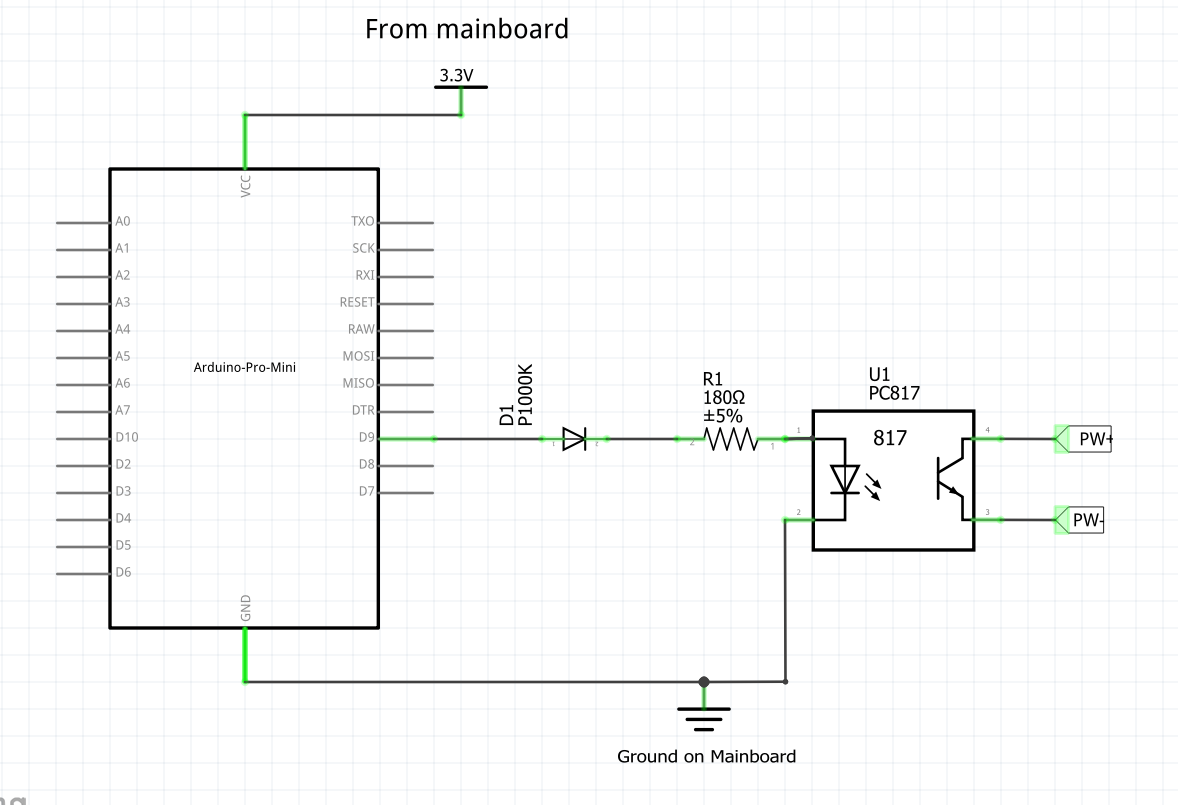
                  2f1f33db-fcc8-4a8e-8519-f2de7ef351d3-image.png

                  But I guess I can't because of the voltage drop. I think that's out of specs for the PC817. And anyway there is a very low chance that I will wiring this side of the schematic up wrong.

                  I guess I was just confused by the lower part of your drawing.

                  Thank you VERY much for your patience! I'll supply pictures when I have this hooked up in the hopes they will help others.

                  Have a nice weekend!

                  C 1 Reply Last reply
                  0
                  • K kiesel

                    @cabat

                    Ah, ok, I get it now. The diode protects me from wiring this up with POWER and GND switched. So I would use it like this

                    2f1f33db-fcc8-4a8e-8519-f2de7ef351d3-image.png

                    But I guess I can't because of the voltage drop. I think that's out of specs for the PC817. And anyway there is a very low chance that I will wiring this side of the schematic up wrong.

                    I guess I was just confused by the lower part of your drawing.

                    Thank you VERY much for your patience! I'll supply pictures when I have this hooked up in the hopes they will help others.

                    Have a nice weekend!

                    C Offline
                    C Offline
                    cabat
                    wrote on last edited by
                    #11

                    @kiesel Sorry friend, I guess I confused you a little ..
                    The diode is needed so that, when powered from the contacts on the motherboard with 5V, it does not damage my arduino, that's all :)
                    Have a nice weekend to!

                    K 1 Reply Last reply
                    1
                    • C cabat

                      @kiesel Sorry friend, I guess I confused you a little ..
                      The diode is needed so that, when powered from the contacts on the motherboard with 5V, it does not damage my arduino, that's all :)
                      Have a nice weekend to!

                      K Offline
                      K Offline
                      kiesel
                      wrote on last edited by kiesel
                      #12

                      @cabat

                      If I wanted this protection where would I put it in my schematic? :)

                      Between ground an 3.3v?

                      /edit: no between the arduino and 3.3v from the Mainboard, right?

                      C 1 Reply Last reply
                      0
                      • K kiesel

                        @cabat

                        If I wanted this protection where would I put it in my schematic? :)

                        Between ground an 3.3v?

                        /edit: no between the arduino and 3.3v from the Mainboard, right?

                        C Offline
                        C Offline
                        cabat
                        wrote on last edited by
                        #13

                        @kiesel Yes, you rigth - between 3.3V on mainboard and VCC of arduino!

                        1 Reply Last reply
                        0
                        • TheoLT Offline
                          TheoLT Offline
                          TheoL
                          Contest Winner
                          wrote on last edited by
                          #14

                          @kiesel said in Starting my PC with a 3.3v arduino pro mini?:
                          It wouldn't be logic to put it between the opto coupler and the Arduino pin. Because it's purpose is to separate the 2 circuits. Hence protecting both circuits. At least that's how I understand how Opto Couplers work. The opto coupler connects 2 circuits trough light no physical contact.

                          1 Reply Last reply
                          1
                          • K Offline
                            K Offline
                            kiesel
                            wrote on last edited by
                            #15

                            So, I finally got this done and it works just like I want it to. I used my initial schematics (plus radio, of course) and this code:

                            /**
                             * The MySensors Arduino library handles the wireless radio link and protocol
                             * between your home built sensors/actuators and HA controller of choice.
                             * The sensors forms a self healing radio network with optional repeaters. Each
                             * repeater and gateway builds a routing tables in EEPROM which keeps track of the
                             * network topology allowing messages to be routed to nodes.
                             *
                             * Created by Henrik Ekblad <henrik.ekblad@mysensors.org>
                             * Copyright (C) 2013-2015 Sensnology AB
                             * Full contributor list: https://github.com/mysensors/Arduino/graphs/contributors
                             *
                             * Documentation: http://www.mysensors.org
                             * Support Forum: http://forum.mysensors.org
                             *
                             * This program is free software; you can redistribute it and/or
                             * modify it under the terms of the GNU General Public License
                             * version 2 as published by the Free Software Foundation.
                             *
                             *******************************
                             *
                             * REVISION HISTORY
                             * Version 1.0: Yveaux
                             * 
                             * DESCRIPTION
                             * This sketch provides an example of how to implement a humidity/temperature
                             * sensor using a Si7021 sensor.
                             *  
                             * For more information, please visit:
                             * http://www.mysensors.org/build/humiditySi7021
                             * 
                             */
                            
                            // Enable debug prints
                            #define MY_DEBUG
                            
                            #define MY_OWN_DEBUG
                            
                            #ifndef MY_OWN_DEBUG //disable serial in production compile, potentially saves few uA in sleep mode
                                 #define MY_DISABLED_SERIAL
                            #endif
                            
                            
                            // Enable and select radio type attached
                            #define MY_RADIO_RFM69
                            #define MY_IS_RFM69HW
                            #define MY_RFM69_NEW_DRIVER
                            
                            
                            #define MY_NODE_ID 5
                            #define CHILD_ID_TXT 0
                            #define OUTPIN 8
                            #include <MySensors.h>
                            
                            
                            #define SKETCH_NAME "media_pc_switch"
                            #define SKETCH_MAJOR_VER "1"
                            #define SKETCH_MINOR_VER "0"
                            
                            static bool metric = true;
                            
                            MyMessage msgTxt(CHILD_ID_TXT, V_TEXT);
                            void presentation()
                            {
                               // Send the sketch version information to the gateway and Controller
                              sendSketchInfo(SKETCH_NAME, SKETCH_MAJOR_VER "." SKETCH_MINOR_VER);
                              present(CHILD_ID_TXT, S_INFO);
                            }
                            void setup()
                            { 
                               pinMode(OUTPIN, OUTPUT);    //
                               digitalWrite(OUTPIN, LOW);
                               #ifdef MY_OWN_DEBUG
                                  Serial.print("Starting: ");
                              #endif
                              send(msgTxt.set("Ready"));
                            }
                            
                            void receive(const MyMessage &msg)
                            {
                              uint16_t ms;
                              Serial.print("Received a message: ");
                              Serial.println(msg.getString());
                              send(msgTxt.set(msg.getString()));
                              ms = msg.getUInt();
                              if (ms > 10000 || ms < 1){return;}
                              send(msgTxt.set("Received"));
                              Serial.println("Pulling pin high");
                              digitalWrite(OUTPIN, HIGH);
                              Serial.print("Waiting for "); Serial.println(ms);
                              delay(ms);
                              Serial.println("Switching off");
                              digitalWrite(OUTPIN, LOW);
                              Serial.println("Delaying a few seconds to ignore message resends.");
                              send(msgTxt.set("Sleeping"));
                              delay(10000);
                              send(msgTxt.set("Ready"));
                              
                              
                            }
                            

                            Now I can use this sequence in HA to start my PC even when the power was cut:

                            wzimmer_ms_start_htpc:
                              alias: Use mysensors node 5 to start the mediapc in the living room
                              sequence:
                                repeat:
                                  sequence:
                                    #don't run if htpc already running
                                      - condition: not
                                        conditions:
                                        - condition: state
                                          entity_id: binary_sensor.htpc
                                          state: 'on'
                                    #send start signal to mysensors
                                      - service: notify.mysensors
                                        data:
                                          target: "media_pc_switch 5 0"
                                          message: 1000
                                    #wait for timeout seconds whether a message has been received
                                      - wait_for_trigger:
                                        - platform: state
                                          entity_id: sensor.media_pc_switch_5_0
                                          to: "Received"
                                        timeout: '00:00:04'
                                  until:
                                      # Did it work?
                                      - condition: state
                                        entity_id: sensor.media_pc_switch_5_0
                                        state: Received
                            

                            Thank you, @cabat for your help and your patience!!! :)

                            1 Reply Last reply
                            0
                            Reply
                            • Reply as topic
                            Log in to reply
                            • Oldest to Newest
                            • Newest to Oldest
                            • Most Votes


                            20

                            Online

                            11.7k

                            Users

                            11.2k

                            Topics

                            113.1k

                            Posts


                            Copyright 2025 TBD   |   Forum Guidelines   |   Privacy Policy   |   Terms of Service
                            • Login

                            • Don't have an account? Register

                            • Login or register to search.
                            • First post
                              Last post
                            0
                            • MySensors
                            • OpenHardware.io
                            • Categories
                            • Recent
                            • Tags
                            • Popular