
Soil Sensor analog values differ on Uno vs Pro Mini
-
@Moshe-Livne said:
Serial.println(soilValue);
gw.send(msg.set(static_cast<int>(static_cast<float>(1023 - soilValue))/1023*100))how about just using the map() function...
Serial.println(soilValue); gw.send(msg.set(map(soilValue, 0, 1023, 0 ,100));@BulldogLowell would have used it if I knew it existed.... would it work is reverse? (1023,0, 0, 100)?
-
@BulldogLowell would have used it if I knew it existed.... would it work is reverse? (1023,0, 0, 100)?
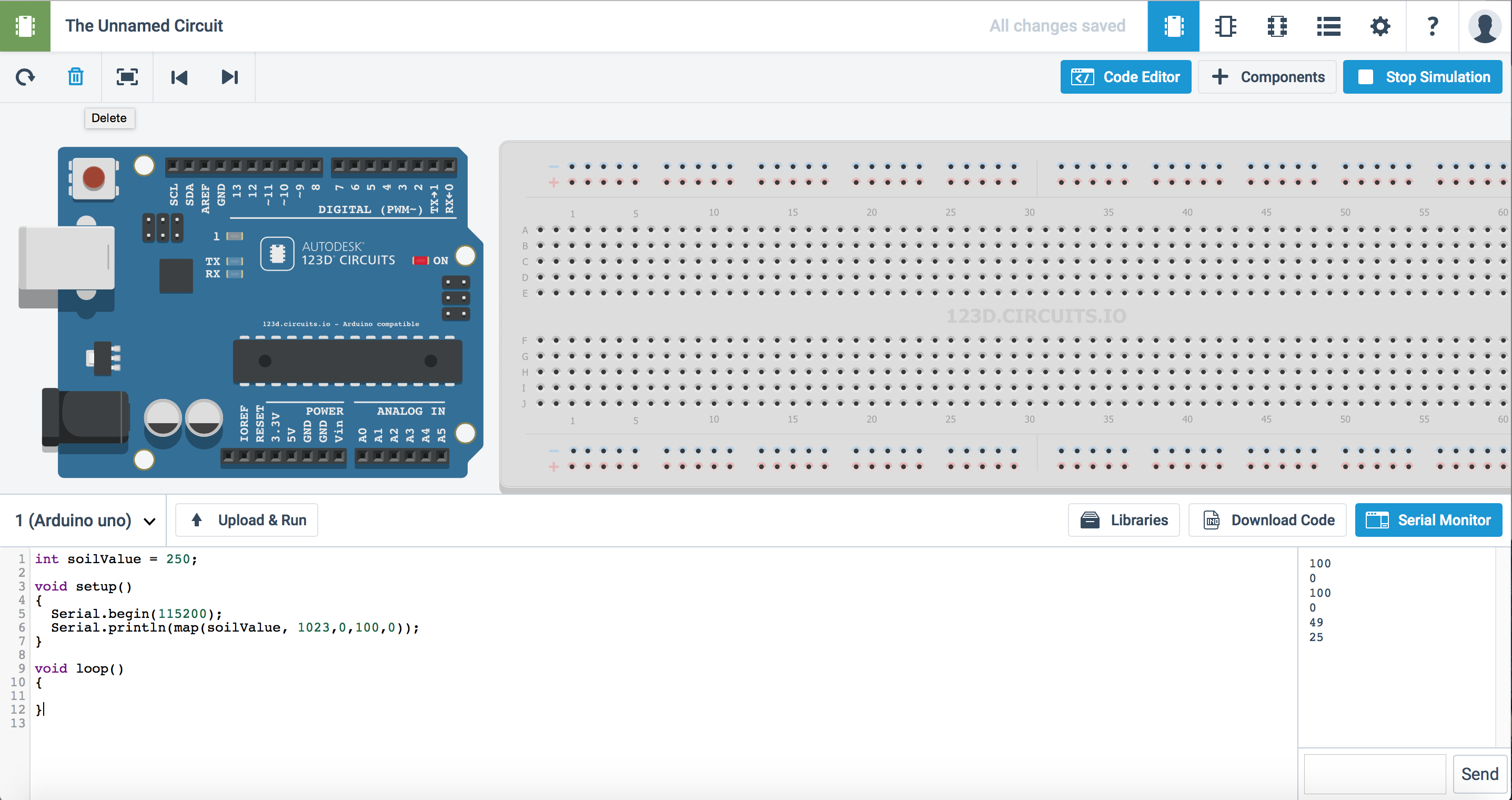
Try it!!
int soilValue = 250;

void setup()
{
  Serial.begin(115200);
  Serial.println(map(soilValue, 1023,0,100,0));
}

void loop()
{

}
have you run into 123dcircuits yet?
-
Try it!!
int soilValue = 250;

void setup()
{
  Serial.begin(115200);
  Serial.println(map(soilValue, 1023,0,100,0));
}

void loop()
{

}
have you run into 123dcircuits yet?
@BulldogLowell not yet!!! my first encounter with arduino was only a few weeks ago.... so much to learn! the wood are lovely dark and deep, but i have promises to keep....
-
hello
it's working but is not inverted :+1:
314
send: 2-2-0-0 s=0,c=1,t=1,pt=4,l=4,st=ok:30
294
send: 2-2-0-0 s=0,c=1,t=1,pt=4,l=4,st=ok:28
287
send: 2-2-0-0 s=0,c=1,t=1,pt=4,l=4,st=ok:28
299
send: 2-2-0-0 s=0,c=1,t=1,pt=4,l=4,st=ok:29
313
send: 2-2-0-0 s=0,c=1,t=1,pt=4,l=4,st=ok:30
1023
send: 2-2-0-0 s=0,c=1,t=1,pt=4,l=4,st=ok:100
100 is when is dry and 220/250 is when the sensor is in water .
i just need little more help for invert value , 100 = in water and 0 when is drythx
-
hello
it's working but is not inverted :+1:
314
send: 2-2-0-0 s=0,c=1,t=1,pt=4,l=4,st=ok:30
294
send: 2-2-0-0 s=0,c=1,t=1,pt=4,l=4,st=ok:28
287
send: 2-2-0-0 s=0,c=1,t=1,pt=4,l=4,st=ok:28
299
send: 2-2-0-0 s=0,c=1,t=1,pt=4,l=4,st=ok:29
313
send: 2-2-0-0 s=0,c=1,t=1,pt=4,l=4,st=ok:30
1023
send: 2-2-0-0 s=0,c=1,t=1,pt=4,l=4,st=ok:100
100 is when is dry and 220/250 is when the sensor is in water .
i just need little more help for invert value , 100 = in water and 0 when is drythx
@BulldogLowell said:
gw.send(msg.set(map(soilValue, 0, 1023, 0 ,100));
like this:
gw.send(msg.set(map(soilValue, 100, 250, 0, 100));it maps 100 to zero and 250 to 100
Let me know if that works for you.
or... you can try this to bound the returned value by zero and 100:
gw.send((max(min(map(soilValue, 100,250,0,100), 100), 0)));confusing but is is mapping the value, and limiting to 100 and then making sure it is at least zero (i.e. non-negative).
or just:
gw.send(constrain(map(soilValue, 100,250,0,100), 0, 100)); -
gw.send(msg.set(map(soilValue, 100, 250, 0, 100)));```you have forget one ) at last .
sensor started, id 2
send: 2-2-0-0 s=255,c=0,t=17,pt=0,l=5,st=ok:1.4.1
send: 2-2-0-0 s=255,c=3,t=6,pt=1,l=1,st=ok:0
read: 0-0-2 s=255,c=3,t=6,pt=0,l=1:M
send: 2-2-0-0 s=255,c=3,t=11,pt=0,l=25,st=ok:Soil Moisture Sensor - an
send: 2-2-0-0 s=255,c=3,t=12,pt=0,l=3,st=ok:1.0
send: 2-2-0-0 s=0,c=0,t=7,pt=0,l=5,st=ok:1.4.1
1023
send: 2-2-0-0 s=0,c=1,t=1,pt=4,l=4,st=ok:615
285
send: 2-2-0-0 s=0,c=1,t=1,pt=4,l=4,st=ok:123
250 is when is in water and 1023 is dry , it's alway inverted , i can test 2 other exemple because there is a problem in sketch maybe ;or ) when is try this
gw.send((max(min(map(soilValue, 100,250,0,100), 100), 0)));and for other 2 exemple i can send to arduino compiling error
sketch_may24a.ino: In function 'void loop()': sketch_may24a:31: error: no matching function for call to 'MySensor::send(long int)' C:\Program Files (x86)\Arduino\libraries\MySensors/MySensor.h:142: note: candidates are: bool MySensor::send(MyMessage&, bool) -
gw.send(msg.set(map(soilValue, 100, 250, 0, 100)));```you have forget one ) at last .
sensor started, id 2
send: 2-2-0-0 s=255,c=0,t=17,pt=0,l=5,st=ok:1.4.1
send: 2-2-0-0 s=255,c=3,t=6,pt=1,l=1,st=ok:0
read: 0-0-2 s=255,c=3,t=6,pt=0,l=1:M
send: 2-2-0-0 s=255,c=3,t=11,pt=0,l=25,st=ok:Soil Moisture Sensor - an
send: 2-2-0-0 s=255,c=3,t=12,pt=0,l=3,st=ok:1.0
send: 2-2-0-0 s=0,c=0,t=7,pt=0,l=5,st=ok:1.4.1
1023
send: 2-2-0-0 s=0,c=1,t=1,pt=4,l=4,st=ok:615
285
send: 2-2-0-0 s=0,c=1,t=1,pt=4,l=4,st=ok:123
250 is when is in water and 1023 is dry , it's alway inverted , i can test 2 other exemple because there is a problem in sketch maybe ;or ) when is try this
gw.send((max(min(map(soilValue, 100,250,0,100), 100), 0)));and for other 2 exemple i can send to arduino compiling error
sketch_may24a.ino: In function 'void loop()': sketch_may24a:31: error: no matching function for call to 'MySensor::send(long int)' C:\Program Files (x86)\Arduino\libraries\MySensors/MySensor.h:142: note: candidates are: bool MySensor::send(MyMessage&, bool)Post your entire sketch.
-
#include <SPI.h>
#include <MySensor.h>

#define ANALOG_INPUT_SOIL_SENSOR A0
#define CHILD_ID 0 // Id of the sensor child

MySensor gw;
MyMessage msg(CHILD_ID, V_HUM);
int lastSoilValue = -1;

void setup()
{
gw.begin();

// Send the sketch version information to the gateway and Controller
gw.sendSketchInfo("Soil Moisture Sensor - analog", "1.0");
// sets the soil sensor analog pin as input
pinMode(ANALOG_INPUT_SOIL_SENSOR, INPUT);
// Register all sensors to gw (they will be created as child devices)
gw.present(CHILD_ID, S_HUM);
}

void loop()
{
// Read analog soil value
int soilValue = analogRead(ANALOG_INPUT_SOIL_SENSOR);

if (soilValue != lastSoilValue) {
Serial.println(soilValue);
gw.send(msg.set(map(soilValue, 100, 250, 0, 100)));
lastSoilValue = soilValue;
}
// Power down the radio and arduino until analog input changes.
gw.sleep(1000);
}
is the same sketch but i have changed only
gw.send(msg.set(static_cast<int>(static_cast<float>(1023 - soilValue))/1023*100)); // Send the relative moisture. this will probably work only on nano or uno as I used 1023by this
gw.send(msg.set(map(soilValue, 100, 250, 0, 100)));i don't understand why is alway inverted ??
-
#include <SPI.h>
#include <MySensor.h>

#define ANALOG_INPUT_SOIL_SENSOR A0
#define CHILD_ID 0 // Id of the sensor child

MySensor gw;
MyMessage msg(CHILD_ID, V_HUM);
int lastSoilValue = -1;

void setup()
{
gw.begin();

// Send the sketch version information to the gateway and Controller
gw.sendSketchInfo("Soil Moisture Sensor - analog", "1.0");
// sets the soil sensor analog pin as input
pinMode(ANALOG_INPUT_SOIL_SENSOR, INPUT);
// Register all sensors to gw (they will be created as child devices)
gw.present(CHILD_ID, S_HUM);
}

void loop()
{
// Read analog soil value
int soilValue = analogRead(ANALOG_INPUT_SOIL_SENSOR);

if (soilValue != lastSoilValue) {
Serial.println(soilValue);
gw.send(msg.set(map(soilValue, 100, 250, 0, 100)));
lastSoilValue = soilValue;
}
// Power down the radio and arduino until analog input changes.
gw.sleep(1000);
}
is the same sketch but i have changed only
gw.send(msg.set(static_cast<int>(static_cast<float>(1023 - soilValue))/1023*100)); // Send the relative moisture. this will probably work only on nano or uno as I used 1023by this
gw.send(msg.set(map(soilValue, 100, 250, 0, 100)));i don't understand why is alway inverted ??
@fred97 said:
i don't understand why is alway inverted ??
try to use this:
gw.send(msg.set(constrain(map(soilValue, 1023, 250, 0, 100),0,100)));it maps 1023 to zero and 250 to 100... that is what you want, yes?
#include <SPI.h> #include <MySensor.h> #define ANALOG_INPUT_SOIL_SENSOR A0 #define CHILD_ID 0 // Id of the sensor child MySensor gw; MyMessage msg(CHILD_ID, V_HUM); int lastSoilValue = -1; void setup() { gw.begin(); // Send the sketch version information to the gateway and Controller gw.sendSketchInfo("Soil Moisture Sensor - analog", "1.0"); // sets the soil sensor analog pin as input pinMode(ANALOG_INPUT_SOIL_SENSOR, INPUT); // Register all sensors to gw (they will be created as child devices) gw.present(CHILD_ID, S_HUM); } void loop() { // Read analog soil value int soilValue = analogRead(ANALOG_INPUT_SOIL_SENSOR); if (soilValue != lastSoilValue) { Serial.println(soilValue); gw.send(msg.set(constrain(map(soilValue, 1023, 250, 0, 100),0,100))); lastSoilValue = soilValue; } // Power down the radio and arduino until analog input changes. gw.sleep(1000); } -


Hello! It looks like you're interested in this conversation, but you don't have an account yet.
Getting fed up of having to scroll through the same posts each visit? When you register for an account, you'll always come back to exactly where you were before, and choose to be notified of new replies (either via email, or push notification). You'll also be able to save bookmarks and upvote posts to show your appreciation to other community members.
With your input, this post could be even better 💗
Register Login