
Washing machine state sensor
-
Created a custom widget in HomeGenie and set it up to send PushBullet notifications. After running for a week I've noticed a few small problems.
- If I leave the door open and the sun shines on the sensor, it's status changes to 'Running'. Increasing the threshold doesn't help so I'll need to protect the sensor from outside elements better. *
- The LED on the machine also flashes just before it goes into running mode. I think I'll go with an extra status depending on the previous one (Off -> Flashing = 'stand by', Running -> flashing = 'Idle') or something like that.
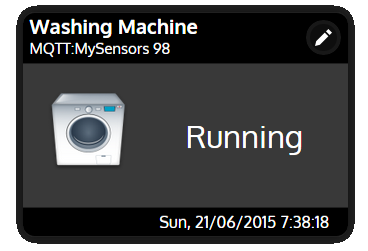
- My 3D printer is ordered and on its way, so I'll be able to create a custom holder. You guys are killing my finances :)
-
Created a custom widget in HomeGenie and set it up to send PushBullet notifications. After running for a week I've noticed a few small problems.
- If I leave the door open and the sun shines on the sensor, it's status changes to 'Running'. Increasing the threshold doesn't help so I'll need to protect the sensor from outside elements better. *
- The LED on the machine also flashes just before it goes into running mode. I think I'll go with an extra status depending on the previous one (Off -> Flashing = 'stand by', Running -> flashing = 'Idle') or something like that.
- My 3D printer is ordered and on its way, so I'll be able to create a custom holder. You guys are killing my finances :)
@mvdarend While waiting for the current sensor (and also discovering that new powerboards have one way screws! evil people!), I have re-checked my vibration sensors. i am using this one http://www.aliexpress.com/item/1pc-lot-SW-420-Normally-Closed-Alarm-Vibration-Sensor-Module-Vibration-Switch-30512/32259757483.html which is better than the others i think.
currently I am just monitoring 5 minute periods and if there is a vibration during this time I mark it as "active". my theory (that I can't check as I ran out of laundry) is that 3 periods of vibrations signal that a cycle is in progress. a period of quite means the cycle has finished. will post final results the minute the kids will produce enough dirty cloths. -
@mvdarend While waiting for the current sensor (and also discovering that new powerboards have one way screws! evil people!), I have re-checked my vibration sensors. i am using this one http://www.aliexpress.com/item/1pc-lot-SW-420-Normally-Closed-Alarm-Vibration-Sensor-Module-Vibration-Switch-30512/32259757483.html which is better than the others i think.
currently I am just monitoring 5 minute periods and if there is a vibration during this time I mark it as "active". my theory (that I can't check as I ran out of laundry) is that 3 periods of vibrations signal that a cycle is in progress. a period of quite means the cycle has finished. will post final results the minute the kids will produce enough dirty cloths. -
@Moshe-Livne How is it working so far, have you been able to test it?
@mvdarend so far so good. have added a bit of logic to my sketch and need another load to test it :-)
this is the current sketch:
// Washing machine finished sketch

#include <MySensor.h>
#include <SPI.h>


#define CHILD_ID 3
#define BUTTON_PIN  3  // Arduino Digital I/O pin for button/reed switch
#define SAMPLING_PERIOD 600000
MySensor gw;
int oldValue=-1;
unsigned long period_start = millis();
int state = -1;


// Change to V_LIGHT if you use S_LIGHT in presentation below
MyMessage msg(CHILD_ID,V_TRIPPED);

void setup()
{
  gw.begin();

 // Setup the button
  pinMode(BUTTON_PIN,INPUT);
  // Activate internal pull-up
  digitalWrite(BUTTON_PIN,HIGH);

  // After setting up the button, setup debouncer

  // Register binary input sensor to gw (they will be created as child devices)
  // You can use S_DOOR, S_MOTION or S_LIGHT here depending on your usage.
  // If S_LIGHT is used, remember to update variable type you send in. See "msg" above.
  gw.present(CHILD_ID, S_DOOR);
}

void report_state(int state)
{
	  	Serial.print("reporting state: ");
		Serial.println(state);
	    gw.send(msg.set(state));

}

int prev_state = -1;
int prev_state_length = 0;

//  Check if digital input has changed and send in new value
void loop()
{
  // Get the update value
  int value = digitalRead(BUTTON_PIN);

  if (value == 1) {// 0 means vibration detected
  	state = 1;
  	Serial.println("setting state to 1");
  }
  Serial.println(millis()-period_start);

  if (millis() - period_start > SAMPLING_PERIOD) {
  	period_start = millis();
  	Serial.println(state);
    if (state != prev_state) {
  		if (state == 1 && prev_state_length > 2) { //a vibration period after long period of quit means a cycle started
  	    	report_state(state);
	    	prev_state_length = 1;

  		} else if (state == 0 && prev_state_length > 2){ //a long quite period after a cycle means cycle finished
  			report_state(state);
  			prev_state_length = 1;
  		}
  	}
	prev_state = state;
    state = 0;

  }


  delay(100);
}
will refine it once i verify it works through all the different cycles - this is not even a tested version, just to give you an idea about how it works. looks promising so far.
-
found some flaws in the logic - updated and checking - do not use the code above
-
found some flaws in the logic - updated and checking - do not use the code above
I think you can make this easier...
It looks like you are looking for two motion events in the past two minutes to indicate washer is on?
something like this (untested)
// Washing machine finished sketch #include <MySensor.h> #include <SPI.h> #define CHILD_ID 3 #define BUTTON_PIN 3 // Arduino Digital I/O pin for button/reed switch #define SAMPLING_PERIOD 600000UL MySensor gw; unsigned long motionTime; unsigned long lastMotionTime = millis(); boolean lastSensorState = false; boolean lastWasherState = false; MyMessage msg(CHILD_ID, V_TRIPPED); void setup() { gw.begin(); pinMode(BUTTON_PIN, INPUT_PULLUP); gw.present(CHILD_ID, S_DOOR); } void loop() { boolean sensorState = digitalRead(BUTTON_PIN);// Get the updated sensor value if (sensorState != lastSensorState && lastSensorState == true) //detect state change from true to false { lastMotionTime = motionTime; //cascade time back motionTime = millis(); } lastSensorState = sensorState; // boolean washerState = (motionTime - lastMotionTime < SAMPLING_PERIOD && motionTime - millis() < SAMPLING_PERIOD); if (washerState != lastWasherState) { gw.send(msg.set(washerState)); } lastWasherState = washerState; } -
I think you can make this easier...
It looks like you are looking for two motion events in the past two minutes to indicate washer is on?
something like this (untested)
// Washing machine finished sketch #include <MySensor.h> #include <SPI.h> #define CHILD_ID 3 #define BUTTON_PIN 3 // Arduino Digital I/O pin for button/reed switch #define SAMPLING_PERIOD 600000UL MySensor gw; unsigned long motionTime; unsigned long lastMotionTime = millis(); boolean lastSensorState = false; boolean lastWasherState = false; MyMessage msg(CHILD_ID, V_TRIPPED); void setup() { gw.begin(); pinMode(BUTTON_PIN, INPUT_PULLUP); gw.present(CHILD_ID, S_DOOR); } void loop() { boolean sensorState = digitalRead(BUTTON_PIN);// Get the updated sensor value if (sensorState != lastSensorState && lastSensorState == true) //detect state change from true to false { lastMotionTime = motionTime; //cascade time back motionTime = millis(); } lastSensorState = sensorState; // boolean washerState = (motionTime - lastMotionTime < SAMPLING_PERIOD && motionTime - millis() < SAMPLING_PERIOD); if (washerState != lastWasherState) { gw.send(msg.set(washerState)); } lastWasherState = washerState; }@BulldogLowell It is slightly more complicated (but not much). the machine can idle for 5-10 min (well, not really idle, but idle enough so no vibrations will be felt). so, the current logic marks 5 minute periods. a vibration period marks the beginning of the cycle and 2 or 3 (yet to be determined) periods of quite marks end of cycle.
-
@BulldogLowell It is slightly more complicated (but not much). the machine can idle for 5-10 min (well, not really idle, but idle enough so no vibrations will be felt). so, the current logic marks 5 minute periods. a vibration period marks the beginning of the cycle and 2 or 3 (yet to be determined) periods of quite marks end of cycle.
so if no vibration is sensed in the past five (configurable) minutes machine is OFF, otherwise machine is ON?
likewise you want to indicate Washing when two vibrations are sensed in less than two or three (configurable) minutes?
yes?
-
I think you can make this easier...
It looks like you are looking for two motion events in the past two minutes to indicate washer is on?
something like this (untested)
// Washing machine finished sketch #include <MySensor.h> #include <SPI.h> #define CHILD_ID 3 #define BUTTON_PIN 3 // Arduino Digital I/O pin for button/reed switch #define SAMPLING_PERIOD 600000UL MySensor gw; unsigned long motionTime; unsigned long lastMotionTime = millis(); boolean lastSensorState = false; boolean lastWasherState = false; MyMessage msg(CHILD_ID, V_TRIPPED); void setup() { gw.begin(); pinMode(BUTTON_PIN, INPUT_PULLUP); gw.present(CHILD_ID, S_DOOR); } void loop() { boolean sensorState = digitalRead(BUTTON_PIN);// Get the updated sensor value if (sensorState != lastSensorState && lastSensorState == true) //detect state change from true to false { lastMotionTime = motionTime; //cascade time back motionTime = millis(); } lastSensorState = sensorState; // boolean washerState = (motionTime - lastMotionTime < SAMPLING_PERIOD && motionTime - millis() < SAMPLING_PERIOD); if (washerState != lastWasherState) { gw.send(msg.set(washerState)); } lastWasherState = washerState; }@BulldogLowell re-reading your code, it would work well. the reason I made the "periods" was more to help me debug the scenario as I didn't want to sift through zillions of on/off.
-
yeah, that is why it is important to just print() when there are state changes... added configuration and debug:
// Washing machine finished sketch #include <MySensor.h> #include <SPI.h> #define CHILD_ID 3 #define BUTTON_PIN 3 // Arduino Digital I/O pin for button/reed switch #define ONE_MINUTE 600000UL MySensor gw; unsigned long motionTime; unsigned long lastMotionTime = millis(); boolean lastSensorState = false; boolean lastWasherState = false; MyMessage msg(CHILD_ID, V_TRIPPED); void setup() { gw.begin(); pinMode(BUTTON_PIN, INPUT_PULLUP); gw.present(CHILD_ID, S_DOOR); } void loop() { boolean sensorState = digitalRead(BUTTON_PIN);// Get the updated sensor value if (sensorState != lastSensorState && lastSensorState == true) //detect state change from true to false { lastMotionTime = motionTime; //cascade time back motionTime = millis(); } lastSensorState = sensorState; // boolean washerState = ((motionTime - lastMotionTime < ONE_MINUTE * 2) && (motionTime - millis() < ONE_MINUTE * 5)); if (washerState != lastWasherState) { gw.send(msg.set(washerState)); Serial.print(F("Washer is ")); Serial.println(washerState? F("ON") : F("OFF")); } lastWasherState = sensorState; } -
yeah, that is why it is important to just print() when there are state changes... added configuration and debug:
// Washing machine finished sketch #include <MySensor.h> #include <SPI.h> #define CHILD_ID 3 #define BUTTON_PIN 3 // Arduino Digital I/O pin for button/reed switch #define ONE_MINUTE 600000UL MySensor gw; unsigned long motionTime; unsigned long lastMotionTime = millis(); boolean lastSensorState = false; boolean lastWasherState = false; MyMessage msg(CHILD_ID, V_TRIPPED); void setup() { gw.begin(); pinMode(BUTTON_PIN, INPUT_PULLUP); gw.present(CHILD_ID, S_DOOR); } void loop() { boolean sensorState = digitalRead(BUTTON_PIN);// Get the updated sensor value if (sensorState != lastSensorState && lastSensorState == true) //detect state change from true to false { lastMotionTime = motionTime; //cascade time back motionTime = millis(); } lastSensorState = sensorState; // boolean washerState = ((motionTime - lastMotionTime < ONE_MINUTE * 2) && (motionTime - millis() < ONE_MINUTE * 5)); if (washerState != lastWasherState) { gw.send(msg.set(washerState)); Serial.print(F("Washer is ")); Serial.println(washerState? F("ON") : F("OFF")); } lastWasherState = sensorState; }@BulldogLowell Alas, no. The sensors are on the edge of their capability, so you get some on, lots of off. an ON means a cycle started (I am not too worried about false positives from loading the machine for now. A quite period (no ON what so ever) of about 10 min means the cycle has finished. so basically its going to be eventually a very simple code like:
if (sensorState == ON)
    cycleState=WASHING
else period check and if long enough then cycleState = ENDED
I am still checking through different cycles and the kids do not produce enough dirty cloths, just to annoy me i think. Anyone has cloths he needs to wash?
-


Hello! It looks like you're interested in this conversation, but you don't have an account yet.
Getting fed up of having to scroll through the same posts each visit? When you register for an account, you'll always come back to exactly where you were before, and choose to be notified of new replies (either via email, or push notification). You'll also be able to save bookmarks and upvote posts to show your appreciation to other community members.
With your input, this post could be even better 💗
Register Login