
2 channel relais with 2 buttons sending strange values for on:off
-
@mfalkvidd thank you very much. I use a ESP as gateway and was following this thread, but must have missed that problem in the 200+ posts. I will try to use newest development branch and see if problem still exists.
-
ok tested that again, installed a fresh mysensors lib (stable master, downloaded 11.01.16) and first test ran fine. Relay gives 1 or 0 as status, worked even for hours.
But after powering another node it starts again. Sad that I have no third one here at the moment to test if its a general problem with more than one node or specific to this one. I also reflashed the problematic node (with dht and switch), but nothing changed. Is it possible that a message from the DHT-node brings the ESP to a special mode/error state that makes it misinterprete 0 and 1 readings to 1107296257? -
Did some further tests. As it seems to be related with the ESP gateway maybe @Yveaux has a hint for me.
When starting the relay node it works fine, until the first message of the DHT node is received. After that it starts to get strange. I already tried to recompile all sketches with newest MS 1.5.1 and cleared all eeproms (except the gw, is that neccesary?)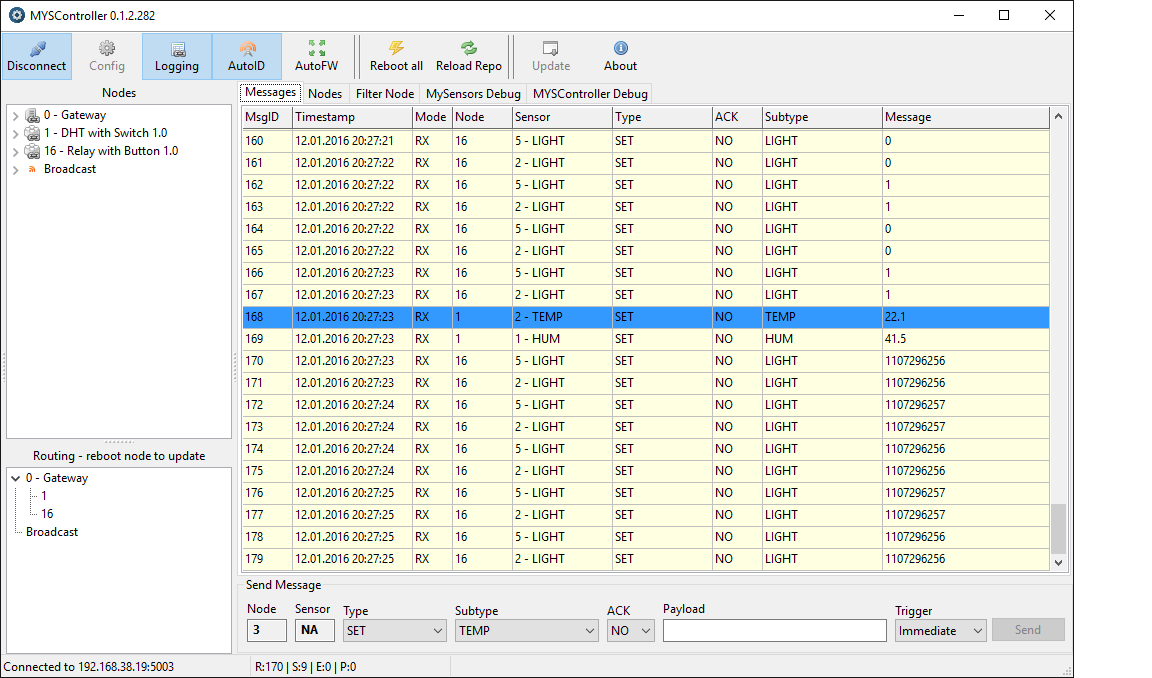
just for completeness the sketch of my DHT node. If someone finds something strange in there please let me know.
#include <MySensor.h> #include <SPI.h> #include <Bounce2.h> #include <DHT.h> #define CHILD_ID 3 #define BUTTON_PIN 3 // Arduino Digital I/O pin for button/reed switch #define CHILD_ID_HUM 1 #define CHILD_ID_TEMP 2 #define HUMIDITY_SENSOR_DIGITAL_PIN 5 unsigned long SLEEP_TIME = 1000; // Sleep time between reads of switch (in milliseconds) unsigned int debounce_nr = 10; // No of cycles doing button test unsigned int cycle_min = 10; // No of cycles min for DHT read unsigned int cycle_max = 60; // No of cycles max for DHT read (must be cycle_min*n) float Temp_dif =0.3; // change in Temp to trigger send float Hum_dif =3; // change in Hum to trigger send MySensor gw; DHT dht; float lastTemp; float lastHum; boolean sendNow = true; MyMessage msgHum(CHILD_ID_HUM, V_HUM); MyMessage msgTemp(CHILD_ID_TEMP, V_TEMP); Bounce debouncer = Bounce(); int oldValue=-1; unsigned int debouncecycle=0; unsigned int cycle=0; unsigned int cycle_multiplier = 1; float temperature; float humidity; // Change to V_LIGHT if you use S_LIGHT in presentation below MyMessage msg(CHILD_ID,V_TRIPPED); void setup() { gw.begin(); dht.setup(HUMIDITY_SENSOR_DIGITAL_PIN); // Send the sketch version information to the gateway and Controller gw.sendSketchInfo("DHT with Switch", "1.0"); // Setup the button pinMode(BUTTON_PIN,INPUT); // Activate internal pull-up digitalWrite(BUTTON_PIN,HIGH); // After setting up the button, setup debouncer debouncer.attach(BUTTON_PIN); debouncer.interval(5); // Register binary input sensor to gw (they will be created as child devices) // You can use S_DOOR, S_MOTION or S_LIGHT here depending on your usage. // If S_LIGHT is used, remember to update variable type you send in. See "msg" above. gw.present(CHILD_ID, S_DOOR); delay(10); gw.present(CHILD_ID_HUM, S_HUM); delay(10); gw.present(CHILD_ID_TEMP, S_TEMP); } // Check if digital input has changed and send in new value void loop() { debouncer.update(); // Get the update value int value = debouncer.read(); if (value != oldValue) { // Send in the new value gw.send(msg.set(value==HIGH ? 1 : 0)); oldValue = value; } if (cycle >= cycle_min * cycle_multiplier) { cycle_multiplier=cycle_multiplier+1; delay(dht.getMinimumSamplingPeriod()); temperature = dht.getTemperature(); //Serial.print("Temp: "); //Serial.print(temperature); //Serial.print("LastTemp: "); //Serial.println(lastTemp); if (isnan(temperature)) { Serial.println("Failed reading temperature from DHT"); } else if ((temperature < lastTemp - Temp_dif) or (temperature > lastTemp + Temp_dif)) { sendNow=true; Serial.println("SendNow set by Temp"); } humidity = dht.getHumidity(); //Serial.print("Hum: "); //Serial.print(humidity); //Serial.print("LastHum: "); //Serial.println(lastHum); if (isnan(humidity)) { Serial.println("Failed reading humidity from DHT"); } else if ((humidity < lastHum - Hum_dif) or (humidity > lastHum + Hum_dif)) { sendNow=true; Serial.println("SendNow set by Hum"); } if (cycle >= cycle_max){ sendNow=true; Serial.println("SendNow set by cycle_max"); } } if (debouncecycle>debounce_nr){ gw.sleep(SLEEP_TIME); //sleep a bit debouncecycle=0; cycle=cycle+1; //Serial.print("Anzahl Zyklen: "); Serial.println(cycle); } debouncecycle=debouncecycle+1; Serial.print(debouncecycle); if (sendNow){ sendNow = false; cycle=0; cycle_multiplier=1; Serial.println("Zyklen zurueckgesetzt, Daten gesendet."); Serial.println(cycle); gw.send(msgTemp.set(temperature, 1)); lastTemp = temperature; gw.send(msgHum.set(humidity, 1)); lastHum = humidity; } } -
Did some further tests. As it seems to be related with the ESP gateway maybe @Yveaux has a hint for me.
When starting the relay node it works fine, until the first message of the DHT node is received. After that it starts to get strange. I already tried to recompile all sketches with newest MS 1.5.1 and cleared all eeproms (except the gw, is that neccesary?)just for completeness the sketch of my DHT node. If someone finds something strange in there please let me know.
#include <MySensor.h> #include <SPI.h> #include <Bounce2.h> #include <DHT.h> #define CHILD_ID 3 #define BUTTON_PIN 3 // Arduino Digital I/O pin for button/reed switch #define CHILD_ID_HUM 1 #define CHILD_ID_TEMP 2 #define HUMIDITY_SENSOR_DIGITAL_PIN 5 unsigned long SLEEP_TIME = 1000; // Sleep time between reads of switch (in milliseconds) unsigned int debounce_nr = 10; // No of cycles doing button test unsigned int cycle_min = 10; // No of cycles min for DHT read unsigned int cycle_max = 60; // No of cycles max for DHT read (must be cycle_min*n) float Temp_dif =0.3; // change in Temp to trigger send float Hum_dif =3; // change in Hum to trigger send MySensor gw; DHT dht; float lastTemp; float lastHum; boolean sendNow = true; MyMessage msgHum(CHILD_ID_HUM, V_HUM); MyMessage msgTemp(CHILD_ID_TEMP, V_TEMP); Bounce debouncer = Bounce(); int oldValue=-1; unsigned int debouncecycle=0; unsigned int cycle=0; unsigned int cycle_multiplier = 1; float temperature; float humidity; // Change to V_LIGHT if you use S_LIGHT in presentation below MyMessage msg(CHILD_ID,V_TRIPPED); void setup() { gw.begin(); dht.setup(HUMIDITY_SENSOR_DIGITAL_PIN); // Send the sketch version information to the gateway and Controller gw.sendSketchInfo("DHT with Switch", "1.0"); // Setup the button pinMode(BUTTON_PIN,INPUT); // Activate internal pull-up digitalWrite(BUTTON_PIN,HIGH); // After setting up the button, setup debouncer debouncer.attach(BUTTON_PIN); debouncer.interval(5); // Register binary input sensor to gw (they will be created as child devices) // You can use S_DOOR, S_MOTION or S_LIGHT here depending on your usage. // If S_LIGHT is used, remember to update variable type you send in. See "msg" above. gw.present(CHILD_ID, S_DOOR); delay(10); gw.present(CHILD_ID_HUM, S_HUM); delay(10); gw.present(CHILD_ID_TEMP, S_TEMP); } // Check if digital input has changed and send in new value void loop() { debouncer.update(); // Get the update value int value = debouncer.read(); if (value != oldValue) { // Send in the new value gw.send(msg.set(value==HIGH ? 1 : 0)); oldValue = value; } if (cycle >= cycle_min * cycle_multiplier) { cycle_multiplier=cycle_multiplier+1; delay(dht.getMinimumSamplingPeriod()); temperature = dht.getTemperature(); //Serial.print("Temp: "); //Serial.print(temperature); //Serial.print("LastTemp: "); //Serial.println(lastTemp); if (isnan(temperature)) { Serial.println("Failed reading temperature from DHT"); } else if ((temperature < lastTemp - Temp_dif) or (temperature > lastTemp + Temp_dif)) { sendNow=true; Serial.println("SendNow set by Temp"); } humidity = dht.getHumidity(); //Serial.print("Hum: "); //Serial.print(humidity); //Serial.print("LastHum: "); //Serial.println(lastHum); if (isnan(humidity)) { Serial.println("Failed reading humidity from DHT"); } else if ((humidity < lastHum - Hum_dif) or (humidity > lastHum + Hum_dif)) { sendNow=true; Serial.println("SendNow set by Hum"); } if (cycle >= cycle_max){ sendNow=true; Serial.println("SendNow set by cycle_max"); } } if (debouncecycle>debounce_nr){ gw.sleep(SLEEP_TIME); //sleep a bit debouncecycle=0; cycle=cycle+1; //Serial.print("Anzahl Zyklen: "); Serial.println(cycle); } debouncecycle=debouncecycle+1; Serial.print(debouncecycle); if (sendNow){ sendNow = false; cycle=0; cycle_multiplier=1; Serial.println("Zyklen zurueckgesetzt, Daten gesendet."); Serial.println(cycle); gw.send(msgTemp.set(temperature, 1)); lastTemp = temperature; gw.send(msgHum.set(humidity, 1)); lastHum = humidity; } } -
-
@Anduril is the second node running the same MySensors version as the other node and gateway?
What Arduino core version are you using for ESP support?@Yveaux yeah I compiled all 2 nodes and the gw just yesterday with the same MySensors version. With Arduino core version you mean the version of Arduino IDE? 1.6.6
Is it necessary/usefull/possible to do a eeprom reset on the gw?
Btw sometimes MYSController does not recognice all presentation messages. Is that somehow a problem? I don't know why this happens as all my nrf are equiped with 4.7µF (node in question also tried with 2 caps). -
-
-
these relays your sketch works well, but is not displayed correctly in the controller
http://ru.aliexpress.com/item/2-channel-New-2-channel-relay-module-relay-expansion-board-5V-low-level-triggered-2-way/1617727658.html
and with these relay failures. why is that? although "RelayWithButtonActuator" in truth it works with one group
http://ru.aliexpress.com/item/10PCS-LOT-New-original-solid-state-relay-G3MB-202P-DC-AC-PCB-SSR-In-5VDC-Out/32339505849.html -
@vampircik I don't realy understand what you tried to say. At the moment I have no real relays connected but simply LEDs for testing purposes.
@Yveaux I updated the ESP8266 definitions to ver 2.0.0. But now I can't upload a sketch. I get this message:warning: espcomm_sync failed error: espcomm_open failedDo you know what that means?
-
@vampircik I don't realy understand what you tried to say. At the moment I have no real relays connected but simply LEDs for testing purposes.
@Yveaux I updated the ESP8266 definitions to ver 2.0.0. But now I can't upload a sketch. I get this message:warning: espcomm_sync failed error: espcomm_open failedDo you know what that means?
-
-
-
Now I tested with a third node the check. Also after node 3 sending data my 0 and 1 from the relay node become large numbers. One thing that seems strange to me is the behavior during reboot of the temp/hum node. First this node is active and sending temp and hum data. Readings from relay are strange as usual. When rebooting the relay signals turn to be 0 and 1 after the temp/hum node has presented itself to the gateway. But after sending the first data for temp/hum it is again receiving those large numbers. Does this make any sense for you @Yveaux?
-
I updated my gateway to newest dev version and now my nodes are communicating correctly (not updated, still 1.5.3). So the problem seems to be gone in 2.0, but I think it would still be nice to know what caused it for those not willing to upgrade to dev branch.
For @netram and @kr0815 (and maybe others) who had similiar problems: dev branch fixes this issue. -




Hello! It looks like you're interested in this conversation, but you don't have an account yet.
Getting fed up of having to scroll through the same posts each visit? When you register for an account, you'll always come back to exactly where you were before, and choose to be notified of new replies (either via email, or push notification). You'll also be able to save bookmarks and upvote posts to show your appreciation to other community members.
With your input, this post could be even better 💗
Register Login