Skip to content
  • MySensors
  • OpenHardware.io
  • Categories
  • Recent
  • Tags
  • Popular
Skins
  • Light
  • Brite
  • Cerulean
  • Cosmo
  • Flatly
  • Journal
  • Litera
  • Lumen
  • Lux
  • Materia
  • Minty
  • Morph
  • Pulse
  • Sandstone
  • Simplex
  • Sketchy
  • Spacelab
  • United
  • Yeti
  • Zephyr
  • Dark
  • Cyborg
  • Darkly
  • Quartz
  • Slate
  • Solar
  • Superhero
  • Vapor

  • Default (No Skin)
  • No Skin
Collapse
Brand Logo
  1. Home
  2. My Project
  3. Weather Station with Scene Activator!!!

Weather Station with Scene Activator!!!

Scheduled Pinned Locked Moved My Project
51 Posts 3 Posters 30.3k Views 3 Watching
  • Oldest to Newest
  • Newest to Oldest
  • Most Votes
Reply
  • Reply as topic
Log in to reply
This topic has been deleted. Only users with topic management privileges can see it.
  • korttomaK Offline
    korttomaK Offline
    korttoma
    Hero Member
    wrote on last edited by
    #2

    Grate to see you got it all to work.
    A few comments came to mind.

    Is the hardware debounce realy necesary? Did you try any software solutions?

    Is the sleep mode really useful for this sketch? I'm guessing you do not have any plans to run this one on battery so I see no reason to put it to sleep to save power.

    • Tomas
    BulldogLowellB 2 Replies Last reply
    0
    • korttomaK korttoma

      Grate to see you got it all to work.
      A few comments came to mind.

      Is the hardware debounce realy necesary? Did you try any software solutions?

      Is the sleep mode really useful for this sketch? I'm guessing you do not have any plans to run this one on battery so I see no reason to put it to sleep to save power.

      BulldogLowellB Offline
      BulldogLowellB Offline
      BulldogLowell
      Contest Winner
      wrote on last edited by
      #3

      @korttoma

      thanks for the feedback.

      I found that it needed debouncing. It was getting into a funny state once in a while where it would lock up. it was so easy for me to add the capacitor on my breadboard, so I did it. A software debounce with a timeout on the button press would work too.

      I started with the sketch that had the radio sleep, never sure if I was going to make it battery version or not, so it was left in. It can be yanked out, do you want to try that?

      I really wanted to do two things, get data in, and push data out. I am working on a project that is reliant on both of those so building this was a major step for me.

      I thought it had a nice practical use given the display and the scene trigger. Plus it is so easy to build, I thought i could get some more people to look at it and help make improvements.

      I'm not a software guy, as you can tell from the sketch...

      1 Reply Last reply
      0
      • BulldogLowellB Offline
        BulldogLowellB Offline
        BulldogLowell
        Contest Winner
        wrote on last edited by
        #4

        @hek

        Cool addition the youtube videos right on the MySensors page... nice improvement.

        1 Reply Last reply
        0
        • korttomaK korttoma

          Grate to see you got it all to work.
          A few comments came to mind.

          Is the hardware debounce realy necesary? Did you try any software solutions?

          Is the sleep mode really useful for this sketch? I'm guessing you do not have any plans to run this one on battery so I see no reason to put it to sleep to save power.

          BulldogLowellB Offline
          BulldogLowellB Offline
          BulldogLowell
          Contest Winner
          wrote on last edited by
          #5

          @korttoma

          FYI I added the debounce to the sketch. Even with the cap I had a few lockups. I noticed I could get multiples and needed it to go away.

          1 Reply Last reply
          0
          • BulldogLowellB Offline
            BulldogLowellB Offline
            BulldogLowell
            Contest Winner
            wrote on last edited by
            #6

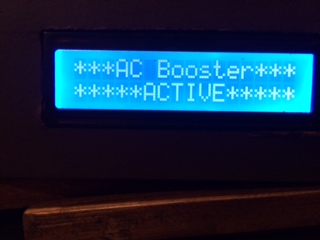
            I thought I would post a few photos of the finished device. While I like all things tech, my wife does not. So you can see, I have added to the list of making 'stuff' have a purpose.
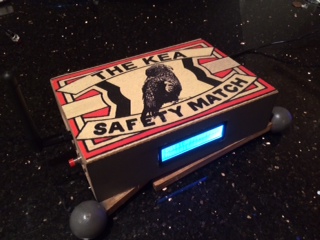
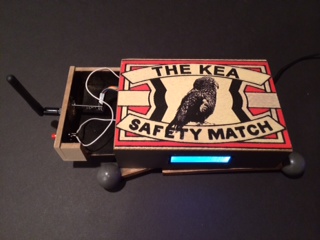
            photo 1.JPG photo 2.JPG photo 3.JPG

            1 Reply Last reply
            0
            • korttomaK Offline
              korttomaK Offline
              korttoma
              Hero Member
              wrote on last edited by
              #7

              Hay @BulldogLowell , I'm trying to make use of your sketch for my own project but I ran in to some issue.

              I had trouble finding the right library. I used the "LiquidCrystal_V1.2.1.zip" from here -> https://bitbucket.org/fmalpartida/new-liquidcrystal/downloads

              But I got some errors when compiling sketch. Then I found the library link under the ebay item you referred to and now it seems to work.
              you could mention this in the first post if possible so others don't fall in the same ditch.

              cheers ;)

              • Tomas
              1 Reply Last reply
              0
              • korttomaK Offline
                korttomaK Offline
                korttoma
                Hero Member
                wrote on last edited by
                #8

                Now I ran int to the next issue. How do I know which pin the SDA and SCL should be connected to??

                Is it this line that defines it?

                LiquidCrystal_I2C lcd(0x27,20,4);
                

                So what should it be if I'm using a Pro Mini?

                • Tomas
                1 Reply Last reply
                0
                • korttomaK Offline
                  korttomaK Offline
                  korttoma
                  Hero Member
                  wrote on last edited by
                  #9

                  I think I found it now... For the Pro Mini it is like this:

                  "I2C: A4 (SDA) and A5 (SCL). Support I2C (TWI) communication using the Wire library."

                  I was expecting it to be declared somehow in the sketch so I got confused... Well I learned something once again...

                  • Tomas
                  BulldogLowellB 1 Reply Last reply
                  0
                  • korttomaK korttoma

                    I think I found it now... For the Pro Mini it is like this:

                    "I2C: A4 (SDA) and A5 (SCL). Support I2C (TWI) communication using the Wire library."

                    I was expecting it to be declared somehow in the sketch so I got confused... Well I learned something once again...

                    BulldogLowellB Offline
                    BulldogLowellB Offline
                    BulldogLowell
                    Contest Winner
                    wrote on last edited by
                    #10

                    @korttoma hey, glad you have it figured out.

                    I have been very busy and haven't been able to check in here for a while:(

                    all working now?

                    1 Reply Last reply
                    0
                    • korttomaK Offline
                      korttomaK Offline
                      korttoma
                      Hero Member
                      wrote on last edited by
                      #11

                      Yepp, all working now. Just need to find some time to make my deviec

                      • Tomas
                      1 Reply Last reply
                      0
                      • korttomaK Offline
                        korttomaK Offline
                        korttoma
                        Hero Member
                        wrote on last edited by korttoma
                        #12

                        Hi @BulldogLowell (or anybody else),I'm hoping you could help me with one last thing to finish this project of mine.

                        The issue I'm facing is that I do not know how to send a "string" from Vera using luup. Or basically collecting a string from a variable of one device and sending it to a MySensors node. Here is what I tried:

                        local text = luup.variable_get("urn:empuk-net:serviceId:SimpleAlarm1","StatusLabel", 319)
                        
                        luup.call_action("urn:upnp-arduino-cc:serviceId:arduino1", "SendCommand", {radioId="11;3", variableId="VAR_3", value=text}, 276)
                        

                        If I give the variable "text" a numeric value it is sent and received without problems but how the h**l can I send a string??

                        Grateful for any help

                        • Tomas
                        1 Reply Last reply
                        0
                        • korttomaK Offline
                          korttomaK Offline
                          korttoma
                          Hero Member
                          wrote on last edited by korttoma
                          #13

                          One step closer:

                          local text = "Test"
                          
                          luup.call_action("urn:upnp-arduino-cc:serviceId:arduino1", "SendCommand", {radioId="11;3", variableId="VAR_3", value=text}, 276)
                          

                          Instantly prints the text "Test" on my display :D
                          Seems like my issue is that I can not get the text from the SimpleAlarm Variable "StatusLable".

                          any suggestions?

                          • Tomas
                          1 Reply Last reply
                          0
                          • korttomaK Offline
                            korttomaK Offline
                            korttoma
                            Hero Member
                            wrote on last edited by
                            #14

                            Solved! :D

                            local status_label = luup.variable_get("urn:upnp-empuk-net:serviceId:SimpleAlarm1", "StatusLabel", 319)
                            luup.call_action("urn:upnp-arduino-cc:serviceId:arduino1", "SendCommand", {radioId="11;3", variableId="VAR_3", value=status_label}, 276)
                            

                            Found my answere from the vera forum:
                            http://forum.micasaverde.com/index.php/topic,23942.msg168373.html#msg168373

                            • Tomas
                            BulldogLowellB 1 Reply Last reply
                            0
                            • korttomaK korttoma

                              Solved! :D

                              local status_label = luup.variable_get("urn:upnp-empuk-net:serviceId:SimpleAlarm1", "StatusLabel", 319)
                              luup.call_action("urn:upnp-arduino-cc:serviceId:arduino1", "SendCommand", {radioId="11;3", variableId="VAR_3", value=status_label}, 276)
                              

                              Found my answere from the vera forum:
                              http://forum.micasaverde.com/index.php/topic,23942.msg168373.html#msg168373

                              BulldogLowellB Offline
                              BulldogLowellB Offline
                              BulldogLowell
                              Contest Winner
                              wrote on last edited by
                              #15

                              @korttoma said:

                              Solved! :D

                              local status_label = luup.variable_get("urn:upnp-empuk-net:serviceId:SimpleAlarm1", "StatusLabel", 319)
                              luup.call_action("urn:upnp-arduino-cc:serviceId:arduino1", "SendCommand", {radioId="11;3", variableId="VAR_3", value=status_label}, 276)
                              

                              Found my answere from the vera forum:
                              http://forum.micasaverde.com/index.php/topic,23942.msg168373.html#msg168373

                              Hye korttoma,

                              Did you finish this project?

                              I have a bit of time and thought I would convert my weather station up to the new mySensors version... was wondering if you could share your work...

                              korttomaK 1 Reply Last reply
                              0
                              • BulldogLowellB BulldogLowell

                                @korttoma said:

                                Solved! :D

                                local status_label = luup.variable_get("urn:upnp-empuk-net:serviceId:SimpleAlarm1", "StatusLabel", 319)
                                luup.call_action("urn:upnp-arduino-cc:serviceId:arduino1", "SendCommand", {radioId="11;3", variableId="VAR_3", value=status_label}, 276)
                                

                                Found my answere from the vera forum:
                                http://forum.micasaverde.com/index.php/topic,23942.msg168373.html#msg168373

                                Hye korttoma,

                                Did you finish this project?

                                I have a bit of time and thought I would convert my weather station up to the new mySensors version... was wondering if you could share your work...

                                korttomaK Offline
                                korttomaK Offline
                                korttoma
                                Hero Member
                                wrote on last edited by
                                #16

                                @BulldogLowell

                                Hi Jim, Yeah I finished it. there is a few posts about it over in heks scene controller thread -> http://forum.mysensors.org/topic/446/scene-controller

                                • Tomas
                                1 Reply Last reply
                                0
                                • BulldogLowellB Offline
                                  BulldogLowellB Offline
                                  BulldogLowell
                                  Contest Winner
                                  wrote on last edited by
                                  #17

                                  Tomas,

                                  My business has kept me away from this, I guess I didn't notice how far along you took it... brilliant job!

                                  I'll check in when it's done.

                                  Thanks mate.

                                  jim

                                  1 Reply Last reply
                                  0
                                  • BulldogLowellB Offline
                                    BulldogLowellB Offline
                                    BulldogLowell
                                    Contest Winner
                                    wrote on last edited by
                                    #18

                                    Tomas,

                                    Again, thanks for your example. I have to say, it helped a lot.

                                    I am however struggling with radio communication it seems and I am wondering at this point what I am doing wrong, having spent a couple hours trying to find my errors.

                                    Would you mind to take a look for anything you may see:

                                    #define STATES 7
                                    #define HUMIDITY_SENSOR_DIGITAL_PIN 4
                                    #define DEBUG
                                    
                                    #ifdef DEBUG
                                    #define DEBUG_SERIAL(x) Serial.begin(x)
                                    #define DEBUG_PRINT(x) Serial.print(x)
                                    #define DEBUG_PRINTLN(x) Serial.println(x)
                                    #else
                                    #define DEBUG_SERIAL(x)
                                    #define DEBUG_PRINT(x) 
                                    #define DEBUG_PRINTLN(x) 
                                    #endif
                                    
                                    #include <Wire.h>
                                    #include <Time.h>
                                    #include <SPI.h>
                                    #include <MySensor.h>
                                    #include <LiquidCrystal_I2C.h>
                                    #include <DHT.h> 
                                    //
                                    #define RADIO_ID 11
                                    #define CHILD_ID_SCENE 3
                                    //
                                    LiquidCrystal_I2C lcd(0x27,16,2);  // set the LCD address to 0x20 for a 16 chars and 2 line display
                                    //
                                    void (*lcdDisplay[STATES])();
                                    //
                                    byte state = 0;
                                    byte lastState;
                                    byte timeCounter = 0;
                                    unsigned long lastTime;
                                    unsigned long refreshInterval = 3000UL;
                                    unsigned long lastClockSet;
                                    boolean isMessage = false;
                                    float insideTemperature;
                                    float humidity;
                                    int OutdoorTemp = -99;
                                    int OutdoorHumidity = -99;
                                    int todayHigh = -99; 
                                    int todayLow = -99;
                                    String conditions = "Not yet Reported";
                                    String FreeMessage = "No Message recieved"; //*****
                                    int ledStatus = 1;// to toggle LCD backlight led
                                    //int ledLevel = 254;
                                    boolean buttonPushed = false;
                                    //
                                    MySensor gw;
                                    DHT dht;
                                    //
                                    MyMessage msgOn(CHILD_ID_SCENE, V_SCENE_ON);
                                    MyMessage msgOff(CHILD_ID_SCENE, V_SCENE_OFF);
                                    MyMessage msgVAR1(CHILD_ID_SCENE, V_VAR1);
                                    MyMessage msgVAR2(CHILD_ID_SCENE, V_VAR2);
                                    MyMessage msgVAR3(CHILD_ID_SCENE, V_VAR3);
                                    MyMessage msgVAR4(CHILD_ID_SCENE, V_VAR4);
                                    MyMessage msgVAR5(CHILD_ID_SCENE, V_VAR5);
                                    //
                                    void setup()  
                                    { 
                                      DEBUG_SERIAL(115200);
                                      DEBUG_PRINTLN(F("Serial started"));
                                      attachInterrupt(1, PushButton, CHANGE);
                                      //
                                      lcdDisplay[0] = lcdDisplay0;
                                      lcdDisplay[1] = lcdDisplay1;
                                      lcdDisplay[2] = lcdDisplay2;
                                      lcdDisplay[3] = lcdDisplay3;
                                      lcdDisplay[4] = lcdDisplay4;
                                      lcdDisplay[5] = lcdDisplay5;
                                      lcdDisplay[6] = lcdDisplay6;
                                      //
                                      dht.setup(HUMIDITY_SENSOR_DIGITAL_PIN);
                                      gw.begin(TempStatus, RADIO_ID);
                                      gw.sendSketchInfo("WeatherClock", "1.0");
                                      gw.present(CHILD_ID_SCENE, S_SCENE_CONTROLLER);
                                      int clockTimer;
                                      while(timeStatus() != timeSet && clockTimer < 10)
                                      {
                                        gw.requestTime(receiveTime);
                                        Serial.println("getting Time");
                                        delay(500);
                                        clockTimer++;
                                      }
                                      //
                                      lcd.init();
                                      lcd.clear();
                                      lcd.backlight();
                                      lcd.setCursor(0, 0);
                                      lcd.print("Hello World!!!");
                                      delay(2000);
                                      lcd.clear();
                                      lastTime = millis();
                                    }
                                    void loop()      
                                    {
                                      gw.process();
                                      if (millis() - lastClockSet >= 60000UL)
                                      {
                                        gw.requestTime(receiveTime);
                                        lastClockSet = millis();
                                      }
                                      if (millis() - lastTime >= refreshInterval)
                                      {
                                        state++;
                                        if (state > STATES - 1) state = 0;
                                        DEBUG_PRINTLN(F("State:")); 
                                        DEBUG_PRINTLN(state);
                                        lastTime += refreshInterval;
                                        getTempHumidity();
                                      }
                                      if (state != lastState) 
                                      {
                                        fastClear();
                                        lcdDisplay[state]();
                                      }
                                      lastState = state;
                                      if (buttonPushed)
                                      {
                                        activateScene();
                                      }
                                    }
                                    void fastClear()
                                    {
                                      lcd.setCursor(0,0);
                                      lcd.print("                ");
                                      lcd.setCursor(0,1);
                                      lcd.print("                ");
                                    }
                                    //
                                    void lcdDisplay0()
                                    {
                                      lcd.setCursor(0,0);
                                      lcd.print(F("Time: "));
                                      if (hourFormat12() < 10) lcd.print("0");
                                      lcd.print(hourFormat12());
                                      lcd.print(":");
                                      if (minute() < 10) lcd.print("0");
                                      lcd.print(minute());
                                      DEBUG_PRINT(F("Time:"));
                                      DEBUG_PRINTLN(hourFormat12());
                                      lcd.setCursor(0,1);
                                      lcd.print(F("Date: "));
                                      if (month() < 10) lcd.print("0");
                                      lcd.print(month());
                                      lcd.print("/");
                                      if (day() < 10) lcd.print("0");
                                      lcd.print(day());
                                      lcd.print("/");
                                      lcd.print(year());
                                      DEBUG_PRINTLN(F("Date: 01.11.2014"));
                                    }
                                    void lcdDisplay1()
                                    {
                                      lcd.setCursor(0,0);
                                      lcd.print(F("Indoor Temp:"));
                                      lcd.print(int(insideTemperature));
                                      lcd.print(char(223));
                                      DEBUG_PRINT(F("Indoor Temp:")); 
                                      DEBUG_PRINT(int(insideTemperature)); 
                                      DEBUG_PRINTLN(F("F"));
                                      lcd.setCursor(0,1);
                                      lcd.print("   Humidity:");
                                      lcd.print(int(humidity));
                                      lcd.print(F("%"));
                                      DEBUG_PRINT("   Humidity:");
                                      DEBUG_PRINT(int(humidity));
                                      DEBUG_PRINTLN(F("F"));
                                    }
                                    void lcdDisplay2()
                                    {
                                      lcd.setCursor(0,0);
                                      lcd.print("Outdoor Temp:"); 
                                      lcd.print(OutdoorTemp); 
                                      lcd.print(char(223));
                                      DEBUG_PRINT(F("Outdoor Temp:"));
                                      DEBUG_PRINTLN(OutdoorTemp);
                                      lcd.setCursor(0,1);
                                      lcd.print(F("    Humidity:")); 
                                      lcd.print(OutdoorHumidity); 
                                      lcd.print(F("%"));
                                      DEBUG_PRINT(F("    Humidity:"));
                                      DEBUG_PRINTLN(OutdoorHumidity);
                                    }
                                    void lcdDisplay3()
                                    {
                                      lcd.setCursor(0,0);
                                      lcd.print(F("Today's HI:"));
                                      lcd.print(todayHigh); 
                                      lcd.print(char(223));
                                      DEBUG_PRINT(F("Today's HIGH"));
                                      DEBUG_PRINTLN(todayHigh);
                                      lcd.setCursor(0,1);
                                      lcd.print(F("        LO:"));
                                      lcd.print(todayLow); 
                                      lcd.print(char(223));
                                      DEBUG_PRINT(F("Today's LOW"));
                                      DEBUG_PRINTLN(todayLow);
                                    }
                                    void lcdDisplay4()
                                    {
                                      lcd.setCursor(0,0);
                                      lcd.print(F("Today's Weather is"));
                                      DEBUG_PRINTLN(F("Today's Weather:"));
                                      lcd.setCursor(0,1);
                                      lcd.print(conditions);
                                      DEBUG_PRINTLN(F("EXAMPLE"));
                                    }
                                    void lcdDisplay5()
                                    {
                                      if (isMessage)
                                      {
                                        lcd.setCursor(0,0);
                                        lcd.print(F("****Message****"));
                                        DEBUG_PRINTLN(F("****Message****"));
                                        lcd.setCursor(0,1);
                                        lcd.print(F("Custom Message"));
                                        DEBUG_PRINTLN(F("Custom Message"));
                                      }
                                      else
                                      {
                                        lcd.setCursor(0,0);
                                        lcd.print(F("****Message****"));
                                        DEBUG_PRINTLN(F("****Message****"));
                                        lcd.setCursor(0,1);
                                        lcd.print(F("Have a Nice Day"));
                                        DEBUG_PRINTLN(F("Have a Nice Day"));
                                      }
                                    }
                                    void lcdDisplay6()
                                    {
                                      lcd.setCursor(0,0);
                                      lcd.print(F(" Weather & Time "));
                                      DEBUG_PRINTLN(F(" Weather & Time "));
                                      lcd.setCursor(0,1);
                                      lcd.print(F("by BulldogLowell"));
                                      DEBUG_PRINTLN(F("by BulldogLowell")); 
                                    }
                                    
                                    //
                                    void getTempHumidity()
                                    {
                                      insideTemperature = dht.toFahrenheit(dht.getTemperature());
                                      if (isnan(insideTemperature)) 
                                      {
                                        DEBUG_PRINTLN(F("Failed reading temperature from DHT"));
                                      } 
                                      humidity = dht.getHumidity();
                                      if (isnan(humidity)) 
                                      {
                                        DEBUG_PRINTLN(F("Failed reading humidity from DHT"));
                                      } 
                                    }
                                    //
                                    void receiveTime(unsigned long time)
                                    {
                                      DEBUG_PRINTLN(F("Time value received: "));
                                      DEBUG_PRINTLN(time);
                                      setTime(time);
                                    }
                                    //
                                    void PushButton()
                                    {
                                      static unsigned long last_interrupt_time = 0;
                                      unsigned long interrupt_time = millis();
                                      if (interrupt_time - last_interrupt_time > 200)
                                      {
                                        buttonPushed = true;
                                      }
                                      last_interrupt_time = interrupt_time;
                                    }
                                    //
                                    void activateScene()
                                    {
                                      DEBUG_PRINTLN(F("ButtonPushed"));
                                      fastClear();
                                      for (byte i = 0; i < 10; i++)
                                      {
                                        lcd.noBacklight();
                                        delay(50);
                                        lcd.backlight();
                                        delay(50);
                                      }
                                      lcd.setCursor(0,0);
                                      lcd.print(F(" A/C Boost Mode "));
                                      lcd.setCursor(0,1);
                                      lcd.print(F("**** ACTIVE ****"));
                                      delay(2000);
                                      buttonPushed = false;
                                      lastTime = millis(); //Reset the timer to even out display interval
                                    }
                                    //
                                    void TempStatus(const MyMessage &message)
                                    {
                                      if (message.type == V_VAR1)
                                      {
                                        OutdoorTemp = atoi(message.data);
                                        DEBUG_PRINTLN(F("OutdoorTemp recieved:"));
                                        DEBUG_PRINTLN(OutdoorTemp);
                                      }
                                      if (message.type == V_VAR2)
                                      {
                                        OutdoorHumidity = atoi(message.data);
                                        DEBUG_PRINT(F("OutdoorHumidity recieved:"));
                                        DEBUG_PRINTLN(OutdoorHumidity);
                                      }
                                      if (message.type == V_VAR3)
                                      {
                                        todayLow = atoi(message.data);
                                        DEBUG_PRINT(F("Today's LOW:"));
                                        DEBUG_PRINTLN(todayLow);
                                      }
                                    
                                      if (message.type == V_VAR4)
                                      {
                                        todayHigh = atoi(message.data);
                                        DEBUG_PRINT(F("Today's HIGH:"));
                                        DEBUG_PRINTLN(todayHigh);
                                      }
                                      if (message.type == V_VAR5)
                                      {
                                        conditions = String(message.data);
                                      }
                                    }
                                    

                                    my error looks like this:

                                    Serial started
                                    sensor started, id 11
                                    send: 11-11-0-0 s=255,c=0,t=17,pt=0,l=3,st=fail:1.4
                                    send: 11-11-0-0 s=255,c=3,t=6,pt=1,l=1,st=fail:0
                                    send: 11-11-0-0 s=255,c=3,t=11,pt=0,l=12,st=fail:WeatherClock
                                    send: 11-11-0-0 s=255,c=3,t=12,pt=0,l=3,st=fail:1.0
                                    send: 11-11-0-0 s=3,c=0,t=25,pt=0,l=3,st=fail:1.4
                                    send: 11-11-0-0 s=255,c=3,t=1,pt=0,l=3,st=fail:1.4
                                    getting Time
                                    send: 11-11-0-0 s=255,c=3,t=1,pt=0,l=3,st=fail:1.4
                                    send: 11-11-255-255 s=255,c=3,t=7,pt=0,l=0,st=fail:
                                    getting Time
                                    send: 11-11-0-0 s=255,c=3,t=1,pt=0,l=0,st=fail:
                                    getting Time
                                    send: 11-11-0-0 s=255,c=3,t=1,pt=0,l=0,st=fail:
                                    getting Time
                                    send: 11-11-0-0 s=255,c=3,t=1,pt=0,l=0,st=fail:
                                    getting Time
                                    send: 11-11-0-0 s=255,c=3,t=1,pt=0,l=0,st=fail:
                                    getting Time
                                    send: 11-11-0-0 s=255,c=3,t=1,pt=0,l=0,st=fail:
                                    getting Time
                                    State:
                                    1
                                    Indoor Temp:71F
                                       Humidity:46F
                                    State:
                                    2
                                    Outdoor Temp:-99
                                        Humidity:-99
                                    State:
                                    3
                                    Today's HIGH-99
                                    Today's LOW-99
                                    State:
                                    

                                    My lua code server-side is this:

                                    local temp = luup.variable_get("urn:upnp-org:serviceId:TemperatureSensor1","CurrentTemperature", 60)
                                    luup.call_action("urn:upnp-arduino-cc:serviceId:arduino1", "SendCommand", {radioId="11;3", variableId="VAR_1", value=temp}, 85)
                                    
                                     local humid = luup.variable_get("urn:micasaverde-com:serviceId:HumiditySensor1","CurrentLevel", 63)
                                    luup.call_action("urn:upnp-arduino-cc:serviceId:arduino1", "SendCommand", {radioId="11;3", variableId="VAR_2", value=humid}, 85)
                                    
                                    local low = luup.variable_get("urn:upnp-org:serviceId:TemperatureSensor1","CurrentTemperature", 61)
                                    luup.call_action("urn:upnp-arduino-cc:serviceId:arduino1", "SendCommand", {radioId="11;3", variableId="VAR_3", value=low}, 85)
                                    
                                    local high = luup.variable_get("urn:upnp-org:serviceId:TemperatureSensor1","CurrentTemperature", 62)
                                    luup.call_action("urn:upnp-arduino-cc:serviceId:arduino1", "SendCommand", {radioId="11;3", variableId="VAR_4", value=high}, 85)
                                    
                                    local conditions = luup.variable_get("urn:upnp-org:serviceId:Weather1","CurrentTemperature", 59)
                                    luup.call_action("urn:upnp-arduino-cc:serviceId:arduino1", "SendCommand", {radioId="11;3", variableId="VAR_5", value=conditions}, 85)
                                    
                                    1 Reply Last reply
                                    0
                                    • BulldogLowellB Offline
                                      BulldogLowellB Offline
                                      BulldogLowell
                                      Contest Winner
                                      wrote on last edited by
                                      #19

                                      I added delays in the lua code and that seemed to help a lot:

                                      local temp = luup.variable_get("urn:upnp-org:serviceId:TemperatureSensor1","CurrentTemperature", 60)
                                      luup.call_action("urn:upnp-arduino-cc:serviceId:arduino1", "SendCommand", {radioId="11;3", variableId="VAR_1", value=temp}, 85)
                                      
                                      luup.sleep(750)
                                      
                                      local humid = luup.variable_get("urn:micasaverde-com:serviceId:HumiditySensor1","CurrentLevel", 63)
                                      luup.call_action("urn:upnp-arduino-cc:serviceId:arduino1", "SendCommand", {radioId="11;3", variableId="VAR_2", value=humid}, 85)
                                      
                                      luup.sleep(750)
                                      
                                      local low = luup.variable_get("urn:upnp-org:serviceId:TemperatureSensor1","CurrentTemperature", 61)
                                      luup.call_action("urn:upnp-arduino-cc:serviceId:arduino1", "SendCommand", {radioId="11;3", variableId="VAR_3", value=low}, 85)
                                      
                                      luup.sleep(750)
                                      
                                      local high = luup.variable_get("urn:upnp-org:serviceId:TemperatureSensor1","CurrentTemperature", 62)
                                      luup.call_action("urn:upnp-arduino-cc:serviceId:arduino1", "SendCommand", {radioId="11;3", variableId="VAR_4", value=high}, 85)
                                      
                                      luup.sleep(750)
                                      
                                      local conditions = luup.variable_get("urn:upnp-org:serviceId:Weather1","CurrentTemperature", 59)
                                      luup.call_action("urn:upnp-arduino-cc:serviceId:arduino1", "SendCommand", {radioId="11;3", variableId="VAR_5", value=conditions}, 85)
                                      

                                      still struggling with this, however:

                                      if (message.type == V_VAR5)
                                      {
                                        conditions = String(message.data);
                                        DEBUG_PRINT(F("Received today's Conditions:"));
                                        DEBUG_PRINTLN(conditions);
                                      }
                                      

                                      not returning the present conditions....

                                      korttomaK 1 Reply Last reply
                                      0
                                      • BulldogLowellB Offline
                                        BulldogLowellB Offline
                                        BulldogLowell
                                        Contest Winner
                                        wrote on last edited by BulldogLowell
                                        #20

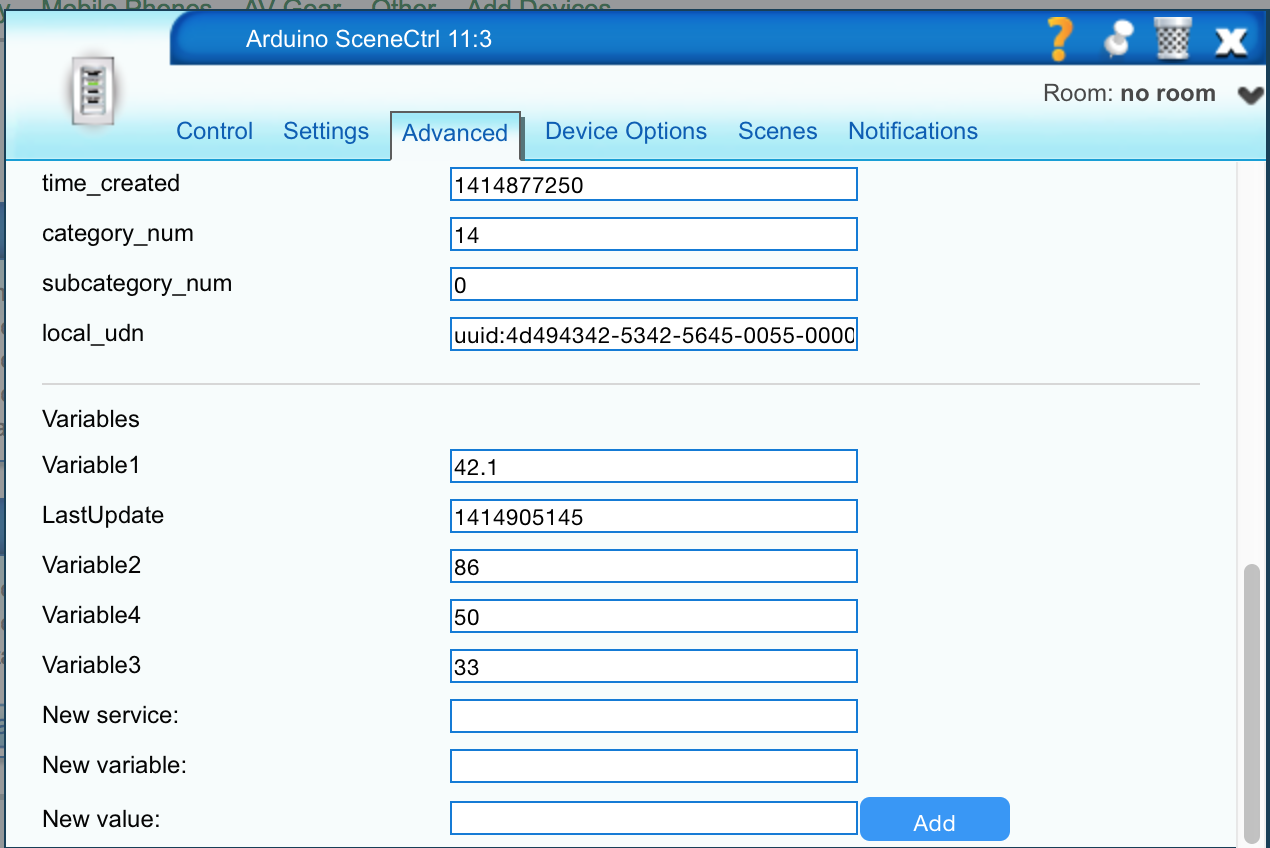
                                        also noticed that variable5 (V_VAR5) does not show up here (in device 85):
                                        Screen Shot 2014-11-02 at 1.19.11 AM.png

                                        1 Reply Last reply
                                        0
                                        • BulldogLowellB BulldogLowell

                                          I added delays in the lua code and that seemed to help a lot:

                                          local temp = luup.variable_get("urn:upnp-org:serviceId:TemperatureSensor1","CurrentTemperature", 60)
                                          luup.call_action("urn:upnp-arduino-cc:serviceId:arduino1", "SendCommand", {radioId="11;3", variableId="VAR_1", value=temp}, 85)
                                          
                                          luup.sleep(750)
                                          
                                          local humid = luup.variable_get("urn:micasaverde-com:serviceId:HumiditySensor1","CurrentLevel", 63)
                                          luup.call_action("urn:upnp-arduino-cc:serviceId:arduino1", "SendCommand", {radioId="11;3", variableId="VAR_2", value=humid}, 85)
                                          
                                          luup.sleep(750)
                                          
                                          local low = luup.variable_get("urn:upnp-org:serviceId:TemperatureSensor1","CurrentTemperature", 61)
                                          luup.call_action("urn:upnp-arduino-cc:serviceId:arduino1", "SendCommand", {radioId="11;3", variableId="VAR_3", value=low}, 85)
                                          
                                          luup.sleep(750)
                                          
                                          local high = luup.variable_get("urn:upnp-org:serviceId:TemperatureSensor1","CurrentTemperature", 62)
                                          luup.call_action("urn:upnp-arduino-cc:serviceId:arduino1", "SendCommand", {radioId="11;3", variableId="VAR_4", value=high}, 85)
                                          
                                          luup.sleep(750)
                                          
                                          local conditions = luup.variable_get("urn:upnp-org:serviceId:Weather1","CurrentTemperature", 59)
                                          luup.call_action("urn:upnp-arduino-cc:serviceId:arduino1", "SendCommand", {radioId="11;3", variableId="VAR_5", value=conditions}, 85)
                                          

                                          still struggling with this, however:

                                          if (message.type == V_VAR5)
                                          {
                                            conditions = String(message.data);
                                            DEBUG_PRINT(F("Received today's Conditions:"));
                                            DEBUG_PRINTLN(conditions);
                                          }
                                          

                                          not returning the present conditions....

                                          korttomaK Offline
                                          korttomaK Offline
                                          korttoma
                                          Hero Member
                                          wrote on last edited by
                                          #21

                                          @BulldogLowell

                                          I do have all 5 variables listed under my scene-controler device. Do you still get the failed for getting time in your serial print? Seems like you might have "general" communication issues, you have cap on the radio? Try a different power source or temporarily move your device closer to the gateway. I had some similar problems when trying to use the PA+LNA radio module so I switched to a regular one and that one works fine. I wanted to use the PA+LNA version because the device is quite far from GW and I did not think the regular one could handle the distance but it did.

                                          Thanks for showing me how to add a delay to the lua code btw, I newer figured that out so I only ewer sent two variables at a time. Btw, does the delay affect vera in any way? I thought I read somewhere that the unit does not do anything during sleep.


                                          • Tomas
                                          1 Reply Last reply
                                          0
                                          Reply
                                          • Reply as topic
                                          Log in to reply
                                          • Oldest to Newest
                                          • Newest to Oldest
                                          • Most Votes


                                          16

                                          Online

                                          11.7k

                                          Users

                                          11.2k

                                          Topics

                                          113.1k

                                          Posts


                                          Copyright 2025 TBD   |   Forum Guidelines   |   Privacy Policy   |   Terms of Service
                                          • Login

                                          • Don't have an account? Register

                                          • Login or register to search.
                                          • First post
                                            Last post
                                          0
                                          • MySensors
                                          • OpenHardware.io
                                          • Categories
                                          • Recent
                                          • Tags
                                          • Popular