
Remove duplicated mysensors in homeassistant front-end
-
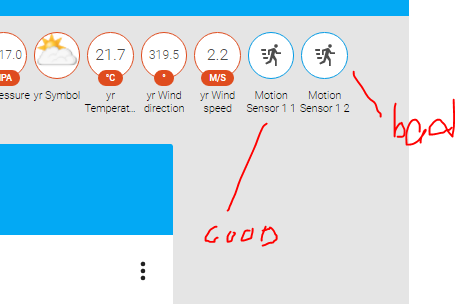
Anyone know how to remove duplicated sensors? I created a motion sensor with a CHILD_ID 1, then changed it to 2 during trouble-shooting and can't remove the original one now.
My configuration.yaml file:
mysensors:
gateways:
- device: '/dev/ttyUSB0'
baud_rate: 115200
debug: true
persistence: true
version: '1.5'
optimistic: falseI tried clearing the 'mysensors1.pickle' file thinking that's where the sensor was being stored but it didn't work. I also tried using the persistence_file: 'path/mysensors.json' in my yaml file but that just breaks my homeassistant connection - anyone have a similar experience?
My motion sensor test seems to work but still receiving an error message in the log. Not sure if this has anything to do with it.
16-07-17 12:45:07 mysensors.mysensors: Error decoding message from gateway, bad data received:
16-07-17 12:45:08 mysensors.mysensors: Error decoding message from gateway, bad data received: 0;255;3;0;9;Starting gateway (RNNGA-, 2.0.0)--- here's my code
#include <MySensor.h>
#include <SPI.h>

// Enable and select radio type attached
#define MY_RADIO_NRF24

unsigned long SLEEP_TIME = 10000; // Sleep time between reports (in milliseconds) 120000
#define DIGITAL_INPUT_SENSOR 3   // The digital input you attached your motion sensor.  (Only 2 and 3 generates interrupt!)
#define INTERRUPT DIGITAL_INPUT_SENSOR-2 // Usually the interrupt = pin -2 (on uno/nano anyway)
#define CHILD_ID 1   // Id of the sensor child

MyMessage msg(CHILD_ID, V_TRIPPED);
// Initialize motion messagePED);
MySensor gw;

void setup()
{
  Serial.begin(115200);
  gw.begin();
  gw.sendSketchInfo("Motion Sensor", "1.0");

  pinMode(DIGITAL_INPUT_SENSOR, INPUT);      // sets the motion sensor digital pin as input
  gw.present(CHILD_ID, S_MOTION);
}

void loop()
{
  // Read digital motion value
  boolean tripped = digitalRead(DIGITAL_INPUT_SENSOR) == HIGH;

  Serial.println(tripped);
  gw.send(msg.set(tripped?"1":"0"));  // Send tripped value to gw

  // Sleep until interrupt comes in on motion sensor. Send update every two minute.
  gw.sleep(INTERRUPT,CHANGE, SLEEP_TIME);
}
Any help would be greatly appreciated.
-
fixed 1 issue:
gw.sendSketchInfo("Motion Sensor", "1.0");
doesn't apply.Here's the current log related to the main issue.
16-07-17 13:13:24 mysensors.mysensors: child_id 1 already exists in children, cannot add child
16-07-17 13:13:58 homeassistant.core: Home Assistant requested a restart. -
fixed 1 issue:
gw.sendSketchInfo("Motion Sensor", "1.0");
doesn't apply.Here's the current log related to the main issue.
16-07-17 13:13:24 mysensors.mysensors: child_id 1 already exists in children, cannot add child
16-07-17 13:13:58 homeassistant.core: Home Assistant requested a restart.Deleting the persistence file and the backup file and restarting home assistant should have removed all sensors.
I recommend using a json file as persistence file, as you can easily edit that file type and remove individual children etc. A pickle file is not easily editable. Make sure you have the correct path to the persistence file. The path in the example config is not a valid path.
-
Thanks for the reply Martin.
To clarify the steps:
I need to add a persistence file in the .yaml file and ensure the path is a real path.
persistence_file: 'path/mysensors.json'. Do I need to remove those pickle files? I'm assuming they were automatically created because I did not specify a .json file in my config.I actually tried to add persistence_file: 'path/mysensors.json' where path was = to the location of my .yaml file on my rpi3. When i restarted homeassistant, the system wouldn't come up. I tried rebooting the pi to no avail.
Do I need to create an empty mysensors.json file first?
Thanks again.
-
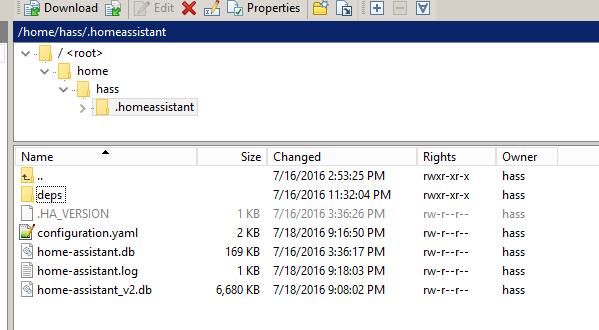
Just specify a valid path to the file in a folder that exists. I usually use the
.homeassistantfolder. You should not create the file. The file will be created when one of your sensors is first presented.Remove all old pickle files if you want to switch to json files. I don't know why home assistant didn't want to start.
-
hmm. restarting HA/rebooting my pi3 doesn't generate the .json file. I'm pretty sure my config is correct now. Would you mind giving it a once over? I've already done a full re-install with updates and pretty much back to where I started.
What else could I check?
-
sweet, i got it. Thanks!
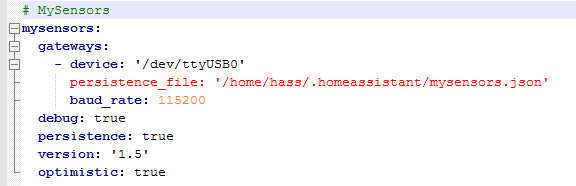
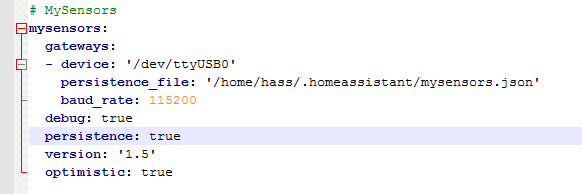
spacing in my config. yaml file. used tab instead of space which is why notepad++ had that line in red.
also had to move a few lines back under gateways: line.


Hello! It looks like you're interested in this conversation, but you don't have an account yet.
Getting fed up of having to scroll through the same posts each visit? When you register for an account, you'll always come back to exactly where you were before, and choose to be notified of new replies (either via email, or push notification). You'll also be able to save bookmarks and upvote posts to show your appreciation to other community members.
With your input, this post could be even better 💗
Register Login