
Relay Actuator stops responding after a week or so
-
I built a white noise device using the relay actuator. It runs all night long while I'm sleeping then I turn it off in the morning (from Vera). I absolutely love the device because I can turn it on/off with any Vera interface. Lately I have been using EventGhost to send an html command to turn on the device when I turn off my media computer. It's so cool!
I do have one slight problem though I have noticed that after a week or so it will stop responding to commands from Vera. I need to disconnect/reconnect power to the device and it will work flawlessly for another week or so then the pattern will repeat. Does anyone have any idea what may be causing this? It seems the device stops receiving communication from Vera because the status of the device in Vera is incorrect. The relay is powered by a separate power source.
Thanks,
Pete
-
@petewill said:
wlessly for another week or so then the pattern will repeat. Does anyone have any idea what may be causing this? It seems the device stops receiving communication from Vera because the status of the device in Vera is incorrect. The relay is powered by a separate power source.
Hi Pete,
I used to have similar issues with relay actuator just running on my bench.How is it connected up? i suspect some of the cheapy breadboards i was using at fault.
Do you have a capacitor for the radio? If not try adding.
Are you running the latest versions - where the ack's are performed? ( this may have been the silver bullet in my case) -
@petewill said:
wlessly for another week or so then the pattern will repeat. Does anyone have any idea what may be causing this? It seems the device stops receiving communication from Vera because the status of the device in Vera is incorrect. The relay is powered by a separate power source.
Hi Pete,
I used to have similar issues with relay actuator just running on my bench.How is it connected up? i suspect some of the cheapy breadboards i was using at fault.
Do you have a capacitor for the radio? If not try adding.
Are you running the latest versions - where the ack's are performed? ( this may have been the silver bullet in my case)@gregl said:
Are you running the latest versions - where the ack's are performed? ( this may have been the silver bullet in my case)
interesting, how will I know if mine are the latest.
I have been having some issues here an there as well. 100% caps added and occasionally I'm losing a node.
-
@petewill said:
wlessly for another week or so then the pattern will repeat. Does anyone have any idea what may be causing this? It seems the device stops receiving communication from Vera because the status of the device in Vera is incorrect. The relay is powered by a separate power source.
Hi Pete,
I used to have similar issues with relay actuator just running on my bench.How is it connected up? i suspect some of the cheapy breadboards i was using at fault.
Do you have a capacitor for the radio? If not try adding.
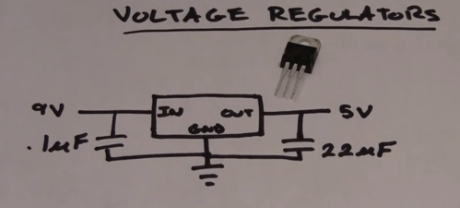
Are you running the latest versions - where the ack's are performed? ( this may have been the silver bullet in my case)Thanks for the reply! I have capacitors across the 3.3v regulator like this:
I have not put a capacitor between 3.3v and ground on the radio chip though. Is that what you're referring to? I have a couple of other sketches that have been running without a capacitor on the radio chip for months but maybe this one is different.I am not running the latest version. I built this on 3/2/14 and I haven't updated since then. I am planning to update soon (I just have so many things I need to get done and I don't want to break my existing sensors). Maybe this will prompt me to do it a little sooner than planned though.
What version are you running that is working for you?
Thanks!
-
Thanks for the reply! I have capacitors across the 3.3v regulator like this:
I have not put a capacitor between 3.3v and ground on the radio chip though. Is that what you're referring to? I have a couple of other sketches that have been running without a capacitor on the radio chip for months but maybe this one is different.I am not running the latest version. I built this on 3/2/14 and I haven't updated since then. I am planning to update soon (I just have so many things I need to get done and I don't want to break my existing sensors). Maybe this will prompt me to do it a little sooner than planned though.
What version are you running that is working for you?
Thanks!
@petewill said:
I have not put a capacitor between 3.3v and ground on the radio chip though. Is that what you're referring to?
What version are you running that is working for you?
Thanks!
Yeah, putting the capacitor on the radio chip... it really improved the reliability of the radio, in my experience.
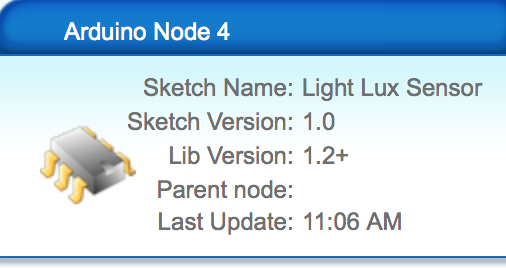
I'm running libraries as attached:
like you I don't want to have to do any sketch upgrades on the sensors.

Hello! It looks like you're interested in this conversation, but you don't have an account yet.
Getting fed up of having to scroll through the same posts each visit? When you register for an account, you'll always come back to exactly where you were before, and choose to be notified of new replies (either via email, or push notification). You'll also be able to save bookmarks and upvote posts to show your appreciation to other community members.
With your input, this post could be even better 💗
Register Login