
mqtt_esp8266_gateway and 1mhz node
-
@cimba007 very interesting.
Somewhat of a side note:
People have reported that they have had trouble to use 57600 bps on the 3.3V 8MHz atmegas, because the timing isn't accurate enough for that high speed. Based on that, using 115200 on 1MHz should be impossible. Bit I guess it is working since your terminal works.You could try to lower the speed to 9600 or even lower and see if that makes a difference.
It is indded working with 115200 .. at least my terminal is set at this rate and the node too. It even pumped it up to not waste too much time in the serial routines.
I used this sketch:
void setup() {
  Serial.begin(57600);
  pinMode(A4,OUTPUT);
  Serial.println(OSCCAL);
}

// Use hterm to repeatatly send the same message unti you cacn read it
void loop() {
  static uint8_t val = 140;
  OSCCAL=val;
  //Serial.println();
  Serial.print("Osccal= ");
  Serial.println(OSCCAL,DEC);

  delay(500);
  //digitalWrite(A4,HIGH);
  //delay(1);
  //digitalWrite(A4,LOW);
  //delay(100);
  while(Serial.available())
    Serial.write(Serial.read());
  val++;
  if(val > 200)
    val = 140;
}
It just tries out various settings for OSCCAL .. thus ramping the atmega328 up and speed. There are some settings where I can receive clear messages like in the range from 140 to 160 .. so ist just set OSCCAL to 150.
This might be specific for my current serial-usb converter but for now its fine.
-
I only recently got into the jboard and thought abou trying out 1mhz as described here:
I plan to use the jboard with 2x AA so 3,0Volt and the only valid option is 1mhz.
I can only guess that an esp8266 as an gateway in combination with 1mhz nodes is "special".
Now I will check the esp8266 gateway code to look if there are some assumptions on delays etc.
EDIT: For now I can see that the gatway is receiving the PING message .. and that the node is waiting.
		transportRouteMessage(build(_msgTmp, _nc.nodeId, targetId, NODE_SENSOR_ID, C_INTERNAL, I_PING, false).set((uint8_t)0x01));
		// Wait for ping reply or timeout
		//Serial.print("WAITING");
		transportWait(2000, C_INTERNAL, I_PONG);
EDIT2: And that the gateway want's to send out the I_PONG
my debug code got this
WE GOT SOME PING?!11<\r><\n>
We got an message for11 type: I_PONG<\r><\n>
We got an message for11 type: OTHER<\r><\n>
So .. let me try to state the timing:
Node sends I_PING message to Gateway .. at 21:42:52,314
Gateway receives I_PING at 21:42:52,281waiiiiittt .. the node is still debugging on the serial as the gateway already got the message like 25ms ago? This might be an artifact of my hterm serial console but lets assume it is right.
gateway send I_PONG at 21:42:52,284
So the gateway takes 3ms to process the message including serial overhead .. nice timing
the node reports TSP:CHKUPL:FAIL (hops=255)<\n> at 21:42:54,404
assuming transportWait(2000, C_INTERNAL, I_PONG); takes 2000ms then the node began listeing at
21:42:52,404
whereas the gateway responded at:
21:42:52,281 .. so there seems a whopping 120ms delay caused by some serial output or just the slow 1mhz of the node ..
The gateway already responded while the node didn't even move to the "LISTEN" code ..
This is just a "rough guess" as the timings are only measured using my terminal program but I think this might narrow down my issue
I might have been wrong regarding the timing.
My latest test indicates gateway sends pong at:
573.8
Node starts listeing at
572.8
Still there is not too much time ...
To be extra sure I popped an delay on the gateway side:
	Serial.println(message.type == I_PONG ? "I_PONG" : "OTHER");
	delay(2);
	//Serial.println("")
	bool ok = transportSendWrite(route, message);
Now my node is working again .. I would say the whole issue is an race condition resulting from the great difference in speed.
I found a workaround that is acceptable (for me at least):
In MyTransport.cpp I added an delay(2).
I_PING messages should not be too common to have an impact on battery life and the node now has enough time to switch to receiving mode.// general if (type == I_PING) { delay(2); //Serial.print("WE GOT SOME PING?!"); //Serial.println(sender); debug(PSTR("TSP:MSG:PINGED (ID=%d, hops=%d)\n"), sender, _msg.getByte()); transportRouteMessage(build(_msgTmp, _nc.nodeId, sender, NODE_SENSOR_ID, C_INTERNAL, I_PONG, false).set((uint8_t)0x01)); return; // no further processing required } -
I might have been wrong regarding the timing.
My latest test indicates gateway sends pong at:
573.8
Node starts listeing at
572.8
Still there is not too much time ...
To be extra sure I popped an delay on the gateway side:
	Serial.println(message.type == I_PONG ? "I_PONG" : "OTHER");
	delay(2);
	//Serial.println("")
	bool ok = transportSendWrite(route, message);
Now my node is working again .. I would say the whole issue is an race condition resulting from the great difference in speed.
I found a workaround that is acceptable (for me at least):
In MyTransport.cpp I added an delay(2).
I_PING messages should not be too common to have an impact on battery life and the node now has enough time to switch to receiving mode.// general if (type == I_PING) { delay(2); //Serial.print("WE GOT SOME PING?!"); //Serial.println(sender); debug(PSTR("TSP:MSG:PINGED (ID=%d, hops=%d)\n"), sender, _msg.getByte()); transportRouteMessage(build(_msgTmp, _nc.nodeId, sender, NODE_SENSOR_ID, C_INTERNAL, I_PONG, false).set((uint8_t)0x01)); return; // no further processing required } -
@tekka
I just realized that this might affect all request-response operations and a solution might be difficult to find without affecting all users that don't use this particular setup.It would be ideal if an potential fix could be made so it would only affect the esp8266_mqtt code .. but again .. this might have further implications.
-
@tekka
I just realized that this might affect all request-response operations and a solution might be difficult to find without affecting all users that don't use this particular setup.It would be ideal if an potential fix could be made so it would only affect the esp8266_mqtt code .. but again .. this might have further implications.
-
@cimba007 Yes - and now thinking of the upcoming RPI GW port running at 1.2GHz ... :) I think a delay of ~300ms should be safe.
-
Lol I don't think/hope that the 1.2ghz will break the 8mhz node :)
@cimba007 I already noticed this behaviour as I use 1Mhz nodes. but didn't digged too much because for me this was a racing issue and was making sense, especially when serial debug was enabled. But even if not, 1mhz detunes timers etc so 1ms is not anymore.
Finally, for my network stability, I have decided to use 8Mhz when radio is active. Because imho it was making more sense, that for all nodes 1ms=1ms. So, if i don't need radio, i use 1mhz, else 8mhz. So I always have a decent speed process for the communication. And when radio is active, the 1mhz power savings of atmel is too small regarding radio power consumption..I think there is no problem to go as low as 1.8v with 328p
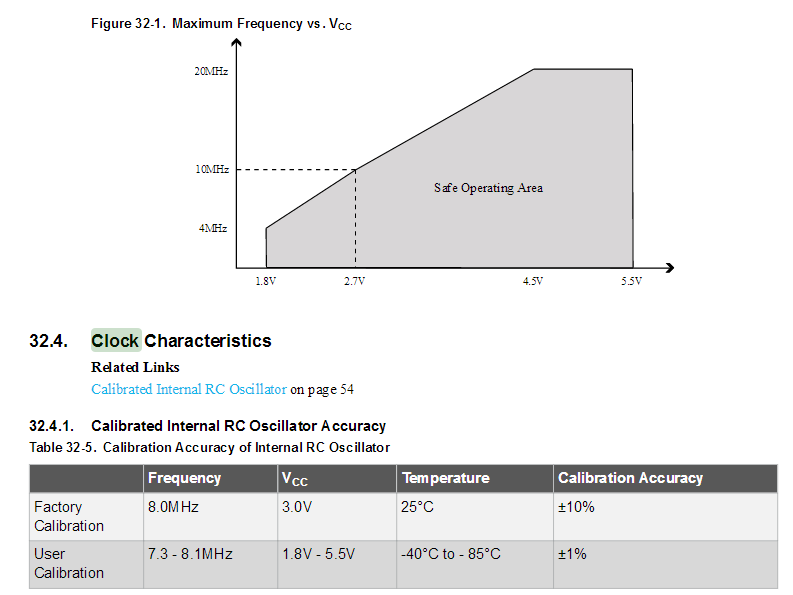
Also interesting about 250 000kbps baudrate, 0% error...
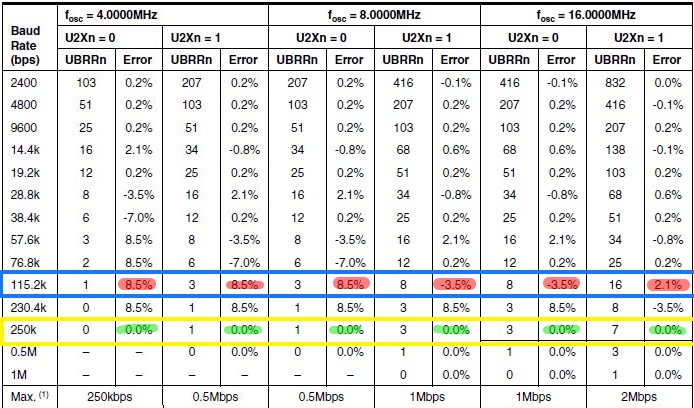
(I have only tried this for 4mhz, i'm not sure if it could work for 1mhz, from the datasheet it shouldn't. And that wasn't with Arduino Serial Monitor (250k). -
With 1Mhz I could get working was 115200.
I would like to switch to 8mhz but I have a dilemma.
I got ten 2xAA battery holders which would give me (with batteries) a working range from ~2.00V - 3.00V (approx).
The only option left is trying out the whole stuff with 16mhz / 8 = 2mhz but .. well .. I can't reflash the fuses on the jnode after assembly.
The other option I have is to switch to LDO + LiPo battery but I was not too sure to put lipo batteries all over my place for safety concerns. Don't know what will happen if on a hot summer day the lipo might get a full day of sun radiation when placed near a window for example.
-
Update: I missed one important point .. OSCCAL doesn't range from 140 to 200 but actually from 0 to 255
I changed the ranges and ...
void setup() {
  Serial.begin(250000);
  Serial.println(OSCCAL);
}

// Use hterm to repeatatly send the same message unti you cacn read it
void loop() {
  static uint8_t val = 0;
  OSCCAL=val;
  //Serial.println();
  Serial.print("Osccal= ");
  Serial.println(OSCCAL,DEC);

  delay(100);
  //while(Serial.available())
  //  Serial.write(Serial.read());
  val++;
  if(val > 250)
  {
    while(true);
  }
}
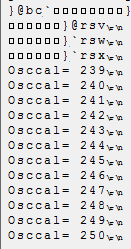
Believe it or not
Starting from osccal 239 .. which is technically 12/8 = 1,5mhz and not 1mhz .. I was able to receive some data .. with the drawback that all delay functions etc. might be "a little bit" off.
Wohoo .. 1,5mhz @ 250.000baud
Might be some artifact but .. it is still nice to know ^^
-
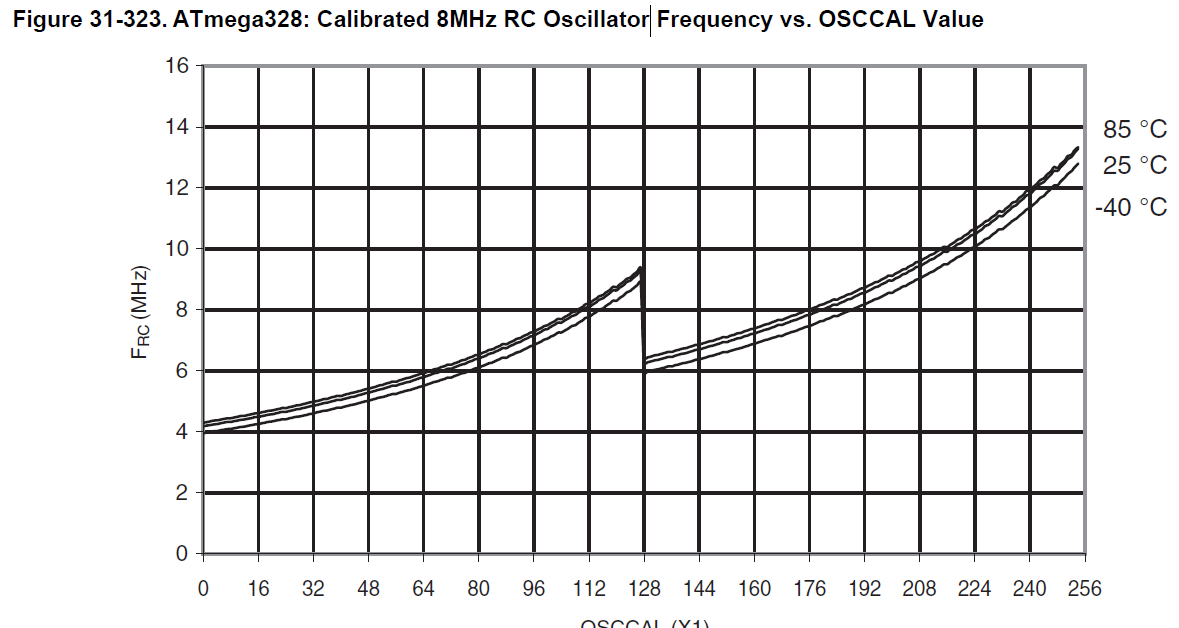
Somehow the graph from the datasheet doesn't fit at all for my internal oscillator.
Just an example .. I programmed the fuse to output the clock on PortB0 and I got:
OSCCAL=66;
Serial.begin(57600);
~973 KHzOSCCAL=66;
Serial.begin(115200);
~973 KHzOSCCAL=240;
Serial.begin(250000);
~1.88 MHzI would expect OSCCAL = 66 to get me ~ 6/8 = 800KHz
-




Hello! It looks like you're interested in this conversation, but you don't have an account yet.
Getting fed up of having to scroll through the same posts each visit? When you register for an account, you'll always come back to exactly where you were before, and choose to be notified of new replies (either via email, or push notification). You'll also be able to save bookmarks and upvote posts to show your appreciation to other community members.
With your input, this post could be even better 💗
Register Login