
Water floor heater system
-
hi,
since month that i wondering if could built a controller for the water floor heater system,
i have solar panel with a pump that bring warm water to circulate on floor pipes.so my goal was built the controller for this, I started with small code after I added more features and ended up creating a board with components.
very soon , it is a temperature comparator with LCD , a button to temporarily turn on the LCD and the other to change the summer / winter cycle.
But when i arrived at finish part i discover a bug, that is when there is a rapid power failure the system does not restart , it is with the LCD turned on but not the system works.
just as I am a curious coder , having not been able to solve the problem, i am asking for your help in such problem.
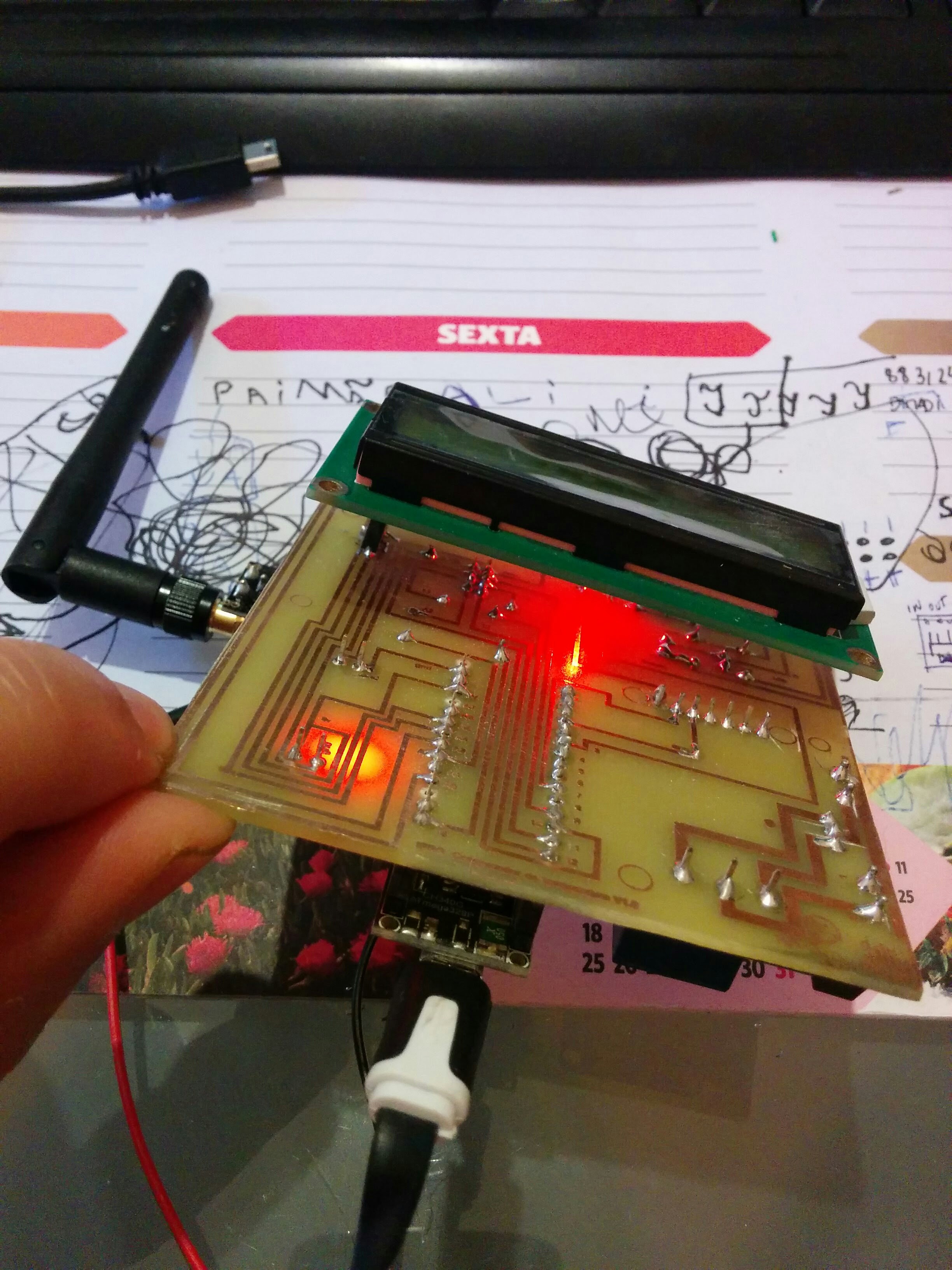
Thanks
/* Este sketch lê 2 DS18B20 "1-Wire" digital com LCD e botao */ #include <Wire.h> #include <OneWire.h> #include <SPI.h> #include <MySensor.h> #include <LiquidCrystal_I2C.h> #include <DallasTemperature.h> #include <Bounce2.h> // -----------Configurações personalizadas------------------------- #define ONE_WIRE_BUS 3 // DS18B20 Ligado ao pin X no arduino #define rele 7 // Relé ligado ao pin X no arduino #define Tempo_lcd_ligado 2500 // define o tempo do lcd ligado após ligar botão (milisegundos) #define Diferenca 1.0 // Define a diferença entre sensores para ativar relé #define botao_lcd A3 // Escolher pin de entrada para botão #define botao_verao A0 // escolher Modo verao/inverno // my sensors --botão #define CHILD_ID 7 // #define BUTTON_PIN 7 //------------------------------------------------------------------ #define MAX_ATTACHED_DS18B20 16 // configura onewire para comunicar com qq dispositivo OW OneWire oneWire(ONE_WIRE_BUS); // Envia a referençia oneWire para Dallas Temperature. DallasTemperature sensors(&oneWire); // configura o endereço LCD I2C, descobrir endereço ver outro skecht LiquidCrystal_I2C lcd(0x3F, 2, 1, 0, 4, 5, 6, 7, 3, POSITIVE); //definir estado inicial do relé int state1 = 0; int state2 = digitalRead(botao_verao); // defiinir estado inicial do botão int buttonState = 0; // definir endereço dos sensores de temp 1-Wire, descobrir ver outro sketch . DeviceAddress solpainel = { 0x28, 0xFF, 0xEC, 0xDA, 0xA4, 0x15, 0x01, 0x8C }; DeviceAddress bomba = { 0x28, 0xFF, 0x2D, 0x17, 0x00, 0x16, 0x03, 0x46 }; // numero de dispositivos 1wire encontrados int numberOfDevices; //Variaveis para controlo logico MySensor gw; float lastTemperature[MAX_ATTACHED_DS18B20]; int numSensors=0; boolean receivedConfig = false; boolean metric = true; MyMessage msg(0,V_TEMP); //---- mysensors - botão Bounce debouncer = Bounce(); int oldValue=-1; MyMessage msg1(CHILD_ID,V_TRIPPED); //---------- float Temp1, Temp2; // grava para comparação float differential1 = 0.0 ; float differential2 = 0.0 ; int invalidCount = 0; //codigo corre sempre que se inicia. void setup(void) { delay(6000); // iniciar serial port Serial.begin(9600); // Start up the library Serial.println ("ligando sensores one wire"); sensors.begin(); gw.begin(); gw.sendSketchInfo("Temperature Sensor", "1.1"); numSensors = sensors.getDeviceCount(); for (int i=0; i<numSensors && i<MAX_ATTACHED_DS18B20; i++) { gw.present(i, S_TEMP); } //---------------------------------------------mysensor botao // Setup the button pinMode(BUTTON_PIN,INPUT); // Activate internal pull-up digitalWrite(BUTTON_PIN,HIGH); // After setting up the button, setup debouncer debouncer.attach(BUTTON_PIN); debouncer.interval(5); // Register binary input sensor to gw (they will be created as child devices) // You can use S_DOOR, S_MOTION or S_LIGHT here depending on your usage. // If S_LIGHT is used, remember to update variable type you send in. See "msg" above. gw.present(CHILD_ID, S_DOOR); //-------------------------------- // locate devices on the one wire bus Serial.println(""); Serial.print("encontrando dispositivos 1-wire..."); Serial.println (""); Serial.print("encontrado "); Serial.print(sensors.getDeviceCount(), DEC); Serial.println(" dispositivos."); lcd.begin(16,2); Serial.print("Ligando LCD"); Serial.print("\n\r"); // ------- Pisca 3 vezes ------------- for(int i = 0; i< 3; i++) { lcd.backlight(); delay(250); lcd.noBacklight(); delay(250); } lcd.backlight(); // finish with backlight on //-------- Escreve carateres no LCD ------------------ lcd.setCursor(0,0); lcd.print("Comparador do"); delay(1000); lcd.setCursor(0,1); lcd.print("Aquecimento"); delay(2000); lcd.clear(); // set the resolution to 10 bit (good enough?) sensors.setResolution(solpainel, 10); sensors.setResolution(bomba, 10); //delay (1500); lcd.noBacklight(); //definir pin output { pinMode(rele, OUTPUT); pinMode(botao_lcd, INPUT); pinMode(botao_verao, INPUT); } delay (1000); } void printTemperature(DeviceAddress deviceAddress) { float tempC = sensors.getTempC(deviceAddress); if (tempC == -127.00) { Serial.print("Erro a obter temperatura"); } else { Serial.print("C: "); Serial.print(tempC); } } void loop(void) { gw.process(); Serial.print("A atualizar temperaturas...\n\r"); sensors.requestTemperatures(); int16_t conversionTime = sensors.millisToWaitForConversion(sensors.getResolution()); gw.sleep(conversionTime); for (int i=0; i<numSensors && i<MAX_ATTACHED_DS18B20; i++) { float temperature = static_cast<float>(static_cast<int>((gw.getConfig().isMetric?sensors.getTempCByIndex(i):sensors.getTempFByIndex(i)) * 10.)) / 10.; #if COMPARE_TEMP == 1 if (lastTemperature[i] != temperature && temperature != -127.00 && temperature != 85.00) { #else if (temperature != -127.00 && temperature != 85.00) { #endif gw.send(msg.setSensor(i).set(temperature,1)); lastTemperature[i]=temperature; } } Serial.print("Temp do painel: "); printTemperature(solpainel); Serial.print("\n\r"); Serial.print("Temp da bomba: "); printTemperature(bomba); Serial.print("\n\r"); Serial.println(""); Serial.println(""); Serial.print ("estado do rele: "); Serial.println(state1); Serial.println(""); buttonState = digitalRead(botao_lcd); if (buttonState == HIGH){ // Botao pressionado. Serial.println("Botao pressionado - HIGH"); lcd.on(); lcd.setCursor(0,0); buttonState = digitalRead(botao_verao); if (buttonState == HIGH) { lcd.print("Modo: Verao");} else { lcd.print("Modo: Inverno"); } delay (1000); lcd.setCursor(0,0); lcd.print("T.Painel :"); lcd.print(sensors.getTempC(solpainel)); lcd.setCursor(15,1); lcd.print("C"); lcd.backlight(); lcd.setCursor(0,1); lcd.print("T.Entrada:"); lcd.print(sensors.getTempC(bomba)); lcd.setCursor(15,0); lcd.print("C"); delay (Tempo_lcd_ligado); lcd.clear(); lcd.off(); } else{ // botao nao pressionado. Serial.println("Botao nao pressionado - LOW"); } //Sensors for logic Temp1 = sensors.getTempC(bomba); Temp2 = sensors.getTempC(solpainel); //diferença entre Solpainel e bomba differential1 = Temp2-Temp1; differential2 = Temp1-Temp2; Serial.print("Diferenca para inverno e:"); Serial.println(differential1); Serial.println(""); Serial.print("Diferenca para Verao e:"); Serial.println(differential2); Serial.println(""); //logic1 { buttonState = digitalRead(botao_verao); if (buttonState == HIGH){ if (differential2 >= (Diferenca)) { // comparara temps, (state2 = 1); digitalWrite(rele, LOW); Serial.print("bomba verao ligada"); Serial.print("\n\r");} else { (state2 = 0); digitalWrite(rele, HIGH); Serial.print("bomba verao desligada"); Serial.println(""); Serial.print("\n\r");}} else { if (differential1 >= (Diferenca)) { // comparara temps, (state1 = 1); digitalWrite(rele, LOW); Serial.print("bomba inverno ligada"); Serial.print("\n\r");} else { (state1 = 0); digitalWrite(rele, HIGH); Serial.print("bomba inverno Desligada"); Serial.println(""); Serial.print("\n\r");} } } { debouncer.update(); // Get the update value int value = debouncer.read(); if (value != oldValue) { // Send in the new value gw.send(msg1.set(value==LOW ? 1 : 0)); oldValue = value; } } delay (1000); } -
-
-
I've seen this when I set the radio power to max and power the LCD via the nano at the same time. The LCD takes to much so the rest doesn't work....
-

Hello! It looks like you're interested in this conversation, but you don't have an account yet.
Getting fed up of having to scroll through the same posts each visit? When you register for an account, you'll always come back to exactly where you were before, and choose to be notified of new replies (either via email, or push notification). You'll also be able to save bookmarks and upvote posts to show your appreciation to other community members.
With your input, this post could be even better 💗
Register Login