
💬 Building a wired RS485 sensor network
-
-
@pjr i dont know what is this "for(byte w=0; w<3; w++)" because i am beginner but i see after change this , my network work better. very better. but no perfect
-
@kimot also do you have idea for improve wireless transport(nrf24)?
because for wireless also i have 50% error for commands.@Reza
Sorry, I do not know.
I am not using radio now (but RS485 too not).
I only look to code and try some RS485 library things,
but only two nodes connected through serial lines.
I am trying understand like MySensors code works to write my own library for CAN bus.https://forum.mysensors.org/topic/5327/can-bus-transport-implementation-for-mys/17
-
@Reza
This code makes, that your node sends three SOH bytes on beginning of message instead of only one SOH. -
@Reza
Like someone writes here, your module maybe includes all needed resistors for the bus on PCB.http://yourduino.com/sunshop//index.php?l=product_detail&p=323
For two nodes it ok and you must not connect any terminating resistors.
For three and more, you must remove this resistors from PCB exclude those nodes, which are on the ends of bus.
Maybe you can divide your "big" problem to several "small" problems.
RS485 is tested bus and MUST work even on long cables.
It must be problem with electricity circuit or software.
Maybe software switchs direction pin to receiving mode early and not all data are send on the bus.
In MyTransportRS485.cpp maybe it is wrong .
It is "hard coded" for crystal 20MHz and bus speed 9600 bd. Try put your values.
//
_dev.flush();
delayMicroseconds((20000000UL/9600)+1);
//Try examples from AltSoftSerial library with different lengths of cables and do not forgot handle your DE pin.
https://github.com/PaulStoffregen/AltSoftSerialOr connect your two nodes only through serial wires and check functionality of your code without rs485 converters.
-
@Reza
Like someone writes here, your module maybe includes all needed resistors for the bus on PCB.http://yourduino.com/sunshop//index.php?l=product_detail&p=323
For two nodes it ok and you must not connect any terminating resistors.
For three and more, you must remove this resistors from PCB exclude those nodes, which are on the ends of bus.
Maybe you can divide your "big" problem to several "small" problems.
RS485 is tested bus and MUST work even on long cables.
It must be problem with electricity circuit or software.
Maybe software switchs direction pin to receiving mode early and not all data are send on the bus.
In MyTransportRS485.cpp maybe it is wrong .
It is "hard coded" for crystal 20MHz and bus speed 9600 bd. Try put your values.
//
_dev.flush();
delayMicroseconds((20000000UL/9600)+1);
//Try examples from AltSoftSerial library with different lengths of cables and do not forgot handle your DE pin.
https://github.com/PaulStoffregen/AltSoftSerialOr connect your two nodes only through serial wires and check functionality of your code without rs485 converters.
@kimot how remove resistors from PCB ? :O there is resistor onboard? so for first and end dont need connect external resistor ? in other means i must for example for 10 nodes , any change in node 1 and 10 ! and remove resistor for node 2 - 9 with soldering?
i test with some hardware. for 30 meter cable i dont use sheild cable. this is without sheild? may be problem for 30 meter is related to this ! is this true ?
i dont change any things in mytransport rs485 just W<3. also sketch is from site
im my transport is:
_dev.flush();
delayMicroseconds((20000000UL/9600)+1);your last experience how many nodes you use ? with how much wire? and how % error for send and receive you have?
-
I agree regarding your rs485 network you may need to adjust resistors. But i've not this setup, even if i would like to try it!
about removing smd resistor..if you have a solder iron, a simple trick :
Let's assume you want to push and remove your resistor to the right..- Add a blob of solder to the right pad (take a magnifier if you're not confident or smd is too small)
- Heat well this pad. Not like hell, lol, but enough so solder will still be melted, for,
- Then quickly move to the left pad, heat it, and push the resistor to the right for removing it.
Be careful with others parts around of course ;)
I hope it's clear :)
-
I agree regarding your rs485 network you may need to adjust resistors. But i've not this setup, even if i would like to try it!
about removing smd resistor..if you have a solder iron, a simple trick :
Let's assume you want to push and remove your resistor to the right..- Add a blob of solder to the right pad (take a magnifier if you're not confident or smd is too small)
- Heat well this pad. Not like hell, lol, but enough so solder will still be melted, for,
- Then quickly move to the left pad, heat it, and push the resistor to the right for removing it.
Be careful with others parts around of course ;)
I hope it's clear :)
-
@Reza
I recommend nothing solder or unsolder now.
Simply start with two Arduinos on two ends of cable.
When your communication will work for these two devices, then you can go further.
For one Arduino write simple sketch, which will periodically send something ("Hello World/n" )
to the bus. Other Arduino with sketch witch will receive characters and sends then through USB serial port to serial monitor on PC. Only with AltSoftSerial library, not with MySensors.
When this communication will work on any length of cable ( I suppose you have not cable longer then 1km at your home ), you can go further.
You do not need drive DE and RE pins by software, simply on transmitting Arduino set it for transmit ( to +5V ) and on receiving Arduino to ground. -
@Reza
I recommend nothing solder or unsolder now.
Simply start with two Arduinos on two ends of cable.
When your communication will work for these two devices, then you can go further.
For one Arduino write simple sketch, which will periodically send something ("Hello World/n" )
to the bus. Other Arduino with sketch witch will receive characters and sends then through USB serial port to serial monitor on PC. Only with AltSoftSerial library, not with MySensors.
When this communication will work on any length of cable ( I suppose you have not cable longer then 1km at your home ), you can go further.
You do not need drive DE and RE pins by software, simply on transmitting Arduino set it for transmit ( to +5V ) and on receiving Arduino to ground. -
Hi, i have a Gateway running and the motion-sensor. The Sensors talks with the Gateway. (Arduino Pins: D2,D8,D9)
Now i have to switch to another Hardware. On the Arduino-Pro Mini i have easy access to 0-RX, 1-TX, 2-D5, 3-D5, 4-D7, 10-13, A1-A3)
Which combination of this pins would be the best, and how can i define it in the sketch ?
Im happe for each hint. -
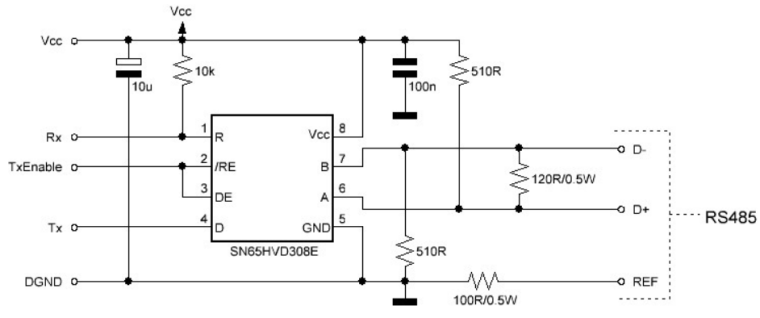
The 510 ohm pull up and pull down resistors are usually mounted on the master side. Theoretically it
would be best to install it in the middle of your bus line. The 120 ohm termination resistor must always
be used on distances greater than 1 meter and/or baud rates higher than 9600. It’s best to install it as a
norm as noise and reflections will cause havoc on your communication once implemented in the field.
The termination resistors should be mounted at both ends of the bus line. Please note that adding bias
resistors will load the driver IC output. With the indicated values the max number of units on the bus
line is limited to eight 12kΩ, sixteen 24kΩ, or thirty-two 48kΩ units.
For further protection transient suppressors can be installed across the differential lines, from the Vcc to
D+ and from GND to D-.!
-
Google for simple Modbus Master dcouments (arduino forum)
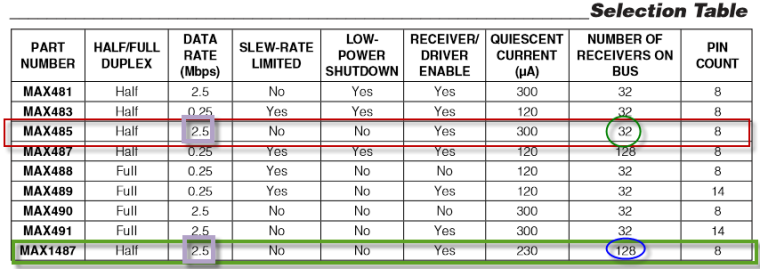
The MAX485 is not the best RS485 chip because of it's own internal impedance.
The chip in the diagram can be change by MAX485, MAX...
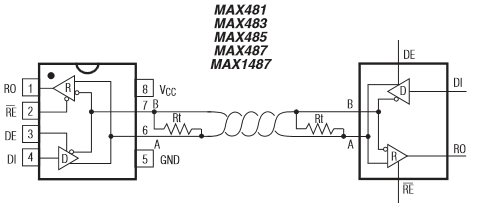
https://datasheets.maximintegrated.com/en/ds/MAX1487-MAX491.pdf
-
-
Hi, I'm building my home automation system and I have UTP cables cat5e in walls going to my wall switches. I have four cables, 5 nodes on one cable, 2 nodes on the second cable, and one node on 3rd and one 4th cable. 9 nodes. I know that the RS485 should be connected in parallel on single twisted pair but i cant change cables now cause my walls are painted etc.. So I have few problems, nodes stops working, i need to reset them few times, after few days the network stops to work and i start to search for an answers here. I changed numbers of SOH from 1 to 3 in 274 line of MyTransportRS485.cpp and now I think the network working better. I have 120ohm resistor in every node. You think that I should remove them ? Nodes are max 10 meters from the gateway so the cable lengths aren't so long.
-
Hi, I'm building my home automation system and I have UTP cables cat5e in walls going to my wall switches. I have four cables, 5 nodes on one cable, 2 nodes on the second cable, and one node on 3rd and one 4th cable. 9 nodes. I know that the RS485 should be connected in parallel on single twisted pair but i cant change cables now cause my walls are painted etc.. So I have few problems, nodes stops working, i need to reset them few times, after few days the network stops to work and i start to search for an answers here. I changed numbers of SOH from 1 to 3 in 274 line of MyTransportRS485.cpp and now I think the network working better. I have 120ohm resistor in every node. You think that I should remove them ? Nodes are max 10 meters from the gateway so the cable lengths aren't so long.
-
-
@nofox
If you have got one free pair of wires in cat5e cable, it is easy to convert your "star" topology to pure 485 bus topology with terminal resistors on both ends only. -
-
Ok, so i switched my RS485 network to "bus". I desolder all of 120ohm resistors and have them only on both ends of the bus. RS485 to Ethernet gateway is in the middle of the wire. There are still some problems.. When I switching on the power and reading debug from gate I see that only 4 from 9 nodes are presenting. I need to reset other nodes manually to get them properly presented to the gateway. What am I doing wrong ? I need help I think.. Maybe its caused by the fact that all nodes powering on at the same time and there are many collisions on the RS485 bus ?? Maybe I should add some different delay() to setup part of my sketches to give, a time for every single node to present to the gateway ? Someone have successful working rs485 mysensors network here ?
This is code for one of my nodes with buttons, relays and temperature sensor:
#define MY_NODE_ID 8

// Enable debug prints to serial monitor
#define MY_DEBUG

// Enable RS485 transport layer
#define MY_RS485

// Define this to enables DE-pin management on defined pin
#define MY_RS485_DE_PIN 2

// Set RS485 baud rate to use
#define MY_RS485_BAUD_RATE 9600

#include <SPI.h>
#include <MySensors.h>
#include <Bounce2.h>
#include <DallasTemperature.h>
#include <OneWire.h>
#include <OneButton.h>

// define actions for OneButton function
typedef enum {
  ACTION_OFF_1,  // set relay "OFF".
  ACTION_ON_1,   // set relay "ON"
  ACTION_OFF_2,
  ACTION_ON_2
}
MyActions;

MyActions nextAction_1 = ACTION_OFF_1;
MyActions nextAction_2 = ACTION_OFF_2;

// define Arduino I/O pins for relays
#define RELAY_1  3 // Arduino Digital I/O pin number for first relay
#define RELAY_2  5 // Arduino Digital I/O pin number for first relay
#define RELAY_ON 1  // GPIO value to write to turn on attached relay
#define RELAY_OFF 0 // GPIO value to write to turn off attached relay

// configure parameters for 1Wire temp sensor
#define COMPARE_TEMP 1
#define ONE_WIRE_BUS 6
#define MAX_ATTACHED_DS18B20 16

// define CHILD IDs for relays and virtual multiaction click/doubleclick/longpress buttons
#define CHILD_ID_11 11 // child id for first relay and first button single click
#define CHILD_ID_12 12 // child id for second relay and second button single click
// #define CHILD_ID_13 13 // child id for first button single click (in this version not active because single click is attached directly to relay state)
#define CHILD_ID_14 14 // child id for first button double click
#define CHILD_ID_15 15 // child id for first button long press
// #define CHILD_ID_16 16 // child id for second button single click (in this version not active because single click is attached directly to relay state)
#define CHILD_ID_17 17 // child id for second button double click
#define CHILD_ID_18 18 // child id for second button long press

// define variables for temperature (and other) 1Wire Sensors
long previousMillis = 0;
long sensorInterval = 60000; // interval for temperature measurement
long HI_interval = 1000;
OneWire oneWire(ONE_WIRE_BUS);
DallasTemperature sensors(&oneWire);

float lastTemperature[MAX_ATTACHED_DS18B20];
int numSensors=0;
bool recivedConfig = false;
bool metric = true;

// define Arduino Digital I/O pins for OneButton function
OneButton BUTTON_1(7, true); // Arduino Digital I/O pin number for first physical button
OneButton BUTTON_2(10, true); // Arduino Digital I/O pin number for second physical button

bool V1_BUTTON_1; // set variable for virtual one click button 1
bool V2_BUTTON_1; // set variable for virtual double click button 1
bool V3_BUTTON_1; // set variable for virtual long press button 1

bool V1_BUTTON_2; // set variable for virtual one click button 2
bool V2_BUTTON_2; // set variable for virtual one click button 2
bool V3_BUTTON_2; // set variable for virtual one click button 2


bool state1; // variable for RELAY_1 states
bool state2; // variable for RELAY_2 states

void before()
{

 sensors.begin();

}

//define messages for diferent type of sensors CHILD_IDs used
MyMessage msg0(0,V_TEMP); // temperature sensor message
MyMessage msg11(CHILD_ID_11, V_LIGHT); // first relay & single click message
MyMessage msg12(CHILD_ID_12, V_LIGHT); // second relay & single click message

// MyMessage msg13(CHILD_ID_13, V_LIGHT); // button 1 Single click
MyMessage msg14(CHILD_ID_14, V_LIGHT); // button 1 Double click
MyMessage msg15(CHILD_ID_15, V_LIGHT); // button 1 Long press

// MyMessage msg16(CHILD_ID_16, V_LIGHT); // button 2 Single click
MyMessage msg17(CHILD_ID_17, V_LIGHT); // button 2 Dobule click
MyMessage msg18(CHILD_ID_18, V_LIGHT); // button 2 Long press

void setup()
{

digitalWrite(RELAY_1, RELAY_OFF); // Set first relay state and pin mode
 pinMode(RELAY_1, OUTPUT);

state1 = loadState(CHILD_ID_11);  // Set relay to last known state (using eeprom storage)
 digitalWrite(RELAY_1, state1?RELAY_ON:RELAY_OFF);

digitalWrite(RELAY_2, RELAY_OFF); // Set second relay state and pin mode
 pinMode(RELAY_2, OUTPUT);

state2 = loadState(CHILD_ID_12);  // Set relay to last known state (using eeprom storage)
 digitalWrite(RELAY_2, state2?RELAY_ON:RELAY_OFF);


// sending states of relays after node bootup
send(msg11.set(state1));
send(msg12.set(state2));

// attaching physical BUTTON_1 to OneButton function actions
BUTTON_1.attachClick(singleclick_BUTTON_1);
BUTTON_1.attachDoubleClick(doubleclick_BUTTON_1);
BUTTON_1.attachLongPressStop(longpress_BUTTON_1);
// attaching physical BUTTON_2 to OneButton function actions
BUTTON_2.attachClick(singleclick_BUTTON_2);
BUTTON_2.attachDoubleClick(doubleclick_BUTTON_2);
BUTTON_2.attachLongPressStop(longpress_BUTTON_2);
// setup for temperature sensor
sensors.setWaitForConversion(false);

}

void presentation()
{
    sendSketchInfo("pokoiczek_puszka_1", "1.0");

    numSensors = sensors.getDeviceCount();

  // Present all sensors to controller
  for (int i=0; i<numSensors && i<MAX_ATTACHED_DS18B20; i++) {
     present(i, S_TEMP);
  }

    present(CHILD_ID_11, S_LIGHT);
    present(CHILD_ID_12, S_LIGHT);

    // present(CHILD_ID_13, S_LIGHT);
    present(CHILD_ID_14, S_LIGHT);
    present(CHILD_ID_15, S_LIGHT);

    // present(CHILD_ID_16, S_LIGHT);
    present(CHILD_ID_17, S_LIGHT);
    present(CHILD_ID_18, S_LIGHT);

}


void loop()
{

  temperatureCheck(); // tmperature check function

  // states for nextAction of OneButton function
  if(state1 == HIGH)
    {
      nextAction_1 = ACTION_OFF_1;
    }
    else
    {
      nextAction_1 = ACTION_ON_1;
    }

  BUTTON_1.tick();  // reading state of first physical button

  if(state2 == HIGH)
    {
      nextAction_2 = ACTION_OFF_2;
    }
    else
    {
      nextAction_2 = ACTION_ON_2;
    }

  BUTTON_2.tick(); // // reading state of second physical button

}

void singleclick_BUTTON_1()
 {
  if (nextAction_1 == ACTION_OFF_1 )
    {
      nextAction_1 = ACTION_ON_1;
      send(msg11.set(HIGH?false:true), true);
    }
  else
    {
    nextAction_1 = ACTION_OFF_1;
    send(msg11.set(LOW?false:true), true);
    }
  // send(msg13.set(LOW ? 1 : 0));
  // send(msg13.set(HIGH ? 1 : 0));
 }

void doubleclick_BUTTON_1()
{
   send(msg14.set(LOW ? 1 : 0));
   send(msg14.set(HIGH ? 1 : 0));
}

void longpress_BUTTON_1()
{
   send(msg15.set(LOW ? 1 : 0));
   send(msg15.set(HIGH ? 1 : 0));
}

void singleclick_BUTTON_2()
{

   if (nextAction_2 == ACTION_OFF_2 )
    {
      nextAction_2 = ACTION_ON_2;
      send(msg12.set(HIGH?false:true), true);
    }
  else
    {
    nextAction_2 = ACTION_OFF_2;
    send(msg12.set(LOW?false:true), true);
    }

  // send(msg16.set(LOW ? 1 : 0));
  // send(msg16.set(HIGH ? 1 : 0));
}

void doubleclick_BUTTON_2()
{
   send(msg17.set(LOW ? 1 : 0));
   send(msg17.set(HIGH ? 1 : 0));
}

void longpress_BUTTON_2()
{
   send(msg18.set(LOW ? 1 : 0));
   send(msg18.set(HIGH ? 1 : 0));
}

void temperatureCheck()
{
 unsigned long currentMillis = millis();
 if(currentMillis - previousMillis > sensorInterval)
  {
    previousMillis = currentMillis;

  // Fetch temperatures from Dallas sensors
  sensors.requestTemperatures();
  // query conversion time and sleep until conversion completed
  int16_t conversionTime = sensors.millisToWaitForConversion(sensors.getResolution());
  // sleep() call can be replaced by wait() call if node need to process incoming messages (or if node is repeater)
  wait(conversionTime);
  // Read temperatures and send them to controller
  for (int i=0; i<numSensors && i<MAX_ATTACHED_DS18B20; i++) {
    // Fetch and round temperature to one decimal
    float temperature = static_cast<float>(static_cast<int>((getControllerConfig().isMetric?sensors.getTempCByIndex(i):sensors.getTempFByIndex(i)) * 10.)) / 10.;
    // Only send data if temperature has changed and no error
    #if COMPARE_TEMP == 1
    if (lastTemperature[i] != temperature && temperature != -127.00 && temperature != 85.00) {
    #else
    if (temperature != -127.00 && temperature != 85.00) {
    #endif
      // Send in the new temperature
      send(msg0.setSensor(i).set(temperature,1));
      // Save new temperatures for next compare
      lastTemperature[i]=temperature;
    }
  }

}

}

void receive(const MyMessage &message)
{
  if (message.type == V_STATUS && message.sensor == 11) {
    // Change relay state
    state1 = message.getBool();
    digitalWrite(RELAY_1, state1?RELAY_ON:RELAY_OFF);
    // Store state in eeprom
    saveState(CHILD_ID_11, state1);

   // send(msg11.set(state1));

     // Write some debug info
    Serial.print("Incoming change for sensor:");
    Serial.print(message.sensor);
    Serial.print(", New status: ");
    Serial.println(message.getBool());
  }
  else if (message.type == V_STATUS && message.sensor == 12) {

    state2 = message.getBool();
    digitalWrite(RELAY_2, state2?RELAY_ON:RELAY_OFF);

    saveState(CHILD_ID_12, state2);

   // send(msg12.set(state2));

    // Write some debug info
    Serial.print("Incoming change for sensor:");
    Serial.print(message.sensor);
    Serial.print(", New status: ");
    Serial.println(message.getBool());
  }
}
I'm using OneButton library to get different actions when i'm clicking once, twice and holding buttons.




Hello! It looks like you're interested in this conversation, but you don't have an account yet.
Getting fed up of having to scroll through the same posts each visit? When you register for an account, you'll always come back to exactly where you were before, and choose to be notified of new replies (either via email, or push notification). You'll also be able to save bookmarks and upvote posts to show your appreciation to other community members.
With your input, this post could be even better 💗
Register Login