
Newbie problem
-
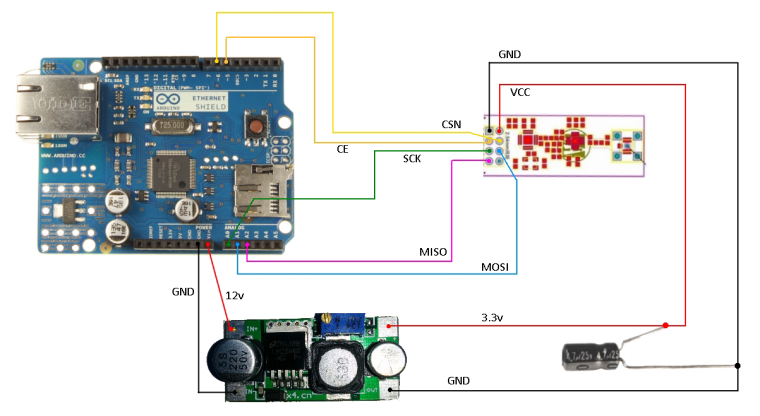
@Redpages use the wiring guide on https://www.mysensors.org/build/ethernet_gateway
The wiring is different from other sensors because the ethernet shield has problems with sharing SPI.
-
Hi guys,
I'm trying to make my first mysensors ethernet gateway, but somehow I'm in trouble.
I have Arduino Uno r3 plus w5100 ethernet shield + nrf24l01 radio. My code is the following:/** * The MySensors Arduino library handles the wireless radio link and protocol * between your home built sensors/actuators and HA controller of choice. * The sensors forms a self healing radio network with optional repeaters. Each * repeater and gateway builds a routing tables in EEPROM which keeps track of the * network topology allowing messages to be routed to nodes. * * Created by Henrik Ekblad <henrik.ekblad@mysensors.org> * Copyright (C) 2013-2015 Sensnology AB * Full contributor list: https://github.com/mysensors/Arduino/graphs/contributors * * Documentation: http://www.mysensors.org * Support Forum: http://forum.mysensors.org * * This program is free software; you can redistribute it and/or * modify it under the terms of the GNU General Public License * version 2 as published by the Free Software Foundation. * ******************************* * * REVISION HISTORY * Version 1.0 - Henrik EKblad * Contribution by a-lurker and Anticimex, * Contribution by Norbert Truchsess <norbert.truchsess@t-online.de> * Contribution by Tomas Hozza <thozza@gmail.com> * * * DESCRIPTION * The EthernetGateway sends data received from sensors to the ethernet link. * The gateway also accepts input on ethernet interface, which is then sent out to the radio network. * * The GW code is designed for Arduino 328p / 16MHz. ATmega168 does not have enough memory to run this program. * * LED purposes: * - To use the feature, uncomment MY_DEFAULT_xxx_LED_PIN in the sketch below * - RX (green) - blink fast on radio message recieved. In inclusion mode will blink fast only on presentation recieved * - TX (yellow) - blink fast on radio message transmitted. In inclusion mode will blink slowly * - ERR (red) - fast blink on error during transmission error or recieve crc error * * See http://www.mysensors.org/build/ethernet_gateway for wiring instructions. * */ // Enable debug prints to serial monitor #define MY_DEBUG // Enable and select radio type attached #define MY_RADIO_NRF24 //#define MY_RADIO_RFM69 // Enable gateway ethernet module type #define MY_GATEWAY_W5100 // W5100 Ethernet module SPI enable (optional if using a shield/module that manages SPI_EN signal) #define MY_W5100_SPI_EN 4 // Enable Soft SPI for NRF radio (note different radio wiring is required) // The W5100 ethernet module seems to have a hard time co-operate with // radio on the same spi bus. #if !defined(MY_W5100_SPI_EN) && !defined(ARDUINO_ARCH_SAMD) #define MY_SOFTSPI #define MY_SOFT_SPI_SCK_PIN 14 #define MY_SOFT_SPI_MISO_PIN 16 #define MY_SOFT_SPI_MOSI_PIN 15 #endif // When W5100 is connected we have to move CE/CSN pins for NRF radio #ifndef MY_RF24_CE_PIN #define MY_RF24_CE_PIN 5 #endif #ifndef MY_RF24_CS_PIN #define MY_RF24_CS_PIN 6 #endif // Enable to UDP //#define MY_USE_UDP #define MY_IP_ADDRESS 192,168,100,12 // If this is disabled, DHCP is used to retrieve address // Renewal period if using DHCP //#define MY_IP_RENEWAL_INTERVAL 60000 // The port to keep open on node server mode / or port to contact in client mode #define MY_PORT 5003 // Controller ip address. Enables client mode (default is "server" mode). // Also enable this if MY_USE_UDP is used and you want sensor data sent somewhere. //#define MY_CONTROLLER_IP_ADDRESS 192, 168, 178, 254 // The MAC address can be anything you want but should be unique on your network. // Newer boards have a MAC address printed on the underside of the PCB, which you can (optionally) use. // Note that most of the Ardunio examples use "DEAD BEEF FEED" for the MAC address. #define MY_MAC_ADDRESS 0xDE, 0xAD, 0xBE, 0xEF, 0xFE, 0xED // Enable inclusion mode #define MY_INCLUSION_MODE_FEATURE // Enable Inclusion mode button on gateway //#define MY_INCLUSION_BUTTON_FEATURE // Set inclusion mode duration (in seconds) #define MY_INCLUSION_MODE_DURATION 60 // Digital pin used for inclusion mode button //#define MY_INCLUSION_MODE_BUTTON_PIN 3 // Set blinking period #define MY_DEFAULT_LED_BLINK_PERIOD 300 // Flash leds on rx/tx/err // Uncomment to override default HW configurations //#define MY_DEFAULT_ERR_LED_PIN 7 // Error led pin //#define MY_DEFAULT_RX_LED_PIN 8 // Receive led pin //#define MY_DEFAULT_TX_LED_PIN 9 // Transmit led pin #if defined(MY_USE_UDP) #include <EthernetUdp.h> #endif #include <Ethernet.h> #include <MySensors.h> void setup() { } void loop() { }And this is my error:
0;255;3;0;9;MCO:BGN:INIT GW,CP=RNNGA--,VER=2.1.1
0;255;3;0;9;TSM:INIT
0;255;3;0;9;TSF:WUR:MS=0
0;255;3;0;9;!TSM:INIT:TSP FAIL
0;255;3;0;9;TSM:FAIL:CNT=1
0;255;3;0;9;TSM:FAIL:PDT
0;255;3;0;9;TSM:FAIL:RE-INIT
0;255;3;0;9;TSM:INIT
0;255;3;0;9;!TSM:INIT:TSP FAIL
0;255;3;0;9;TSM:FAIL:CNT=2
0;255;3;0;9;TSM:FAIL:PDT
0;255;3;0;9;TSM:FAIL:RE-INIT
0;255;3;0;9;TSM:INIT
0;255;3;0;9;!TSM:INIT:TSP FAIL
0;255;3;0;9;TSM:FAIL:CNT=3
0;255;3;0;9;TSM:FAIL:PDT
0;255;3;0;9;TSM:FAIL:RE-INIT
0;255;3;0;9;TSM:INIT
0;255;3;0;9;!TSM:INIT:TSP FAIL
0;255;3;0;9;TSM:FAIL:CNT=4
0;255;3;0;9;TSM:FAIL:PDT
I tried simple w5100 demo webserver sketch, everything works. Tried nrf24l01 without a shield with blink sensor example and connetcted to ports 9,10,11,12,13 and it seems working. But when the shield and the radio are together I can't even ping the gateway.
And have the error above.What did I wrong?
Regrds,
Janos
-
@Redpages Make sure you are using the correct wiring and also you should comment out the line
//#define MY_W5100_SPI_EN 4That line is stopping soft spi
-
The wiring is correct, it's a hard wired shield. As you can see above that line is uncommented.
Thx
Janos
-
The wiring is correct, it's a hard wired shield. As you can see above that line is uncommented.
Thx
Janos
The problem is that the Ethernet shield is not responding even to a simple ping. And it should even without a radio. If I load web server demo sketch everything is fine.
I tried to disconnect nrf, changed spi ports, triple checked wiring.
Janos
-
@Redpages You need to comment it out. it is not needed for the shield and will stop spi from being used
-
The problem is that the Ethernet shield is not responding even to a simple ping. And it should even without a radio. If I load web server demo sketch everything is fine.
I tried to disconnect nrf, changed spi ports, triple checked wiring.
Janos
-
the log is now beautiful:
0;255;3;0;9;MCO:BGN:INIT GW,CP=RNNGA--,VER=2.1.1
0;255;3;0;9;TSM:INIT
0;255;3;0;9;TSF:WUR:MS=0
0;255;3;0;9;TSM:INIT:TSP OK
0;255;3;0;9;TSM:INIT:GW MODE
0;255;3;0;9;TSM:READY:ID=0,PAR=0,DIS=0
0;255;3;0;9;MCO:REG:NOT NEEDED
IP: 192.168.100.12
0;255;3;0;9;MCO:BGN:STP
0;255;3;0;9;MCO:BGN:INIT OK,TSP=1
0;255;3;0;9;Eth: connect
0;255;3;0;9;MCO:BGN:INIT GW,CP=RNNGA--,VER=2.1.1
0;255;3;0;9;TSM:INIT
0;255;3;0;9;TSF:WUR:MS=0
0;255;3;0;9;TSM:INIT:TSP OK
0;255;3;0;9;TSM:INIT:GW MODE
0;255;3;0;9;TSM:READY:ID=0,PAR=0,DIS=0
0;255;3;0;9;MCO:REG:NOT NEEDED
IP: 192.168.100.12
0;255;3;0;9;MCO:BGN:STP
0;255;3;0;9;MCO:BGN:INIT OK,TSP=1
thank you,
Janos
-
the log is now beautiful:
0;255;3;0;9;MCO:BGN:INIT GW,CP=RNNGA--,VER=2.1.1
0;255;3;0;9;TSM:INIT
0;255;3;0;9;TSF:WUR:MS=0
0;255;3;0;9;TSM:INIT:TSP OK
0;255;3;0;9;TSM:INIT:GW MODE
0;255;3;0;9;TSM:READY:ID=0,PAR=0,DIS=0
0;255;3;0;9;MCO:REG:NOT NEEDED
IP: 192.168.100.12
0;255;3;0;9;MCO:BGN:STP
0;255;3;0;9;MCO:BGN:INIT OK,TSP=1
0;255;3;0;9;Eth: connect
0;255;3;0;9;MCO:BGN:INIT GW,CP=RNNGA--,VER=2.1.1
0;255;3;0;9;TSM:INIT
0;255;3;0;9;TSF:WUR:MS=0
0;255;3;0;9;TSM:INIT:TSP OK
0;255;3;0;9;TSM:INIT:GW MODE
0;255;3;0;9;TSM:READY:ID=0,PAR=0,DIS=0
0;255;3;0;9;MCO:REG:NOT NEEDED
IP: 192.168.100.12
0;255;3;0;9;MCO:BGN:STP
0;255;3;0;9;MCO:BGN:INIT OK,TSP=1
thank you,
Janos
-
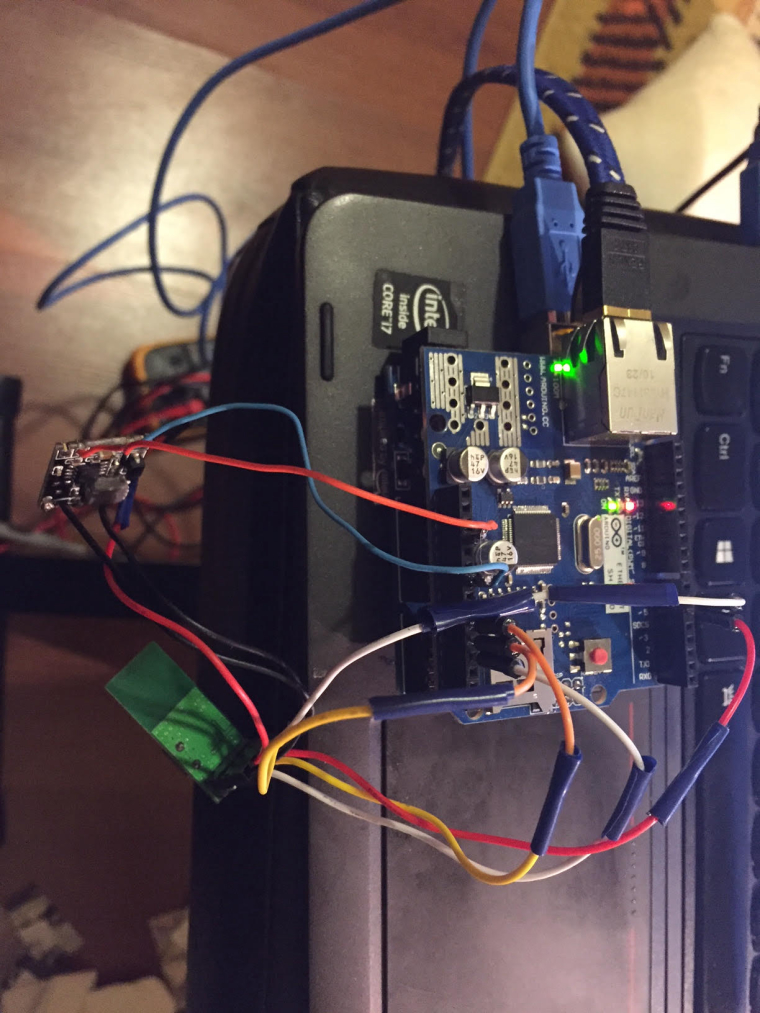
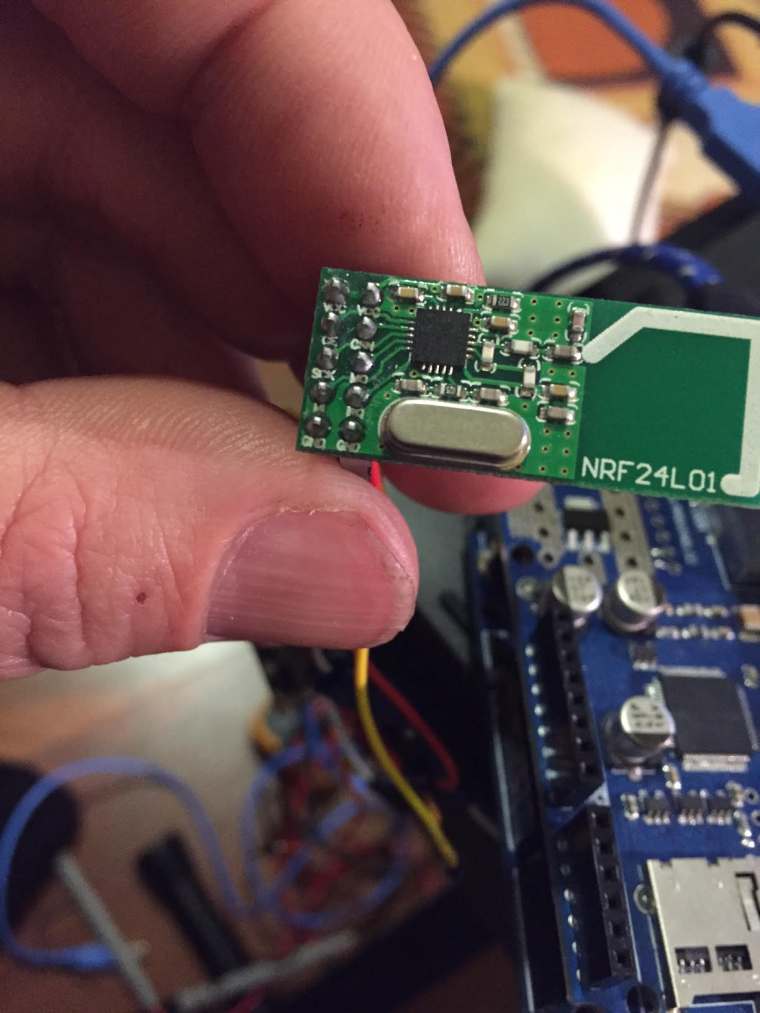
@Redpages the gateway will not work with the shield if you do not comment out that line. and the wiring should be as below. Ignore the extra power module.


Hello! It looks like you're interested in this conversation, but you don't have an account yet.
Getting fed up of having to scroll through the same posts each visit? When you register for an account, you'll always come back to exactly where you were before, and choose to be notified of new replies (either via email, or push notification). You'll also be able to save bookmarks and upvote posts to show your appreciation to other community members.
With your input, this post could be even better 💗
Register Login