
Skip to content
  • MySensors
  • OpenHardware.io
  • Categories
  • Recent
  • Tags
  • Popular
Skins
  • Light
  • Brite
  • Cerulean
  • Cosmo
  • Flatly
  • Journal
  • Litera
  • Lumen
  • Lux
  • Materia
  • Minty
  • Morph
  • Pulse
  • Sandstone
  • Simplex
  • Sketchy
  • Spacelab
  • United
  • Yeti
  • Zephyr
  • Dark
  • Cyborg
  • Darkly
  • Quartz
  • Slate
  • Solar
  • Superhero
  • Vapor

  • Default (No Skin)
  • No Skin
Collapse
Brand Logo
  1. Home
  2. Hardware
  3. Battery based atmega328p sensor (no SMD)

Battery based atmega328p sensor (no SMD)

Scheduled Pinned Locked Moved Hardware
12 Posts 4 Posters 2.3k Views 4 Watching
  • Oldest to Newest
  • Newest to Oldest
  • Most Votes
Reply
  • Reply as topic
Log in to reply
This topic has been deleted. Only users with topic management privileges can see it.
  • M Offline
    M Offline
    Markus.
    wrote on last edited by
    #1

    Hi all,

    Well, iam starting to learn to use pcbs. I have now two of above mentioned sensor boards. But im anot sure how i connect the batterrys for the power supply or the Ftdi usb adapter for programming. Is there a kind of cabling diagramm available where i can see how and where which connection must be done?

    Many thanks

    Markus

    K 1 Reply Last reply
    0
    • M Markus.

      Hi all,

      Well, iam starting to learn to use pcbs. I have now two of above mentioned sensor boards. But im anot sure how i connect the batterrys for the power supply or the Ftdi usb adapter for programming. Is there a kind of cabling diagramm available where i can see how and where which connection must be done?

      Many thanks

      Markus

      K Offline
      K Offline
      kimot
      wrote on last edited by
      #2

      @Markus.
      Hi.
      What you exactly mean "above mentioned sensor boards" ?
      I do not see any info about some boards.
      ATmega328p is type of processor only.

      1 Reply Last reply
      0
      • FotoFieberF Offline
        FotoFieberF Offline
        FotoFieber
        Hardware Contributor
        wrote on last edited by
        #3

        http://www.psyelmer9.info/blog/may-17th-2012

        You may need to set the fuses to disable bod and burn a bootloader with an ISP-Adapter.

        1 Reply Last reply
        0
        • M Offline
          M Offline
          Markus.
          wrote on last edited by
          #4

          Sorry i mean this one here

          https://www.openhardware.io/view/5/Battery-based-atmega328p-sensor-no-SMD
          And how must i connect the ftdi usb adapter to flash this board...

          Thx

          M

          M 1 Reply Last reply
          0
          • M Markus.

            Sorry i mean this one here

            https://www.openhardware.io/view/5/Battery-based-atmega328p-sensor-no-SMD
            And how must i connect the ftdi usb adapter to flash this board...

            Thx

            M

            M Offline
            M Offline
            Markus.
            wrote on last edited by
            #5

            And how should i connect correctly the battery for the power supply? A complete cabeling diagramm would be great... :-)

            AWIA 1 Reply Last reply
            0
            • FotoFieberF Offline
              FotoFieberF Offline
              FotoFieber
              Hardware Contributor
              wrote on last edited by
              #6

              I found a label FTDI on one picture of the PCB. 😀

              I encourage you to read articles about arduino on breadboard and dive deeper or buy complete solutions like the sensebender micro.

              1 Reply Last reply
              1
              • M Markus.

                And how should i connect correctly the battery for the power supply? A complete cabeling diagramm would be great... :-)

                AWIA Offline
                AWIA Offline
                AWI
                Hero Member
                wrote on last edited by
                #7

                @Markus. The ftdi connection is marked on the board. @GertSanders used a standard ftdi connector with 6 pins and "black" and "green" marking.

                M 1 Reply Last reply
                0
                • AWIA AWI

                  @Markus. The ftdi connection is marked on the board. @GertSanders used a standard ftdi connector with 6 pins and "black" and "green" marking.

                  M Offline
                  M Offline
                  Markus.
                  wrote on last edited by
                  #8

                  @AWI many thanks thats now clear for me. Sorry for all this questions but I've started to learn.... :-(
                  I can see on the board some 3,3 V Connections beside VCC and VBAT. Where is now the correct place to connect the Battery as power supply ?

                  Thanks

                  Markus

                  AWIA 1 Reply Last reply
                  0
                  • M Markus.

                    @AWI many thanks thats now clear for me. Sorry for all this questions but I've started to learn.... :-(
                    I can see on the board some 3,3 V Connections beside VCC and VBAT. Where is now the correct place to connect the Battery as power supply ?

                    Thanks

                    Markus

                    AWIA Offline
                    AWIA Offline
                    AWI
                    Hero Member
                    wrote on last edited by
                    #9

                    @Markus. From my perspective @GertSanders has done a great job in documenting the board, but there are many options.
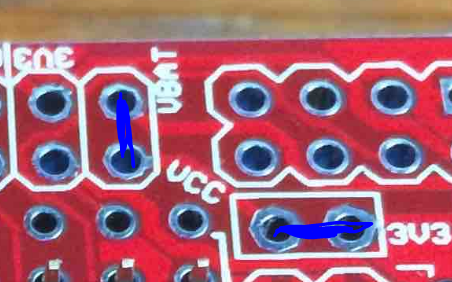
                    0_1487839791325_upload-015d0f54-3e86-4972-9ced-211bd758d7ae This is the place where you determine what is connected to Vcc and battery. If you don't use an external regulator, just make connections indicated and any 3v3, Vcc and vbat connection can be used.
                    If you operate from 2 AA cells then probably your next question is leading to burning the fuses for operating at low voltages ;-)

                    1 Reply Last reply
                    0
                    • M Offline
                      M Offline
                      Markus.
                      wrote on last edited by Markus.
                      #10

                      yes thats the idea to operate themwith 2xAA cells.... ;-) So it means that I can use each GND conenction for Minus and each 3V3 connction for plus....
                      Ohhh hell.. :-) And what exactly do you mean with "burning the fuses for operating at low voltages" ?? Thought I can simple connect my Minus from the Battery to a Connection on the board and also the Plus to get it working with Batterys...:-(
                      What I also not understand is .."If powered by two AA or AAA batteries, the circuits VCC and 3V3 should be connected. This is done by shorting jumper "J1"." ...
                      Hope I will understand all this in the next 100 years .. :-)

                      AWIA 1 Reply Last reply
                      0
                      • M Markus.

                        yes thats the idea to operate themwith 2xAA cells.... ;-) So it means that I can use each GND conenction for Minus and each 3V3 connction for plus....
                        Ohhh hell.. :-) And what exactly do you mean with "burning the fuses for operating at low voltages" ?? Thought I can simple connect my Minus from the Battery to a Connection on the board and also the Plus to get it working with Batterys...:-(
                        What I also not understand is .."If powered by two AA or AAA batteries, the circuits VCC and 3V3 should be connected. This is done by shorting jumper "J1"." ...
                        Hope I will understand all this in the next 100 years .. :-)

                        AWIA Offline
                        AWIA Offline
                        AWI
                        Hero Member
                        wrote on last edited by
                        #11

                        @Markus. "shorting jumper J1' is equivalent to the right blue line in my last post.
                        "fuses for operating at low voltages" means you need to program the AVR processor so that it can operate at low voltages (< 2.7 volt). this needs to be done with a special programming circuit. So you either keep your batteries above 2.7 volt or dive into the world of Fuse programming.


                        M 1 Reply Last reply
                        0
                        • AWIA AWI

                          @Markus. "shorting jumper J1' is equivalent to the right blue line in my last post.
                          "fuses for operating at low voltages" means you need to program the AVR processor so that it can operate at low voltages (< 2.7 volt). this needs to be done with a special programming circuit. So you either keep your batteries above 2.7 volt or dive into the world of Fuse programming.

                          M Offline
                          M Offline
                          Markus.
                          wrote on last edited by
                          #12

                          @AWI So I will Keep my batterys above 2.7 Volts ..:-)
                          So in Summary... Hope its now correct

                          1. Shorting the 3V3 Connections (right site of the Picture)
                          2. plus from Battery to VBAT
                          3. minus to any GND

                          Any many many thanks for your Patience !!!!

                          1 Reply Last reply
                          0
                          Reply
                          • Reply as topic
                          Log in to reply
                          • Oldest to Newest
                          • Newest to Oldest
                          • Most Votes


                          17

                          Online

                          11.7k

                          Users

                          11.2k

                          Topics

                          113.1k

                          Posts


                          Copyright 2025 TBD   |   Forum Guidelines   |   Privacy Policy   |   Terms of Service
                          • Login

                          • Don't have an account? Register

                          • Login or register to search.
                          • First post
                            Last post
                          0
                          • MySensors
                          • OpenHardware.io
                          • Categories
                          • Recent
                          • Tags
                          • Popular