
Connecting grid-eye sensor
-
I accidently ordered the wrong kind of sensor and got Grid-eye one wire instead of Grid-eye usb. The one I got have two RJ11-connectors and from what I understand uses onewire for communication.
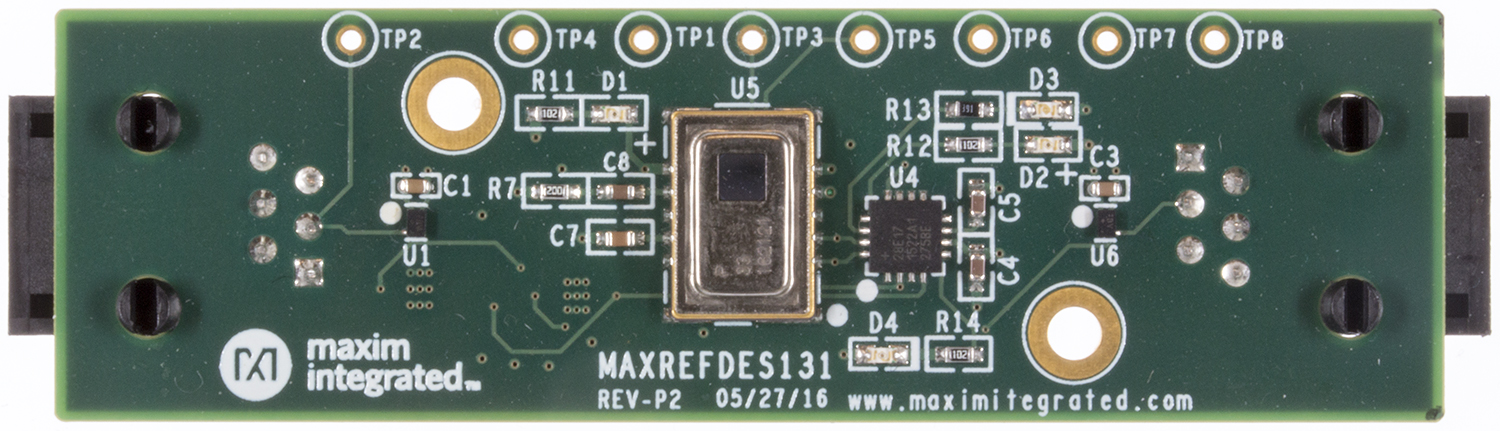
SchematicI tried to understand the schematic to determine if I could use the TPx connectors at the top to connect and found that TP6 is 1-wire out and TP1 looks like GND, but I do not understand where VCC should go.
So my questions is
1: can I connect it to arduino using onewire and the TPx connections, and how would I connect it in that case.
2: Can I use a FTDI-adapter in some way to be able to connect it to a PC to use the windows-demo-software?It looks like you're supposed to use some kind of additional hardware or shield between the sensor and the arduino but is there some way to connect it directly?
-
I managed to connect the sensor using the SDA and SCL and found some example code. I have only connected SDA,SCL, GND, and VCC. There where some more pins mentioned in the info but I guess they where not needed.
I tried some software and it showed all temeratures correctly in a graphical gui but when I tried the arduino code the serial monitor wass willed with "garbage" even tho I used the the specified baudrate in the serial monitor.But I clearly see that the serial monitor reacts to my hand and other warm objects. Can I change anything in the code to have a clearer output?
#include <Wire.h> /*** including the Wire libary needed for the I2C communication ***/ #include <Arduino.h> /*** including the standard Arduino libary ***/ #define AD_SELECT 19 /*** Define the address select pin ***/ #define INT 18 /*** Define the interrupt pin ***/ #define Hz10 85 /*** Define the delay time [ms] for the 10Hz mode ***/ #define Hz1 985 /*** Define the delay time [ms] for the 1Hz mode ***/ #define ADDR 0x68 /*** Define the I2C address for the Grid-EYE ***/ void setup() { /*** join the I2C bus as master ***/ Wire.begin(); /*** start the serial Communication with 57600 Bauts ***/ Serial.begin(57600); /*** Set the address pin as an output and set the Grid-EYE ***/ /*** Slave address to 0x68 (0110 1000) ***/ pinMode(AD_SELECT, OUTPUT); digitalWrite(AD_SELECT,LOW); /*** Set interrupt pin as an input pin ***/ pinMode(INT, INPUT); } void loop() { /*** Variable declaration ***/ byte pixelAddL; byte lowerLevel[64]; byte upperLevel[64]; byte lowerLevelTherm; byte upperLevelTherm; short Maindelay = Hz10; while(1) { /*** read out the Thermister tremperature ***/ Wire.beginTransmission(ADDR); Wire.write(0x0E); Wire.endTransmission(); Wire.requestFrom(ADDR, 2); lowerLevelTherm = Wire.read(); upperLevelTherm = Wire.read(); /*** set pixel address on the first Pixel (low) address ***/ pixelAddL = 0x80; /*** read out the temperature of all 64 Pixel ***/ for (int pixel = 0; pixel < 64; pixel++) { Wire.beginTransmission(ADDR); Wire.write(pixelAddL); Wire.endTransmission(); Wire.requestFrom(ADDR, 2); lowerLevel[pixel] = Wire.read(); upperLevel[pixel] = Wire.read(); pixelAddL = pixelAddL + 2; } /*** end of read out ***/ /*** Start Serial communication the temperature readout ***/ /*** header ***/ Serial.print('*'); Serial.print('*'); Serial.print('*'); /*** send the thermistor temerature ***/ Serial.print((char)lowerLevelTherm); Serial.print((char)upperLevelTherm); /*** send the temperature of the Pixel array ***/ for (int pixel = 0; pixel < 64; pixel++) { Serial.print((char)lowerLevel[pixel]); Serial.print((char)upperLevel[pixel]); } /*** check if data was send to the EVB ***/ if(Serial.available() > 0) { int command = Serial.read(); int freq = Serial.read(); if(freq == 10) //Set the Grid-EYE to the 10 Hz mode { Wire.beginTransmission(ADDR); Wire.write(0x02); Wire.write(0x00); Wire.endTransmission(); Maindelay = Hz10; } else if(freq == 1) //Set the Grid-EYE to the 1 Hz mode { Wire.beginTransmission(ADDR); Wire.write(0x02); Wire.write(0x01); Wire.endTransmission(); Maindelay = Hz1; } else if(freq == 2) //Set the output Mode of the Grid-EYE to normal { Wire.beginTransmission(ADDR); Wire.write(0x1F); Wire.write(0x50); Wire.endTransmission(); Wire.beginTransmission(ADDR); Wire.write(0x1F); Wire.write(0x45); Wire.endTransmission(); Wire.beginTransmission(ADDR); Wire.write(0x1F); Wire.write(0x57); Wire.endTransmission(); Wire.beginTransmission(ADDR); Wire.write(0x07); Wire.write(0x00); Wire.endTransmission(); Wire.beginTransmission(ADDR); Wire.write(0x1F); Wire.write(0x00); Wire.endTransmission(); } else if(freq == 3) //Set the output Mode of the Grid-EYE to moving average { Wire.beginTransmission(ADDR); Wire.write(0x1F); Wire.write(0x50); Wire.endTransmission(); Wire.beginTransmission(ADDR); Wire.write(0x1F); Wire.write(0x45); Wire.endTransmission(); Wire.beginTransmission(ADDR); Wire.write(0x1F); Wire.write(0x57); Wire.endTransmission(); Wire.beginTransmission(ADDR); Wire.write(0x07); Wire.write(0x20); Wire.endTransmission(); Wire.beginTransmission(ADDR); Wire.write(0x1F); Wire.write(0x00); Wire.endTransmission(); } } /*** termination of Serial ***/ Serial.print("\r"); Serial.print("\n"); /*** delay for refresh of Grid-EYE data ***/ delay(Maindelay); } } -
I managed to connect the sensor using the SDA and SCL and found some example code. I have only connected SDA,SCL, GND, and VCC. There where some more pins mentioned in the info but I guess they where not needed.
I tried some software and it showed all temeratures correctly in a graphical gui but when I tried the arduino code the serial monitor wass willed with "garbage" even tho I used the the specified baudrate in the serial monitor.But I clearly see that the serial monitor reacts to my hand and other warm objects. Can I change anything in the code to have a clearer output?
#include <Wire.h> /*** including the Wire libary needed for the I2C communication ***/ #include <Arduino.h> /*** including the standard Arduino libary ***/ #define AD_SELECT 19 /*** Define the address select pin ***/ #define INT 18 /*** Define the interrupt pin ***/ #define Hz10 85 /*** Define the delay time [ms] for the 10Hz mode ***/ #define Hz1 985 /*** Define the delay time [ms] for the 1Hz mode ***/ #define ADDR 0x68 /*** Define the I2C address for the Grid-EYE ***/ void setup() { /*** join the I2C bus as master ***/ Wire.begin(); /*** start the serial Communication with 57600 Bauts ***/ Serial.begin(57600); /*** Set the address pin as an output and set the Grid-EYE ***/ /*** Slave address to 0x68 (0110 1000) ***/ pinMode(AD_SELECT, OUTPUT); digitalWrite(AD_SELECT,LOW); /*** Set interrupt pin as an input pin ***/ pinMode(INT, INPUT); } void loop() { /*** Variable declaration ***/ byte pixelAddL; byte lowerLevel[64]; byte upperLevel[64]; byte lowerLevelTherm; byte upperLevelTherm; short Maindelay = Hz10; while(1) { /*** read out the Thermister tremperature ***/ Wire.beginTransmission(ADDR); Wire.write(0x0E); Wire.endTransmission(); Wire.requestFrom(ADDR, 2); lowerLevelTherm = Wire.read(); upperLevelTherm = Wire.read(); /*** set pixel address on the first Pixel (low) address ***/ pixelAddL = 0x80; /*** read out the temperature of all 64 Pixel ***/ for (int pixel = 0; pixel < 64; pixel++) { Wire.beginTransmission(ADDR); Wire.write(pixelAddL); Wire.endTransmission(); Wire.requestFrom(ADDR, 2); lowerLevel[pixel] = Wire.read(); upperLevel[pixel] = Wire.read(); pixelAddL = pixelAddL + 2; } /*** end of read out ***/ /*** Start Serial communication the temperature readout ***/ /*** header ***/ Serial.print('*'); Serial.print('*'); Serial.print('*'); /*** send the thermistor temerature ***/ Serial.print((char)lowerLevelTherm); Serial.print((char)upperLevelTherm); /*** send the temperature of the Pixel array ***/ for (int pixel = 0; pixel < 64; pixel++) { Serial.print((char)lowerLevel[pixel]); Serial.print((char)upperLevel[pixel]); } /*** check if data was send to the EVB ***/ if(Serial.available() > 0) { int command = Serial.read(); int freq = Serial.read(); if(freq == 10) //Set the Grid-EYE to the 10 Hz mode { Wire.beginTransmission(ADDR); Wire.write(0x02); Wire.write(0x00); Wire.endTransmission(); Maindelay = Hz10; } else if(freq == 1) //Set the Grid-EYE to the 1 Hz mode { Wire.beginTransmission(ADDR); Wire.write(0x02); Wire.write(0x01); Wire.endTransmission(); Maindelay = Hz1; } else if(freq == 2) //Set the output Mode of the Grid-EYE to normal { Wire.beginTransmission(ADDR); Wire.write(0x1F); Wire.write(0x50); Wire.endTransmission(); Wire.beginTransmission(ADDR); Wire.write(0x1F); Wire.write(0x45); Wire.endTransmission(); Wire.beginTransmission(ADDR); Wire.write(0x1F); Wire.write(0x57); Wire.endTransmission(); Wire.beginTransmission(ADDR); Wire.write(0x07); Wire.write(0x00); Wire.endTransmission(); Wire.beginTransmission(ADDR); Wire.write(0x1F); Wire.write(0x00); Wire.endTransmission(); } else if(freq == 3) //Set the output Mode of the Grid-EYE to moving average { Wire.beginTransmission(ADDR); Wire.write(0x1F); Wire.write(0x50); Wire.endTransmission(); Wire.beginTransmission(ADDR); Wire.write(0x1F); Wire.write(0x45); Wire.endTransmission(); Wire.beginTransmission(ADDR); Wire.write(0x1F); Wire.write(0x57); Wire.endTransmission(); Wire.beginTransmission(ADDR); Wire.write(0x07); Wire.write(0x20); Wire.endTransmission(); Wire.beginTransmission(ADDR); Wire.write(0x1F); Wire.write(0x00); Wire.endTransmission(); } } /*** termination of Serial ***/ Serial.print("\r"); Serial.print("\n"); /*** delay for refresh of Grid-EYE data ***/ delay(Maindelay); } }@Cliff-Karlsson Very interested to see what you'll be building with this sensor! (http://www.pureengineering.com/projects/grid-eye-breakout)
Maybe this sketch can help? https://github.com/kriswiner/AMG8833


Hello! It looks like you're interested in this conversation, but you don't have an account yet.
Getting fed up of having to scroll through the same posts each visit? When you register for an account, you'll always come back to exactly where you were before, and choose to be notified of new replies (either via email, or push notification). You'll also be able to save bookmarks and upvote posts to show your appreciation to other community members.
With your input, this post could be even better 💗
Register Login