
TEMT6000
-
Hello first time user here, I have been trying to build a 4in1 light, motion, tem/hum using a nano, temt6000, dht22, and sr501 using the examples and already made sketches i can combine everything, but i am not sure if i am entering the info for the temt6000 correctly. Can someone take a look please```
Insert Code Here// Enable and select radio type attached #define MY_RADIO_NRF24 //#define MY_RADIO_RFM69 #include <SPI.h> #include <MySensors.h> #include <DHT.h> #define CHILD_ID_HUM 0 #define CHILD_ID_TEMP 1 #define CHILD_ID_MOTION 2 #define CHILD_ID_LIGHT 3 #define LIGHT_SENSOR_ANALOG_PIN 0 int lastLightLevel; #define HUMIDITY_SENSOR_DIGITAL_PIN 4 #define DIGITAL_INPUT_SENSOR 2 // The digital input you attached your motion sensor. (Only 2 and 3 generates interrupt!) DHT dht; float lastTemp; float lastHum; boolean metric = false; unsigned long interval= 3000;//dht.getMinimumSamplingPeriod(); // the time we need to wait unsigned long previousMillis=0; // millis() returns an unsigned long. unsigned long SLEEP_TIME = 120000; // Sleep time between reports (in milliseconds) MyMessage msgHum(CHILD_ID_HUM, V_HUM); MyMessage msgTemp(CHILD_ID_TEMP, V_TEMP); MyMessage msgMot(CHILD_ID_MOTION, V_TRIPPED); MyMessage msg(CHILD_ID_LIGHT, V_LIGHT_LEVEL); uint16_t lastlux; void setup() { dht.setup(HUMIDITY_SENSOR_DIGITAL_PIN); // metric = getConfig().isMetric; pinMode(DIGITAL_INPUT_SENSOR, INPUT); // sets the motion sensor digital pin as input } void presentation() { // Send the Sketch Version Information to the Gateway sendSketchInfo("4-1 Sensor", "1.0"); // Register all sensors to gw (they will be created as child devices) present(CHILD_ID_HUM, S_HUM); present(CHILD_ID_TEMP, S_TEMP); present(CHILD_ID_MOTION, V_TRIPPED); present(CHILD_ID_LIGHT, S_LIGHT_LEVEL); } void loop() { // Read digital motion value boolean tripped = digitalRead(DIGITAL_INPUT_SENSOR) == HIGH; // only run loop if time has passed. unsigned long currentMillis = millis(); // grab current time // check if "interval" time has passed if ((unsigned long)(currentMillis - previousMillis) >= interval) { send(msgMot.set(tripped?"1":"0")); #ifdef MY_DEBUG Serial.print("Motion: "); Serial.println(tripped); #endif // Fetch temperatures from DHT sensor float temperature = dht.getTemperature(); if (isnan(temperature)) { Serial.println("Failed reading temperature from DHT"); } else if (temperature != lastTemp) { lastTemp = temperature; if (!metric) { temperature = dht.toFahrenheit(temperature); } send(msgTemp.set(temperature, 1)); #ifdef MY_DEBUG Serial.print("T: "); Serial.println(temperature); #endif } // Fetch humidity from DHT sensor float humidity = dht.getHumidity(); if (isnan(humidity)) { Serial.println("Failed reading humidity from DHT"); } else if (humidity != lastHum) { lastHum = humidity; send(msgHum.set(humidity, 1)); #ifdef MY_DEBUG Serial.print("H: "); Serial.println(humidity); #endif } // Read lux from TEMT6000 float lightLevel = analogRead(LIGHT_SENSOR_ANALOG_PIN) * 9.; // 1000/1024 if (int(lightLevel - lastLightLevel) > 10 || int(lastLightLevel - lightLevel) > 10) { send(msg.setSensor(CHILD_ID_LIGHT).set(lightLevel,1)); lastLightLevel = lightLevel; } // save the "current" time previousMillis = millis(); } // Sleep until interrupt comes in on motion sensor. Send update every two minute. //sleep(digitalPinToInterrupt(DIGITAL_INPUT_SENSOR), CHANGE, SLEEP_TIME); }
-
Hello first time user here, I have been trying to build a 4in1 light, motion, tem/hum using a nano, temt6000, dht22, and sr501 using the examples and already made sketches i can combine everything, but i am not sure if i am entering the info for the temt6000 correctly. Can someone take a look please```
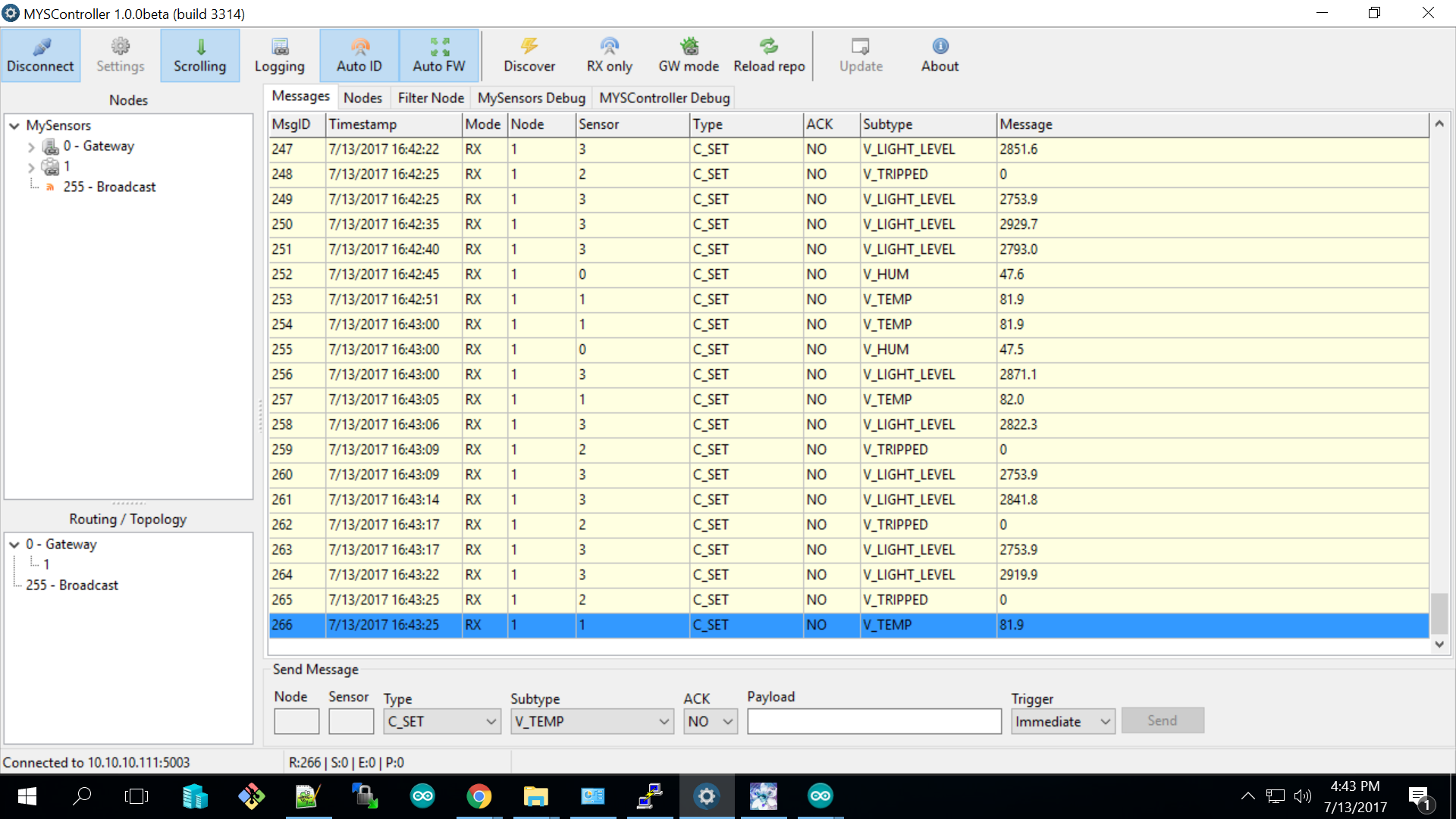
Insert Code Here// Enable and select radio type attached #define MY_RADIO_NRF24 //#define MY_RADIO_RFM69 #include <SPI.h> #include <MySensors.h> #include <DHT.h> #define CHILD_ID_HUM 0 #define CHILD_ID_TEMP 1 #define CHILD_ID_MOTION 2 #define CHILD_ID_LIGHT 3 #define LIGHT_SENSOR_ANALOG_PIN 0 int lastLightLevel; #define HUMIDITY_SENSOR_DIGITAL_PIN 4 #define DIGITAL_INPUT_SENSOR 2 // The digital input you attached your motion sensor. (Only 2 and 3 generates interrupt!) DHT dht; float lastTemp; float lastHum; boolean metric = false; unsigned long interval= 3000;//dht.getMinimumSamplingPeriod(); // the time we need to wait unsigned long previousMillis=0; // millis() returns an unsigned long. unsigned long SLEEP_TIME = 120000; // Sleep time between reports (in milliseconds) MyMessage msgHum(CHILD_ID_HUM, V_HUM); MyMessage msgTemp(CHILD_ID_TEMP, V_TEMP); MyMessage msgMot(CHILD_ID_MOTION, V_TRIPPED); MyMessage msg(CHILD_ID_LIGHT, V_LIGHT_LEVEL); uint16_t lastlux; void setup() { dht.setup(HUMIDITY_SENSOR_DIGITAL_PIN); // metric = getConfig().isMetric; pinMode(DIGITAL_INPUT_SENSOR, INPUT); // sets the motion sensor digital pin as input } void presentation() { // Send the Sketch Version Information to the Gateway sendSketchInfo("4-1 Sensor", "1.0"); // Register all sensors to gw (they will be created as child devices) present(CHILD_ID_HUM, S_HUM); present(CHILD_ID_TEMP, S_TEMP); present(CHILD_ID_MOTION, V_TRIPPED); present(CHILD_ID_LIGHT, S_LIGHT_LEVEL); } void loop() { // Read digital motion value boolean tripped = digitalRead(DIGITAL_INPUT_SENSOR) == HIGH; // only run loop if time has passed. unsigned long currentMillis = millis(); // grab current time // check if "interval" time has passed if ((unsigned long)(currentMillis - previousMillis) >= interval) { send(msgMot.set(tripped?"1":"0")); #ifdef MY_DEBUG Serial.print("Motion: "); Serial.println(tripped); #endif // Fetch temperatures from DHT sensor float temperature = dht.getTemperature(); if (isnan(temperature)) { Serial.println("Failed reading temperature from DHT"); } else if (temperature != lastTemp) { lastTemp = temperature; if (!metric) { temperature = dht.toFahrenheit(temperature); } send(msgTemp.set(temperature, 1)); #ifdef MY_DEBUG Serial.print("T: "); Serial.println(temperature); #endif } // Fetch humidity from DHT sensor float humidity = dht.getHumidity(); if (isnan(humidity)) { Serial.println("Failed reading humidity from DHT"); } else if (humidity != lastHum) { lastHum = humidity; send(msgHum.set(humidity, 1)); #ifdef MY_DEBUG Serial.print("H: "); Serial.println(humidity); #endif } // Read lux from TEMT6000 float lightLevel = analogRead(LIGHT_SENSOR_ANALOG_PIN) * 9.; // 1000/1024 if (int(lightLevel - lastLightLevel) > 10 || int(lastLightLevel - lightLevel) > 10) { send(msg.setSensor(CHILD_ID_LIGHT).set(lightLevel,1)); lastLightLevel = lightLevel; } // save the "current" time previousMillis = millis(); } // Sleep until interrupt comes in on motion sensor. Send update every two minute. //sleep(digitalPinToInterrupt(DIGITAL_INPUT_SENSOR), CHANGE, SLEEP_TIME); }@stress-nero do the v light levels values look good or am i missing something?
-

Hello! It looks like you're interested in this conversation, but you don't have an account yet.
Getting fed up of having to scroll through the same posts each visit? When you register for an account, you'll always come back to exactly where you were before, and choose to be notified of new replies (either via email, or push notification). You'll also be able to save bookmarks and upvote posts to show your appreciation to other community members.
With your input, this post could be even better 💗
Register Login