Skip to content
  • MySensors
  • OpenHardware.io
  • Categories
  • Recent
  • Tags
  • Popular
Skins
  • Light
  • Brite
  • Cerulean
  • Cosmo
  • Flatly
  • Journal
  • Litera
  • Lumen
  • Lux
  • Materia
  • Minty
  • Morph
  • Pulse
  • Sandstone
  • Simplex
  • Sketchy
  • Spacelab
  • United
  • Yeti
  • Zephyr
  • Dark
  • Cyborg
  • Darkly
  • Quartz
  • Slate
  • Solar
  • Superhero
  • Vapor

  • Default (No Skin)
  • No Skin
Collapse
Brand Logo
  1. Home
  2. Controllers
  3. Domoticz
  4. relay as a switch not as a button (domoticz)

relay as a switch not as a button (domoticz)

Scheduled Pinned Locked Moved Domoticz
25 Posts 4 Posters 5.7k Views 6 Watching
  • Oldest to Newest
  • Newest to Oldest
  • Most Votes
Reply
  • Reply as topic
Log in to reply
This topic has been deleted. Only users with topic management privileges can see it.
  • A ago1980

    @Boots33 I would like to use with switch, I find nothing on.

    Boots33B Offline
    Boots33B Offline
    Boots33
    Hero Member
    wrote on last edited by
    #6

    @ago1980 You can find the relay with button sketch Here

    That sketch uses a push button, to use that sketch with a toggle switch you should just need to make a couple of small changes in the loop part of the sketch.

    void loop() 
    {
      debouncer.update();
      // Get the update value
      int value = debouncer.read();
    
      /*
      if (value != oldValue && value==0) {
          send(msg.set(state?false:true), true); // Send new state and request ack back
      }
      oldValue = value;
     */
    
    if (value != oldValue) {
          send(msg.set(state?false:true), true); // Send new state and request ack back
          oldValue = value;
      } 
    } 
    
    A 1 Reply Last reply
    0
    • Boots33B Boots33

      @ago1980 You can find the relay with button sketch Here

      That sketch uses a push button, to use that sketch with a toggle switch you should just need to make a couple of small changes in the loop part of the sketch.

      void loop() 
      {
        debouncer.update();
        // Get the update value
        int value = debouncer.read();
      
        /*
        if (value != oldValue && value==0) {
            send(msg.set(state?false:true), true); // Send new state and request ack back
        }
        oldValue = value;
       */
      
      if (value != oldValue) {
            send(msg.set(state?false:true), true); // Send new state and request ack back
            oldValue = value;
        } 
      } 
      
      A Offline
      A Offline
      ago1980
      wrote on last edited by
      #7

      @Boots33 ok, but then the status is updated Domoticz?
      thank you

      Boots33B 1 Reply Last reply
      0
      • A ago1980

        @Boots33 ok, but then the status is updated Domoticz?
        thank you

        Boots33B Offline
        Boots33B Offline
        Boots33
        Hero Member
        wrote on last edited by
        #8

        @ago1980 Yes it should still update the status in domoticz when you use the switch.

        A 1 Reply Last reply
        0
        • Boots33B Boots33

          @ago1980 Yes it should still update the status in domoticz when you use the switch.

          A Offline
          A Offline
          ago1980
          wrote on last edited by
          #9

          @Boots33 ok, tomorrow I try and let me know. Thanks so much

          1 Reply Last reply
          0
          • dbemowskD Offline
            dbemowskD Offline
            dbemowsk
            wrote on last edited by
            #10

            I recently explained how to do this in this thread. https://forum.mysensors.org/topic/7849/relay-control-bistable-switch-instead-of-monostable/3

            Vera Plus running UI7 with MySensors, Sonoffs and 1-Wire devices
            Visit my website for more Bits, Bytes and Ramblings from me: http://dan.bemowski.info/

            A 1 Reply Last reply
            0
            • dbemowskD dbemowsk

              I recently explained how to do this in this thread. https://forum.mysensors.org/topic/7849/relay-control-bistable-switch-instead-of-monostable/3

              A Offline
              A Offline
              ago1980
              wrote on last edited by
              #11

              @dbemowsk ok thanks clear code explanation, but I did not understand well what to do to hardware part.

              dbemowskD 1 Reply Last reply
              0
              • A ago1980

                @dbemowsk ok thanks clear code explanation, but I did not understand well what to do to hardware part.

                dbemowskD Offline
                dbemowskD Offline
                dbemowsk
                wrote on last edited by
                #12

                @ago1980 So in the diagram below I show a wall switch and the push button switch that is normally used in this example. Simply remove the push button and attach the wall switch.
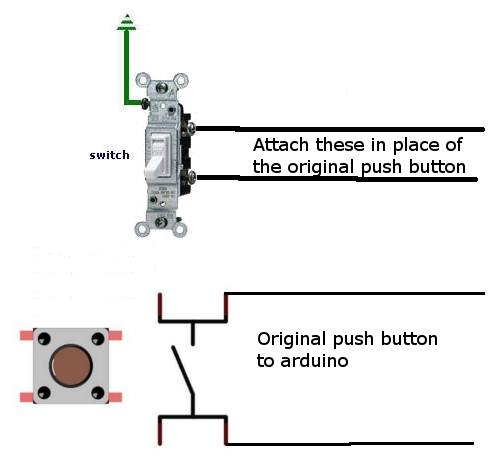
                0_1509027939025_upload-89cb12d2-1378-4196-9fcd-93a24c352da6

                Does this clear up the confusion?

                Vera Plus running UI7 with MySensors, Sonoffs and 1-Wire devices
                Visit my website for more Bits, Bytes and Ramblings from me: http://dan.bemowski.info/

                A 1 Reply Last reply
                0
                • dbemowskD dbemowsk

                  @ago1980 So in the diagram below I show a wall switch and the push button switch that is normally used in this example. Simply remove the push button and attach the wall switch.
                  0_1509027939025_upload-89cb12d2-1378-4196-9fcd-93a24c352da6

                  Does this clear up the confusion?

                  A Offline
                  A Offline
                  ago1980
                  wrote on last edited by ago1980
                  #13

                  @dbemowsk So you just have to remove the button and put the switch on? or put the switch in parallel with the button?Thank you

                  dbemowskD 2 Replies Last reply
                  0
                  • A ago1980

                    @dbemowsk So you just have to remove the button and put the switch on? or put the switch in parallel with the button?Thank you

                    dbemowskD Offline
                    dbemowskD Offline
                    dbemowsk
                    wrote on last edited by
                    #14

                    @ago1980 Yes. If you use the switch, you will need to use the code changes that I pointed out in the other thread.

                    Vera Plus running UI7 with MySensors, Sonoffs and 1-Wire devices
                    Visit my website for more Bits, Bytes and Ramblings from me: http://dan.bemowski.info/

                    1 Reply Last reply
                    0
                    • A ago1980

                      @dbemowsk So you just have to remove the button and put the switch on? or put the switch in parallel with the button?Thank you

                      dbemowskD Offline
                      dbemowskD Offline
                      dbemowsk
                      wrote on last edited by
                      #15

                      @ago1980 With the switch in place you don't want to run it in parallel with the button. When the switch is in the on position, the connection will be shorted in which case the push button would not work. This is the reason for the code change. It is to detect when the switch changed from off to on, or on to off.

                      Vera Plus running UI7 with MySensors, Sonoffs and 1-Wire devices
                      Visit my website for more Bits, Bytes and Ramblings from me: http://dan.bemowski.info/

                      1 Reply Last reply
                      0
                      • A Offline
                        A Offline
                        ago1980
                        wrote on last edited by
                        #16

                        I have a problem when the radio nrf24l01 loses contact with the gateway does not work the node, how can I do? thank you

                        dbemowskD 1 Reply Last reply
                        0
                        • A ago1980

                          I have a problem when the radio nrf24l01 loses contact with the gateway does not work the node, how can I do? thank you

                          dbemowskD Offline
                          dbemowskD Offline
                          dbemowsk
                          wrote on last edited by
                          #17

                          @ago1980 DO you have a capacitor on the nRF radio? How far away from the gateway is the node? Is there anything in between the gateway and the node such as windows or walls? If it is really far from the gateway, you will probably need a repeater node in between.

                          Vera Plus running UI7 with MySensors, Sonoffs and 1-Wire devices
                          Visit my website for more Bits, Bytes and Ramblings from me: http://dan.bemowski.info/

                          A 1 Reply Last reply
                          0
                          • dbemowskD dbemowsk

                            @ago1980 DO you have a capacitor on the nRF radio? How far away from the gateway is the node? Is there anything in between the gateway and the node such as windows or walls? If it is really far from the gateway, you will probably need a repeater node in between.

                            A Offline
                            A Offline
                            ago1980
                            wrote on last edited by
                            #18

                            @dbemowsk I mean if GATEWAY does not work for some problem the node does not work does not turn on light

                            dbemowskD Boots33B 2 Replies Last reply
                            0
                            • A ago1980

                              @dbemowsk I mean if GATEWAY does not work for some problem the node does not work does not turn on light

                              dbemowskD Offline
                              dbemowskD Offline
                              dbemowsk
                              wrote on last edited by
                              #19

                              @ago1980 Are you sure the problem is with the gateway? Can you post pictures of your node and your gateway? Having those will allow us to help you better.

                              Vera Plus running UI7 with MySensors, Sonoffs and 1-Wire devices
                              Visit my website for more Bits, Bytes and Ramblings from me: http://dan.bemowski.info/

                              1 Reply Last reply
                              0
                              • A ago1980

                                @dbemowsk I mean if GATEWAY does not work for some problem the node does not work does not turn on light

                                Boots33B Offline
                                Boots33B Offline
                                Boots33
                                Hero Member
                                wrote on last edited by
                                #20

                                @ago1980 said in relay as a switch not as a button (domoticz):

                                I mean if GATEWAY does not work for some problem the node does not work does not turn on light

                                The original sketch relies on an ack from the gateway to trigger the relay, so if the gateway is not available the relay state cannot be changed by the local switch or even the controller.

                                Under most circumstances it would be desirable to have the local switch function no matter what the state of the network is. To do this you will need to modify the sketch so it no longer relies on the ack to make the change.

                                In MySensors 2.1.1 by default a node will not boot through to the loop section of your sketch if it cannot find the gateway, so the first thing you need to do is force it to move on.

                                The line shown below will do just that. The number at the end is how long you want the node to wait for an uplink to be established before it will move on to the rest of your sketch. It is in milliseconds, so in the example below it will wait 5 seconds. This line needs to be inserted near the top of your sketch before the #include <MySensors.h> line.

                                #define MY_TRANSPORT_WAIT_READY_MS 5000

                                After adding that you will then need to change the sketch so it no longer relies on the ack to change the relay state. that is pretty straight forward and once done your relay will then be able to be switched by the local switch no mater what the uplink status is.

                                The next problem you will encounter is trying to keep your controller in sync with the local node. As you can now change the state of the relay without a connection to the controller it may loose its sync to the node. So you may find your controller thinks the relay is on when it is actually off. This is where it gets a little trickier so if it is important to you that the controller stays in sync you may need to experiment a bit to find what will give you the best results.

                                I have some examples of relay nodes that explore ways to switch locally and try to maintain sync with the controller.
                                The last sketch I posted there uses requestTime() to check to see if the controller is available and though there is a trade off in how quickly you can flick the switch back and forward it at least confirms that the controller is available. Other methods may only check for the gateways presence.

                                Have a look you may find something of use.

                                Synchronising Light switch

                                Its a bit of an old post but some of these issues (using a toggle switch and making the switch always work) were also discussed in this post

                                A 1 Reply Last reply
                                0
                                • Boots33B Boots33

                                  @ago1980 said in relay as a switch not as a button (domoticz):

                                  I mean if GATEWAY does not work for some problem the node does not work does not turn on light

                                  The original sketch relies on an ack from the gateway to trigger the relay, so if the gateway is not available the relay state cannot be changed by the local switch or even the controller.

                                  Under most circumstances it would be desirable to have the local switch function no matter what the state of the network is. To do this you will need to modify the sketch so it no longer relies on the ack to make the change.

                                  In MySensors 2.1.1 by default a node will not boot through to the loop section of your sketch if it cannot find the gateway, so the first thing you need to do is force it to move on.

                                  The line shown below will do just that. The number at the end is how long you want the node to wait for an uplink to be established before it will move on to the rest of your sketch. It is in milliseconds, so in the example below it will wait 5 seconds. This line needs to be inserted near the top of your sketch before the #include <MySensors.h> line.

                                  #define MY_TRANSPORT_WAIT_READY_MS 5000

                                  After adding that you will then need to change the sketch so it no longer relies on the ack to change the relay state. that is pretty straight forward and once done your relay will then be able to be switched by the local switch no mater what the uplink status is.

                                  The next problem you will encounter is trying to keep your controller in sync with the local node. As you can now change the state of the relay without a connection to the controller it may loose its sync to the node. So you may find your controller thinks the relay is on when it is actually off. This is where it gets a little trickier so if it is important to you that the controller stays in sync you may need to experiment a bit to find what will give you the best results.

                                  I have some examples of relay nodes that explore ways to switch locally and try to maintain sync with the controller.
                                  The last sketch I posted there uses requestTime() to check to see if the controller is available and though there is a trade off in how quickly you can flick the switch back and forward it at least confirms that the controller is available. Other methods may only check for the gateways presence.

                                  Have a look you may find something of use.

                                  Synchronising Light switch

                                  Its a bit of an old post but some of these issues (using a toggle switch and making the switch always work) were also discussed in this post

                                  A Offline
                                  A Offline
                                  ago1980
                                  wrote on last edited by
                                  #21

                                  @boots33 ok, thanks, so if I use switches I should not have problems? I follow this thread

                                  https://forum.mysensors.org/topic/4847/multi-button-relay-sketch

                                  Boots33B 1 Reply Last reply
                                  0
                                  • A ago1980

                                    @boots33 ok, thanks, so if I use switches I should not have problems? I follow this thread

                                    https://forum.mysensors.org/topic/4847/multi-button-relay-sketch

                                    Boots33B Offline
                                    Boots33B Offline
                                    Boots33
                                    Hero Member
                                    wrote on last edited by Boots33
                                    #22

                                    @ago1980 said in relay as a switch not as a button (domoticz):

                                    so if I use switches I should not have problems?

                                    Other than the issues I have outlined in my post above the toggle switch will work just like the button.

                                    The basic re-write of the original button with relay sketch so it will work with a toggle switch and no uplink to the gateway is shown below. Remember it does not try and keep in sync with the controller other than notifying it of a change by the switch.
                                    As @dbemowsk has already said you should also try and find out why the node is losing its uplink to the gateway.

                                    Sketch untested but I think should be ok

                                    /*
                                       Relay with toggle switch sketch
                                       modified to work with no uplink
                                       to gateway
                                       Toggle switch connected between pin3 and ground.
                                    */
                                    
                                    
                                    #define MY_DEBUG                               // Enable debug prints to serial monitor
                                    
                                    #define MY_RADIO_NRF24                         // Enable and select radio type attached
                                    
                                    #define MY_TRANSPORT_WAIT_READY_MS 5000        //set how long to wait for transport ready in milliseconds
                                    
                                    #include <MySensors.h>
                                    #include <Bounce2.h>
                                    
                                    #define RELAY_PIN  4      // Arduino Digital I/O pin number for relay 
                                    #define SWITCH_PIN  3     // Arduino Digital I/O pin number for switch 
                                    #define CHILD_ID 1        // Id of the sensor child
                                    #define RELAY_ON 1
                                    #define RELAY_OFF 0
                                    
                                    Bounce debouncer = Bounce();
                                    int oldswitchState = 0;
                                    bool state = false;
                                    bool firstStart = true;
                                    MyMessage msg(CHILD_ID, V_STATUS);
                                    
                                    void setup(){
                                      pinMode(SWITCH_PIN, INPUT_PULLUP);           // Setup the button pin, Activate internal pull-up  
                                      debouncer.attach(SWITCH_PIN);                // After setting up the button, setup debouncer
                                      debouncer.interval(5);
                                    
                                      pinMode(RELAY_PIN, OUTPUT);                 // set relay pin in output mode
                                      digitalWrite(RELAY_PIN, RELAY_OFF);         // Make sure relay is off when starting up
                                    }
                                    
                                    void presentation()  {
                                      // Send the sketch version information to the gateway and Controller
                                      sendSketchInfo("Relay & Toggle", "1.0");
                                    
                                      // Register all sensors to gw (they will be created as child devices)
                                      present(CHILD_ID, S_BINARY);
                                    }
                                    
                                    
                                    void loop(){
                                    
                                    if (firstStart) {                            // this code is only run once at startup
                                      debouncer.update();
                                      oldswitchState = debouncer.read();         // set oldswitchState to the current toggle switch state
                                      send(msg.set(false), false);                              // notify controller of current state no ack 
                                      firstStart = false;                       // set firstStart flag false to prevent code from running again
                                    }  
                                      debouncer.update();
                                      int switchState = debouncer.read();                               // Get the update value
                                      if (switchState != oldswitchState) {                                    // check for new throw of toggle switch
                                        state =  !state;                                          // Toggle the state
                                        digitalWrite(RELAY_PIN, state ? RELAY_ON : RELAY_OFF);    // switch the relay to the new state
                                        send(msg.set(state), false);                              // notify controller of current state no ack   
                                       oldswitchState = switchState;
                                      }
                                    }
                                    
                                    /*-------------------start of functions--------------------------*/
                                    
                                    void receive(const MyMessage &message) {
                                      if (message.type == V_STATUS) {                                   // check to see if incoming message is for a switch                                      
                                            state = message.getBool();                                  // get the new state
                                            digitalWrite(RELAY_PIN, state ? RELAY_ON : RELAY_OFF);      // switch relay to new state
                                            
                                            /*---- Write some debug info----*/
                                            Serial.print("Incoming change for sensor:");
                                            Serial.print(message.sensor);
                                            Serial.print(", New status: ");
                                            Serial.println(message.getBool());         
                                      }
                                    }


                                    A 1 Reply Last reply
                                    0
                                    • Boots33B Boots33

                                      @ago1980 said in relay as a switch not as a button (domoticz):

                                      so if I use switches I should not have problems?

                                      Other than the issues I have outlined in my post above the toggle switch will work just like the button.

                                      The basic re-write of the original button with relay sketch so it will work with a toggle switch and no uplink to the gateway is shown below. Remember it does not try and keep in sync with the controller other than notifying it of a change by the switch.
                                      As @dbemowsk has already said you should also try and find out why the node is losing its uplink to the gateway.

                                      Sketch untested but I think should be ok

                                      /*
                                         Relay with toggle switch sketch
                                         modified to work with no uplink
                                         to gateway
                                         Toggle switch connected between pin3 and ground.
                                      */
                                      
                                      
                                      #define MY_DEBUG                               // Enable debug prints to serial monitor
                                      
                                      #define MY_RADIO_NRF24                         // Enable and select radio type attached
                                      
                                      #define MY_TRANSPORT_WAIT_READY_MS 5000        //set how long to wait for transport ready in milliseconds
                                      
                                      #include <MySensors.h>
                                      #include <Bounce2.h>
                                      
                                      #define RELAY_PIN  4      // Arduino Digital I/O pin number for relay 
                                      #define SWITCH_PIN  3     // Arduino Digital I/O pin number for switch 
                                      #define CHILD_ID 1        // Id of the sensor child
                                      #define RELAY_ON 1
                                      #define RELAY_OFF 0
                                      
                                      Bounce debouncer = Bounce();
                                      int oldswitchState = 0;
                                      bool state = false;
                                      bool firstStart = true;
                                      MyMessage msg(CHILD_ID, V_STATUS);
                                      
                                      void setup(){
                                        pinMode(SWITCH_PIN, INPUT_PULLUP);           // Setup the button pin, Activate internal pull-up  
                                        debouncer.attach(SWITCH_PIN);                // After setting up the button, setup debouncer
                                        debouncer.interval(5);
                                      
                                        pinMode(RELAY_PIN, OUTPUT);                 // set relay pin in output mode
                                        digitalWrite(RELAY_PIN, RELAY_OFF);         // Make sure relay is off when starting up
                                      }
                                      
                                      void presentation()  {
                                        // Send the sketch version information to the gateway and Controller
                                        sendSketchInfo("Relay & Toggle", "1.0");
                                      
                                        // Register all sensors to gw (they will be created as child devices)
                                        present(CHILD_ID, S_BINARY);
                                      }
                                      
                                      
                                      void loop(){
                                      
                                      if (firstStart) {                            // this code is only run once at startup
                                        debouncer.update();
                                        oldswitchState = debouncer.read();         // set oldswitchState to the current toggle switch state
                                        send(msg.set(false), false);                              // notify controller of current state no ack 
                                        firstStart = false;                       // set firstStart flag false to prevent code from running again
                                      }  
                                        debouncer.update();
                                        int switchState = debouncer.read();                               // Get the update value
                                        if (switchState != oldswitchState) {                                    // check for new throw of toggle switch
                                          state =  !state;                                          // Toggle the state
                                          digitalWrite(RELAY_PIN, state ? RELAY_ON : RELAY_OFF);    // switch the relay to the new state
                                          send(msg.set(state), false);                              // notify controller of current state no ack   
                                         oldswitchState = switchState;
                                        }
                                      }
                                      
                                      /*-------------------start of functions--------------------------*/
                                      
                                      void receive(const MyMessage &message) {
                                        if (message.type == V_STATUS) {                                   // check to see if incoming message is for a switch                                      
                                              state = message.getBool();                                  // get the new state
                                              digitalWrite(RELAY_PIN, state ? RELAY_ON : RELAY_OFF);      // switch relay to new state
                                              
                                              /*---- Write some debug info----*/
                                              Serial.print("Incoming change for sensor:");
                                              Serial.print(message.sensor);
                                              Serial.print(", New status: ");
                                              Serial.println(message.getBool());         
                                        }
                                      }


                                      A Offline
                                      A Offline
                                      ago1980
                                      wrote on last edited by
                                      #23

                                      @boots33 ok thanks does it work, wanting to add another relay?

                                      Boots33B 1 Reply Last reply
                                      0
                                      • A ago1980

                                        @boots33 ok thanks does it work, wanting to add another relay?

                                        Boots33B Offline
                                        Boots33B Offline
                                        Boots33
                                        Hero Member
                                        wrote on last edited by
                                        #24

                                        @ago1980 It should work but as I said i have not tested it. You may still need to tweak it to suit your setup.

                                        To add extra relays I usually just duplicate the code if it is only two relays but more than that you will probably want to use a loop and perhaps an array to assign the variables etc. You will also need to add some code to your void receive function to sort out which switch/relay the incoming message is for.

                                        The RelayActuator sketch in the MySensors examples shows a way to add more than one relay.

                                        You could also have a look at my AC power controller project for an idea of how to use a case statement in the receive function to filter the incoming messages.

                                        1 Reply Last reply
                                        0
                                        • zrom69Z Offline
                                          zrom69Z Offline
                                          zrom69
                                          wrote on last edited by
                                          #25

                                          thanks for the work you did
                                          i add the motion sensor and light level sensor its not working well
                                          you can help me thank you

                                          /*
                                          Relay with toggle switch sketch
                                          modified to work with no uplink
                                          to gateway
                                          Toggle switch connected between pin3 and ground.
                                          */

                                          #define MY_DEBUG // Enable debug prints to serial monitor

                                          #define MY_RADIO_NRF24 // Enable and select radio type attached

                                          #define MY_TRANSPORT_WAIT_READY_MS 5000 //set how long to wait for transport ready in milliseconds

                                          #include <MySensors.h>
                                          #include <Bounce2.h>

                                          #define CHILD_ID_LEVEL A0
                                          #define RELAY_PIN 5 // Arduino Digital I/O pin number for relay
                                          #define SWITCH_PIN 4 // Arduino Digital I/O pin number for switch
                                          #define DIGITAL_INPUT_SENSOR 3 // The digital input you attached your motion sensor. (Only 2 and 3 generates interrupt!)

                                          #define CHILD_ID 1 // Id of the sensor child
                                          #define CHILD_ID_MOT 2 //motion sensor
                                          #define CHILD_ID_LEVEL 3
                                          #define RELAY_ON 1
                                          #define RELAY_OFF 0

                                          Bounce debouncer = Bounce();
                                          int oldswitchState = 0;
                                          bool state = false;
                                          bool firstStart = true;
                                          int photocellPin = 0; // The photoresistor and resistance 10 / 12KOhms connected on the pin / analog pin A0
                                          int photocellReading;

                                          unsigned long interval= 6000;//dht.getMinimumSamplingPeriod(); // the time we need to wait
                                          unsigned long previousMillis=0; // millis() returns an unsigned long.
                                          unsigned long SLEEP_TIME = 120000; // Sleep time between reports (in milliseconds)

                                          MyMessage msg(CHILD_ID, V_STATUS);
                                          MyMessage msgMot(CHILD_ID_MOT, V_TRIPPED);
                                          MyMessage msgLight(CHILD_ID_LEVEL, V_LIGHT_LEVEL);

                                          void setup(){
                                          pinMode(SWITCH_PIN, INPUT_PULLUP); // Setup the button pin, Activate internal pull-up
                                          debouncer.attach(SWITCH_PIN); // After setting up the button, setup debouncer
                                          debouncer.interval(5);

                                          pinMode(RELAY_PIN, OUTPUT); // set relay pin in output mode
                                          digitalWrite(RELAY_PIN, RELAY_OFF); // Make sure relay is off when starting up
                                          }

                                          void presentation() {
                                          // Send the sketch version information to the gateway and Controller
                                          sendSketchInfo("Relay & Toggle", "1.0");

                                          // Register all sensors to gw (they will be created as child devices)
                                          present(CHILD_ID, S_BINARY);
                                          present(CHILD_ID_LEVEL, S_LIGHT_LEVEL);
                                          present(CHILD_ID_MOT, V_TRIPPED); //me
                                          }

                                          void loop(){

                                          if (firstStart) { // this code is only run once at startup
                                          debouncer.update();
                                          oldswitchState = debouncer.read(); // set oldswitchState to the current toggle switch state
                                          send(msg.set(false), false); // notify controller of current state no ack
                                          firstStart = false; // set firstStart flag false to prevent code from running again
                                          }
                                          debouncer.update();
                                          int switchState = debouncer.read(); // Get the update value
                                          if (switchState != oldswitchState) { // check for new throw of toggle switch
                                          state = !state; // Toggle the state
                                          digitalWrite(RELAY_PIN, state ? RELAY_ON : RELAY_OFF); // switch the relay to the new state
                                          send(msg.set(state), false); // notify controller of current state no ack
                                          oldswitchState = switchState;
                                          }
                                          // Read digital motion value
                                          boolean tripped = digitalRead(DIGITAL_INPUT_SENSOR) == HIGH;

                                          // only run loop if time has passed.
                                          unsigned long currentMillis = millis(); // grab current time

                                          // check if "interval" time has passed
                                          if ((unsigned long)(currentMillis - previousMillis) >= interval) {

                                          send(msgMot.set(tripped?"1":"0"));

                                          photocellReading = analogRead(photocellPin)/10; // Conversion en 100% (approximatif)
                                          // Valeur de la photorésistance avec lampe torche devant = ~1000
                                          Serial.print("Luminosité : ");
                                          Serial.println(photocellReading);
                                          send(msgLight.set(photocellReading, 1));

                                                if(tripped == 1 && photocellReading < 30)           // Si la luminosité est inférieure à 30%
                                          

                                          #ifdef MY_DEBUG
                                          Serial.print("Motion: ");
                                          Serial.println(tripped);
                                          #endif
                                          }
                                          }
                                          /-------------------start of functions--------------------------/

                                          void receive(const MyMessage &message) {
                                          if (message.type == V_STATUS) { // check to see if incoming message is for a switch
                                          state = message.getBool(); // get the new state
                                          digitalWrite(RELAY_PIN, state ? RELAY_ON : RELAY_OFF); // switch relay to new state

                                              /*---- Write some debug info----*/
                                              Serial.print("Incoming change for sensor:");
                                              Serial.print(message.sensor);
                                              Serial.print(", New status: ");
                                              Serial.println(message.getBool());         
                                          

                                          }
                                          }

                                          1 Reply Last reply
                                          0
                                          Reply
                                          • Reply as topic
                                          Log in to reply
                                          • Oldest to Newest
                                          • Newest to Oldest
                                          • Most Votes


                                          19

                                          Online

                                          11.7k

                                          Users

                                          11.2k

                                          Topics

                                          113.1k

                                          Posts


                                          Copyright 2025 TBD   |   Forum Guidelines   |   Privacy Policy   |   Terms of Service
                                          • Login

                                          • Don't have an account? Register

                                          • Login or register to search.
                                          • First post
                                            Last post
                                          0
                                          • MySensors
                                          • OpenHardware.io
                                          • Categories
                                          • Recent
                                          • Tags
                                          • Popular