
RPI Gateway: Connect to Controller and MQTT broker with different IP addresses
-
Hi all,
I am trying to use a RPI as mysensors' gateway for both MQTT as well as RFM69 and connected to network using ethernet. As controller I am using HomeAssistant. Is it possible to run a MQTT broker like mosquito on this gateway / or on a device other than the controller?
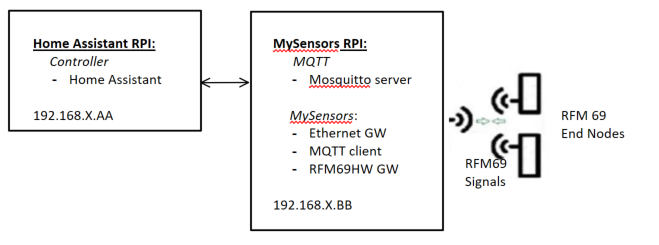
It looks like the assumption is that the MQTT broker is on the same device as the Controller:
https://www.mysensors.org/apidocs/group__RaspberryPiGateway.html:
MySensors options:--my-controller-url-address=<URL> Controller or MQTT broker url. --my-controller-ip-address=<IP> Controller or MQTT broker ip.But maybe I misunderstand.
I was trying to use the following:
./configure --my-gateway=ethernet --my-controller-ip-address=<HomeAssistant IP> --my-transport=rfm69 --my-rfm69-frequency=433 --my-is-rfm69hw --my-gateway=mqtt --my-mqtt-publish-topic-prefix=mysensors-out --my-mqtt-subscribe-topic-prefix=mysensors-in --my-mqtt-client-id=mygateway1Where <HomeAssistant IP> is 192.168.XX.AA in my picture
But that doesn't allow me to specify the MQTT broker on a different device than the Controller/Home Assistant...
Perhaps I got this all wrong?
-
Hi all,
I am trying to use a RPI as mysensors' gateway for both MQTT as well as RFM69 and connected to network using ethernet. As controller I am using HomeAssistant. Is it possible to run a MQTT broker like mosquito on this gateway / or on a device other than the controller?
It looks like the assumption is that the MQTT broker is on the same device as the Controller:
https://www.mysensors.org/apidocs/group__RaspberryPiGateway.html:
MySensors options:--my-controller-url-address=<URL> Controller or MQTT broker url. --my-controller-ip-address=<IP> Controller or MQTT broker ip.But maybe I misunderstand.
I was trying to use the following:
./configure --my-gateway=ethernet --my-controller-ip-address=<HomeAssistant IP> --my-transport=rfm69 --my-rfm69-frequency=433 --my-is-rfm69hw --my-gateway=mqtt --my-mqtt-publish-topic-prefix=mysensors-out --my-mqtt-subscribe-topic-prefix=mysensors-in --my-mqtt-client-id=mygateway1Where <HomeAssistant IP> is 192.168.XX.AA in my picture
But that doesn't allow me to specify the MQTT broker on a different device than the Controller/Home Assistant...
Perhaps I got this all wrong?
--my-gateway=ethernet means a TCP connection between the gateway and the controller. Only one my-gateway option should be specified. If you want to use mqtt, use only --my-gateway=mqtt
Set --my-controller-ip-address to the ip if the mqtt broker.
See the MQTT section on https://www.mysensors.org/build/raspberry#configure for more information.
-
--my-gateway=ethernet means a TCP connection between the gateway and the controller. Only one my-gateway option should be specified. If you want to use mqtt, use only --my-gateway=mqtt
Set --my-controller-ip-address to the ip if the mqtt broker.
See the MQTT section on https://www.mysensors.org/build/raspberry#configure for more information.
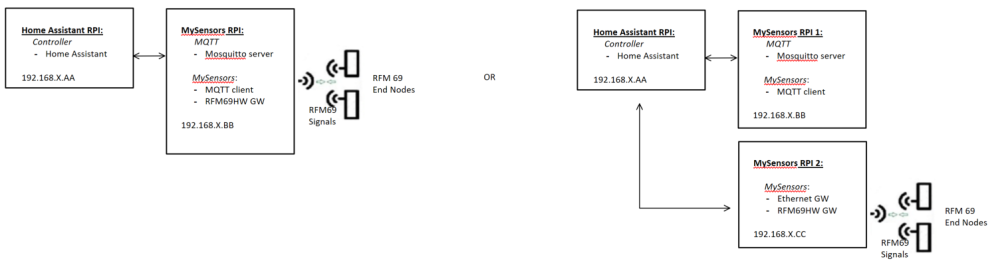
@mfalkvidd Many thanks for your quick and helpful reply! Could I ask you two more clarifying questions:
- So if define the rpi as a mqtt gateway, can I see this mqtt GW still as my GW for my RFM69 sensors?
- Or do I need to split out the ethernet GW for my RFM69 sensors from the mqtt GW?
-
@mfalkvidd Many thanks for your quick and helpful reply! Could I ask you two more clarifying questions:
- So if define the rpi as a mqtt gateway, can I see this mqtt GW still as my GW for my RFM69 sensors?
- Or do I need to split out the ethernet GW for my RFM69 sensors from the mqtt GW?
-
Thanks for clarifying, @mfalkvidd, so that means that I won't use the Ethernet GW, but only the MQTT GW configuration, changing it to
./configure --my-gateway=mqtt --my-controller-ip-address=192.168.X.BB --my-transport=rfm69 --my-rfm69-frequency=433 --my-is-rfm69hw --my-mqtt-publish-topic-prefix=mysensors-out --my-mqtt-subscribe-topic-prefix=mysensors-in --my-mqtt-client-id=mymqttgateway1Where <MQTT / MySensors GW IP address> is the MySensors RPI IP address.
But that also means that in Home-Assistant I will need to change the configuration yaml file and take out the Ethernet GW reference:
So from
mysensors:
  gateways:
    - device: '192.168.X.BB'
      persistence_file: 'mysensors3.json'
      tcp_port: 5003
    - device: mqtt
      persistence_file: 'mysensors1.json'
      topic_in_prefix: 'mysensors-out'
      topic_out_prefix: 'mysensors-in'
  optimistic: false
  persistence: true
  retain: true
  version: '2.0'
to
mysensors:
  gateways:
    - device: mqtt
      persistence_file: 'mysensors1.json'
      topic_in_prefix: 'mysensors-out'
      topic_out_prefix: 'mysensors-in'
  optimistic: false
  persistence: true
  retain: true
  version: '2.0'
But how will Home-Assistant now know what the IP address is for the MySensors RPI gateway?
Apologies if I completely missing something obvious....
-
Thanks for clarifying, @mfalkvidd, so that means that I won't use the Ethernet GW, but only the MQTT GW configuration, changing it to
./configure --my-gateway=mqtt --my-controller-ip-address=192.168.X.BB --my-transport=rfm69 --my-rfm69-frequency=433 --my-is-rfm69hw --my-mqtt-publish-topic-prefix=mysensors-out --my-mqtt-subscribe-topic-prefix=mysensors-in --my-mqtt-client-id=mymqttgateway1Where <MQTT / MySensors GW IP address> is the MySensors RPI IP address.
But that also means that in Home-Assistant I will need to change the configuration yaml file and take out the Ethernet GW reference:
So from
mysensors:
  gateways:
    - device: '192.168.X.BB'
      persistence_file: 'mysensors3.json'
      tcp_port: 5003
    - device: mqtt
      persistence_file: 'mysensors1.json'
      topic_in_prefix: 'mysensors-out'
      topic_out_prefix: 'mysensors-in'
  optimistic: false
  persistence: true
  retain: true
  version: '2.0'
to
mysensors:
  gateways:
    - device: mqtt
      persistence_file: 'mysensors1.json'
      topic_in_prefix: 'mysensors-out'
      topic_out_prefix: 'mysensors-in'
  optimistic: false
  persistence: true
  retain: true
  version: '2.0'
But how will Home-Assistant now know what the IP address is for the MySensors RPI gateway?
Apologies if I completely missing something obvious....

Hello! It looks like you're interested in this conversation, but you don't have an account yet.
Getting fed up of having to scroll through the same posts each visit? When you register for an account, you'll always come back to exactly where you were before, and choose to be notified of new replies (either via email, or push notification). You'll also be able to save bookmarks and upvote posts to show your appreciation to other community members.
With your input, this post could be even better 💗
Register Login