
Clock Sketch (RTC) modified for 1.8" LCD
-
Just embarking on making the 'Real Time Clock Module, LCD Display and Controller Time' sketch to use with a 1.8" lcd 128x160 ST7735. Problem i have is trying to get it to display the correct format of time.
eg I would like to display:-
06:03:09 instead of 6: 3: 9 for the time and equivelant for the date too. This is a problem when the numbers reach double figures as you get false times because it doenst clear.I think i need to use something similar to this;
if (digits < 10)
myGLCD.printNumI('0');I am using the UTFT libraires but cannot work out the correct syntax.
the pic below is not a great example as the time when i took this was all double digit numbers the date and month are single. but need it to say 06/01/20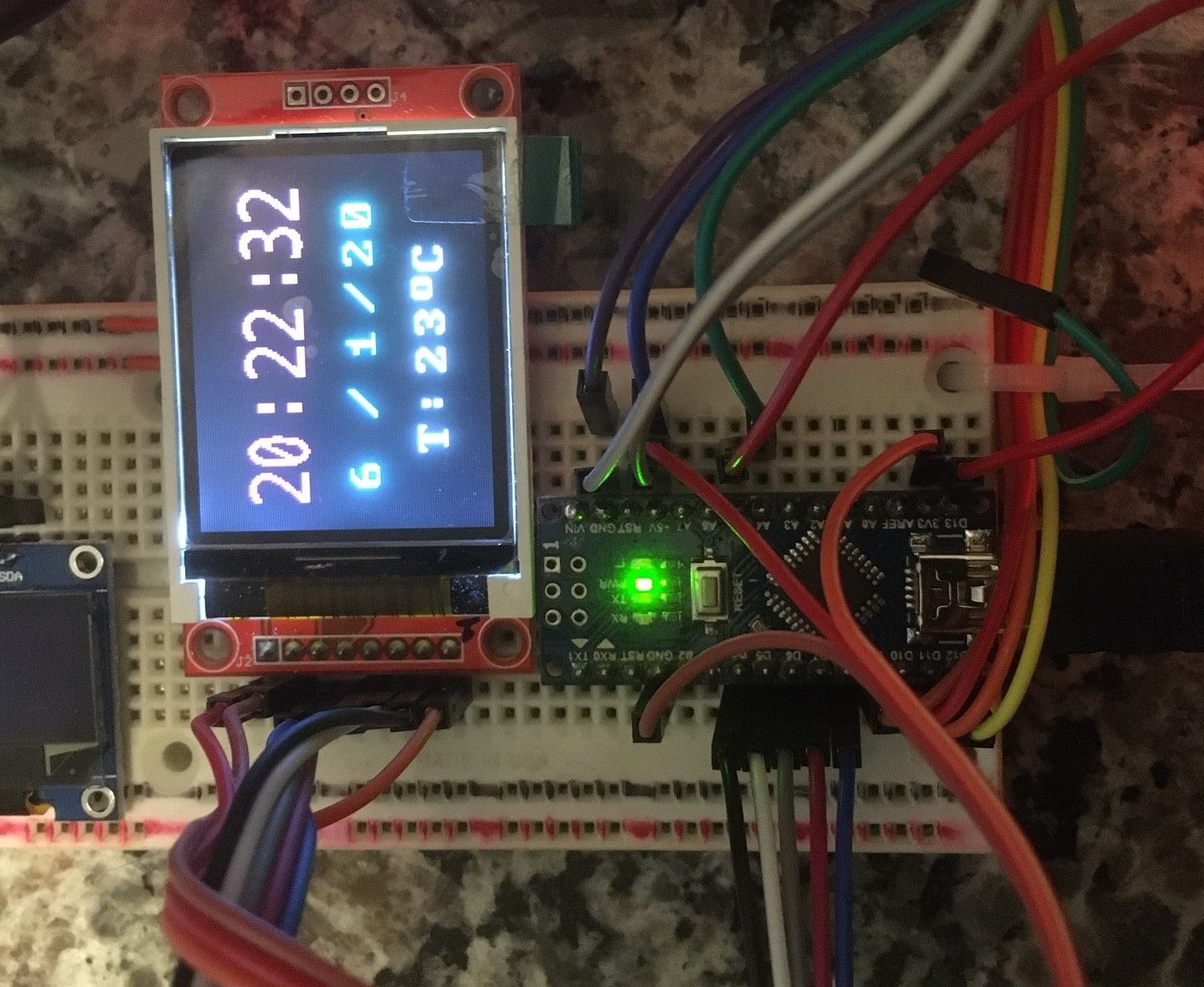
below is my code/** The MySensors Arduino library handles the wireless radio link and protocol between your home built sensors/actuators and HA controller of choice. The sensors forms a self healing radio network with optional repeaters. Each repeater and gateway builds a routing tables in EEPROM which keeps track of the network topology allowing messages to be routed to nodes. Created by Henrik Ekblad <henrik.ekblad@mysensors.org> Copyright (C) 2013-2015 Sensnology AB Full contributor list: https://github.com/mysensors/Arduino/graphs/contributors Documentation: http://www.mysensors.org Support Forum: http://forum.mysensors.org This program is free software; you can redistribute it and/or modify it under the terms of the GNU General Public License version 2 as published by the Free Software Foundation. ******************************* NB uses 1.8inch LCD rememeber to edit the memorysaver.h file and only leave ST7735 REVISION HISTORY Version 1.0 - Henrik Ekblad DESCRIPTION Example sketch showing how to request time from controller which is stored in RTC module The time and temperature (DS3231/DS3232) is shown on an attached Crystal LCD display Wiring (radio wiring on www.mysensors.org) ------------------------------------ Arduino RTC-Module I2C Display ------------------------------------ GND GND GND +5V VCC VCC A4 SDA SDA A5 SCL SCL http://www.mysensors.org/build/display */ // Enable debug prints to serial monitor //#define MY_DEBUG // Enable and select radio type attached #define MY_RADIO_RF24 #define MY_RF24_PA_LEVEL (RF24_PA_MIN) #define MY_NODE_ID 40 //#define MY_RADIO_RFM69 #include <SPI.h> #include <MySensors.h> #include <TimeLib.h> //this is where tm.Hour tm.Min comes from #include <DS3232RTC.h> // A DS3231/DS3232 library #include <Wire.h> #include <UTFT.h> extern uint8_t BigFont[]; //extern uint8_t SmallFont[]; extern uint8_t Grotesk16x32[]; UTFT myGLCD(ITDB18SP, 5, 4, 8, 7, 6); //remember to edit the memorysaver.h file and only leave ST7735XX bool timeReceived = false; unsigned long lastUpdate = 0, lastRequest = 0; void setup() { // the function to get the time from the RTC setSyncProvider(RTC.get); // Request latest time from controller at startup requestTime(); // initialize the lcd fort myGLCD.InitLCD(LANDSCAPE);// or PORTRAIT myGLCD.clrScr(); } void presentation() { // Send the sketch version information to the gateway and Controller sendSketchInfo("Clock Basic Master", "2.0"); } // This is called when a new time value was received void receiveTime(unsigned long controllerTime) { // Ok, set incoming time //Serial.print("Time value received: "); //Serial.println(controllerTime); RTC.set(controllerTime); // this sets the RTC to the time from controller - which we do want periodically timeReceived = true; } void loop() { myGLCD.setColor(255, 255, 255); unsigned long now = millis(); // If no time has been received yet, request it every 10 second from controller // When time has been received, request update every hour if ((!timeReceived && (now - lastRequest) > (10UL * 1000UL)) || (timeReceived && (now - lastRequest) > (60UL * 1000UL * 60UL))) { // Request time from controller. //Serial.println("requesting time"); requestTime(); lastRequest = now; } // Update display every second if (now - lastUpdate > 1000) { updateDisplay(); lastUpdate = now; } } void updateDisplay() { tmElements_t tm; RTC.read(tm); // Print date and time //lcd.home(); myGLCD.setColor(80, 80, 200); myGLCD.setFont(Grotesk16x32); myGLCD.printNumI(tm.Hour, 10 , 20); myGLCD.print(":", 45, 20); myGLCD.printNumI(tm.Minute, CENTER, 20); myGLCD.print(":", 100, 20); myGLCD.printNumI(tm.Second, 115, 20); myGLCD.setFont(BigFont); myGLCD.setColor(255, 255, 0); myGLCD.printNumI(tm.Day, 15 , 65); myGLCD.print("/", 45, 65); myGLCD.printNumI(tm.Month, CENTER, 65); myGLCD.print("/" , 90, 65); myGLCD.printNumI(tmYearToCalendar(tm.Year) - 2000, 110, 65); myGLCD.print("T: ", 30, 95); myGLCD.printNumI(RTC.temperature() / 4, CENTER, 95 ); myGLCD.print("o", 95, 90); // Degree-sign myGLCD.print("C", 107, 95); } /* void print2digits(int number) { if (number >= 0 && number < 10) { myGLCD.print("0",CENTER, 65 ); } // myGLCD.print(number); } /* void printNumI(int digits) { if (digits < 10) myGLCD.printNumI('0'); myGLCD.print(digits); /* original sketch had this below for 16x4 LCD void printDigits(int digits) { if (digits < 10) lcd.print('0'); lcd.print(digits); } */ -
Just embarking on making the 'Real Time Clock Module, LCD Display and Controller Time' sketch to use with a 1.8" lcd 128x160 ST7735. Problem i have is trying to get it to display the correct format of time.
eg I would like to display:-
06:03:09 instead of 6: 3: 9 for the time and equivelant for the date too. This is a problem when the numbers reach double figures as you get false times because it doenst clear.I think i need to use something similar to this;
if (digits < 10)
myGLCD.printNumI('0');I am using the UTFT libraires but cannot work out the correct syntax.
the pic below is not a great example as the time when i took this was all double digit numbers the date and month are single. but need it to say 06/01/20
below is my code/** The MySensors Arduino library handles the wireless radio link and protocol between your home built sensors/actuators and HA controller of choice. The sensors forms a self healing radio network with optional repeaters. Each repeater and gateway builds a routing tables in EEPROM which keeps track of the network topology allowing messages to be routed to nodes. Created by Henrik Ekblad <henrik.ekblad@mysensors.org> Copyright (C) 2013-2015 Sensnology AB Full contributor list: https://github.com/mysensors/Arduino/graphs/contributors Documentation: http://www.mysensors.org Support Forum: http://forum.mysensors.org This program is free software; you can redistribute it and/or modify it under the terms of the GNU General Public License version 2 as published by the Free Software Foundation. ******************************* NB uses 1.8inch LCD rememeber to edit the memorysaver.h file and only leave ST7735 REVISION HISTORY Version 1.0 - Henrik Ekblad DESCRIPTION Example sketch showing how to request time from controller which is stored in RTC module The time and temperature (DS3231/DS3232) is shown on an attached Crystal LCD display Wiring (radio wiring on www.mysensors.org) ------------------------------------ Arduino RTC-Module I2C Display ------------------------------------ GND GND GND +5V VCC VCC A4 SDA SDA A5 SCL SCL http://www.mysensors.org/build/display */ // Enable debug prints to serial monitor //#define MY_DEBUG // Enable and select radio type attached #define MY_RADIO_RF24 #define MY_RF24_PA_LEVEL (RF24_PA_MIN) #define MY_NODE_ID 40 //#define MY_RADIO_RFM69 #include <SPI.h> #include <MySensors.h> #include <TimeLib.h> //this is where tm.Hour tm.Min comes from #include <DS3232RTC.h> // A DS3231/DS3232 library #include <Wire.h> #include <UTFT.h> extern uint8_t BigFont[]; //extern uint8_t SmallFont[]; extern uint8_t Grotesk16x32[]; UTFT myGLCD(ITDB18SP, 5, 4, 8, 7, 6); //remember to edit the memorysaver.h file and only leave ST7735XX bool timeReceived = false; unsigned long lastUpdate = 0, lastRequest = 0; void setup() { // the function to get the time from the RTC setSyncProvider(RTC.get); // Request latest time from controller at startup requestTime(); // initialize the lcd fort myGLCD.InitLCD(LANDSCAPE);// or PORTRAIT myGLCD.clrScr(); } void presentation() { // Send the sketch version information to the gateway and Controller sendSketchInfo("Clock Basic Master", "2.0"); } // This is called when a new time value was received void receiveTime(unsigned long controllerTime) { // Ok, set incoming time //Serial.print("Time value received: "); //Serial.println(controllerTime); RTC.set(controllerTime); // this sets the RTC to the time from controller - which we do want periodically timeReceived = true; } void loop() { myGLCD.setColor(255, 255, 255); unsigned long now = millis(); // If no time has been received yet, request it every 10 second from controller // When time has been received, request update every hour if ((!timeReceived && (now - lastRequest) > (10UL * 1000UL)) || (timeReceived && (now - lastRequest) > (60UL * 1000UL * 60UL))) { // Request time from controller. //Serial.println("requesting time"); requestTime(); lastRequest = now; } // Update display every second if (now - lastUpdate > 1000) { updateDisplay(); lastUpdate = now; } } void updateDisplay() { tmElements_t tm; RTC.read(tm); // Print date and time //lcd.home(); myGLCD.setColor(80, 80, 200); myGLCD.setFont(Grotesk16x32); myGLCD.printNumI(tm.Hour, 10 , 20); myGLCD.print(":", 45, 20); myGLCD.printNumI(tm.Minute, CENTER, 20); myGLCD.print(":", 100, 20); myGLCD.printNumI(tm.Second, 115, 20); myGLCD.setFont(BigFont); myGLCD.setColor(255, 255, 0); myGLCD.printNumI(tm.Day, 15 , 65); myGLCD.print("/", 45, 65); myGLCD.printNumI(tm.Month, CENTER, 65); myGLCD.print("/" , 90, 65); myGLCD.printNumI(tmYearToCalendar(tm.Year) - 2000, 110, 65); myGLCD.print("T: ", 30, 95); myGLCD.printNumI(RTC.temperature() / 4, CENTER, 95 ); myGLCD.print("o", 95, 90); // Degree-sign myGLCD.print("C", 107, 95); } /* void print2digits(int number) { if (number >= 0 && number < 10) { myGLCD.print("0",CENTER, 65 ); } // myGLCD.print(number); } /* void printNumI(int digits) { if (digits < 10) myGLCD.printNumI('0'); myGLCD.print(digits); /* original sketch had this below for 16x4 LCD void printDigits(int digits) { if (digits < 10) lcd.print('0'); lcd.print(digits); } */@palmerfarmer printNumI actually accepts two more parameters:
UTFT::printNumI(long num, int x, int y, int length, char filler)You want the length to be 2 and the filler to be '0'.
So change
myGLCD.printNumI(tm.Hour, 10 , 20);to
myGLCD.printNumI(tm.Hour, 10 , 20, 2, '0');(And similar for the other calls to printNumI where you want 2 numbers)
-
Thanks for the speedy reply, I owe you a beer! works perfectly.


Hello! It looks like you're interested in this conversation, but you don't have an account yet.
Getting fed up of having to scroll through the same posts each visit? When you register for an account, you'll always come back to exactly where you were before, and choose to be notified of new replies (either via email, or push notification). You'll also be able to save bookmarks and upvote posts to show your appreciation to other community members.
With your input, this post could be even better 💗
Register Login