
What really sleep() do please ?
-
Hi there all,
I just finish a simple node using a barebone Atmega328p.
I program the bootloader MiniCore at 8Mhz internal clock.
I use a BME280 for temp/humidity and RFM69HC for radio.
All work great :-)
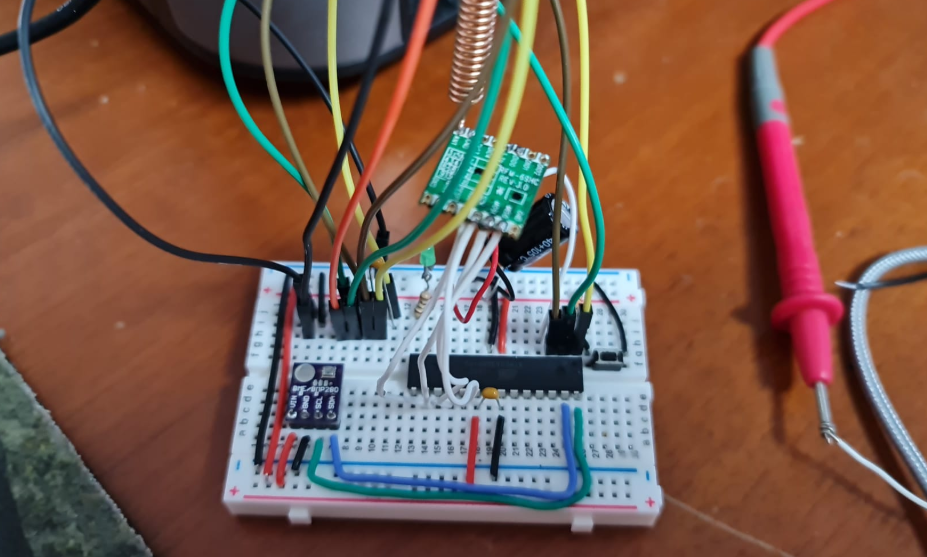
Now I'm on the software part of sleep.
I just use Sleep(30000) in order to test it.
What I receive in the log(parser) is:Sleep node, duration 30000 ms, SmartSleep=0, Int1=255, Mode1=255, Int2=255, Mode2=255 Set transport to sleep Node woke-up, reason/IRQ=-1 (-2=not possible, -1=timer, >=0 IRQ) Set transport to standby Sent Message ...etc...So I wonder what sleep() do please ? ...it use a watchdog internal timer in order to wake up ?
I have try to use a "LowPower.h" lib but the compiler give me an error:multiple definition of `__vector_6'...like already have this piece of code in the MySensor lib.
So if I understand the watchdog internal timer is the best solution to make sleep all strange thinks inside Atmega328p.
Is I still understand it can't do it more than 8sec.Can anyone please help me to understand ?
Thanks a lot
Denis -
Hi there all,
I just finish a simple node using a barebone Atmega328p.
I program the bootloader MiniCore at 8Mhz internal clock.
I use a BME280 for temp/humidity and RFM69HC for radio.
All work great :-)
Now I'm on the software part of sleep.
I just use Sleep(30000) in order to test it.
What I receive in the log(parser) is:Sleep node, duration 30000 ms, SmartSleep=0, Int1=255, Mode1=255, Int2=255, Mode2=255 Set transport to sleep Node woke-up, reason/IRQ=-1 (-2=not possible, -1=timer, >=0 IRQ) Set transport to standby Sent Message ...etc...So I wonder what sleep() do please ? ...it use a watchdog internal timer in order to wake up ?
I have try to use a "LowPower.h" lib but the compiler give me an error:multiple definition of `__vector_6'...like already have this piece of code in the MySensor lib.
So if I understand the watchdog internal timer is the best solution to make sleep all strange thinks inside Atmega328p.
Is I still understand it can't do it more than 8sec.Can anyone please help me to understand ?
Thanks a lot
Denis@DenisJ MySensors implements sleep() for AVR using the watchdog. As you know, the watchdog can only sleep for at most 8 seconds, so long sleeps are divided into smaller watchdog sleeps by MySensors. Sleeping for eg 30 seconds is divided into 3x8 seconds, 1x 4 seconds and 1x2 seconds. This is all done by the library, in the single call to sleep() without you needing to worry about it :muscle:
-
@Yveaux said in What really sleep() do please ?:
Sleeping for eg 30 seconds is divided into 3x8 seconds, 1x 4 seconds and 1x2 seconds.
Whoau... this is exact what I was think to do :-)
But if MySensors is do this in automatic... well it's wonderful :-)Do you know ... is do an automatic sleep also for the RFM69 please ?
Thanks a lot.
Denis -
@Yveaux said in What really sleep() do please ?:
Sleeping for eg 30 seconds is divided into 3x8 seconds, 1x 4 seconds and 1x2 seconds.
Whoau... this is exact what I was think to do :-)
But if MySensors is do this in automatic... well it's wonderful :-)Do you know ... is do an automatic sleep also for the RFM69 please ?
Thanks a lot.
Denis
Hello! It looks like you're interested in this conversation, but you don't have an account yet.
Getting fed up of having to scroll through the same posts each visit? When you register for an account, you'll always come back to exactly where you were before, and choose to be notified of new replies (either via email, or push notification). You'll also be able to save bookmarks and upvote posts to show your appreciation to other community members.
With your input, this post could be even better 💗
Register Login