Skip to content
  • MySensors
  • OpenHardware.io
  • Categories
  • Recent
  • Tags
  • Popular
Skins
  • Light
  • Brite
  • Cerulean
  • Cosmo
  • Flatly
  • Journal
  • Litera
  • Lumen
  • Lux
  • Materia
  • Minty
  • Morph
  • Pulse
  • Sandstone
  • Simplex
  • Sketchy
  • Spacelab
  • United
  • Yeti
  • Zephyr
  • Dark
  • Cyborg
  • Darkly
  • Quartz
  • Slate
  • Solar
  • Superhero
  • Vapor

  • Default (No Skin)
  • No Skin
Collapse
Brand Logo
  1. Home
  2. Development
  3. SI7021 Multisensor - first try

SI7021 Multisensor - first try

Scheduled Pinned Locked Moved Development
multisensorsi7021
26 Posts 9 Posters 23.2k Views 6 Watching
  • Oldest to Newest
  • Newest to Oldest
  • Most Votes
Reply
  • Reply as topic
Log in to reply
This topic has been deleted. Only users with topic management privileges can see it.
  • dakkyD Offline
    dakkyD Offline
    dakky
    wrote on last edited by
    #21

    does the sleeping current come down to an acceptable level when removing the regulator? 1500uA is quite much for a battery powered node.

    Controller: Raspberry Pi 2 :: Openhab2 :: with @TimO MySensors Binding
    Gateway: Arduino MEGA 2560 R3 :: W5100 :: Ethernet GW

    Software: MySensors 2.0development

    1 Reply Last reply
    0
    • N Offline
      N Offline
      n3ro
      wrote on last edited by n3ro
      #22

      @dakky said:

      1500uA

      The sleeping current is ~240uA.

      But it's possible to tune it a little bit more.

      pimatic + MySensors + Homeduino + z-way
      https://github.com/n3roGit/MySensors_n3ro

      1 Reply Last reply
      0
      • dakkyD Offline
        dakkyD Offline
        dakky
        wrote on last edited by
        #23

        hmm ok 240uA is better of course, but still far away from

        @m26872 said:

        Mine sleeps at 11uA.

        Controller: Raspberry Pi 2 :: Openhab2 :: with @TimO MySensors Binding
        Gateway: Arduino MEGA 2560 R3 :: W5100 :: Ethernet GW

        Software: MySensors 2.0development

        N 1 Reply Last reply
        0
        • dakkyD dakky

          hmm ok 240uA is better of course, but still far away from

          @m26872 said:

          Mine sleeps at 11uA.

          N Offline
          N Offline
          n3ro
          wrote on last edited by
          #24

          @dakky Yes, this is because of the multiple sensors on my board. maybe somebody have more tuning tipps.

          pimatic + MySensors + Homeduino + z-way
          https://github.com/n3roGit/MySensors_n3ro

          1 Reply Last reply
          0
          • R riataman

            @n3ro said:

            Big THX,

            now i have understand how to use the si7021 :)

            Reading works great!

            But the sleeping current is very high ~1500uA

            If you got this breakout: http://www.aliexpress.com/item/Industrial-High-Precision-Si7021-Humidity-Sensor-with-I2C-Interface-for-Arduino/32340228487.html?ws_ab_test=searchweb201556_1_79_78_77_80,searchweb201644_5,searchweb201560_1 it includes a 3.3v regulator and level shifting so you can actually use the sensor with a 5v arduino but it consumes quite a bit of current (60uA in the ones I got) even when idling.

            What I did was desolder the regulator and solder a small wire to bypass it (sorry for potato quality pic).
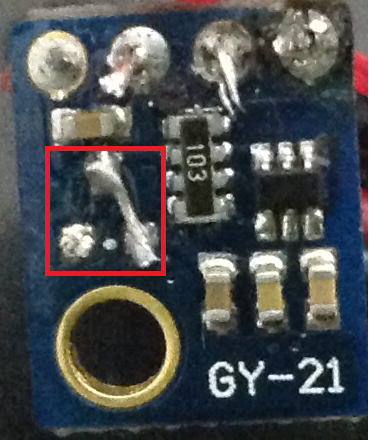
            gy21.png

            Then I ordered this breakout for future nodes: http://www.aliexpress.com/item/New-HTU21D-Temperature-and-Humidity-Sensor-Module/1970355069.html?ws_ab_test=searchweb201556_1_79_78_77_80,searchweb201644_5,searchweb201560_1 that one doesn't seem to include any additional circuits (other than the pull up resistor and safety? resistor).

            M Offline
            M Offline
            Maciej Kulawik
            wrote on last edited by
            #25

            @riataman said:

            Then I ordered this breakout for future nodes: http://www.aliexpress.com/item/New-HTU21D-Temperature-and-Humidity-Sensor-Module/1970355069.html?ws_ab_test=searchweb201556_1_79_78_77_80,searchweb201644_5,searchweb201560_1 that one doesn't seem to include any additional circuits (other than the pull up resistor and safety? resistor).

            Thanks for tip!
            Unfortunatelly quite expensive. I bought my Si7021 modules on ali for 2,9$.

            And what chip is used on this HTU21D module? Si2071 too?
            If not, what library is to be used to communicate?

            1 Reply Last reply
            0
            • G Offline
              G Offline
              GertSanders
              Hardware Contributor
              wrote on last edited by GertSanders
              #26

              Adafruit have a library for the htu21d which works well with Mysensors

              1 Reply Last reply
              0

              Hello! It looks like you're interested in this conversation, but you don't have an account yet.

              Getting fed up of having to scroll through the same posts each visit? When you register for an account, you'll always come back to exactly where you were before, and choose to be notified of new replies (either via email, or push notification). You'll also be able to save bookmarks and upvote posts to show your appreciation to other community members.

              With your input, this post could be even better 💗

              Register Login
              Reply
              • Reply as topic
              Log in to reply
              • Oldest to Newest
              • Newest to Oldest
              • Most Votes


              9

              Online

              12.1k

              Users

              11.2k

              Topics

              113.4k

              Posts


              Copyright 2025 TBD   |   Forum Guidelines   |   Privacy Policy   |   Terms of Service
              • Login

              • Don't have an account? Register

              • Login or register to search.
              • First post
                Last post
              0
              • MySensors
              • OpenHardware.io
              • Categories
              • Recent
              • Tags
              • Popular