Skip to content
  • MySensors
  • OpenHardware.io
  • Categories
  • Recent
  • Tags
  • Popular
Skins
  • Light
  • Brite
  • Cerulean
  • Cosmo
  • Flatly
  • Journal
  • Litera
  • Lumen
  • Lux
  • Materia
  • Minty
  • Morph
  • Pulse
  • Sandstone
  • Simplex
  • Sketchy
  • Spacelab
  • United
  • Yeti
  • Zephyr
  • Dark
  • Cyborg
  • Darkly
  • Quartz
  • Slate
  • Solar
  • Superhero
  • Vapor

  • Default (No Skin)
  • No Skin
Collapse
Brand Logo
  1. Home
  2. Troubleshooting
  3. [Solved] Messed up payload from binary switch sensor?

[Solved] Messed up payload from binary switch sensor?

Scheduled Pinned Locked Moved Troubleshooting
7 Posts 3 Posters 2.7k Views 1 Watching
  • Oldest to Newest
  • Newest to Oldest
  • Most Votes
Reply
  • Reply as topic
Log in to reply
This topic has been deleted. Only users with topic management privileges can see it.
  • N Offline
    N Offline
    netram
    wrote on last edited by netram
    #1

    Vera 3 (UI5)
    WIFI Controller, using standard ESP8266 Gateway sketch, library v1.5, usb powered
    Arduino nano sensor, usb powered, library v1.5.2
    Arduino IDE 1.6.7

    I'm having problems getting binary switch sensors working. Using the latest example sketch, stripped down the loop to:

    void loop() 
    {
      gw.send(msg.set(0));
      delay(10*1000);
      gw.send(msg.set(1));
      delay(10*1000);  
    } 
    

    When serial monitoring the sensor side everything looks ok to me:
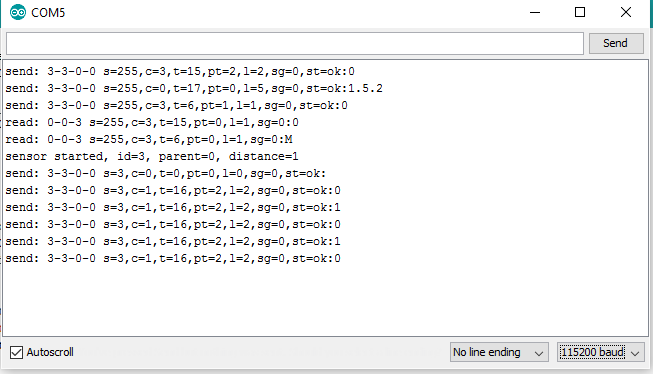
    0_1453369768833_serialplotter.png

    But at the controller side, I’m getting strange payloads:
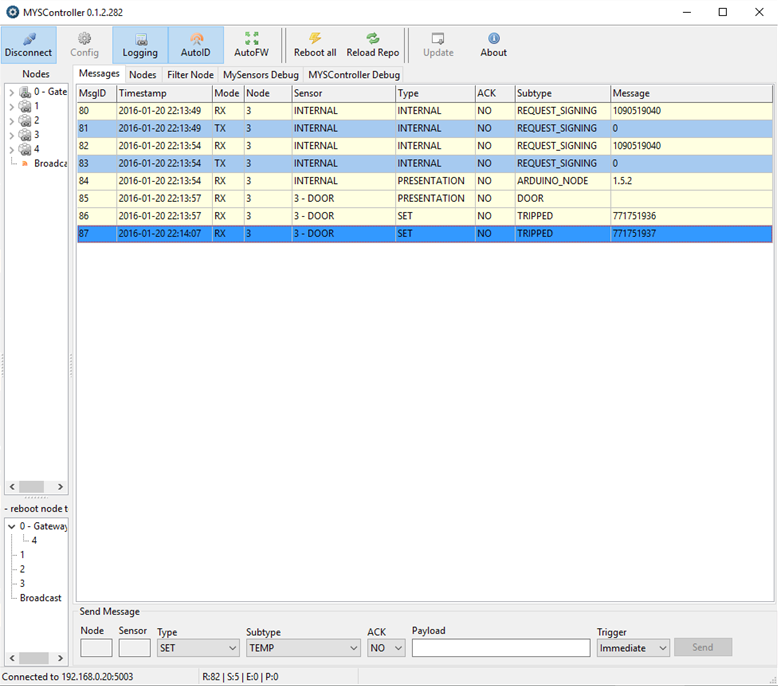
    0_1453369782013_myscontroller.png

    I have tried two different arduinos/radio for the sensor node, same result.

    I had binary switch sensors working a couple of months ago. Since then, the only change in setup I can think of is switching from serial gateway to WIFI.

    My other sensors (temp, humidity) are all working fine.

    Any ideas?

    1 Reply Last reply
    0
    • sundberg84S Offline
      sundberg84S Offline
      sundberg84
      Hardware Contributor
      wrote on last edited by sundberg84
      #2

      Hi. First thing you can look at is replaying delay () because those block the radio. Use gw.wait instead.

      Also if might be something with that update @Anticimex did from 1.5.2 to 1.5.3 ?

      Controller: Proxmox VM - Home Assistant
      MySensors GW: Arduino Uno - W5100 Ethernet, Gw Shield Nrf24l01+ 2,4Ghz
      MySensors GW: Arduino Uno - Gw Shield RFM69, 433mhz
      RFLink GW - Arduino Mega + RFLink Shield, 433mhz

      1 Reply Last reply
      0
      • N Offline
        N Offline
        netram
        wrote on last edited by
        #3

        Thanks for the input, the wait-thing seems reasonable, I'll try that first!

        1 Reply Last reply
        0
        • AndurilA Offline
          AndurilA Offline
          Anduril
          wrote on last edited by
          #4

          Hey @netram,

          I have a very similar problem. Can you please read here http://forum.mysensors.org/topic/2737/2-channel-relais-with-2-buttons-sending-strange-values-for-on-off and give feedback? Do you get these readings all the time (also after restart of gw and node) or only when a third node is sending (like in my case)?
          I'm still trying to figure out what the problem is, so your details are very welcome.

          1 Reply Last reply
          0
          • N Offline
            N Offline
            netram
            wrote on last edited by
            #5

            Now using gw.wait() instead of delay(), but no luck. :expressionless:

            66	2016-01-21 21:17:20	RX	3	3 - DOOR	SET	NO	TRIPPED	-1056964607
            67	2016-01-21 21:17:30	RX	3	3 - DOOR	SET	NO	TRIPPED	-1056964608
            68	2016-01-21 21:17:38	RX	2	0	SET	NO	HUM	30.6
            69	2016-01-21 21:17:39	RX	1	3	SET	NO	TEMP	-8.8
            70	2016-01-21 21:17:40	RX	3	3 - DOOR	SET	NO	TRIPPED	-1056964607
            

            @Anduril I get these readings all the time. I just tried power cycling both the gw and the sensor, but every single TRIPPED-message is flawed.
            Did you try flashing the new 1.5.2 version to your GW?

            1 Reply Last reply
            0
            • AndurilA Offline
              AndurilA Offline
              Anduril
              wrote on last edited by
              #6

              I did not try with 1.5.2/3 yet.
              Will have the time to do further tests maybe this weekend, but not shure how many time my wife and child will consume...

              1 Reply Last reply
              0
              • N Offline
                N Offline
                netram
                wrote on last edited by
                #7

                As stated in other threads, upgrading the gateway to latest dev version (2.x) solved the problem!

                Great, got the old mouse trap up and running again. :grin:

                https://youtu.be/v8gWVBEqwxc

                1 Reply Last reply
                1
                Reply
                • Reply as topic
                Log in to reply
                • Oldest to Newest
                • Newest to Oldest
                • Most Votes


                10

                Online

                11.7k

                Users

                11.2k

                Topics

                113.1k

                Posts


                Copyright 2025 TBD   |   Forum Guidelines   |   Privacy Policy   |   Terms of Service
                • Login

                • Don't have an account? Register

                • Login or register to search.
                • First post
                  Last post
                0
                • MySensors
                • OpenHardware.io
                • Categories
                • Recent
                • Tags
                • Popular