
I can get the WaterMeterPulseSensor working.
-
Dear all,
i am working to get the Water Pulse meter on Arduino to send the data to Domoticz. (through an RFXtrx322e)
i am rather new to this, but the site looked easy to get this working, but apparently its i bit harder than i thought.
So i am in need of your help.I use:
- Arduino IDE 1.6.7 (linux 64Bit)
- Mysensors 1.5 Library
- Arduino UNO R3
- RFM69HW (rev2) 433MHz (connected through a 3,3V regulator, including 4,7uF capacitor)
i loaded the sketch, and i only get 'radio init fail'
In MyConfig.h i enabled
#define RFM69_FREQUENCY RF69_433MHZi am not sure about enabling, cause till now it did'nt matter
//#define MY_SIGNING_FEATUREIn MyTransportRFM69.h i changed: false in to true
bool isRFM69HW=trueWhat did i miss, or do i need to change/check.
Thanx in advance.
-
The code would be as i got it from the site, and its wired like this
Only then for an UNO R3, that would look like:
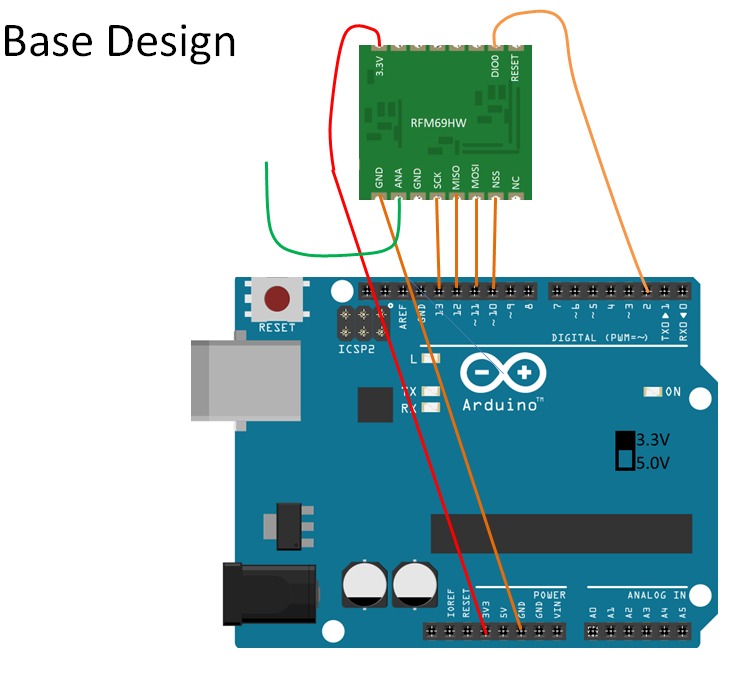
But with the only differences
- it has an 5V to 3,3V regulator and 4.7uF capacitor (instead of directly to 3.3V on the UNO board (wich also doesńt work...))
(3.3V is supplied to the RFM69HW board, i got that checked / measured) - GND between ANA and SCK is also connected to ground.
/** * The MySensors Arduino library handles the wireless radio link and protocol * between your home built sensors/actuators and HA controller of choice. * The sensors forms a self healing radio network with optional repeaters. Each * repeater and gateway builds a routing tables in EEPROM which keeps track of the * network topology allowing messages to be routed to nodes. * * Created by Henrik Ekblad <henrik.ekblad@mysensors.org> * Copyright (C) 2013-2015 Sensnology AB * Full contributor list: https://github.com/mysensors/Arduino/graphs/contributors * * Documentation: http://www.mysensors.org * Support Forum: http://forum.mysensors.org * * This program is free software; you can redistribute it and/or * modify it under the terms of the GNU General Public License * version 2 as published by the Free Software Foundation. * ******************************* * * REVISION HISTORY * Version 1.0 - Henrik Ekblad * Version 1.1 - GizMoCuz * * DESCRIPTION * Use this sensor to measure volume and flow of your house watermeter. * You need to set the correct pulsefactor of your meter (pulses per m3). * The sensor starts by fetching current volume reading from gateway (VAR 1). * Reports both volume and flow back to gateway. * * Unfortunately millis() won't increment when the Arduino is in * sleepmode. So we cannot make this sensor sleep if we also want * to calculate/report flow. * http://www.mysensors.org/build/pulse_water */ #include <MySensor.h> #include <SPI.h> #define DIGITAL_INPUT_SENSOR 3 // The digital input you attached your sensor. (Only 2 and 3 generates interrupt!) #define SENSOR_INTERRUPT DIGITAL_INPUT_SENSOR-2 // Usually the interrupt = pin -2 (on uno/nano anyway) #define PULSE_FACTOR 1000 // Nummber of blinks per m3 of your meter (One rotation/liter) #define SLEEP_MODE false // flowvalue can only be reported when sleep mode is false. #define MAX_FLOW 40 // Max flow (l/min) value to report. This filters outliers. #define CHILD_ID 1 // Id of the sensor child unsigned long SEND_FREQUENCY = 30000; // Minimum time between send (in milliseconds). We don't want to spam the gateway. MySensor gw; MyMessage flowMsg(CHILD_ID,V_FLOW); MyMessage volumeMsg(CHILD_ID,V_VOLUME); MyMessage lastCounterMsg(CHILD_ID,V_VAR1); double ppl = ((double)PULSE_FACTOR)/1000; // Pulses per liter volatile unsigned long pulseCount = 0; volatile unsigned long lastBlink = 0; volatile double flow = 0; boolean pcReceived = false; unsigned long oldPulseCount = 0; unsigned long newBlink = 0; double oldflow = 0; double volume =0; double oldvolume =0; unsigned long lastSend =0; unsigned long lastPulse =0; void setup() { gw.begin(incomingMessage); // initialize our digital pins internal pullup resistor so one pulse switches from high to low (less distortion) pinMode(DIGITAL_INPUT_SENSOR, INPUT_PULLUP); // Send the sketch version information to the gateway and Controller gw.sendSketchInfo("Water Meter", "1.1"); // Register this device as Waterflow sensor gw.present(CHILD_ID, S_WATER); pulseCount = oldPulseCount = 0; // Fetch last known pulse count value from gw gw.request(CHILD_ID, V_VAR1); lastSend = lastPulse = millis(); attachInterrupt(SENSOR_INTERRUPT, onPulse, FALLING); } void loop() { gw.process(); unsigned long currentTime = millis(); // Only send values at a maximum frequency or woken up from sleep if (SLEEP_MODE || (currentTime - lastSend > SEND_FREQUENCY)) { lastSend=currentTime; if (!pcReceived) { //Last Pulsecount not yet received from controller, request it again gw.request(CHILD_ID, V_VAR1); return; } if (!SLEEP_MODE && flow != oldflow) { oldflow = flow; Serial.print("l/min:"); Serial.println(flow); // Check that we dont get unresonable large flow value. // could hapen when long wraps or false interrupt triggered if (flow<((unsigned long)MAX_FLOW)) { gw.send(flowMsg.set(flow, 2)); // Send flow value to gw } } // No Pulse count received in 2min if(currentTime - lastPulse > 120000){ flow = 0; } // Pulse count has changed if ((pulseCount != oldPulseCount)||(!SLEEP_MODE)) { oldPulseCount = pulseCount; Serial.print("pulsecount:"); Serial.println(pulseCount); gw.send(lastCounterMsg.set(pulseCount)); // Send pulsecount value to gw in VAR1 double volume = ((double)pulseCount/((double)PULSE_FACTOR)); if ((volume != oldvolume)||(!SLEEP_MODE)) { oldvolume = volume; Serial.print("volume:"); Serial.println(volume, 3); gw.send(volumeMsg.set(volume, 3)); // Send volume value to gw } } } if (SLEEP_MODE) { gw.sleep(SEND_FREQUENCY); } } void incomingMessage(const MyMessage &message) { if (message.type==V_VAR1) { unsigned long gwPulseCount=message.getULong(); pulseCount += gwPulseCount; flow=oldflow=0; Serial.print("Received last pulse count from gw:"); Serial.println(pulseCount); pcReceived = true; } } void onPulse() { if (!SLEEP_MODE) { unsigned long newBlink = micros(); unsigned long interval = newBlink-lastBlink; if (interval!=0) { lastPulse = millis(); if (interval<500000L) { // Sometimes we get interrupt on RISING, 500000 = 0.5sek debounce ( max 120 l/min) return; } flow = (60000000.0 /interval) / ppl; } lastBlink = newBlink; } pulseCount++; } - it has an 5V to 3,3V regulator and 4.7uF capacitor (instead of directly to 3.3V on the UNO board (wich also doesńt work...))
-
The code would be as i got it from the site, and its wired like this
Only then for an UNO R3, that would look like:
But with the only differences
- it has an 5V to 3,3V regulator and 4.7uF capacitor (instead of directly to 3.3V on the UNO board (wich also doesńt work...))
(3.3V is supplied to the RFM69HW board, i got that checked / measured) - GND between ANA and SCK is also connected to ground.
/** * The MySensors Arduino library handles the wireless radio link and protocol * between your home built sensors/actuators and HA controller of choice. * The sensors forms a self healing radio network with optional repeaters. Each * repeater and gateway builds a routing tables in EEPROM which keeps track of the * network topology allowing messages to be routed to nodes. * * Created by Henrik Ekblad <henrik.ekblad@mysensors.org> * Copyright (C) 2013-2015 Sensnology AB * Full contributor list: https://github.com/mysensors/Arduino/graphs/contributors * * Documentation: http://www.mysensors.org * Support Forum: http://forum.mysensors.org * * This program is free software; you can redistribute it and/or * modify it under the terms of the GNU General Public License * version 2 as published by the Free Software Foundation. * ******************************* * * REVISION HISTORY * Version 1.0 - Henrik Ekblad * Version 1.1 - GizMoCuz * * DESCRIPTION * Use this sensor to measure volume and flow of your house watermeter. * You need to set the correct pulsefactor of your meter (pulses per m3). * The sensor starts by fetching current volume reading from gateway (VAR 1). * Reports both volume and flow back to gateway. * * Unfortunately millis() won't increment when the Arduino is in * sleepmode. So we cannot make this sensor sleep if we also want * to calculate/report flow. * http://www.mysensors.org/build/pulse_water */ #include <MySensor.h> #include <SPI.h> #define DIGITAL_INPUT_SENSOR 3 // The digital input you attached your sensor. (Only 2 and 3 generates interrupt!) #define SENSOR_INTERRUPT DIGITAL_INPUT_SENSOR-2 // Usually the interrupt = pin -2 (on uno/nano anyway) #define PULSE_FACTOR 1000 // Nummber of blinks per m3 of your meter (One rotation/liter) #define SLEEP_MODE false // flowvalue can only be reported when sleep mode is false. #define MAX_FLOW 40 // Max flow (l/min) value to report. This filters outliers. #define CHILD_ID 1 // Id of the sensor child unsigned long SEND_FREQUENCY = 30000; // Minimum time between send (in milliseconds). We don't want to spam the gateway. MySensor gw; MyMessage flowMsg(CHILD_ID,V_FLOW); MyMessage volumeMsg(CHILD_ID,V_VOLUME); MyMessage lastCounterMsg(CHILD_ID,V_VAR1); double ppl = ((double)PULSE_FACTOR)/1000; // Pulses per liter volatile unsigned long pulseCount = 0; volatile unsigned long lastBlink = 0; volatile double flow = 0; boolean pcReceived = false; unsigned long oldPulseCount = 0; unsigned long newBlink = 0; double oldflow = 0; double volume =0; double oldvolume =0; unsigned long lastSend =0; unsigned long lastPulse =0; void setup() { gw.begin(incomingMessage); // initialize our digital pins internal pullup resistor so one pulse switches from high to low (less distortion) pinMode(DIGITAL_INPUT_SENSOR, INPUT_PULLUP); // Send the sketch version information to the gateway and Controller gw.sendSketchInfo("Water Meter", "1.1"); // Register this device as Waterflow sensor gw.present(CHILD_ID, S_WATER); pulseCount = oldPulseCount = 0; // Fetch last known pulse count value from gw gw.request(CHILD_ID, V_VAR1); lastSend = lastPulse = millis(); attachInterrupt(SENSOR_INTERRUPT, onPulse, FALLING); } void loop() { gw.process(); unsigned long currentTime = millis(); // Only send values at a maximum frequency or woken up from sleep if (SLEEP_MODE || (currentTime - lastSend > SEND_FREQUENCY)) { lastSend=currentTime; if (!pcReceived) { //Last Pulsecount not yet received from controller, request it again gw.request(CHILD_ID, V_VAR1); return; } if (!SLEEP_MODE && flow != oldflow) { oldflow = flow; Serial.print("l/min:"); Serial.println(flow); // Check that we dont get unresonable large flow value. // could hapen when long wraps or false interrupt triggered if (flow<((unsigned long)MAX_FLOW)) { gw.send(flowMsg.set(flow, 2)); // Send flow value to gw } } // No Pulse count received in 2min if(currentTime - lastPulse > 120000){ flow = 0; } // Pulse count has changed if ((pulseCount != oldPulseCount)||(!SLEEP_MODE)) { oldPulseCount = pulseCount; Serial.print("pulsecount:"); Serial.println(pulseCount); gw.send(lastCounterMsg.set(pulseCount)); // Send pulsecount value to gw in VAR1 double volume = ((double)pulseCount/((double)PULSE_FACTOR)); if ((volume != oldvolume)||(!SLEEP_MODE)) { oldvolume = volume; Serial.print("volume:"); Serial.println(volume, 3); gw.send(volumeMsg.set(volume, 3)); // Send volume value to gw } } } if (SLEEP_MODE) { gw.sleep(SEND_FREQUENCY); } } void incomingMessage(const MyMessage &message) { if (message.type==V_VAR1) { unsigned long gwPulseCount=message.getULong(); pulseCount += gwPulseCount; flow=oldflow=0; Serial.print("Received last pulse count from gw:"); Serial.println(pulseCount); pcReceived = true; } } void onPulse() { if (!SLEEP_MODE) { unsigned long newBlink = micros(); unsigned long interval = newBlink-lastBlink; if (interval!=0) { lastPulse = millis(); if (interval<500000L) { // Sometimes we get interrupt on RISING, 500000 = 0.5sek debounce ( max 120 l/min) return; } flow = (60000000.0 /interval) / ppl; } lastBlink = newBlink; } pulseCount++; }This post is deleted! - it has an 5V to 3,3V regulator and 4.7uF capacitor (instead of directly to 3.3V on the UNO board (wich also doesńt work...))
-
The wiring instructions say "NOTE: The NSS, MOSI and SCK are not 5V tolerant on RFM69. You will need to use a level converter if you're using a 5V Arduino." The Uno is 5V. So you might have fried your radio :( Except that everything looks fine to me but I haven't tried the RFM69 myself.
-
The wiring instructions say "NOTE: The NSS, MOSI and SCK are not 5V tolerant on RFM69. You will need to use a level converter if you're using a 5V Arduino." The Uno is 5V. So you might have fried your radio :( Except that everything looks fine to me but I haven't tried the RFM69 myself.
@mfalkvidd
i have the RFM69 HW connected through a 3,3V regulator (including capacitor), so there was never 5V on de Radio board.
iĺl add it to the first post aswell. -
@mfalkvidd
i have the RFM69 HW connected through a 3,3V regulator (including capacitor), so there was never 5V on de Radio board.
iĺl add it to the first post aswell. -
ouch, i need to look in to that, but then it might me true the board is damaged...
(Some other sketches seem to report data to the serial monitor, but i am not sure if the RFM69HW module is working.)


Hello! It looks like you're interested in this conversation, but you don't have an account yet.
Getting fed up of having to scroll through the same posts each visit? When you register for an account, you'll always come back to exactly where you were before, and choose to be notified of new replies (either via email, or push notification). You'll also be able to save bookmarks and upvote posts to show your appreciation to other community members.
With your input, this post could be even better 💗
Register Login