
Cannot get my sitemap to show humidity reading
-
To preface this, I am very new to OpenHAB. I am trying to use it for my senior project as it costs us nothing and being able to view the finished project on all devices.
I got a bunch started and am working on the actual sitemap and items setup. The tutorials I have gone through have for the most part worked and I am now trying to get a basic sensor setup, because once that is done I will hopefully be able to just add the rest of my nodes and start messing with rules. Right now I am working with a temperature humidity node with a DHT11. I have my sitemap showing my temperature readings but for humidity it just shows -%. I do not understand why because they are basically identical.
This is what I have in my items:
Number	Temp1	"Temperature [%.1f C]"	<temperature>	(Room,Temperature)		{ mqtt="<[broker:mygateway1-out/9/1/1/0/0:state:default]" }
Number Hum1		"Humidity [%.1f %%]"	<temperature> (Room,Humidity) { mqtt="<[broker:mygateway1-out/9/1/1/0/1:state:default]"}
And my sitemap:
Frame {
		Group item=Room label="Room Information" icon="bedroom" {
			Text item=Temp1
			Text item=Hum1

		}
}
The temperature works fine I don't understand why humidity doesn't work. I got the mqtt binding from MQTT.fx from what shows up after the Arduino sends the information.
-
@CJ-Cassarino said:
The temperature works fine I don't understand why humidity doesn't work. I got the mqtt binding from MQTT.fx from what shows up after the Arduino sends the information.
I am not sure if I understand you correctly. Do you mean that you can see with mqtt.fx your gateway posting the temperature and the humidity on the respective topics or only the temperature?
In my experience the DHT11 is relatively unreliable, so I am wondering if the humidity is actually been read and sent to your controller. You could examine this by checking the serial monitor on your node, on the gateway and the event-log of your openhab instance (
events.log).I am happy to have a look if you post the respective logs here.
-
@CJ-Cassarino said:
The temperature works fine I don't understand why humidity doesn't work. I got the mqtt binding from MQTT.fx from what shows up after the Arduino sends the information.
I am not sure if I understand you correctly. Do you mean that you can see with mqtt.fx your gateway posting the temperature and the humidity on the respective topics or only the temperature?
In my experience the DHT11 is relatively unreliable, so I am wondering if the humidity is actually been read and sent to your controller. You could examine this by checking the serial monitor on your node, on the gateway and the event-log of your openhab instance (
events.log).I am happy to have a look if you post the respective logs here.
Yes I can see with Mqtt that both values are being posted in there topics, and I copied those same topic headings to be used in the sitemap. It's just the sitemap doesn't actually display the value.
I will setup my nodes again to get you those logs.
-
I think for now it is not necessary to modify the nodes. If you can see the messages on the humidity in the mqtt topic, then they must be read by your node.
Could you instead post what you see in mqtt.fx and in openhab's
events.log?Btw, what gateway are you using: the mqtt gateway or the mqtt client gateway?
-
I think for now it is not necessary to modify the nodes. If you can see the messages on the humidity in the mqtt topic, then they must be read by your node.
Could you instead post what you see in mqtt.fx and in openhab's
events.log?Btw, what gateway are you using: the mqtt gateway or the mqtt client gateway?
@27maximilian Sorry for the late response, I can only work on this at special times because I use all the Ethernet cords in my apartment. I am using the mqtt client gateway. And where can I find the events.log? I attached the serial print of my node and mqtt.fx
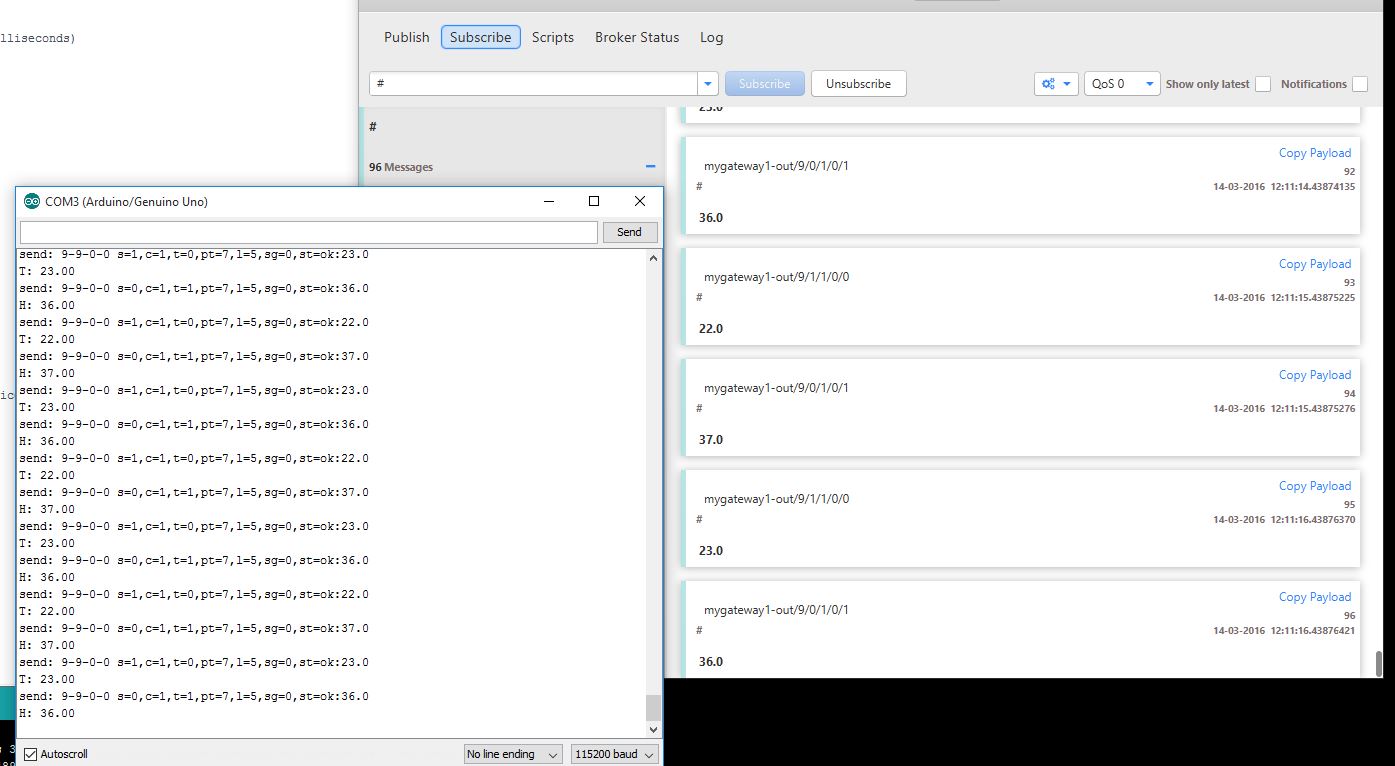
Edit: I don't think my openHAB is working at all. The temperature value is not changing even though it is changing in the SerialMonitor and mqtt.fx
-
Ok I got it working, not sure what I did But I changed my items and followed a few other guides but in all its working now.
-
That's is good to hear.
In case you would like to check your events.log at a later stage, you can find it (depending on your installation) here:
/var/log/openhab/OR
/opt/openhab/logs/See also: Openhab Log-files


Hello! It looks like you're interested in this conversation, but you don't have an account yet.
Getting fed up of having to scroll through the same posts each visit? When you register for an account, you'll always come back to exactly where you were before, and choose to be notified of new replies (either via email, or push notification). You'll also be able to save bookmarks and upvote posts to show your appreciation to other community members.
With your input, this post could be even better 💗
Register Login