
Web App for Simple Control of my Home Automation kludge
-
Like a lot of forum members, I have a lot of automation in my house. It sometimes creates issues for guests who don't have a familiarity with home automation and my wife!
I don't want to give total control of the house to guests, but I wanted them to have a tool that will allow them to control my hybrid system (Vera and a bunch of Particle Photon controlled devices and other gadgets) without having to download an app, which would allow them total control of my house and I have to enter my security keys.
So, I wrote a web app which is hosted on my mac mini server and it is accessible to anyone I let onto my private LAN, only while they are on the LAN.
It took me a while to do this, having never done anything in HTML/CSS/JavaScript/PHP, but it turns out that it is all pretty easy to do. The most difficult part was getting the status data from Vera, because of its particular preferences of handling cross-domain Ajax calls. I eventually created a PHP proxy and well, it all came together after that.
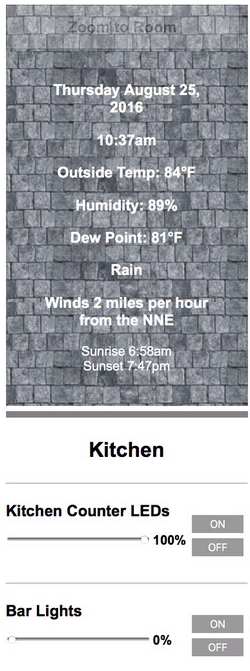
when the website loads, it makess an Ajax call to my Vera and updates the state of every device. Plus, it also gets the state of each of the Particle Photon devices I can control/monitor. I also go get all of the local weather conditions, as you can see below.
If anyone is interested in working on something similar or building off of this project, I'm happy to share my code. I'm certain that it would offer a lot of utility to the MySensors crowd, especially where they are using Vera's ugly UI.
Here are a few screen shots off my web browser and iOS device:
different devices including control of my thermostats (they can only control within a range) and dimmer in the outdoor kitchen:
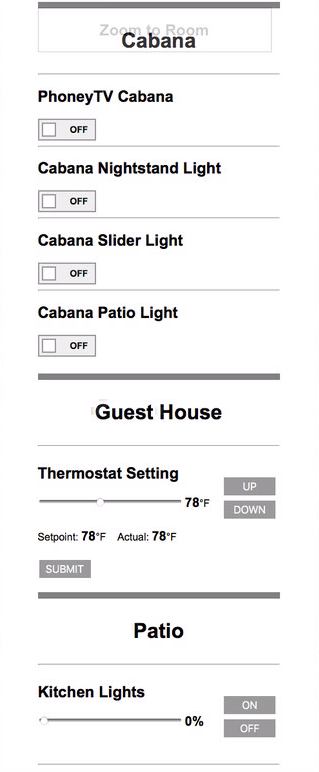
Another shot including the drop down "Zoom to Room" menu:
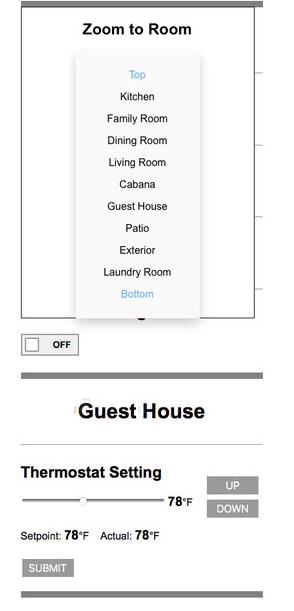
Local Conditions:
-
Like a lot of forum members, I have a lot of automation in my house. It sometimes creates issues for guests who don't have a familiarity with home automation and my wife!
I don't want to give total control of the house to guests, but I wanted them to have a tool that will allow them to control my hybrid system (Vera and a bunch of Particle Photon controlled devices and other gadgets) without having to download an app, which would allow them total control of my house and I have to enter my security keys.
So, I wrote a web app which is hosted on my mac mini server and it is accessible to anyone I let onto my private LAN, only while they are on the LAN.
It took me a while to do this, having never done anything in HTML/CSS/JavaScript/PHP, but it turns out that it is all pretty easy to do. The most difficult part was getting the status data from Vera, because of its particular preferences of handling cross-domain Ajax calls. I eventually created a PHP proxy and well, it all came together after that.
when the website loads, it makess an Ajax call to my Vera and updates the state of every device. Plus, it also gets the state of each of the Particle Photon devices I can control/monitor. I also go get all of the local weather conditions, as you can see below.
If anyone is interested in working on something similar or building off of this project, I'm happy to share my code. I'm certain that it would offer a lot of utility to the MySensors crowd, especially where they are using Vera's ugly UI.
Here are a few screen shots off my web browser and iOS device:
different devices including control of my thermostats (they can only control within a range) and dimmer in the outdoor kitchen:
Another shot including the drop down "Zoom to Room" menu:
Local Conditions:
@BulldogLowell - Awsome project! I could use this as well but I dont know how it will work with Domoticz.
Is it going to be open source? If so I might be able to add http request because then I can make triggers in Domoticz. -
@BulldogLowell - Awsome project! I could use this as well but I dont know how it will work with Domoticz.
Is it going to be open source? If so I might be able to add http request because then I can make triggers in Domoticz.@sundberg84 Domoticz supports Ajax requests through the REST interface. So we just a slight modification it should be able to work on Domotitcz as well.
-
@sundberg84 Domoticz supports Ajax requests through the REST interface. So we just a slight modification it should be able to work on Domotitcz as well.
So, my little app connects to Particle devices using their RESTful API, Ajax looks like this, which control my PhoneyTV (Particle version here) and a LED dimmer:
example of a getter:
function getParticleData(){
	var requestURL = "https://api.spark.io/v1/devices/" + deviceID + "/" + getFunc + "/?access_token=" + accessToken;
	$.getJSON(requestURL, function(json) {
		document.getElementById("range").innerHTML = json.result + "%";
		document.getElementById("myRange").value = json.result;
	});
	var myURL = "https://api.spark.io/v1/devices/" + phoneyID + "/" + phoneyVariable + "/?access_token=" + accessToken;
	$.getJSON(myURL, function(data) {
	var state = parseInt(data.result);
	console.log("phoneyTV state =" + state);
	document.getElementById("phoneyTV").checked = ((state == 1)? true : false);
	});
}
and a setter:
function sendDimmerValue() {
    var newValue = document.getElementById("range").innerHTML;
    var request = new XMLHttpRequest();
    var data = 'params=' + newValue + '&access_token=' + accessToken;
    var url = 'https://api.particle.io/v1/devices/' + dev_id + '/setDimLevel/';
    request.open('POST', url, true);
    request.setRequestHeader('Content-Type', 'application/x-www-form-urlencoded; charset=UTF-8');
    request.send(data);
}
no extra url encoding needed here but for Vera you must, for example:
function sendThermostatValue(tStat) {
	console.log("pressed");
    var newValue = document.getElementById(tStat.reading).innerHTML;
    var request = new XMLHttpRequest();
    var url = 'http://10.0.1.15/proxy.php?url=http%3A%2F%2F10.0.1.25%3A3480%2Fdata_request%3Fid%3Daction%26output_format%3Dxml%26DeviceNum%3D' + tStat.deviceNum + '%26serviceId%3Durn%3Aupnp-org%3AserviceId%3ATemperatureSetpoint1_Cool%26action%3DSetCurrentSetpoint%26NewCurrentSetpoint%3D' + newValue;
	console.log(url);
    request.open('GET', url);
    request.send();
}
My code doesn't dynamically create devices (yet) rather, it is static HTML. My next improvement would be to build device classes, poll Vera for relevant device types and build the UI dynamically.
I started with a simple web page with a single value... once I learned how to make an AJAX call to Vera, it was easy to call any variable I wanted, especially because of Vera's native JSON output.
If Domoticz API supports JSON, well it will be a breeze for you.
Since there are a few people interested I can post something. If we get a Vera person interested, the Javascript I wrote will give them a big step in the right direction.
-
So, my little app connects to Particle devices using their RESTful API, Ajax looks like this, which control my PhoneyTV (Particle version here) and a LED dimmer:
example of a getter:
function getParticleData(){
	var requestURL = "https://api.spark.io/v1/devices/" + deviceID + "/" + getFunc + "/?access_token=" + accessToken;
	$.getJSON(requestURL, function(json) {
		document.getElementById("range").innerHTML = json.result + "%";
		document.getElementById("myRange").value = json.result;
	});
	var myURL = "https://api.spark.io/v1/devices/" + phoneyID + "/" + phoneyVariable + "/?access_token=" + accessToken;
	$.getJSON(myURL, function(data) {
	var state = parseInt(data.result);
	console.log("phoneyTV state =" + state);
	document.getElementById("phoneyTV").checked = ((state == 1)? true : false);
	});
}
and a setter:
function sendDimmerValue() {
    var newValue = document.getElementById("range").innerHTML;
    var request = new XMLHttpRequest();
    var data = 'params=' + newValue + '&access_token=' + accessToken;
    var url = 'https://api.particle.io/v1/devices/' + dev_id + '/setDimLevel/';
    request.open('POST', url, true);
    request.setRequestHeader('Content-Type', 'application/x-www-form-urlencoded; charset=UTF-8');
    request.send(data);
}
no extra url encoding needed here but for Vera you must, for example:
function sendThermostatValue(tStat) {
	console.log("pressed");
    var newValue = document.getElementById(tStat.reading).innerHTML;
    var request = new XMLHttpRequest();
    var url = 'http://10.0.1.15/proxy.php?url=http%3A%2F%2F10.0.1.25%3A3480%2Fdata_request%3Fid%3Daction%26output_format%3Dxml%26DeviceNum%3D' + tStat.deviceNum + '%26serviceId%3Durn%3Aupnp-org%3AserviceId%3ATemperatureSetpoint1_Cool%26action%3DSetCurrentSetpoint%26NewCurrentSetpoint%3D' + newValue;
	console.log(url);
    request.open('GET', url);
    request.send();
}
My code doesn't dynamically create devices (yet) rather, it is static HTML. My next improvement would be to build device classes, poll Vera for relevant device types and build the UI dynamically.
I started with a simple web page with a single value... once I learned how to make an AJAX call to Vera, it was easy to call any variable I wanted, especially because of Vera's native JSON output.
If Domoticz API supports JSON, well it will be a breeze for you.
Since there are a few people interested I can post something. If we get a Vera person interested, the Javascript I wrote will give them a big step in the right direction.
@BulldogLowell - well I didnt know but @TheoL said Domoicz supports AJAX and I know that it supports JSON so this sounds great!
-
OK, so I think I'll throw this all up onto GitHub as a starting point. For the Vera folks out there, I'll put a basic example of how to get user data via Ajax, using PHP proxy.
here is a little HTML for folks to play with:
<!DOCTYPE html> <html lang="en"> <head> <title>mYHome Controller</title> <link rel="icon" href="penguin.png"> <link rel="stylesheet" type="text/css" href="style.css" /> <meta name="viewport" content="width=device-width, initial-scale=1.0, user-scalable=0"> <script src="https://ajax.googleapis.com/ajax/libs/jquery/3.1.0/jquery.min.js" ></script> <script src="support.js"</script> <script src="https://code.jquery.com/jquery-3.1.0.min.js"></script> </head> <body style="cursor:wait"> <script> $('body').on("click", ".dropdown", function() { $('.dropdown-content').toggle(); $('#banner').fadeTo(900, $('#banner').css("opacity") == "1" ? "0.20" : "1"); // 900 milliseconds }); </script> <p id="controller"></p> <div id="container"> <div id="banner"> <div class="dropdown"> <h2><span id="mySpan" class="select-room" onclick="true" >Zoom to Room</span></h2> <div class="dropdown-content" id="menucontainer"> <p><a href="#top"><font color=#58ACFA>Top</font></a></p> <p><a href="#kitchen">Kitchen</a></p> <p><a href="#family">Family Room</a></p> <p><a href="#diningRoom">Dining Room</a></p> <p><a href="#livingRoom">Living Room</a></p> <p><a href="#cabana">Cabana</a></p> <p><a href="#guesthouse">Guest House</a></p> <p><a href="#Patio">Patio</a></p> <p><a href="#exterior">Exterior</a></p> <p><a href="#laundryRoom">Laundry Room</a></p> <p><a href="#footer"><font color=#58ACFA>Bottom</font></a></p> </div> </div> </div> <div id="header"> <br /> <br /> <h3> <p id="todayDate"></p> </h3> <h3> <p id="currentTime"></p> </h3> <h3> <p id="currentTemp">Outside Temp: --°F</p> </h3> <h3> <p id="currentHumidity">Humidity --%</p> </h3> <h3> <p id="currentDewPoint">Dew Point: --°F</p> <p id="currentConditions">--</p> Winds <a id="windSpeed">--</a> miles per hour from the <a id="windDir">---<a> </h3> Sunrise <a id="sunriseTime">6:30</a><br> Sunset <a id="sunsetTime">6:30pm</a> </div> <div id="rooms"> <div id="kitchen"> <hr size="10" NOSHADE> <h1> <p align="center">Kitchen</p> </h1> <hr /> <div id="ledTool"> <div id="ledSlider"> <h2>Kitchen Counter LEDs</h2> <input id="myRange" type="range" style="width: 220px; height 40px" min="0" max="100" value="50" step = "5" list="settings" oninput="showValue(this.value+ '%') " onchange="sendValue(this.value+ '%')"> <datalist id="settings"> <option>0</option> <option>10</option> <option>20</option> <option>30</option> <option>40</option> <option>50</option> <option>60</option> <option>70</option> <option>80</option> <option>90</option> <option>100</option> </datalist> <span id="range" class="readings">--</span> <br/> <br/> <br /><br /> </div> <div id="ledButtons"> <br /> <br /> <input type="button" class="button" value="ON" onclick="setDimmerPower(100)"> <br /> <input type="button" class="button" value="OFF" onclick="setDimmerPower(0)"> </div> </div> <div id = "space2"> <hr /> </div> <div id = kitchenSlider> <h2>Bar Lights</h2> <input id="kitchenBarRange" type="range" style="width: 220px; height 40px" min="0" max="100" value="50" step = "5" list="settings" oninput="setVeraValue(this.value, kitchenBarLight.spanID, kitchenBarLight.deviceNumber, kitchenBarLight.rangeID)" onchange="setVeraValue(this.value, kitchenBarLight.spanID, kitchenBarLight.deviceNumber, kitchenBarLight.rangeID)"> <datalist id="settings"> <option>0</option> <option>10</option> <option>20</option> <option>30</option> <option>40</option> <option>50</option> <option>60</option> <option>70</option> <option>80</option> <option>90</option> <option>100</option> </datalist> <span id = "kitchenDimVal" class="readings">--%</span> <br/> <br/> <br /><br /> </div> <div id="kitchenBarButton"> <br /> <br /> <input type="button" class="button" value="ON" onclick="showVeraValue(100, kitchenBarLight.spanID, kitchenBarLight.deviceNumber, kitchenBarLight.rangeID)"> <br /> <input type="button" class="button" value="OFF" onclick="showVeraValue(0, kitchenBarLight.spanID, kitchenBarLight.deviceNumber, kitchenBarLight.rangeID)"> </div> <div> <div id = "space1"> <hr /> </div> </div> <div id = pubTableSlider> <h2>Pub Table Dimmer</h2> <input id="pubTableRange" type="range" style="width: 220px; height 40px" min="0" max="100" value="50" step = "5" list="settings" oninput="setVeraValue(this.value, pubTableLight.spanID, pubTableLight.deviceNumber, pubTableLight.rangeID) " onchange="setVeraValue(this.value, pubTableLight.spanID, pubTableLight.deviceNumber, pubTableLight.rangeID)"> <datalist id="settings"> <option>0</option> <option>10</option> <option>20</option> <option>30</option> <option>40</option> <option>50</option> <option>60</option> <option>70</option> <option>80</option> <option>90</option> <option>100</option> </datalist> <span id = "pubTableDimVal" class="readings">--%</span> <br/> <br/> <br /><br /> </div> <div id="pubTableButton"> <br /> <br /> <input type="button" class="button" value="ON" onclick="showVeraValue(100, pubTableLight.spanID,pubTableLight.deviceNumber, pubTableLight.rangeID)"> <br /> <input type="button" class="button" value="OFF" onclick="showVeraValue(0, pubTableLight.spanID,pubTableLight.deviceNumber, pubTableLight.rangeID)"> </div> <div id="kitchAccent"> <hr /> <h2>Kitchen Accent Lights</h2> <div class="onoffswitch"> <input type="checkbox" name="onoffswitch" class="onoffswitch-checkbox" id="kitchenAccent" onclick="handleToggle(this);" > <label class="onoffswitch-label" for="kitchenAccent"> <span class="onoffswitch-inner"></span> <span class="onoffswitch-switch"></span> </label> </div><br> </div> <div id="family"> <hr size="10" NOSHADE> <h1> <p align="center">Family Room</p> </h1> <hr /> <h2>Family Room Accent Lights</h2> <div class="onoffswitch"> <input type="checkbox" name="onoffswitch" class="onoffswitch-checkbox" id="faamilyRoomAccent" onclick="handleToggle(this);" > <label class="onoffswitch-label" for="faamilyRoomAccent"> <span class="onoffswitch-inner"></span> <span class="onoffswitch-switch"></span> </label> </div><br> </div> <div id="diningRoom"> <hr size="10" NOSHADE> <h1> <p align="center">Dining Room</p> </h1> <hr /> <h2>Dining Room Table</h2> <div class="onoffswitch"> <input type="checkbox" name="onoffswitch" class="onoffswitch-checkbox" id="diningLights" onclick="handleToggle(this);" > <label class="onoffswitch-label" for="diningLights"> <span class="onoffswitch-inner"></span> <span class="onoffswitch-switch"></span> </label> </div><br> </div> <div id="livingRoom"> <hr size="10" NOSHADE> <h1> <p align="center">Living Room</p> </h1> <hr /> <div id="livingRoomThermostatSlider"> <h2>Thermostat Setting</h2> <input id="tstatRange2" type="range" style="width: 220px; height 40px" min=72 max=86 value=76 step = 1.0 list="increments4" oninput="updateThermostatValue(this.id, this.value)" onchange="updateThermostatValue(this.id, this.value)"> <datalist id="increments4"> <option>72</option> <option>74</option> <option>76</option> <option>78</option> <option>80</option> <option>82</option> <option>84</option> <option>86</option> </datalist> <span id="range2" class="readings">--</span>°F </br> </br>Setpoint: <span id="setpoint2" class="readings">--</span>°F Actual: <span id="current2" class="readings">--</span>°F <span id="snowFlake2"><font size=6>❄</font></span> </br> </br> <input type="button" class="button" onclick="sendThermostatValue(thermostat[2])" value = SUBMIT /> </br></br> </div> <div id="livingRoomThermButtons"> <br /> <br /> <input type="button" class="button" value="UP" onclick="thermostatUP(thermostat[2])"> <br /> <input type="button" class="button" value="DOWN" onclick="thermostatDOWN(thermostat[2])"> </div> </div> <div id="livingRoomElements"> <hr /> <h2>End Tables</h2> <div class="onoffswitch"> <input type="checkbox" name="onoffswitch" class="onoffswitch-checkbox" id="endTables" onclick="handleToggle(this);" > <label class="onoffswitch-label" for="endTables"> <span class="onoffswitch-inner"></span> <span class="onoffswitch-switch"></span> </label> </div> <hr /> <h2>Portrait Lamp</h2> <div class="onoffswitch"> <input type="checkbox" name="onoffswitch" class="onoffswitch-checkbox" id="portraitLamp" onclick="handleToggle(this);" > <label class="onoffswitch-label" for="portraitLamp"> <span class="onoffswitch-inner"></span> <span class="onoffswitch-switch"></span> </label> </div> <hr /> <h2>Wall Art</h2> <div class="onoffswitch"> <input type="checkbox" name="onoffswitch" class="onoffswitch-checkbox" id="wallArt" onclick="handleToggle(this);" > <label class="onoffswitch-label" for="wallArt"> <span class="onoffswitch-inner"></span> <span class="onoffswitch-switch"></span> </label> </div> <hr /> <h2>Floor Lamp</h2> <div class="onoffswitch"> <input type="checkbox" name="onoffswitch" class="onoffswitch-checkbox" id="floorLamp" onclick="handleToggle(this);" > <label class="onoffswitch-label" for="floorLamp"> <span class="onoffswitch-inner"></span> <span class="onoffswitch-switch"></span> </label> </div> <hr /> <h2>Master Hallway</h2> <div class="onoffswitch"> <input type="checkbox" name="onoffswitch" class="onoffswitch-checkbox" id="masterHallway" onclick="handleToggle(this);" > <label class="onoffswitch-label" for="masterHallway"> <span class="onoffswitch-inner"></span> <span class="onoffswitch-switch"></span> </label> </div> <hr /> <h2>Main Entrance</h2> <div class="onoffswitch"> <input type="checkbox" name="onoffswitch" class="onoffswitch-checkbox" id="mainEntrance" onclick="handleToggle(this);" > <label class="onoffswitch-label" for="mainEntrance"> <span class="onoffswitch-inner"></span> <span class="onoffswitch-switch"></span> </label> </div><br> </div> </div> <div id="cabana"> <hr size="10" NOSHADE> <h1> <p align="center">Cabana</p> </h1> <div id="cabanaElements"> <hr /> <h2>PhoneyTV Cabana</h2> <div class="onoffswitch"> <input type="checkbox" name="onoffswitch" class="onoffswitch-checkbox" id="phoneyTV" onclick="handlePhoneyTV(this);" > <label class="onoffswitch-label" for="phoneyTV"> <span class="onoffswitch-inner"></span> <span class="onoffswitch-switch"></span> </label> </div> <hr /> <h2>Cabana Nightstand Light</h2> <div class="onoffswitch"> <input type="checkbox" name="onoffswitch" class="onoffswitch-checkbox" id="cabanaNightstand" onclick="handleToggle(this);" > <label class="onoffswitch-label" for="cabanaNightstand"> <span class="onoffswitch-inner"></span> <span class="onoffswitch-switch"></span> </label> </div> <hr /> <h2>Cabana Slider Light</h2> <div class="onoffswitch"> <input type="checkbox" name="onoffswitch" class="onoffswitch-checkbox" id="cabanaSlider" onclick="handleToggle(this);" > <label class="onoffswitch-label" for="cabanaSlider"> <span class="onoffswitch-inner"></span> <span class="onoffswitch-switch"></span> </label> </div> <hr /> <h2>Cabana Patio Light</h2> <div class="onoffswitch"> <input type="checkbox" name="onoffswitch" class="onoffswitch-checkbox" id="cabanaPatio" onclick="handleToggle(this);" > <label class="onoffswitch-label" for="cabanaPatio"> <span class="onoffswitch-inner"></span> <span class="onoffswitch-switch"></span> </label> </div><br> </div> </div> <div id="guesthouse"> <hr size="10" NOSHADE> <h1> <p align="center">Guest House</p> </h1> <hr /> <div id="guestThermSlider"> <h2>Thermostat Setting</h2> <input id="tstatRange1" type="range" style="width: 220px; height 40px" min=72 max=86 value=76 step = 1.0 list="increments3" oninput="updateThermostatValue(this.id, this.value)" onchange="updateThermostatValue(this.id, this.value)"> <datalist id="increments3"> <option>72</option> <option>74</option> <option>76</option> <option>78</option> <option>80</option> <option>82</option> <option>84</option> <option>86</option> </datalist> <span id="range1" class="readings">76</span>°F <br/> <br/>Setpoint: <span id="setpoint1" class="readings">--</span>°F Actual: <span id="current1" class="readings">--</span>°F <span id="snowFlake1"><font size=6>❄</font></span> <br/> <br/> <input type="button" class="button" onclick="sendThermostatValue(thermostat[1])" value = SUBMIT /> <br/><br/> </div> <div id="guestThermButtons"> <br /> <br /> <input type="button" class="button" value="UP" onclick="thermostatUP(thermostat[1])"> <br /> <input type="button" class="button" value="DOWN" onclick="thermostatDOWN(thermostat[1])"> </div> </div> <div id="Patio"> <hr size="10" NOSHADE> <h1> <p align="center">Patio</p> </h1> <hr /> <div id="patioElements"> <div id = outdoorSlider> <h2>Kitchen Lights</h2> <input id="outdoorKitchenRange" type="range" style="width: 220px; height 40px" min="0" max="100" value="50" step = "5" list="settings" oninput="setVeraValue(this.value, outdoorKitchenDimmer.spanID, outdoorKitchenDimmer.deviceNumber, outdoorKitchenDimmer.rangeID)" onchange="setVeraValue(this.value, outdoorKitchenDimmer.spanID, outdoorKitchenDimmer.deviceNumber, outdoorKitchenDimmer.rangeID)"> <datalist id="settings"> <option>0</option> <option>10</option> <option>20</option> <option>30</option> <option>40</option> <option>50</option> <option>60</option> <option>70</option> <option>80</option> <option>90</option> <option>100</option> </datalist> <span id = "outdoorKitchenDimVal" class="readings">--%</span> <br/> <br/> <br /><br /> </div> <div id="extKitchenButton"> <br /> <br /> <input type="button" class="button" value="ON" onclick="showVeraValue(100, outdoorKitchenDimmer.spanID, outdoorKitchenDimmer.deviceNumber, outdoorKitchenDimmer.rangeID)"> <br /> <input type="button" class="button" value="OFF" onclick="showVeraValue(0, outdoorKitchenDimmer.spanID, outdoorKitchenDimmer.deviceNumber, outdoorKitchenDimmer.rangeID)"> </div> <div id="space"> <hr /> </div/> <div id = cabanaSlider> <h2>Cabana Dimmer</h2> <input id="cabanaRange" type="range" style="width: 220px; height 40px" min="0" max="100" value="50" step = "5" list="settings" oninput="setVeraValue(this.value, cabanaDimmer.spanID, cabanaDimmer.deviceNumber, cabanaDimmer.rangeID) " onchange="setVeraValue(this.value, cabanaDimmer.spanID, cabanaDimmer.deviceNumber, cabanaDimmer.rangeID)"> <datalist id="settings"> <option>0</option> <option>10</option> <option>20</option> <option>30</option> <option>40</option> <option>50</option> <option>60</option> <option>70</option> <option>80</option> <option>90</option> <option>100</option> </datalist> <span id = "cabanaDimVal" class="readings">--%</span> <br/> <br/> <br /><br /> </div> <div id="cabanaButton"> <br /> <br /> <input type="button" class="button" value="ON" onclick="showVeraValue(100, cabanaDimmer.spanID,cabanaDimmer.deviceNumber, cabanaDimmer.rangeID)"> <br /> <input type="button" class="button" value="OFF" onclick="showVeraValue(0, cabanaDimmer.spanID,cabanaDimmer.deviceNumber, cabanaDimmer.rangeID)"> </div> <div id = "patioRadioButtons"> <hr /> <h2>Under Counter Lights</h2> <div class="onoffswitch"> <input type="checkbox" name="onoffswitch" class="onoffswitch-checkbox" id="ropeLights" onclick="handleToggle(this);" > <label class="onoffswitch-label" for="ropeLights"> <span class="onoffswitch-inner"></span> <span class="onoffswitch-switch"></span> </label> </div> <hr /> <h2>Flood Lights</h2> <div class="onoffswitch"> <input type="checkbox" name="onoffswitch" class="onoffswitch-checkbox" id="mainFloodLights" onclick="handleToggle(this);" > <label class="onoffswitch-label" for="mainFloodLights"> <span class="onoffswitch-inner"></span> <span class="onoffswitch-switch"></span> </label> </div> <hr /> <h2>Master Slider</h2> <div class="onoffswitch"> <input type="checkbox" name="onoffswitch" class="onoffswitch-checkbox" id="masterSlider" onclick="handleToggle(this);" > <label class="onoffswitch-label" for="masterSlider"> <span class="onoffswitch-inner"></span> <span class="onoffswitch-switch"></span> </label> </div> <hr /> <h2>Pool Light</h2> <div class="onoffswitch"> <input type="checkbox" name="onoffswitch" class="onoffswitch-checkbox" id="poolLight" onclick="handleToggle(this);" > <label class="onoffswitch-label" for="poolLight"> <span class="onoffswitch-inner"></span> <span class="onoffswitch-switch"></span> </label> </div> <hr /> <h2>Pergola</h2> <div class="onoffswitch"> <input type="checkbox" name="onoffswitch" class="onoffswitch-checkbox" id="pergola" onclick="handleToggle(this);" > <label class="onoffswitch-label" for="pergola"> <span class="onoffswitch-inner"></span> <span class="onoffswitch-switch"></span> </label> </div> <hr /> <h2>Television</h2> <div class="onoffswitch"> <input type="checkbox" name="onoffswitch" class="onoffswitch-checkbox" id="television" onclick="handleToggle(this);" > <label class="onoffswitch-label" for="television"> <span class="onoffswitch-inner"></span> <span class="onoffswitch-switch"></span> </label> </div> <hr /> <h2>Cabana Slider</h2> <div class="onoffswitch"> <input type="checkbox" name="onoffswitch" class="onoffswitch-checkbox" id="cabanaSlidingDoor" onclick="handleToggle(this);" > <label class="onoffswitch-label" for="cabanaSlidingDoor"> <span class="onoffswitch-inner"></span> <span class="onoffswitch-switch"></span> </label> </div><br> </div> </div> </div> </div> <div id="exterior"> <hr size="10" NOSHADE> <h1> <p align="center">Exterior Lights</p> </h1> <div id = "exteriorRadioButtons"> <hr /> <h2>Front Door Garage</h2> <div class="onoffswitch"> <input type="checkbox" name="onoffswitch" class="onoffswitch-checkbox" id="frontDoorGarage" onclick="handleToggle(this);" > <label class="onoffswitch-label" for="frontDoorGarage"> <span class="onoffswitch-inner"></span> <span class="onoffswitch-switch"></span> </label> </div> <hr /> <h2>Guest Flood Lights</h2> <div class="onoffswitch"> <input type="checkbox" name="onoffswitch" class="onoffswitch-checkbox" id="guestFloodLights" onclick="handleToggle(this);" > <label class="onoffswitch-label" for="guestFloodLights"> <span class="onoffswitch-inner"></span> <span class="onoffswitch-switch"></span> </label> </div> <hr /> <h2>Guest House Garage</h2> <div class="onoffswitch"> <input type="checkbox" name="onoffswitch" class="onoffswitch-checkbox" id="guestHouseGarage" onclick="handleToggle(this);" > <label class="onoffswitch-label" for="guestHouseGarage"> <span class="onoffswitch-inner"></span> <span class="onoffswitch-switch"></span> </label> </div> <hr /> <h2>Storage Room</h2> <div class="onoffswitch"> <input type="checkbox" name="onoffswitch" class="onoffswitch-checkbox" id="storageRoom" onclick="handleToggle(this);" > <label class="onoffswitch-label" for="storageRoom"> <span class="onoffswitch-inner"></span> <span class="onoffswitch-switch"></span> </label> </div> <hr /> <h2>Back Yard</h2> <div class="onoffswitch"> <input type="checkbox" name="onoffswitch" class="onoffswitch-checkbox" id="backYard" onclick="handleToggle(this);" > <label class="onoffswitch-label" for="backYard"> <span class="onoffswitch-inner"></span> <span class="onoffswitch-switch"></span> </label> </div> <hr /> <h2>Fountain</h2> <div class="onoffswitch"> <input type="checkbox" name="onoffswitch" class="onoffswitch-checkbox" id="fountain" onclick="handleToggle(this);" > <label class="onoffswitch-label" for="fountain"> <span class="onoffswitch-inner"></span> <span class="onoffswitch-switch"></span> </label> </div> <hr /> <h2>Pool Pump</h2> <div class="onoffswitch"> <input type="checkbox" name="onoffswitch" class="onoffswitch-checkbox" id="poolPump" onclick="handleToggle(this);" > <label class="onoffswitch-label" for="poolPump"> <span class="onoffswitch-inner"></span> <span class="onoffswitch-switch"></span> </label> </div><br> </div> </div> <div id="laundryRoom"> <hr size="10" NOSHADE> <h1> <p align="center">Laundry Room</p></h1> <hr /> <div id="mainThermostat"> <div id="tstatSlider"> <h2>Thermostat Setting</h2> <input id="tstatRange0" type="range" style="width: 220px; height 40px" min=72 max=86 value=76 step = 1.0 list="increments2" oninput="updateThermostatValue(this.id, this.value)" onchange="updateThermostatValue(this.id, this.value)"> <datalist id="increments2"> <option>72</option> <option>74</option> <option>76</option> <option>78</option> <option>80</option> <option>82</option> <option>84</option> <option>86</option> </datalist> <span id="range0" class="readings">76</span>°F <br/> <br/>Setpoint: <span id="setpoint0" class="readings">--</span>°F Actual: <span id="current0" class="readings">--</span>°F <span id="snowFlake0"><font size=6>❄</font></span> <br/> <br/> <input type="button" class="button" onclick="sendThermostatValue(thermostat[0])" value = SUBMIT /> <br /><br /> </div> <div id="tstatButtons"> <br /> <br /> <input type="button" class="button" value="UP" onclick="thermostatUP(thermostat[0])"> <br /> <input type="button" class="button" value="DOWN" onclick="thermostatDOWN(thermostat[0])"> </div> </div> <div id = "laundryRadioButtons"> <hr /> <h2>Laundry Room Lights</h2> <div class="onoffswitch"> <input type="checkbox" name="onoffswitch" class="onoffswitch-checkbox" id="laundryLight" onclick="handleToggle(this);" > <label class="onoffswitch-label" for="laundryLight"> <span class="onoffswitch-inner"></span> <span class="onoffswitch-switch"></span> </label> </div> <hr /> <h2>Laundry Hallway Outlet</h2> <div class="onoffswitch"> <input type="checkbox" name="onoffswitch" class="onoffswitch-checkbox" id="laundryOutlet" onclick="handleToggle(this);" > <label class="onoffswitch-label" for="laundryOutlet"> <span class="onoffswitch-inner"></span> <span class="onoffswitch-switch"></span> </label> </div><br> </div> </div> <div id="footer"> <br><br><br><br> <p><font color="white">Copyright © 2016, Jim Brower</font></p> </div> <div id="gutter"> <a href="mailto:bulldoglowell@gmail.com?subject=Suggestions"><font color=#58ACFA>Send suggestions for improvements</font><a> </div> </div> </body> </html> -
OK, so I think I'll throw this all up onto GitHub as a starting point. For the Vera folks out there, I'll put a basic example of how to get user data via Ajax, using PHP proxy.
here is a little HTML for folks to play with:
<!DOCTYPE html> <html lang="en"> <head> <title>mYHome Controller</title> <link rel="icon" href="penguin.png"> <link rel="stylesheet" type="text/css" href="style.css" /> <meta name="viewport" content="width=device-width, initial-scale=1.0, user-scalable=0"> <script src="https://ajax.googleapis.com/ajax/libs/jquery/3.1.0/jquery.min.js" ></script> <script src="support.js"</script> <script src="https://code.jquery.com/jquery-3.1.0.min.js"></script> </head> <body style="cursor:wait"> <script> $('body').on("click", ".dropdown", function() { $('.dropdown-content').toggle(); $('#banner').fadeTo(900, $('#banner').css("opacity") == "1" ? "0.20" : "1"); // 900 milliseconds }); </script> <p id="controller"></p> <div id="container"> <div id="banner"> <div class="dropdown"> <h2><span id="mySpan" class="select-room" onclick="true" >Zoom to Room</span></h2> <div class="dropdown-content" id="menucontainer"> <p><a href="#top"><font color=#58ACFA>Top</font></a></p> <p><a href="#kitchen">Kitchen</a></p> <p><a href="#family">Family Room</a></p> <p><a href="#diningRoom">Dining Room</a></p> <p><a href="#livingRoom">Living Room</a></p> <p><a href="#cabana">Cabana</a></p> <p><a href="#guesthouse">Guest House</a></p> <p><a href="#Patio">Patio</a></p> <p><a href="#exterior">Exterior</a></p> <p><a href="#laundryRoom">Laundry Room</a></p> <p><a href="#footer"><font color=#58ACFA>Bottom</font></a></p> </div> </div> </div> <div id="header"> <br /> <br /> <h3> <p id="todayDate"></p> </h3> <h3> <p id="currentTime"></p> </h3> <h3> <p id="currentTemp">Outside Temp: --°F</p> </h3> <h3> <p id="currentHumidity">Humidity --%</p> </h3> <h3> <p id="currentDewPoint">Dew Point: --°F</p> <p id="currentConditions">--</p> Winds <a id="windSpeed">--</a> miles per hour from the <a id="windDir">---<a> </h3> Sunrise <a id="sunriseTime">6:30</a><br> Sunset <a id="sunsetTime">6:30pm</a> </div> <div id="rooms"> <div id="kitchen"> <hr size="10" NOSHADE> <h1> <p align="center">Kitchen</p> </h1> <hr /> <div id="ledTool"> <div id="ledSlider"> <h2>Kitchen Counter LEDs</h2> <input id="myRange" type="range" style="width: 220px; height 40px" min="0" max="100" value="50" step = "5" list="settings" oninput="showValue(this.value+ '%') " onchange="sendValue(this.value+ '%')"> <datalist id="settings"> <option>0</option> <option>10</option> <option>20</option> <option>30</option> <option>40</option> <option>50</option> <option>60</option> <option>70</option> <option>80</option> <option>90</option> <option>100</option> </datalist> <span id="range" class="readings">--</span> <br/> <br/> <br /><br /> </div> <div id="ledButtons"> <br /> <br /> <input type="button" class="button" value="ON" onclick="setDimmerPower(100)"> <br /> <input type="button" class="button" value="OFF" onclick="setDimmerPower(0)"> </div> </div> <div id = "space2"> <hr /> </div> <div id = kitchenSlider> <h2>Bar Lights</h2> <input id="kitchenBarRange" type="range" style="width: 220px; height 40px" min="0" max="100" value="50" step = "5" list="settings" oninput="setVeraValue(this.value, kitchenBarLight.spanID, kitchenBarLight.deviceNumber, kitchenBarLight.rangeID)" onchange="setVeraValue(this.value, kitchenBarLight.spanID, kitchenBarLight.deviceNumber, kitchenBarLight.rangeID)"> <datalist id="settings"> <option>0</option> <option>10</option> <option>20</option> <option>30</option> <option>40</option> <option>50</option> <option>60</option> <option>70</option> <option>80</option> <option>90</option> <option>100</option> </datalist> <span id = "kitchenDimVal" class="readings">--%</span> <br/> <br/> <br /><br /> </div> <div id="kitchenBarButton"> <br /> <br /> <input type="button" class="button" value="ON" onclick="showVeraValue(100, kitchenBarLight.spanID, kitchenBarLight.deviceNumber, kitchenBarLight.rangeID)"> <br /> <input type="button" class="button" value="OFF" onclick="showVeraValue(0, kitchenBarLight.spanID, kitchenBarLight.deviceNumber, kitchenBarLight.rangeID)"> </div> <div> <div id = "space1"> <hr /> </div> </div> <div id = pubTableSlider> <h2>Pub Table Dimmer</h2> <input id="pubTableRange" type="range" style="width: 220px; height 40px" min="0" max="100" value="50" step = "5" list="settings" oninput="setVeraValue(this.value, pubTableLight.spanID, pubTableLight.deviceNumber, pubTableLight.rangeID) " onchange="setVeraValue(this.value, pubTableLight.spanID, pubTableLight.deviceNumber, pubTableLight.rangeID)"> <datalist id="settings"> <option>0</option> <option>10</option> <option>20</option> <option>30</option> <option>40</option> <option>50</option> <option>60</option> <option>70</option> <option>80</option> <option>90</option> <option>100</option> </datalist> <span id = "pubTableDimVal" class="readings">--%</span> <br/> <br/> <br /><br /> </div> <div id="pubTableButton"> <br /> <br /> <input type="button" class="button" value="ON" onclick="showVeraValue(100, pubTableLight.spanID,pubTableLight.deviceNumber, pubTableLight.rangeID)"> <br /> <input type="button" class="button" value="OFF" onclick="showVeraValue(0, pubTableLight.spanID,pubTableLight.deviceNumber, pubTableLight.rangeID)"> </div> <div id="kitchAccent"> <hr /> <h2>Kitchen Accent Lights</h2> <div class="onoffswitch"> <input type="checkbox" name="onoffswitch" class="onoffswitch-checkbox" id="kitchenAccent" onclick="handleToggle(this);" > <label class="onoffswitch-label" for="kitchenAccent"> <span class="onoffswitch-inner"></span> <span class="onoffswitch-switch"></span> </label> </div><br> </div> <div id="family"> <hr size="10" NOSHADE> <h1> <p align="center">Family Room</p> </h1> <hr /> <h2>Family Room Accent Lights</h2> <div class="onoffswitch"> <input type="checkbox" name="onoffswitch" class="onoffswitch-checkbox" id="faamilyRoomAccent" onclick="handleToggle(this);" > <label class="onoffswitch-label" for="faamilyRoomAccent"> <span class="onoffswitch-inner"></span> <span class="onoffswitch-switch"></span> </label> </div><br> </div> <div id="diningRoom"> <hr size="10" NOSHADE> <h1> <p align="center">Dining Room</p> </h1> <hr /> <h2>Dining Room Table</h2> <div class="onoffswitch"> <input type="checkbox" name="onoffswitch" class="onoffswitch-checkbox" id="diningLights" onclick="handleToggle(this);" > <label class="onoffswitch-label" for="diningLights"> <span class="onoffswitch-inner"></span> <span class="onoffswitch-switch"></span> </label> </div><br> </div> <div id="livingRoom"> <hr size="10" NOSHADE> <h1> <p align="center">Living Room</p> </h1> <hr /> <div id="livingRoomThermostatSlider"> <h2>Thermostat Setting</h2> <input id="tstatRange2" type="range" style="width: 220px; height 40px" min=72 max=86 value=76 step = 1.0 list="increments4" oninput="updateThermostatValue(this.id, this.value)" onchange="updateThermostatValue(this.id, this.value)"> <datalist id="increments4"> <option>72</option> <option>74</option> <option>76</option> <option>78</option> <option>80</option> <option>82</option> <option>84</option> <option>86</option> </datalist> <span id="range2" class="readings">--</span>°F </br> </br>Setpoint: <span id="setpoint2" class="readings">--</span>°F Actual: <span id="current2" class="readings">--</span>°F <span id="snowFlake2"><font size=6>❄</font></span> </br> </br> <input type="button" class="button" onclick="sendThermostatValue(thermostat[2])" value = SUBMIT /> </br></br> </div> <div id="livingRoomThermButtons"> <br /> <br /> <input type="button" class="button" value="UP" onclick="thermostatUP(thermostat[2])"> <br /> <input type="button" class="button" value="DOWN" onclick="thermostatDOWN(thermostat[2])"> </div> </div> <div id="livingRoomElements"> <hr /> <h2>End Tables</h2> <div class="onoffswitch"> <input type="checkbox" name="onoffswitch" class="onoffswitch-checkbox" id="endTables" onclick="handleToggle(this);" > <label class="onoffswitch-label" for="endTables"> <span class="onoffswitch-inner"></span> <span class="onoffswitch-switch"></span> </label> </div> <hr /> <h2>Portrait Lamp</h2> <div class="onoffswitch"> <input type="checkbox" name="onoffswitch" class="onoffswitch-checkbox" id="portraitLamp" onclick="handleToggle(this);" > <label class="onoffswitch-label" for="portraitLamp"> <span class="onoffswitch-inner"></span> <span class="onoffswitch-switch"></span> </label> </div> <hr /> <h2>Wall Art</h2> <div class="onoffswitch"> <input type="checkbox" name="onoffswitch" class="onoffswitch-checkbox" id="wallArt" onclick="handleToggle(this);" > <label class="onoffswitch-label" for="wallArt"> <span class="onoffswitch-inner"></span> <span class="onoffswitch-switch"></span> </label> </div> <hr /> <h2>Floor Lamp</h2> <div class="onoffswitch"> <input type="checkbox" name="onoffswitch" class="onoffswitch-checkbox" id="floorLamp" onclick="handleToggle(this);" > <label class="onoffswitch-label" for="floorLamp"> <span class="onoffswitch-inner"></span> <span class="onoffswitch-switch"></span> </label> </div> <hr /> <h2>Master Hallway</h2> <div class="onoffswitch"> <input type="checkbox" name="onoffswitch" class="onoffswitch-checkbox" id="masterHallway" onclick="handleToggle(this);" > <label class="onoffswitch-label" for="masterHallway"> <span class="onoffswitch-inner"></span> <span class="onoffswitch-switch"></span> </label> </div> <hr /> <h2>Main Entrance</h2> <div class="onoffswitch"> <input type="checkbox" name="onoffswitch" class="onoffswitch-checkbox" id="mainEntrance" onclick="handleToggle(this);" > <label class="onoffswitch-label" for="mainEntrance"> <span class="onoffswitch-inner"></span> <span class="onoffswitch-switch"></span> </label> </div><br> </div> </div> <div id="cabana"> <hr size="10" NOSHADE> <h1> <p align="center">Cabana</p> </h1> <div id="cabanaElements"> <hr /> <h2>PhoneyTV Cabana</h2> <div class="onoffswitch"> <input type="checkbox" name="onoffswitch" class="onoffswitch-checkbox" id="phoneyTV" onclick="handlePhoneyTV(this);" > <label class="onoffswitch-label" for="phoneyTV"> <span class="onoffswitch-inner"></span> <span class="onoffswitch-switch"></span> </label> </div> <hr /> <h2>Cabana Nightstand Light</h2> <div class="onoffswitch"> <input type="checkbox" name="onoffswitch" class="onoffswitch-checkbox" id="cabanaNightstand" onclick="handleToggle(this);" > <label class="onoffswitch-label" for="cabanaNightstand"> <span class="onoffswitch-inner"></span> <span class="onoffswitch-switch"></span> </label> </div> <hr /> <h2>Cabana Slider Light</h2> <div class="onoffswitch"> <input type="checkbox" name="onoffswitch" class="onoffswitch-checkbox" id="cabanaSlider" onclick="handleToggle(this);" > <label class="onoffswitch-label" for="cabanaSlider"> <span class="onoffswitch-inner"></span> <span class="onoffswitch-switch"></span> </label> </div> <hr /> <h2>Cabana Patio Light</h2> <div class="onoffswitch"> <input type="checkbox" name="onoffswitch" class="onoffswitch-checkbox" id="cabanaPatio" onclick="handleToggle(this);" > <label class="onoffswitch-label" for="cabanaPatio"> <span class="onoffswitch-inner"></span> <span class="onoffswitch-switch"></span> </label> </div><br> </div> </div> <div id="guesthouse"> <hr size="10" NOSHADE> <h1> <p align="center">Guest House</p> </h1> <hr /> <div id="guestThermSlider"> <h2>Thermostat Setting</h2> <input id="tstatRange1" type="range" style="width: 220px; height 40px" min=72 max=86 value=76 step = 1.0 list="increments3" oninput="updateThermostatValue(this.id, this.value)" onchange="updateThermostatValue(this.id, this.value)"> <datalist id="increments3"> <option>72</option> <option>74</option> <option>76</option> <option>78</option> <option>80</option> <option>82</option> <option>84</option> <option>86</option> </datalist> <span id="range1" class="readings">76</span>°F <br/> <br/>Setpoint: <span id="setpoint1" class="readings">--</span>°F Actual: <span id="current1" class="readings">--</span>°F <span id="snowFlake1"><font size=6>❄</font></span> <br/> <br/> <input type="button" class="button" onclick="sendThermostatValue(thermostat[1])" value = SUBMIT /> <br/><br/> </div> <div id="guestThermButtons"> <br /> <br /> <input type="button" class="button" value="UP" onclick="thermostatUP(thermostat[1])"> <br /> <input type="button" class="button" value="DOWN" onclick="thermostatDOWN(thermostat[1])"> </div> </div> <div id="Patio"> <hr size="10" NOSHADE> <h1> <p align="center">Patio</p> </h1> <hr /> <div id="patioElements"> <div id = outdoorSlider> <h2>Kitchen Lights</h2> <input id="outdoorKitchenRange" type="range" style="width: 220px; height 40px" min="0" max="100" value="50" step = "5" list="settings" oninput="setVeraValue(this.value, outdoorKitchenDimmer.spanID, outdoorKitchenDimmer.deviceNumber, outdoorKitchenDimmer.rangeID)" onchange="setVeraValue(this.value, outdoorKitchenDimmer.spanID, outdoorKitchenDimmer.deviceNumber, outdoorKitchenDimmer.rangeID)"> <datalist id="settings"> <option>0</option> <option>10</option> <option>20</option> <option>30</option> <option>40</option> <option>50</option> <option>60</option> <option>70</option> <option>80</option> <option>90</option> <option>100</option> </datalist> <span id = "outdoorKitchenDimVal" class="readings">--%</span> <br/> <br/> <br /><br /> </div> <div id="extKitchenButton"> <br /> <br /> <input type="button" class="button" value="ON" onclick="showVeraValue(100, outdoorKitchenDimmer.spanID, outdoorKitchenDimmer.deviceNumber, outdoorKitchenDimmer.rangeID)"> <br /> <input type="button" class="button" value="OFF" onclick="showVeraValue(0, outdoorKitchenDimmer.spanID, outdoorKitchenDimmer.deviceNumber, outdoorKitchenDimmer.rangeID)"> </div> <div id="space"> <hr /> </div/> <div id = cabanaSlider> <h2>Cabana Dimmer</h2> <input id="cabanaRange" type="range" style="width: 220px; height 40px" min="0" max="100" value="50" step = "5" list="settings" oninput="setVeraValue(this.value, cabanaDimmer.spanID, cabanaDimmer.deviceNumber, cabanaDimmer.rangeID) " onchange="setVeraValue(this.value, cabanaDimmer.spanID, cabanaDimmer.deviceNumber, cabanaDimmer.rangeID)"> <datalist id="settings"> <option>0</option> <option>10</option> <option>20</option> <option>30</option> <option>40</option> <option>50</option> <option>60</option> <option>70</option> <option>80</option> <option>90</option> <option>100</option> </datalist> <span id = "cabanaDimVal" class="readings">--%</span> <br/> <br/> <br /><br /> </div> <div id="cabanaButton"> <br /> <br /> <input type="button" class="button" value="ON" onclick="showVeraValue(100, cabanaDimmer.spanID,cabanaDimmer.deviceNumber, cabanaDimmer.rangeID)"> <br /> <input type="button" class="button" value="OFF" onclick="showVeraValue(0, cabanaDimmer.spanID,cabanaDimmer.deviceNumber, cabanaDimmer.rangeID)"> </div> <div id = "patioRadioButtons"> <hr /> <h2>Under Counter Lights</h2> <div class="onoffswitch"> <input type="checkbox" name="onoffswitch" class="onoffswitch-checkbox" id="ropeLights" onclick="handleToggle(this);" > <label class="onoffswitch-label" for="ropeLights"> <span class="onoffswitch-inner"></span> <span class="onoffswitch-switch"></span> </label> </div> <hr /> <h2>Flood Lights</h2> <div class="onoffswitch"> <input type="checkbox" name="onoffswitch" class="onoffswitch-checkbox" id="mainFloodLights" onclick="handleToggle(this);" > <label class="onoffswitch-label" for="mainFloodLights"> <span class="onoffswitch-inner"></span> <span class="onoffswitch-switch"></span> </label> </div> <hr /> <h2>Master Slider</h2> <div class="onoffswitch"> <input type="checkbox" name="onoffswitch" class="onoffswitch-checkbox" id="masterSlider" onclick="handleToggle(this);" > <label class="onoffswitch-label" for="masterSlider"> <span class="onoffswitch-inner"></span> <span class="onoffswitch-switch"></span> </label> </div> <hr /> <h2>Pool Light</h2> <div class="onoffswitch"> <input type="checkbox" name="onoffswitch" class="onoffswitch-checkbox" id="poolLight" onclick="handleToggle(this);" > <label class="onoffswitch-label" for="poolLight"> <span class="onoffswitch-inner"></span> <span class="onoffswitch-switch"></span> </label> </div> <hr /> <h2>Pergola</h2> <div class="onoffswitch"> <input type="checkbox" name="onoffswitch" class="onoffswitch-checkbox" id="pergola" onclick="handleToggle(this);" > <label class="onoffswitch-label" for="pergola"> <span class="onoffswitch-inner"></span> <span class="onoffswitch-switch"></span> </label> </div> <hr /> <h2>Television</h2> <div class="onoffswitch"> <input type="checkbox" name="onoffswitch" class="onoffswitch-checkbox" id="television" onclick="handleToggle(this);" > <label class="onoffswitch-label" for="television"> <span class="onoffswitch-inner"></span> <span class="onoffswitch-switch"></span> </label> </div> <hr /> <h2>Cabana Slider</h2> <div class="onoffswitch"> <input type="checkbox" name="onoffswitch" class="onoffswitch-checkbox" id="cabanaSlidingDoor" onclick="handleToggle(this);" > <label class="onoffswitch-label" for="cabanaSlidingDoor"> <span class="onoffswitch-inner"></span> <span class="onoffswitch-switch"></span> </label> </div><br> </div> </div> </div> </div> <div id="exterior"> <hr size="10" NOSHADE> <h1> <p align="center">Exterior Lights</p> </h1> <div id = "exteriorRadioButtons"> <hr /> <h2>Front Door Garage</h2> <div class="onoffswitch"> <input type="checkbox" name="onoffswitch" class="onoffswitch-checkbox" id="frontDoorGarage" onclick="handleToggle(this);" > <label class="onoffswitch-label" for="frontDoorGarage"> <span class="onoffswitch-inner"></span> <span class="onoffswitch-switch"></span> </label> </div> <hr /> <h2>Guest Flood Lights</h2> <div class="onoffswitch"> <input type="checkbox" name="onoffswitch" class="onoffswitch-checkbox" id="guestFloodLights" onclick="handleToggle(this);" > <label class="onoffswitch-label" for="guestFloodLights"> <span class="onoffswitch-inner"></span> <span class="onoffswitch-switch"></span> </label> </div> <hr /> <h2>Guest House Garage</h2> <div class="onoffswitch"> <input type="checkbox" name="onoffswitch" class="onoffswitch-checkbox" id="guestHouseGarage" onclick="handleToggle(this);" > <label class="onoffswitch-label" for="guestHouseGarage"> <span class="onoffswitch-inner"></span> <span class="onoffswitch-switch"></span> </label> </div> <hr /> <h2>Storage Room</h2> <div class="onoffswitch"> <input type="checkbox" name="onoffswitch" class="onoffswitch-checkbox" id="storageRoom" onclick="handleToggle(this);" > <label class="onoffswitch-label" for="storageRoom"> <span class="onoffswitch-inner"></span> <span class="onoffswitch-switch"></span> </label> </div> <hr /> <h2>Back Yard</h2> <div class="onoffswitch"> <input type="checkbox" name="onoffswitch" class="onoffswitch-checkbox" id="backYard" onclick="handleToggle(this);" > <label class="onoffswitch-label" for="backYard"> <span class="onoffswitch-inner"></span> <span class="onoffswitch-switch"></span> </label> </div> <hr /> <h2>Fountain</h2> <div class="onoffswitch"> <input type="checkbox" name="onoffswitch" class="onoffswitch-checkbox" id="fountain" onclick="handleToggle(this);" > <label class="onoffswitch-label" for="fountain"> <span class="onoffswitch-inner"></span> <span class="onoffswitch-switch"></span> </label> </div> <hr /> <h2>Pool Pump</h2> <div class="onoffswitch"> <input type="checkbox" name="onoffswitch" class="onoffswitch-checkbox" id="poolPump" onclick="handleToggle(this);" > <label class="onoffswitch-label" for="poolPump"> <span class="onoffswitch-inner"></span> <span class="onoffswitch-switch"></span> </label> </div><br> </div> </div> <div id="laundryRoom"> <hr size="10" NOSHADE> <h1> <p align="center">Laundry Room</p></h1> <hr /> <div id="mainThermostat"> <div id="tstatSlider"> <h2>Thermostat Setting</h2> <input id="tstatRange0" type="range" style="width: 220px; height 40px" min=72 max=86 value=76 step = 1.0 list="increments2" oninput="updateThermostatValue(this.id, this.value)" onchange="updateThermostatValue(this.id, this.value)"> <datalist id="increments2"> <option>72</option> <option>74</option> <option>76</option> <option>78</option> <option>80</option> <option>82</option> <option>84</option> <option>86</option> </datalist> <span id="range0" class="readings">76</span>°F <br/> <br/>Setpoint: <span id="setpoint0" class="readings">--</span>°F Actual: <span id="current0" class="readings">--</span>°F <span id="snowFlake0"><font size=6>❄</font></span> <br/> <br/> <input type="button" class="button" onclick="sendThermostatValue(thermostat[0])" value = SUBMIT /> <br /><br /> </div> <div id="tstatButtons"> <br /> <br /> <input type="button" class="button" value="UP" onclick="thermostatUP(thermostat[0])"> <br /> <input type="button" class="button" value="DOWN" onclick="thermostatDOWN(thermostat[0])"> </div> </div> <div id = "laundryRadioButtons"> <hr /> <h2>Laundry Room Lights</h2> <div class="onoffswitch"> <input type="checkbox" name="onoffswitch" class="onoffswitch-checkbox" id="laundryLight" onclick="handleToggle(this);" > <label class="onoffswitch-label" for="laundryLight"> <span class="onoffswitch-inner"></span> <span class="onoffswitch-switch"></span> </label> </div> <hr /> <h2>Laundry Hallway Outlet</h2> <div class="onoffswitch"> <input type="checkbox" name="onoffswitch" class="onoffswitch-checkbox" id="laundryOutlet" onclick="handleToggle(this);" > <label class="onoffswitch-label" for="laundryOutlet"> <span class="onoffswitch-inner"></span> <span class="onoffswitch-switch"></span> </label> </div><br> </div> </div> <div id="footer"> <br><br><br><br> <p><font color="white">Copyright © 2016, Jim Brower</font></p> </div> <div id="gutter"> <a href="mailto:bulldoglowell@gmail.com?subject=Suggestions"><font color=#58ACFA>Send suggestions for improvements</font><a> </div> </div> </body> </html>and the style sheet (style.css) reference this in HTML:
<link rel="stylesheet" type="text/css" href="style.css" />.onoffswitch { position: relative; width: 90px; -webkit-user-select:none; -moz-user-select:none; -ms-user-select: none; } .onoffswitch-checkbox { display: none; } .onoffswitch-label { display: block; overflow: hidden; cursor: pointer; border: 2px solid #999999; border-radius: 0px; } .onoffswitch-inner { display: block; width: 200%; margin-left: -100%; transition: margin 0.3s ease-in 0s; } .onoffswitch-inner:before, .onoffswitch-inner:after { display: block; float: left; width: 50%; height: 30px; padding: 0; line-height: 30px; font-size: 14px; color: white; font-family: Trebuchet, Arial, sans-serif; font-weight: bold; box-sizing: border-box; } .onoffswitch-inner:before { content: "ON"; padding-left: 10px; background-color: #888E8F; color: #FFFFFF; } .onoffswitch-inner:after { content: "OFF"; padding-right: 10px; background-color: #EEEEEE; color: #000000; text-align: right; } .onoffswitch-switch { display: block; width: 18px; margin: 6px; background: #FFFFFF; position: absolute; top: 0; bottom: 0; right: 56px; border: 2px solid #999999; border-radius: 0px; transition: all 0.3s ease-in 0s; } .onoffswitch-checkbox:checked + .onoffswitch-label .onoffswitch-inner { margin-left: 0; } .onoffswitch-checkbox:checked + .onoffswitch-label .onoffswitch-switch { right: 0px; } .button{ background-color: #999999; border: none; color: white; padding: 5px 10px; text-align: center; text-decoration: none; display: inline-block; font-size: 16px; margin: 4px 2px; cursor: pointer; width: 80px; } .readings{ font-size: 125%; font-weight: bold; } .dropdown { position: relative; display: inline-block; } .dropdown-content { display: none; position: center; background-color: #f9f9f9; min-width: 160px; box-shadow: 0px 8px 16px 0px rgba(0,0,0,0.2); padding: 12px 16px; z-index: 1; } .dropdown-content a { color: black; /*padding: 12px 16px;*/ text-decoration: none; display: block; } .dropdown:hover .dropdown-content { display: block; } .dropdown:hover .dropdown-content { display: block; } #body { width: 375px; font-family: arial, helvetica, sans-serif; } #container { font-family: arial, helvetica, sans-serif; color: black; width: 375px; margin-left: auto; margin-right: auto; background-color: white; } #banner { width: 360px; position: fixed; z-index: 1000; margin-left: auto; margin-right: auto; /* left: 50%;*/ /* margin-left: -50%;*/ text-align: center; background-color: white; border: 1px solid black; opacity: 1; } #header { font-size: 125%; padding: 50px; background-image: url("GreyBrick.jpg"); background-position: center center; text-align: center; color: white; } #rooms{ } #kitchen{ } #ledSlider{ float: left; } #ledButtons{ float: right; } #space2{ clear: left; } #kitchenSlider{ float: left; } #kitchenBarButton{ float: right; } #space1{ clear: left; } #pubTableSlider{ float: left; } #pubTableButton{ float: right; } #kitchAccent{ clear: left; } #livingRoom{ } #livingRoomThermostatSlider{ float: left; } #livingRoomThermButtons{ float: right; } #livingRoomElements{ clear: left; } #cabana{ } #cabanaElements { } #family { } #guesthouse { } #guestThermSlider{ float: left; } #guestThermButtons{ float: right; } #Patio{ clear:left; } #outdoorSlider{ float: left; } #extKitchenButton{ float: right; } #space{ clear: left; } #cabanaSlider{ float: left; } #cabanaButton{ float: right; } #patioRadioButtons{ clear: left; } #exterior{ } #laundryRoom{ } #tstatSlider { float: left; } #tstatButtons { float: right; } #laundryRadioButtons{ clear: left; } #footer{ clear: left; padding: 150px; background-image: url("PaulRevere.jpg"); background-position: center center; } #footer-content { color: white; position: absolute; bottom: 350px; left: 0; width: 100%; }place the two files into a directory and open the html file with your browser:
it should render... minus the image files
hopefully, you can get from this enough to create a few devices, like a binary switch and maybe a dimmer!
then we can move onto the (kinda-more-tough) JavaScript.
-
So, my little app connects to Particle devices using their RESTful API, Ajax looks like this, which control my PhoneyTV (Particle version here) and a LED dimmer:
example of a getter:
function getParticleData(){
	var requestURL = "https://api.spark.io/v1/devices/" + deviceID + "/" + getFunc + "/?access_token=" + accessToken;
	$.getJSON(requestURL, function(json) {
		document.getElementById("range").innerHTML = json.result + "%";
		document.getElementById("myRange").value = json.result;
	});
	var myURL = "https://api.spark.io/v1/devices/" + phoneyID + "/" + phoneyVariable + "/?access_token=" + accessToken;
	$.getJSON(myURL, function(data) {
	var state = parseInt(data.result);
	console.log("phoneyTV state =" + state);
	document.getElementById("phoneyTV").checked = ((state == 1)? true : false);
	});
}
and a setter:
function sendDimmerValue() {
    var newValue = document.getElementById("range").innerHTML;
    var request = new XMLHttpRequest();
    var data = 'params=' + newValue + '&access_token=' + accessToken;
    var url = 'https://api.particle.io/v1/devices/' + dev_id + '/setDimLevel/';
    request.open('POST', url, true);
    request.setRequestHeader('Content-Type', 'application/x-www-form-urlencoded; charset=UTF-8');
    request.send(data);
}
no extra url encoding needed here but for Vera you must, for example:
function sendThermostatValue(tStat) {
	console.log("pressed");
    var newValue = document.getElementById(tStat.reading).innerHTML;
    var request = new XMLHttpRequest();
    var url = 'http://10.0.1.15/proxy.php?url=http%3A%2F%2F10.0.1.25%3A3480%2Fdata_request%3Fid%3Daction%26output_format%3Dxml%26DeviceNum%3D' + tStat.deviceNum + '%26serviceId%3Durn%3Aupnp-org%3AserviceId%3ATemperatureSetpoint1_Cool%26action%3DSetCurrentSetpoint%26NewCurrentSetpoint%3D' + newValue;
	console.log(url);
    request.open('GET', url);
    request.send();
}
My code doesn't dynamically create devices (yet) rather, it is static HTML. My next improvement would be to build device classes, poll Vera for relevant device types and build the UI dynamically.
I started with a simple web page with a single value... once I learned how to make an AJAX call to Vera, it was easy to call any variable I wanted, especially because of Vera's native JSON output.
If Domoticz API supports JSON, well it will be a breeze for you.
Since there are a few people interested I can post something. If we get a Vera person interested, the Javascript I wrote will give them a big step in the right direction.
@BulldogLowell I have a similar page that I run on a touchscreen for getting a room controller. It has a back end, so that I will be able to make things more dynamic. But that's a winter time project ;-)
But the look of your code, it should be fairly easy to refactor it to the Domoticz REST API. It's just a matter of changing the REST end-points to Domoticz.
-
and the style sheet (style.css) reference this in HTML:
<link rel="stylesheet" type="text/css" href="style.css" />.onoffswitch { position: relative; width: 90px; -webkit-user-select:none; -moz-user-select:none; -ms-user-select: none; } .onoffswitch-checkbox { display: none; } .onoffswitch-label { display: block; overflow: hidden; cursor: pointer; border: 2px solid #999999; border-radius: 0px; } .onoffswitch-inner { display: block; width: 200%; margin-left: -100%; transition: margin 0.3s ease-in 0s; } .onoffswitch-inner:before, .onoffswitch-inner:after { display: block; float: left; width: 50%; height: 30px; padding: 0; line-height: 30px; font-size: 14px; color: white; font-family: Trebuchet, Arial, sans-serif; font-weight: bold; box-sizing: border-box; } .onoffswitch-inner:before { content: "ON"; padding-left: 10px; background-color: #888E8F; color: #FFFFFF; } .onoffswitch-inner:after { content: "OFF"; padding-right: 10px; background-color: #EEEEEE; color: #000000; text-align: right; } .onoffswitch-switch { display: block; width: 18px; margin: 6px; background: #FFFFFF; position: absolute; top: 0; bottom: 0; right: 56px; border: 2px solid #999999; border-radius: 0px; transition: all 0.3s ease-in 0s; } .onoffswitch-checkbox:checked + .onoffswitch-label .onoffswitch-inner { margin-left: 0; } .onoffswitch-checkbox:checked + .onoffswitch-label .onoffswitch-switch { right: 0px; } .button{ background-color: #999999; border: none; color: white; padding: 5px 10px; text-align: center; text-decoration: none; display: inline-block; font-size: 16px; margin: 4px 2px; cursor: pointer; width: 80px; } .readings{ font-size: 125%; font-weight: bold; } .dropdown { position: relative; display: inline-block; } .dropdown-content { display: none; position: center; background-color: #f9f9f9; min-width: 160px; box-shadow: 0px 8px 16px 0px rgba(0,0,0,0.2); padding: 12px 16px; z-index: 1; } .dropdown-content a { color: black; /*padding: 12px 16px;*/ text-decoration: none; display: block; } .dropdown:hover .dropdown-content { display: block; } .dropdown:hover .dropdown-content { display: block; } #body { width: 375px; font-family: arial, helvetica, sans-serif; } #container { font-family: arial, helvetica, sans-serif; color: black; width: 375px; margin-left: auto; margin-right: auto; background-color: white; } #banner { width: 360px; position: fixed; z-index: 1000; margin-left: auto; margin-right: auto; /* left: 50%;*/ /* margin-left: -50%;*/ text-align: center; background-color: white; border: 1px solid black; opacity: 1; } #header { font-size: 125%; padding: 50px; background-image: url("GreyBrick.jpg"); background-position: center center; text-align: center; color: white; } #rooms{ } #kitchen{ } #ledSlider{ float: left; } #ledButtons{ float: right; } #space2{ clear: left; } #kitchenSlider{ float: left; } #kitchenBarButton{ float: right; } #space1{ clear: left; } #pubTableSlider{ float: left; } #pubTableButton{ float: right; } #kitchAccent{ clear: left; } #livingRoom{ } #livingRoomThermostatSlider{ float: left; } #livingRoomThermButtons{ float: right; } #livingRoomElements{ clear: left; } #cabana{ } #cabanaElements { } #family { } #guesthouse { } #guestThermSlider{ float: left; } #guestThermButtons{ float: right; } #Patio{ clear:left; } #outdoorSlider{ float: left; } #extKitchenButton{ float: right; } #space{ clear: left; } #cabanaSlider{ float: left; } #cabanaButton{ float: right; } #patioRadioButtons{ clear: left; } #exterior{ } #laundryRoom{ } #tstatSlider { float: left; } #tstatButtons { float: right; } #laundryRadioButtons{ clear: left; } #footer{ clear: left; padding: 150px; background-image: url("PaulRevere.jpg"); background-position: center center; } #footer-content { color: white; position: absolute; bottom: 350px; left: 0; width: 100%; }place the two files into a directory and open the html file with your browser:
it should render... minus the image files
hopefully, you can get from this enough to create a few devices, like a binary switch and maybe a dimmer!
then we can move onto the (kinda-more-tough) JavaScript.
@BulldogLowell Also not sure if it useful for you. But I let my controller mainly activate / deactivate scenes. That way I still have some level of a dynamic front end. What a scene does is up to the configuration of your controller.
-
@BulldogLowell Also not sure if it useful for you. But I let my controller mainly activate / deactivate scenes. That way I still have some level of a dynamic front end. What a scene does is up to the configuration of your controller.
I don't really use scenes, as most of what I do with Vera is using PLEG.
But yes, that is a good idea. Look for updates that will include alarm setting and my garage door states. I just haven't gotten that far yet!
Hello! It looks like you're interested in this conversation, but you don't have an account yet.
Getting fed up of having to scroll through the same posts each visit? When you register for an account, you'll always come back to exactly where you were before, and choose to be notified of new replies (either via email, or push notification). You'll also be able to save bookmarks and upvote posts to show your appreciation to other community members.
With your input, this post could be even better 💗
Register Login