
Motion controlled dimmable LED porch light
-
Hi all,
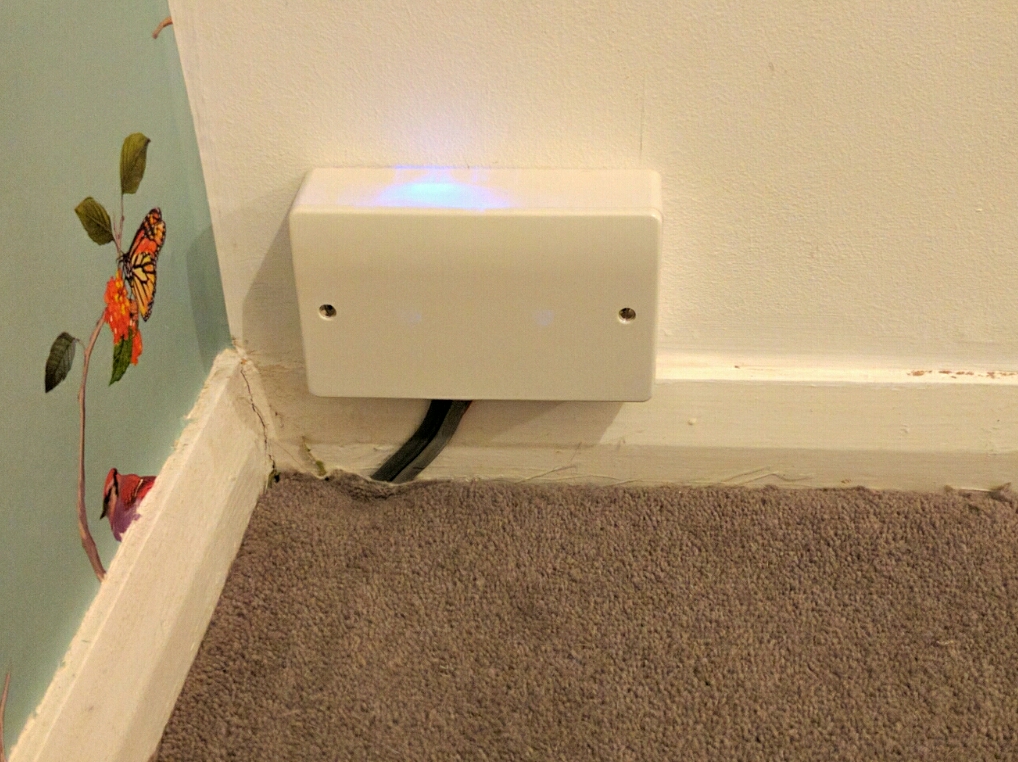
Just wanted to show you all my motion-activated LED Porch Light. Lots of 12v LED lights on here, not so many mains AC-powered bulb projects, so I thought I'd show you mine. Sketch is a standard motion sensor interrupt sketch alongside a dimming sketch, I'm sure I got it from the forums. Initially I wanted it to perform local control of the lamp via the PIR but then decided I wanted the light to come on low (33%) from dusk till dawn, and then raise to 100% when it detects motion. Because of that I've left the control logic to Vera. Below about 30% the bulb shows an obvious unstable flicker so I don't go there! Dimming and ramp up/down is beautifully smooth.
It consists of:
Arduino Nano
NRF24L01 radio
HLK-PM01 240v AC>5v DC
HC-SR501 (PIR)
240v AC Phase control dimming circuit: http://www.ebay.com/itm/111764492631
4w dimmable filament LED bulb
Wall box with blanking plate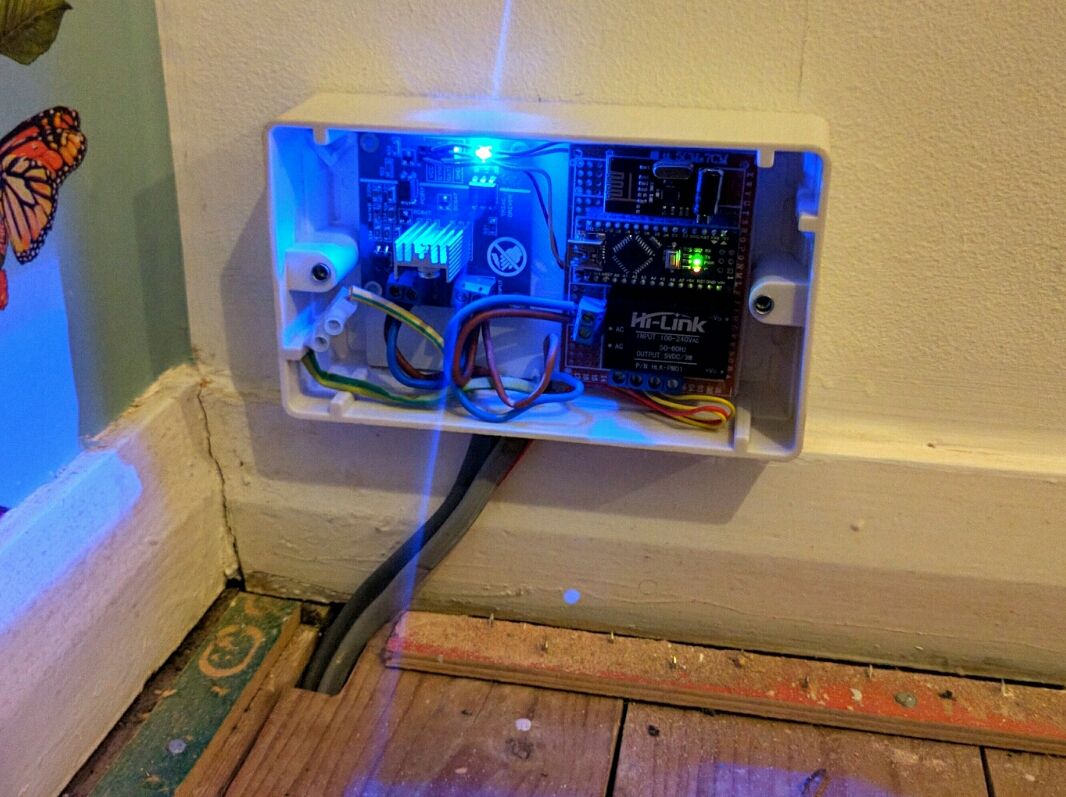
-
Hi all,
Just wanted to show you all my motion-activated LED Porch Light. Lots of 12v LED lights on here, not so many mains AC-powered bulb projects, so I thought I'd show you mine. Sketch is a standard motion sensor interrupt sketch alongside a dimming sketch, I'm sure I got it from the forums. Initially I wanted it to perform local control of the lamp via the PIR but then decided I wanted the light to come on low (33%) from dusk till dawn, and then raise to 100% when it detects motion. Because of that I've left the control logic to Vera. Below about 30% the bulb shows an obvious unstable flicker so I don't go there! Dimming and ramp up/down is beautifully smooth.
It consists of:
Arduino Nano
NRF24L01 radio
HLK-PM01 240v AC>5v DC
HC-SR501 (PIR)
240v AC Phase control dimming circuit: http://www.ebay.com/itm/111764492631
4w dimmable filament LED bulb
Wall box with blanking plate
-
-
-
@pjblink what a great project perfect for my needs.
Can you post the sketch please
Thanks Doug@5546dug Hi Doug,
Here you go. Annoyingly my PIR seems to have died after a week or so. Hoping it's a faulty unit rather than anything to do with the circuit. I've ordered another, and will see how it holds up. It seems i can trigger it by touching the unit in places, but the PIR sensor itself is dead and not detecting anything.
/* AC Light Control Uses up and down buttons to set levels makes use of a timer interrupt to set the level of dimming */ #include <SPI.h> #include <MySensor.h> #include <TimerOne.h> #define SN "AC LED Porch Dimmer Control" #define SV "1.3" #define NODE_ID 30 //change to a number to assign a specific ID #define FADE_DELAY 20 // Delay in ms for each percentage fade up/down (10ms = 1s full-range dim) #define MOTION_CHILD 1 //ID of the motion sensor child #define MOTION_PIN 2 // Arduino pin tied to trigger pin on the motion sensor. volatile int i=0; // Variable to use as a counter of dimming steps. It is volatile since it is passed between interrupts volatile boolean zero_cross=0; // Flag to indicate we have crossed zero int AC_pin = 7; // Output to Opto Triac int freqStep = 75; // This is the delay-per-brightness step in microseconds. It allows for 128 steps // If using 60 Hz grid frequency set this to 65 MySensor gw; //dimming static int currentLevel = 128; // Current dim level... uint8_t fadeLevel = 128; //used to store the fade level when using the buttons //motion sensor uint8_t lastMotion = 0; unsigned long previousMillis = 0; // last time update //see http://stackoverflow.com/questions/10773425/performing-a-function-after-x-time for more details on this unsigned long motionDelay = 10000; // interval at which to keep motion sensor trippped (milliseconds). Used to prevent too frequent updates to Vera. boolean metric = true; MyMessage dimmerMsg(AC_pin, V_DIMMER); MyMessage lightMsg(AC_pin, V_LIGHT); MyMessage motionMsg(MOTION_CHILD, V_TRIPPED); void setup() { // Begin setup Serial.begin(115200); Serial.println( SN ); gw.begin( incomingMessage, NODE_ID, true); // Register the LED Dimmable Light with the gateway gw.present( 6, S_DIMMER ); gw.sendSketchInfo(SN, SV); // Pull the gateway's current dim level - restore light level upon sendor node power-up gw.request( 6, V_DIMMER ); gw.present(MOTION_CHILD, S_MOTION); //Setup AC PIN pinMode(AC_pin, OUTPUT); // Set the Triac pin as output attachInterrupt(1, zero_cross_detect, RISING); // Attach an Interupt to Pin 2 (interupt 0) for Zero Cross Detection Timer1.initialize(freqStep); // Initialize TimerOne library for the freq we need Timer1.attachInterrupt(dim_check, freqStep); // Go to dim_check procedure every 75 uS (50Hz) or 65 uS (60Hz) // Use the TimerOne Library to attach an interrupt } void zero_cross_detect() { zero_cross = true; // set flag for dim_check function that a zero cross has occured i=0; // stepcounter to 0.... as we start a new cycle digitalWrite(AC_pin, LOW); } // Turn on the TRIAC at the appropriate time // We arrive here every 75 (65) uS // First check if a flag has been set // Then check if the counter 'i' has reached the dimming level // if so.... switch on the TRIAC and reset the counter void dim_check() { if(zero_cross == true) { if(i>=fadeLevel) { digitalWrite(AC_pin, HIGH); // turn on light i=0; // reset time step counter zero_cross=false; // reset zero cross detection flag } else { i++; // increment time step counter } } } void loop() { gw.process(); //motion sensor code unsigned long currentMillis = millis(); if(currentMillis - previousMillis > motionDelay){ uint8_t motionDetect = digitalRead(MOTION_PIN); if(motionDetect != lastMotion){ // Serial.print("motionDetect Value: "); // Serial.println(motionDetect); gw.send(motionMsg.set(motionDetect)); // Send tripped value to gw if(motionDetect == 1){ previousMillis = currentMillis; //"Tripped" delay } else{ previousMillis = currentMillis - motionDelay + 1000; //"Not tripped" delay for 1 second to stop rapid "not tripped" and "tripped" updates to Vera } lastMotion = motionDetect; } } } void incomingMessage(const MyMessage &message) { if (message.type == V_LIGHT || message.type == V_DIMMER) { // Retrieve the power or dim level from the incoming request message int requestedLevel = atoi( message.data ); // Adjust incoming level if this is a V_LIGHT variable update [0 == off, 1 == on] requestedLevel *= ( message.type == V_LIGHT ? 100 : 1 ); // Clip incoming level to valid range of 0 to 100 requestedLevel = requestedLevel > 100 ? 100 : requestedLevel; requestedLevel = requestedLevel < 0 ? 0 : requestedLevel; float percent_level; percent_level = 128 - (requestedLevel * 1.28); fadeToLevel( percent_level ); Serial.print( "Changing level to " ); Serial.print( requestedLevel ); Serial.print( ", from " ); Serial.println( currentLevel ); // Inform the gateway of the current DimmableLED's SwitchPower1 and LoadLevelStatus value... //gw.send(lightMsg.set(currentLevel > 0 ? 1 : 0)); // hek comment: Is this really nessesary? // gw.send( dimmerMsg.set(requestedLevel) ); } } /*** * This method provides a graceful fade up/down effect */ void fadeToLevel( int toLevel ) { Serial.print("currentLevel Value: "); Serial.println(currentLevel); Serial.print("toLevel Value: "); Serial.println(toLevel); int delta = ( currentLevel - toLevel ) < 0 ? 1 : -1; Serial.print("delta Value: "); Serial.println(delta); while ( currentLevel != toLevel ) { currentLevel += delta; fadeLevel= ((int)currentLevel); delay( FADE_DELAY ); //fadeLevel = toLevel; } }``` -
-



Hello! It looks like you're interested in this conversation, but you don't have an account yet.
Getting fed up of having to scroll through the same posts each visit? When you register for an account, you'll always come back to exactly where you were before, and choose to be notified of new replies (either via email, or push notification). You'll also be able to save bookmarks and upvote posts to show your appreciation to other community members.
With your input, this post could be even better 💗
Register Login