
Relays not working through MySensors Relay, MQTT, and Openhab
-
Hey guys, so got my first couple DHT11 sensors working perfectly with my RPI Gatewy , Arduino Nano v3 attached to a NRF24 network with MQTT sending updates to openhab.
Now i'm trying to play around and learn the MySensors Relay Code found in https://www.mysensors.org/build/relay to connect my 2 channel relay to and turn the relays on and off through MQTT.
I have my Node set to 3 (as this is going to be my third device), and my "NUMBER_OF_RELAYS" set to 2. It boots up perfectly, and tarts talking to the MQTT broker fine, I see messages coming through MQTT.fx . I can send and recieve MQTT requests and they will chage in the MQTT.fx program
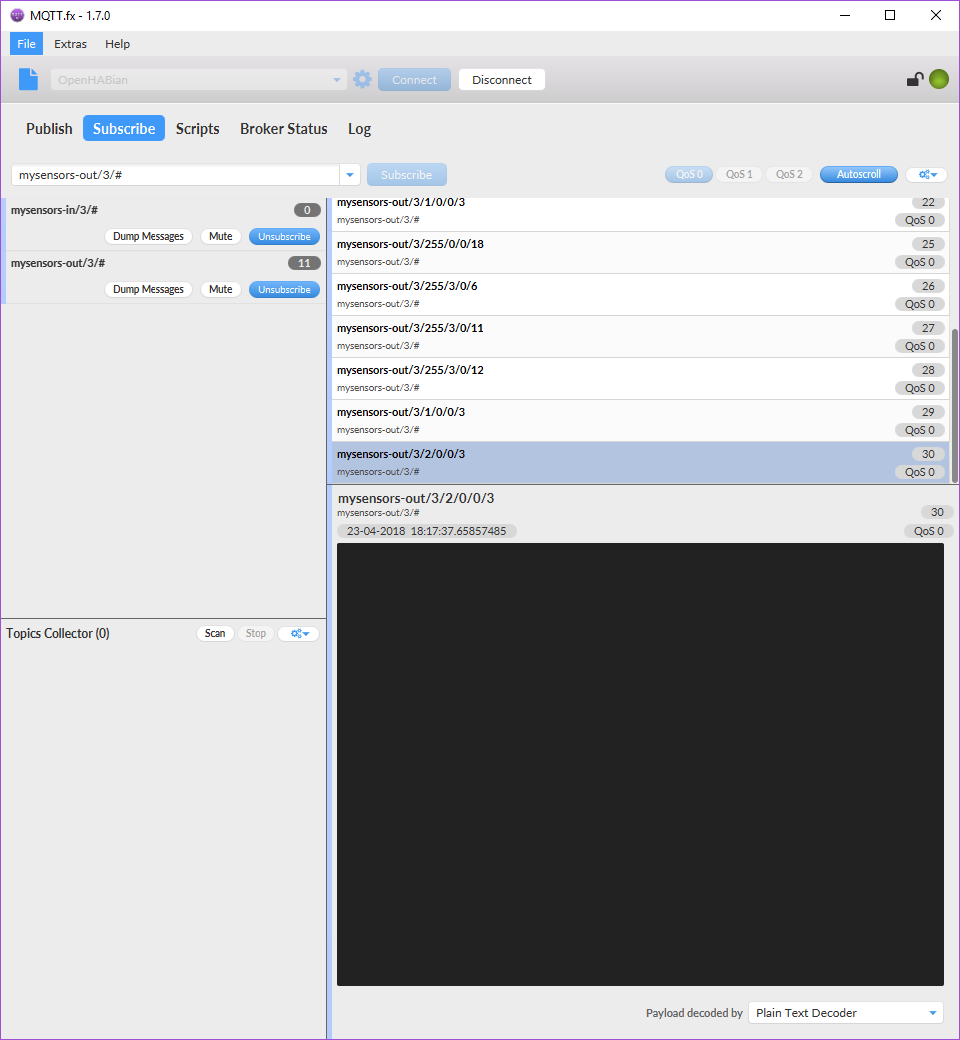
First: "mysensors-out/3/255/0/0/18" outputs "2.2.0" - guessing this is the MySensors Version
Second: "mysensors-out/3/255/3/0/6" outputs "0" - which i have no idea what that is for
Third : "mysensors-out/3/255/3/0/11" - outputs "Relay" - This is written in the code
Fourth: "mysensors-out/3/255/3/0/12" - outputs "1.0"- This also written in the code
Fifth: "mysensors-out/3/1/0/0/3" this has no output
Sixth: "mysensors-out/3/2/0/0/3" this has no outputI am guessing that the last two are the relays with no output.
I have tried to use MQTT to turn on the relay 1 and 2 and the output does not work. In openhab i am using:
Switch MQTTRelayOne "MQTT Test Switch 1 [%s]" (gRelay) {mqtt=">[mosquitto:mysensors-in/3/1/0/0/3:command:ON:1],>[mosquitto:mysensors-in/3/1/0/0/3:command:OFF:0]"}
Switch MQTTRelayTwo "MQTT Test Switch 2 [%s]" (gRelay) {mqtt=">[mosquitto:mysensors-in/3/1/0/0/3:command:ON:1],>[mosquitto:mysensors-in/3/2/0/0/3:command:OFF:0]"}
This shows it is taking the changes in openhab log and also in MQTT.fx it is also changing the values from 0>1 and 1>0 respectivaly when turning the switch from ON to OFF and OFF to ON . But none of the relays are turning on or off.
Am I missing something, or am I doing this completely wrong?
Thanks for any help!
-
@fals3illusion said in Relays not working through MySensors Relay, MQTT, and Openhab:
I think you have the MQTT-messages wrong.
Try this: (I left out the curls and other stuff. That syntax is correct)
for relay 1
mosquitto:mysensors-in/3/1/1/0/2:command:ON:1 and then /3/1/1/0/2:command:OFF/0for relay 2 it should be:
mosquitto:mysensors-in/3/2/1/0/2:command:ON:1 and then /3/2/1/0/2:command:OFF/0
Why?
The message structure is:
/node-id/child-id/command which in this case is 1=set/ack=0/type which in this case is 2=V_STATUS The payload is then either 1 or 0 just as you have it translated from ON and OFFWhat I think confused you is that when the relay is presenting the command type is 0 and the presentation type is 3 S_BINARY, whereas when setting the relay, the command type is 1 and the set type is 2 V_STATUS
Have a look at the Serial protocol definition under the Download/API section. The blue box. Then it will become much more clear I hope.
-
i don't know why this didnt post...
After hours and hours of sifting through the forums and stuff i found this gem i did not know existed!
https://www.mysensors.org/download/serial_api_20#message-structure
The correct syntax for my application was :
Switch MQTTRelayOne "MQTT Test Switch 1 [%s]" (gMQTTRelays) {mqtt=">[mosquitto:mysensors-in/3/1/1/0/2:command:ON:1],>[mosquitto:mysensors-in/3/1/1/0/2:command:OFF:0]"}
Switch MQTTRelayTwo "MQTT Test Switch 2 [%s]" (gMQTTRelays) {mqtt=">[mosquitto:mysensors-in/3/2/1/0/2:command:ON:1],>[mosquitto:mysensors-in/3/2/1/0/2:command:OFF:0]"}Mods you can delete this, or hopefully someone like me could use this when searching!
-
@fals3illusion said in Relays not working through MySensors Relay, MQTT, and Openhab:
I think you have the MQTT-messages wrong.
Try this: (I left out the curls and other stuff. That syntax is correct)
for relay 1
mosquitto:mysensors-in/3/1/1/0/2:command:ON:1 and then /3/1/1/0/2:command:OFF/0for relay 2 it should be:
mosquitto:mysensors-in/3/2/1/0/2:command:ON:1 and then /3/2/1/0/2:command:OFF/0
Why?
The message structure is:
/node-id/child-id/command which in this case is 1=set/ack=0/type which in this case is 2=V_STATUS The payload is then either 1 or 0 just as you have it translated from ON and OFFWhat I think confused you is that when the relay is presenting the command type is 0 and the presentation type is 3 S_BINARY, whereas when setting the relay, the command type is 1 and the set type is 2 V_STATUS
Have a look at the Serial protocol definition under the Download/API section. The blue box. Then it will become much more clear I hope.
You are right, I'm very new to my sensors and didn't see the protocol definition page and now it makes a lot more sense now that I found that page!
Hello! It looks like you're interested in this conversation, but you don't have an account yet.
Getting fed up of having to scroll through the same posts each visit? When you register for an account, you'll always come back to exactly where you were before, and choose to be notified of new replies (either via email, or push notification). You'll also be able to save bookmarks and upvote posts to show your appreciation to other community members.
With your input, this post could be even better 💗
Register Login