Skip to content
  • MySensors
  • OpenHardware.io
  • Categories
  • Recent
  • Tags
  • Popular
Skins
  • Light
  • Brite
  • Cerulean
  • Cosmo
  • Flatly
  • Journal
  • Litera
  • Lumen
  • Lux
  • Materia
  • Minty
  • Morph
  • Pulse
  • Sandstone
  • Simplex
  • Sketchy
  • Spacelab
  • United
  • Yeti
  • Zephyr
  • Dark
  • Cyborg
  • Darkly
  • Quartz
  • Slate
  • Solar
  • Superhero
  • Vapor

  • Default (No Skin)
  • No Skin
Collapse
Brand Logo
  1. Home
  2. Troubleshooting
  3. [SOLVED] 2.2.0 node - sleep() problem

[SOLVED] 2.2.0 node - sleep() problem

Scheduled Pinned Locked Moved Troubleshooting
11 Posts 3 Posters 1.7k Views 2 Watching
  • Oldest to Newest
  • Newest to Oldest
  • Most Votes
Reply
  • Reply as topic
Log in to reply
This topic has been deleted. Only users with topic management privileges can see it.
  • bjacobseB Offline
    bjacobseB Offline
    bjacobse
    wrote on last edited by bjacobse
    #2

    DHT22 is a notorious hungry for current, don't use with a battery, replace it with a similar device like Si7021 or SHT21.
    Or alternative use a MOSFET to switch off the power supply to DHT22 meanwhile your CPU is asleep

    1 Reply Last reply
    0
    • N Offline
      N Offline
      nucutza
      wrote on last edited by
      #3

      But datasheet for dht22 says : 1.5ma when measuring and 50ua in standby.

      bjacobseB 1 Reply Last reply
      1
      • N Offline
        N Offline
        nucutza
        wrote on last edited by
        #4

        This is my sketch. Can anybody test it please ?

        #include <DHT.h>
         
        #define MY_DEBUG
        
        #define MY_RADIO_RFM69
        #define MY_RFM69_NEW_DRIVER
        #define MY_RFM69_FREQUENCY RFM69_433MHZ
        #define MY_IS_RFM69HW
        #define MY_NODE_ID 1
        
        #define CHILD_ID_TEMP 7
        #define CHILD_ID_HUM 8
        #define DHT_DATA_PIN 3
        #define SENSOR_TEMP_OFFSET 0
         
        #include <MySensors.h>
         
        /**************************************************/
        /****************** CONSTANTS *********************/
        /**************************************************/
         
        static const uint64_t UPDATE_INTERVAL = 10000;
        static const uint8_t FORCE_UPDATE_N_READS = 10;
         
        /**************************************************/
        /****************** VARIABLES *********************/
        /**************************************************/
        float lastTemp;
        float lastHum;
        float temperature;
        float humidity;
        uint8_t nNoUpdatesTemp;
        uint8_t nNoUpdatesHum;
         
        /**************************************************/
        /****************** MESSAGES **********************/
        /**************************************************/
         
        MyMessage msgHum(CHILD_ID_HUM, V_HUM);
        MyMessage msgTemp(CHILD_ID_TEMP, V_TEMP);
         
        DHT dht;
         
        void presentation() 
        { 
        present(CHILD_ID_HUM, S_HUM);
        present(CHILD_ID_TEMP, S_TEMP);
        }
         
        void setup()
        {
        delay(2000); //Wait 2 seconds before starting sequence
         
        if (UPDATE_INTERVAL <= dht.getMinimumSamplingPeriod()) 
        {
        Serial.println("Warning: UPDATE_INTERVAL is smaller than supported by the sensor!");
        }
         
        sleep(dht.getMinimumSamplingPeriod()); 
        dht.setup(DHT_DATA_PIN);
        }
         
        void loop() 
        { 
        sendTemperatureHumiditySensor(); 
        Serial.println("Sleep for 10s !");
        sleep(UPDATE_INTERVAL);
        }
         
        /**************************************************/
        /**************** AUX. FUNCTIONS ******************/
        /**************************************************/
         
        void sendTemperatureHumiditySensor()
        {
        dht.readSensor(true);
        temperature = dht.getTemperature();
        humidity = dht.getHumidity();
         
        if (isnan(temperature)) 
        {
        Serial.println("Failed reading temperature from DHT!");
        } else if (temperature != lastTemp || nNoUpdatesTemp == FORCE_UPDATE_N_READS) 
        {
        lastTemp = temperature;
        nNoUpdatesTemp = 0;
        temperature += SENSOR_TEMP_OFFSET;
        send(msgTemp.set(temperature, 1));
         
        #ifdef MY_DEBUG
        Serial.print("T: ");
        Serial.println(temperature);
        #endif
        } else 
        {
        nNoUpdatesTemp++;
        }
         
        if (isnan(humidity)) 
        {
        Serial.println("Failed reading humidity from DHT");
        } else if (humidity != lastHum || nNoUpdatesHum == FORCE_UPDATE_N_READS)
        {
        lastHum = humidity;
        nNoUpdatesHum = 0;
        send(msgHum.set(humidity, 1));
         
        #ifdef MY_DEBUG
        Serial.print("H: ");
        Serial.println(humidity);
        #endif
        } else 
        {
        nNoUpdatesHum++;
        } 
        }```
        1 Reply Last reply
        0
        • N Offline
          N Offline
          nucutza
          wrote on last edited by
          #5

          And this is what I get from debug terminal. However 4ma in sleep !

          Sleep for 10s !
          8540 MCO:SLP:MS=10000,SMS=0,I1=255,M1=255,I2=255,M2=255
          8546 TSF:TDI:TSL
          8548 MCO:SLP:WUP=-1
          8550 TSF:TRI:TSB
          8570 TSF:MSG:SEND,1-1-0-0,s=8,c=1,t=1,pt=7,l=5,sg=0,ft=0,st=OK:59.3
          H: 59.30
          Sleep for 10s !
          8579 MCO:SLP:MS=10000,SMS=0,I1=255,M1=255,I2=255,M2=255
          8585 TSF:TDI:TSL
          8587 MCO:SLP:WUP=-1
          8589 TSF:TRI:TSB
          8609 TSF:MSG:SEND,1-1-0-0,s=7,c=1,t=0,pt=7,l=5,sg=0,ft=0,st=OK:24.0
          T: 24.00
          8634 TSF:MSG:SEND,1-1-0-0,s=8,c=1,t=1,pt=7,l=5,sg=0,ft=0,st=OK:59.1
          H: 59.10
          Sleep for 10s !
          8642 MCO:SLP:MS=10000,SMS=0,I1=255,M1=255,I2=255,M2=255
          8648 TSF:TDI:TSL
          
          1 Reply Last reply
          0
          • N Offline
            N Offline
            nucutza
            wrote on last edited by
            #6

            My gateway is raspberry pi mqtt.

            1 Reply Last reply
            0
            • sundberg84S Offline
              sundberg84S Offline
              sundberg84
              Hardware Contributor
              wrote on last edited by
              #7

              The best way to debug this is to remove the sensor and see what kind of mA you get. If it's still a high reading I would replace the radio.

              Controller: Proxmox VM - Home Assistant
              MySensors GW: Arduino Uno - W5100 Ethernet, Gw Shield Nrf24l01+ 2,4Ghz
              MySensors GW: Arduino Uno - Gw Shield RFM69, 433mhz
              RFLink GW - Arduino Mega + RFLink Shield, 433mhz

              bjacobseB 1 Reply Last reply
              0
              • N nucutza

                But datasheet for dht22 says : 1.5ma when measuring and 50ua in standby.

                bjacobseB Offline
                bjacobseB Offline
                bjacobse
                wrote on last edited by bjacobse
                #8

                @nucutza
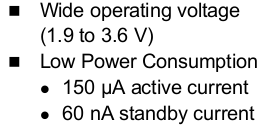
                True spec looks a kind of decent for DHT22 (bur only for main operated power supply), but voltage minimum is not good enough. So that means when your battery is half empty your DHT22 isn't working anymore, using si7021 or SHT21 can go much lower, so that you can use more of your battery, as they go low to 1,9V or 1,5V

                DHT22:
                0_1530782002670_Skærmbillede fra 2018-07-05 11-13-02.png

                si7021:
                0_1530782061781_Skærmbillede fra 2018-07-05 11-14-06.png

                SHT21:
                0_1530781555895_Skærmbillede fra 2018-07-05 11-01-43.png

                1 Reply Last reply
                0
                • sundberg84S sundberg84

                  The best way to debug this is to remove the sensor and see what kind of mA you get. If it's still a high reading I would replace the radio.

                  bjacobseB Offline
                  bjacobseB Offline
                  bjacobse
                  wrote on last edited by
                  #9

                  @sundberg84 said in 2.2.0 node - sleep() problem:

                  The best way to debug this is to remove the sensor and see what kind of mA you get. If it's still a high reading I would replace the radio.

                  Sundbergs approach is the right one, and if non of those are working, replace your Arduino
                  did you remove the LDO voltage converter on your Arduino Pro Mini? This will use current
                  clones are not 100% identical, so your clone could have the LDO positioned somewhere else:

                  https://andreasrohner.at/posts/Electronics/How-to-modify-an-Arduino-Pro-Mini-clone-for-low-power-consumption/

                  1 Reply Last reply
                  0
                  • N Offline
                    N Offline
                    nucutza
                    wrote on last edited by nucutza
                    #10

                    Yes I did remove the LDO on the arduino and the power led.

                    But finally I found the problem ! On my prototype sensor board there was another voltage converter (5 to 3.3V) because I wanted to use the node with an one cell 18650 power bank with 5V output. Even I fed directly the arduino with an external 3.3v power source the output of this LDO remained connected and guess what ? It drained around 4-5ma ! So I desoldered it and now it's ok ! I get around 15-20ua in sleep mode with the dht22.

                    1 Reply Last reply
                    1
                    • bjacobseB Offline
                      bjacobseB Offline
                      bjacobse
                      wrote on last edited by
                      #11

                      Great that you solved your problem, I still recommend to replace DHT22 to a a better sensor that uses less current consumption and also is working with a lower voltage. This will save plenty of money else spend on replacing batteries too often

                      1 Reply Last reply
                      0
                      Reply
                      • Reply as topic
                      Log in to reply
                      • Oldest to Newest
                      • Newest to Oldest
                      • Most Votes


                      26

                      Online

                      11.7k

                      Users

                      11.2k

                      Topics

                      113.1k

                      Posts


                      Copyright 2025 TBD   |   Forum Guidelines   |   Privacy Policy   |   Terms of Service
                      • Login

                      • Don't have an account? Register

                      • Login or register to search.
                      • First post
                        Last post
                      0
                      • MySensors
                      • OpenHardware.io
                      • Categories
                      • Recent
                      • Tags
                      • Popular