
New Gateway not showing on Domoticz
-
I cant for the life of me get this gateway connected lol. The logs look good except the domoticz. i've gone through documentation again just to be sure.
MCO:BGN:INIT GW,CP=RRNGE---,VER=2.3.0 20:14:04.851 -> 92 TSF:LRT:OK 107 TSM:INIT 20:14:04.886 -> 120 TSF:WUR:MS=0 20:14:04.886 -> 140 TSM:INIT:TSP OK 20:14:04.919 -> 161 TSM:INIT:GW MODE 20:14:04.952 -> scandone 20:14:04.952 -> state: 0 -> 2 (b0) 20:14:04.986 -> state: 2 -> 3 (0) 20:14:04.986 -> state: 3 -> 5 (10) 20:14:05.020 -> add 0 20:14:05.020 -> aid 2 20:14:05.020 -> cnt 20:14:05.020 -> 269 TSM:READY:ID=0,PAR=0,DIS=0 20:14:05.053 -> 301 MCO:REG:NOT NEEDED 20:14:05.087 -> 20:14:05.087 -> connected with Maynard 2.4g, channel 3 20:14:05.121 -> dhcp client start... 20:14:05.156 -> ip:192.168.1.136,mask:255.255.255.0,gw:192.168.1.1 scandone 943 GWT:TIN:CONNECTING... 20:14:05.734 -> 970 GWT:TIN:IP: 192.168.1.136 20:14:05.769 -> 1002 MCO:BGN:STP 20:14:05.769 -> 1020 MCO:BGN:INIT OK,TSP=1 pm open,type:2 0 36017 TSF:MSG:READ,10-10-255,s=255,c=3,t=7,pt=0,l=0,sg=0: 20:14:40.856 -> 36077 TSF:MSG:BC 20:14:40.856 -> 36095 TSF:MSG:FPAR REQ,ID=10 20:14:40.891 -> 36126 TSF:PNG:SEND,TO=0 20:14:40.924 -> 36151 TSF:CKU:OK 20:14:40.924 -> 36169 TSF:MSG:GWL OK 37406 TSF:MSG:SEND,0-0-10-10,s=255,c=3,t=8,pt=1,l=1,sg=0,ft=0,st=OK:0 39296 TSF:MSG:READ,10-10-0,s=255,c=3,t=24,pt=1,l=1,sg=0:1 20:14:44.130 -> 39357 TSF:MSG:PINGED,ID=10,HP=1 20:14:44.164 -> 39416 TSF:MSG:SEND,0-0-10-10,s=255,c=3,t=25,pt=1,l=1,sg=0,ft=0,st=OK:1 39678 TSF:MSG:READ,10-10-0,s=255,c=3,t=15,pt=6,l=2,sg=0:0100 39757 TSF:MSG:SEND,0-0-10-10,s=255,c=3,t=15,pt=6,l=2,sg=0,ft=0,st=OK:0100``` -
I cant for the life of me get this gateway connected lol. The logs look good except the domoticz. i've gone through documentation again just to be sure.
MCO:BGN:INIT GW,CP=RRNGE---,VER=2.3.0 20:14:04.851 -> 92 TSF:LRT:OK 107 TSM:INIT 20:14:04.886 -> 120 TSF:WUR:MS=0 20:14:04.886 -> 140 TSM:INIT:TSP OK 20:14:04.919 -> 161 TSM:INIT:GW MODE 20:14:04.952 -> scandone 20:14:04.952 -> state: 0 -> 2 (b0) 20:14:04.986 -> state: 2 -> 3 (0) 20:14:04.986 -> state: 3 -> 5 (10) 20:14:05.020 -> add 0 20:14:05.020 -> aid 2 20:14:05.020 -> cnt 20:14:05.020 -> 269 TSM:READY:ID=0,PAR=0,DIS=0 20:14:05.053 -> 301 MCO:REG:NOT NEEDED 20:14:05.087 -> 20:14:05.087 -> connected with Maynard 2.4g, channel 3 20:14:05.121 -> dhcp client start... 20:14:05.156 -> ip:192.168.1.136,mask:255.255.255.0,gw:192.168.1.1 scandone 943 GWT:TIN:CONNECTING... 20:14:05.734 -> 970 GWT:TIN:IP: 192.168.1.136 20:14:05.769 -> 1002 MCO:BGN:STP 20:14:05.769 -> 1020 MCO:BGN:INIT OK,TSP=1 pm open,type:2 0 36017 TSF:MSG:READ,10-10-255,s=255,c=3,t=7,pt=0,l=0,sg=0: 20:14:40.856 -> 36077 TSF:MSG:BC 20:14:40.856 -> 36095 TSF:MSG:FPAR REQ,ID=10 20:14:40.891 -> 36126 TSF:PNG:SEND,TO=0 20:14:40.924 -> 36151 TSF:CKU:OK 20:14:40.924 -> 36169 TSF:MSG:GWL OK 37406 TSF:MSG:SEND,0-0-10-10,s=255,c=3,t=8,pt=1,l=1,sg=0,ft=0,st=OK:0 39296 TSF:MSG:READ,10-10-0,s=255,c=3,t=24,pt=1,l=1,sg=0:1 20:14:44.130 -> 39357 TSF:MSG:PINGED,ID=10,HP=1 20:14:44.164 -> 39416 TSF:MSG:SEND,0-0-10-10,s=255,c=3,t=25,pt=1,l=1,sg=0,ft=0,st=OK:1 39678 TSF:MSG:READ,10-10-0,s=255,c=3,t=15,pt=6,l=2,sg=0:0100 39757 TSF:MSG:SEND,0-0-10-10,s=255,c=3,t=15,pt=6,l=2,sg=0,ft=0,st=OK:0100``` -
Thanks for responding!
Domoticz Log
2018-09-30 16:52:49.919 Error: MySensors: Can not connect to: 192.168.1.136:5003
2018-09-30 16:53:19.921 Status: TCP: Reconnecting...
2018-09-30 16:53:23.922 Status: TCP: Connection problem (Unable to connect to specified IP/Port)
2018-09-30 16:53:23.922 Status: TCP: Reconnecting in 30 seconds...
2018-09-30 16:53:23.922 Error: MySensors: Can not connect to: 192.168.1.136:5003
2018-09-30 16:53:53.925 Status: TCP: Reconnecting...
2018-09-30 16:53:57.926 Status: TCP: Connection problem (Unable to connect to specified IP/Port)
2018-09-30 16:53:57.926 Status: TCP: Reconnecting in 30 seconds...
2018-09-30 16:53:57.926 Error: MySensors: Can not connect to: 192.168.1.136:5003
At one point it was working great. First time was extremely simple to set up. only difference is the actual esp8266. Therefore new IP address and no setup info. Everything is soldered together. Im about to desolder it and switch.
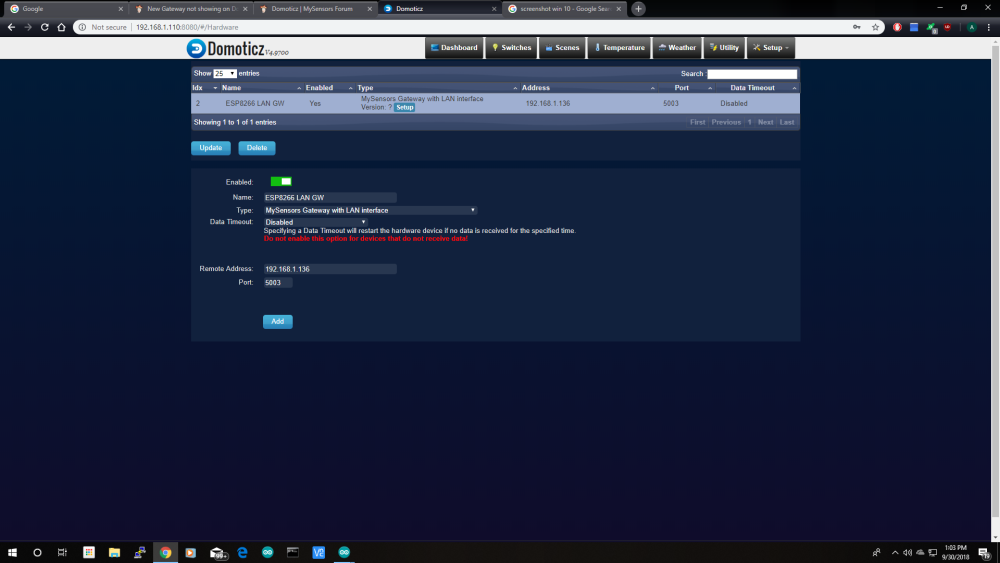
-
This is the gateway sketch. I desoldered the rfm69 module and still no change.
// Enable debug prints to serial monitor #define MY_DEBUG // Use a bit lower baudrate for serial prints on ESP8266 than default in MyConfig.h #define MY_BAUD_RATE 9600 // Enables and select radio type (if attached) #define MY_IS_RFM69HW // Module is high power (HW/HCW) #define MY_RFM69_FREQUENCY (RFM69_433MHZ) #define MY_RADIO_RFM69 // Select Radio-Module RFM69 #define MY_RFM69_CSMA_LIMIT_DBM (-95) #define MY_RFM69_CS_PIN D8 // SPI CS PIN #define MY_RF69_IRQ_PIN D1 // IRQ PIN #define MY_RF69_IRQ_NUM D1 // IRQ PIN NUM (for M0 it is the same as IRQ PIN. Will be obsolete in upcoming MySensors.h) #define MY_GATEWAY_ESP8266 // Set WIFI SSID and password #define MY_WIFI_SSID "xxx" #define MY_WIFI_PASSWORD "xxxx" // Enable UDP communication #define MY_USE_UDP // If using UDP you need to set MY_CONTROLLER_IP_ADDRESS below // Set the hostname for the WiFi Client. This is the hostname // it will pass to the DHCP server if not static. //#define MY_HOSTNAME "sensor-gateway" // Enable MY_IP_ADDRESS here if you want a static ip address (no DHCP) //#define MY_IP_ADDRESS 192,168,178,87 // If using static ip you can define Gateway and Subnet address as well //#define MY_IP_GATEWAY_ADDRESS 192,168,178,1 //#define MY_IP_SUBNET_ADDRESS 255,255,255,0 // The port to keep open on node server mode #define MY_PORT 5003 // How many clients should be able to connect to this gateway (default 1) #define MY_GATEWAY_MAX_CLIENTS 2 // Controller ip address. Enables client mode (default is "server" mode). // Also enable this if MY_USE_UDP is used and you want sensor data sent somewhere. #define MY_CONTROLLER_IP_ADDRESS 192, 168, 1, 110 // Enable inclusion mode //#define MY_INCLUSION_MODE_FEATURE // Enable Inclusion mode button on gateway //#define MY_INCLUSION_BUTTON_FEATURE // Set inclusion mode duration (in seconds) //#define MY_INCLUSION_MODE_DURATION 60 // Digital pin used for inclusion mode button //#define MY_INCLUSION_MODE_BUTTON_PIN D1 // Set blinking period //#define MY_DEFAULT_LED_BLINK_PERIOD 300 // Flash leds on rx/tx/err // Led pins used if blinking feature is enabled above //#define MY_DEFAULT_ERR_LED_PIN 2 // Error led pin //#define MY_DEFAULT_RX_LED_PIN 2 // Receive led pin //#define MY_DEFAULT_TX_LED_PIN 2 // the PCB, on board LED #if defined(MY_USE_UDP) #include <WiFiUdp.h> #endif #include <ESP8266WiFi.h> #include <MySensors.h> void setup() { // Setup locally attached sensors } void presentation() { // Present locally attached sensors here } void loop() { // Send locally attached sensors data here }``` -
This is the gateway sketch. I desoldered the rfm69 module and still no change.
// Enable debug prints to serial monitor #define MY_DEBUG // Use a bit lower baudrate for serial prints on ESP8266 than default in MyConfig.h #define MY_BAUD_RATE 9600 // Enables and select radio type (if attached) #define MY_IS_RFM69HW // Module is high power (HW/HCW) #define MY_RFM69_FREQUENCY (RFM69_433MHZ) #define MY_RADIO_RFM69 // Select Radio-Module RFM69 #define MY_RFM69_CSMA_LIMIT_DBM (-95) #define MY_RFM69_CS_PIN D8 // SPI CS PIN #define MY_RF69_IRQ_PIN D1 // IRQ PIN #define MY_RF69_IRQ_NUM D1 // IRQ PIN NUM (for M0 it is the same as IRQ PIN. Will be obsolete in upcoming MySensors.h) #define MY_GATEWAY_ESP8266 // Set WIFI SSID and password #define MY_WIFI_SSID "xxx" #define MY_WIFI_PASSWORD "xxxx" // Enable UDP communication #define MY_USE_UDP // If using UDP you need to set MY_CONTROLLER_IP_ADDRESS below // Set the hostname for the WiFi Client. This is the hostname // it will pass to the DHCP server if not static. //#define MY_HOSTNAME "sensor-gateway" // Enable MY_IP_ADDRESS here if you want a static ip address (no DHCP) //#define MY_IP_ADDRESS 192,168,178,87 // If using static ip you can define Gateway and Subnet address as well //#define MY_IP_GATEWAY_ADDRESS 192,168,178,1 //#define MY_IP_SUBNET_ADDRESS 255,255,255,0 // The port to keep open on node server mode #define MY_PORT 5003 // How many clients should be able to connect to this gateway (default 1) #define MY_GATEWAY_MAX_CLIENTS 2 // Controller ip address. Enables client mode (default is "server" mode). // Also enable this if MY_USE_UDP is used and you want sensor data sent somewhere. #define MY_CONTROLLER_IP_ADDRESS 192, 168, 1, 110 // Enable inclusion mode //#define MY_INCLUSION_MODE_FEATURE // Enable Inclusion mode button on gateway //#define MY_INCLUSION_BUTTON_FEATURE // Set inclusion mode duration (in seconds) //#define MY_INCLUSION_MODE_DURATION 60 // Digital pin used for inclusion mode button //#define MY_INCLUSION_MODE_BUTTON_PIN D1 // Set blinking period //#define MY_DEFAULT_LED_BLINK_PERIOD 300 // Flash leds on rx/tx/err // Led pins used if blinking feature is enabled above //#define MY_DEFAULT_ERR_LED_PIN 2 // Error led pin //#define MY_DEFAULT_RX_LED_PIN 2 // Receive led pin //#define MY_DEFAULT_TX_LED_PIN 2 // the PCB, on board LED #if defined(MY_USE_UDP) #include <WiFiUdp.h> #endif #include <ESP8266WiFi.h> #include <MySensors.h> void setup() { // Setup locally attached sensors } void presentation() { // Present locally attached sensors here } void loop() { // Send locally attached sensors data here }``` -
Once again thanks for your help! of course it works now lol. i soldered it back together and it works perfectly!
-
This post is deleted!


Hello! It looks like you're interested in this conversation, but you don't have an account yet.
Getting fed up of having to scroll through the same posts each visit? When you register for an account, you'll always come back to exactly where you were before, and choose to be notified of new replies (either via email, or push notification). You'll also be able to save bookmarks and upvote posts to show your appreciation to other community members.
With your input, this post could be even better 💗
Register Login